# What Is Google AI Mode? How It Works

> Google AI Mode is Google's conversational, Gemini-powered search. How query fan-out works, how it differs from AI Overviews, and how to turn it on or off.

- Published: 2026-07-23
- Author: Samy BEN SADOK
- Canonical: https://geotoolbox.ai/blog/what-is-google-ai-mode

---

Google AI Mode is the biggest change to how Google Search works in years, and most people are not sure what it actually is. This is a plain explainer: what Google AI Mode is, how it works under the hood, how it differs from AI Overviews and the Gemini app, and how to turn it on (or get back to plain links). It is mostly about what the thing is, with a short note at the end on what it means if you run a website.

## What Google AI Mode Is

Google AI Mode is a conversational, AI-first way to search, built into Google Search. Instead of returning a page of blue links, it uses Google's Gemini models to read across the web and hand you a written answer with a few cited sources, and you can keep asking follow-up questions like a chat. Google calls it its "most powerful AI search experience."

AI Mode is still Google Search, not a separate chatbot. It runs on Google's live search index, its ranking systems, the Knowledge Graph, and real-time data like shopping and local results. The difference is the interface: you get a synthesized answer and a conversation rather than a page of links to click through yourself. You can ask by typing or talking, and you can add a photo, an image, or a document and ask about it.

You reach it as its own tab or page. When you open AI Mode and ask something, the AI response becomes the whole results experience, with links moved into and beneath the answer rather than listed down the page. It is designed for the harder questions, the ones with several parts, comparisons, or trade-offs that used to take five separate searches and a dozen open tabs.

## How Google AI Mode Works: Query Fan-Out

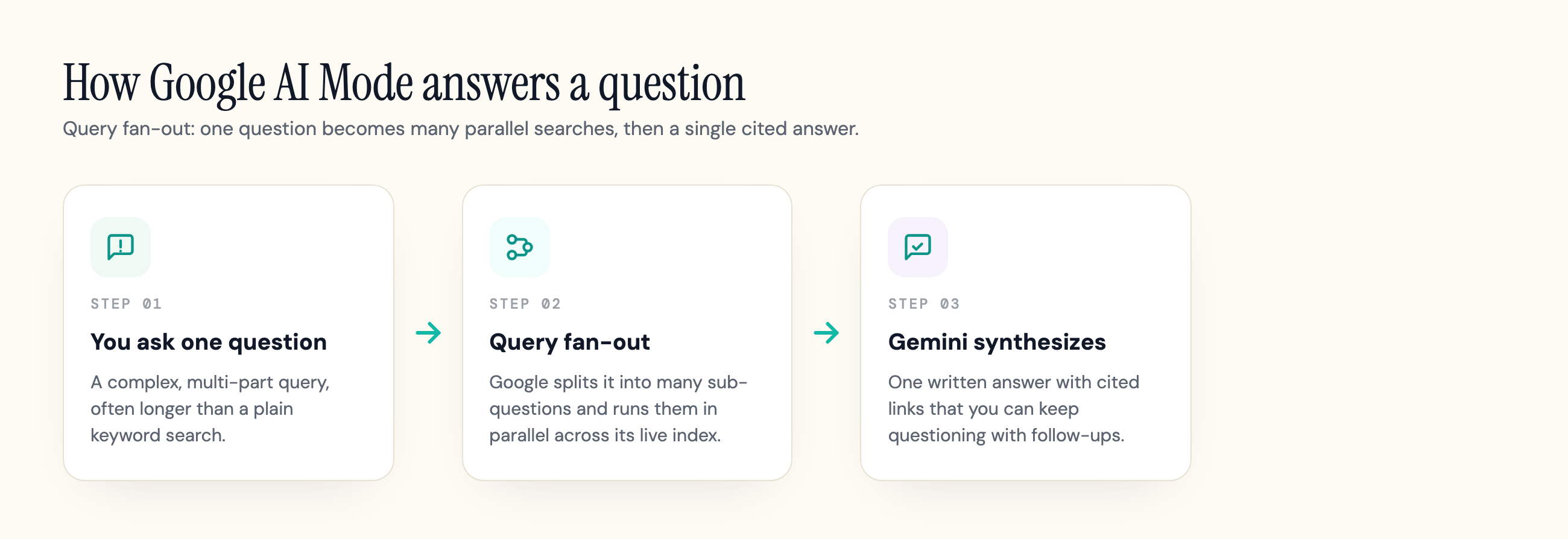
The mechanism behind AI Mode is a technique Google calls query fan-out. When you ask a question, Google does not run one search. It breaks your question into many smaller sub-questions and, [in Google's own words](https://blog.google/products-and-platforms/products/search/ai-mode-search/), issues "multiple related searches concurrently across subtopics and multiple data sources and then brings those results together." A single prompt can trigger many searches running at once.

Here is the sequence. Your question goes in. AI Mode decomposes it into related sub-queries and fires them in parallel against Google's index and live data. It pulls back passages from across many pages, then a Gemini model reasons over everything it gathered and writes one answer, attaching the sources it leaned on. Ask a follow-up and the whole fan-out runs again, this time with the context of the conversation so far.

<figure>
  <img src="/blog/what-is-google-ai-mode/query-fan-out-flow.png" alt="Diagram of Google AI Mode query fan-out: one question splits into parallel sub-searches that Gemini synthesizes into one cited answer" />
  <figcaption>Query fan-out: one question becomes many parallel searches, then Gemini synthesizes a single cited answer.</figcaption>
</figure>

Two things follow from this design. First, it reaches deeper into the web than a normal search, surfacing pages that would never have ranked on the first results page for your exact wording. Second, because it is stitching together passages from many sources, AI Mode handles longer, messier questions well, the kind that run much longer than a typical keyword search. Google has not published how many sub-queries a fan-out generates, and the number varies with the question. If you want the mechanics in more depth, see our explainer on [query fan-out](https://geotoolbox.ai/blog/query-fan-out).

## AI Mode vs AI Overviews vs Gemini vs Classic Search

Most of the confusion about AI Mode comes from Google using several similar-sounding names for different things. There are really four surfaces, and they are not the same product.

**AI Overviews** is the short AI summary that appears at the top of normal search results for some queries. You did not ask for it, it just shows up above the links, and it is mostly a one-shot answer. **AI Mode** is separate: a dedicated tab or page you deliberately open, where the AI answer is the entire experience and you can keep the conversation going. **Gemini** is two things at once, which does not help: it is Google's standalone chatbot app, and it is also the name of the model family that powers both AI Overviews and AI Mode. **Classic Search** is the familiar ranked list of blue links.

<table>
  <thead>
    <tr><th>Surface</th><th>How you get it</th><th>What you see</th><th>Conversation?</th></tr>
  </thead>
  <tbody>
    <tr><td><strong>Classic Search</strong></td><td>Default results page</td><td>Ranked list of links</td><td>No, one query at a time</td></tr>
    <tr><td><strong>AI Overviews</strong></td><td>Auto-appears atop some results</td><td>A short AI summary above the links</td><td>Mostly one-shot</td></tr>
    <tr><td><strong>AI Mode</strong></td><td>You open the AI Mode tab or page</td><td>A full AI answer with cited links</td><td>Yes, multi-turn follow-ups</td></tr>
    <tr><td><strong>Gemini app</strong></td><td>Separate chatbot at gemini.google.com</td><td>A chat assistant, not a search page</td><td>Yes, but it is not Search</td></tr>
  </tbody>
</table>

The simplest way to keep them straight: AI Overviews comes to you, AI Mode is somewhere you go, and Gemini is both a separate app and the engine under the hood. If you mainly want to know how AI Overviews behaves, we cover that in [what Google AI Overviews are](https://geotoolbox.ai/blog/what-are-google-ai-overviews), and the model itself in our guide to [what Gemini is](https://geotoolbox.ai/blog/what-is-gemini).

## How AI Mode Evolved: From SGE to Gemini 3

If you remember an earlier "Search Generative Experience," that is where this started. SGE was Google's opt-in Labs prototype that generated summaries over search results. Google retired the SGE name and shipped the summary part broadly as AI Overviews. AI Mode is the newer, full conversational surface that came after. So AI Mode is not the same as SGE or the old Bard, it is what that line of experiments grew into.

The model powering it has moved fast, which is why other explainers disagree on the version. Google [launched AI Mode on March 5, 2025](https://blog.google/products-and-platforms/products/search/ai-mode-search/) as an opt-in Search Labs experiment in the US, running on a custom version of Gemini 2.0. Around Google I/O in May 2025 it [began rolling out to all US users](https://blog.google/products/search/google-search-ai-mode-update/), no Labs sign-up required, and was upgraded to a custom Gemini 2.5 model. Google's [current AI Mode page](https://search.google/ways-to-search/ai-mode/) now describes it as using "Gemini 3's next-generation intelligence." So, which Gemini model is it? 2.0 at launch, 2.5 by mid-2025, and Gemini 3 today, though the exact model can depend on your plan, with more capable versions on the paid tiers.

<table>
  <thead>
    <tr><th>When</th><th>What happened</th><th>Model</th></tr>
  </thead>
  <tbody>
    <tr><td><strong>2023-2024</strong></td><td>Search Generative Experience (SGE) runs as a Labs prototype</td><td>PaLM 2, then Gemini</td></tr>
    <tr><td><strong>Mar 5, 2025</strong></td><td>AI Mode opens as a US Search Labs opt-in experiment</td><td>Custom Gemini 2.0</td></tr>
    <tr><td><strong>May 2025 (I/O)</strong></td><td>Broad US rollout begins, no Labs sign-up needed</td><td>Custom Gemini 2.5</td></tr>
    <tr><td><strong>Aug 2025</strong></td><td>Expands to 180+ countries and territories, in English</td><td>Gemini 2.5</td></tr>
    <tr><td><strong>2026</strong></td><td>AI Overviews and AI Mode integrate; passes one billion monthly users</td><td>Gemini 3</td></tr>
  </tbody>
</table>

The scale grew just as fast. Google said AI Mode passed [one billion monthly users](https://blog.google/products-and-platforms/products/search/search-io-2026/) by 2026, while AI Overviews, the surface built into normal results, reaches an even larger audience. In under two years this went from a gated Labs toggle to something a billion people use every month. At the same I/O, Google tied the two surfaces together: you can now ask a follow-up straight from an AI Overview and continue in AI Mode, so they increasingly feed one flow even though they remain distinct entry points.

## How to Turn On (Access) Google AI Mode

In markets where it has rolled out, AI Mode is less a setting you flip than a place you open. There are three common ways in:

1. The **AI Mode tab** at the top of a normal Google results page, usually next to "All" and the other filters
2. Going straight to **google.com/ai**
3. The AI Mode entry point in the **Google app** on your phone

If you do not see it yet, the reason is almost always availability rather than a hidden setting. AI Mode started in the US, expanded to [180-plus countries in English](https://searchengineland.com/google-launches-ai-mode-in-180-countries-and-territories-461040) through 2025, and has been reaching more countries and languages since. It also has not come to Workspace (work and school) Google accounts at the same pace as personal ones, so a signed-in work account may not show it even where it is live. Where a feature is still rolling out, Search Labs, Google's opt-in area for experiments, is often where it appears first, so checking there can surface newer AI Mode capabilities early.

## Is Google AI Mode Free?

Yes. AI Mode is free to use as part of Google Search. You do not need a subscription to open the tab and ask questions.

There are paid tiers, but they buy extras rather than access. Google AI Pro and Google AI Ultra add things like Deep Search, which runs a longer, report-style research pass over many more searches, plus more capable models, higher usage limits, and some of the newer agentic features (such as AI Mode carrying out tasks like booking) that have been rolling out to subscribers first, mostly in the US. The core experience, asking a question and getting a synthesized, cited answer, costs nothing.

## Can You Turn Off Google AI Mode?

This is the most common frustration, and the honest answer is that there is no single official switch to permanently disable AI Mode. Google has not shipped a "turn off AI Mode" toggle in search settings.

You rarely need one, though, because AI Mode is a separate tab rather than something forced into your normal results. If you want plain links, just stay on the "All" tab and ignore the AI Mode tab, or use the **Web** filter, which strips a result page down to classic links only. Power users reach the same view by adding **&udm=14** to a Google search URL. A few browser-level tricks (a Chrome flag, a Search Labs toggle) can also hide AI features, but they are experimental and tend not to stick across updates. None of this makes the AI Mode tab disappear, but it keeps your day-to-day searching on plain, ranked links.

Worth separating out: the AI summary that appears at the top of ordinary results is AI Overviews, not AI Mode, and getting rid of that is a different question with its own partial workarounds. We cover those in detail in [how to turn off AI Overviews](https://geotoolbox.ai/blog/how-to-turn-off-ai-overviews).

## Is Google AI Mode Accurate? What It Gets Wrong

Google itself is upfront here: its [AI Mode page](https://search.google/ways-to-search/ai-mode/) states plainly that "AI Mode is experimental and may make mistakes." Treat it as a fast, well-sourced starting point, not a final authority.

The known weak spots are the ones common to all generative search. It can hallucinate, stating something false or outdated with full confidence, which matters most on your-money-or-your-life topics like health, finance, and legal questions. Its citations are approximate: because fan-out pulls passages from many pages, the links attached to an answer do not always map cleanly to the specific sentence they supposedly support. And like any generative system, it can read as more opinionated or more certain than the underlying evidence warrants.

The counterweight is that AI Mode is grounded in Google's live index rather than working from training data alone, which tends to make it better sourced than a standalone chatbot. It is not a settled experience, though: [Nielsen Norman Group's usability review](https://www.nngroup.com/articles/google-ai-mode/) found the search itself powerful but the interface uneven, so the answer is often stronger than the way you have to work with it. The practical habit is the same one good researchers already use: read the answer, then click the cited links to confirm anything that matters.

## What AI Mode Means for Being Found

If you run a website, the shift to grasp is that AI Mode answers questions with citations, not a ranked list, so the thing you are competing for is being one of the sources it pulls into the answer. That is a different job from ranking first, and ranking first does not guarantee it.

It starts with something more basic than tactics: your pages have to be reachable by Google's crawlers at all. A common failure we see when scanning sites for AI visibility at geotoolbox is not weak content but a robots or crawler rule quietly blocking the bots that feed these systems. That is worth checking before anything else.

This is only the "what it is" side of the story. The actual playbook for getting cited and measuring it lives in our guide to [Google AI Mode SEO](https://geotoolbox.ai/blog/google-ai-mode-seo).

## The Short Version

Google AI Mode is Google's conversational search: a Gemini-powered tab that fans your question out into many parallel searches and hands back one cited answer you can keep questioning. It is free, it is separate from both AI Overviews and the Gemini app, it runs on Google's Gemini 3-generation models as of 2026, and it is experimental enough that you should still click the sources. If you would rather have plain links, the "All" or Web view is always a tab away.

One thing you can do today is make sure AI Mode can actually see your site. Run your domain through our free [AI crawler checker](https://geotoolbox.ai/tools/ai-crawler-checker) to confirm the bots behind Google's AI answers are not being blocked.

## Frequently Asked Questions

### Is Google AI Mode the same as Gemini?

No, though they are related. Gemini is Google's standalone chatbot app, and it is also the name of the model family that powers AI Mode. AI Mode is a search experience inside Google Search that uses a Gemini model, combined with Google's live index and ranking, to answer queries with cited links. The Gemini app is a separate product you visit at gemini.google.com.

### Is Google AI Mode free?

Yes. AI Mode is free to use as part of Google Search, with no subscription required. Paid Google AI Pro and AI Ultra plans add extras like Deep Search, more capable models, higher limits, and some agentic features, but the core question-and-answer experience costs nothing.

### Can I turn off Google AI Mode?

There is no official setting that permanently disables it. Because AI Mode is a separate tab, the practical fix is to stay on the "All" tab or use the Web filter for classic links, or add &udm=14 to a search URL. Turning off the AI Overviews summary at the top of normal results is a different question, covered in our [guide to turning off AI Overviews](https://geotoolbox.ai/blog/how-to-turn-off-ai-overviews).

### Is Google AI Mode replacing normal Google Search?

Not entirely, at least not yet. AI Mode is an additional way to search that sits alongside classic results, and the ranked-link view is still there whenever you want it. That said, Google keeps folding AI deeper into the default experience: at I/O 2026 it connected AI Overviews and AI Mode so a follow-up from an Overview flows into an AI Mode conversation, so the surfaces are converging even as the plain-links view stays available.

### Does Google AI Mode use my personal data?

Standard AI Mode answers from public web results, not your private data. Google has added an opt-in Personal Intelligence layer that can connect Gmail, Photos, and other Google apps to personalize answers, but it is off until you turn it on, and you can manage or disable it in your Search personalization settings.

### Is Google AI Mode accurate?

It is usually well sourced because it grounds answers in Google's live index, but Google itself labels it experimental and warns it "may make mistakes." It can hallucinate, its citations are approximate, and it can sound more certain than it should. Verify anything important by clicking the cited links, especially for health, finance, or legal questions.

### What countries and languages is Google AI Mode available in?

It launched in the US, expanded to more than 180 countries in English through 2025, and has been adding countries and languages since. Availability also depends on account type, and it has reached personal Google accounts ahead of Workspace (work and school) accounts.

## Sources

- Introducing AI Mode in Search - Google, March 5, 2025 - `blog.google/products-and-platforms/products/search/ai-mode-search/`
- Google AI Mode product page (current capabilities and model) - Google - `search.google/ways-to-search/ai-mode/`
- What's new in Search at I/O 2026 (usage scale) - Google - `blog.google/products-and-platforms/products/search/search-io-2026/`
- Get AI-powered responses with AI Mode in Google Search - Google Search Help - `support.google.com/websearch/answer/16011537`
- AI Mode in Search update (I/O 2025 rollout and Gemini 2.5) - Google, May 20, 2025 - `blog.google/products/search/google-search-ai-mode-update/`
- Google launches AI Mode in 180 countries and territories - Search Engine Land - `searchengineland.com/google-launches-ai-mode-in-180-countries-and-territories-461040`
- Google AI Mode: Powerful Search, Poor Usability - Nielsen Norman Group - `nngroup.com/articles/google-ai-mode/`
