AI analyst chat
Stop digging through dashboards. Just ask.
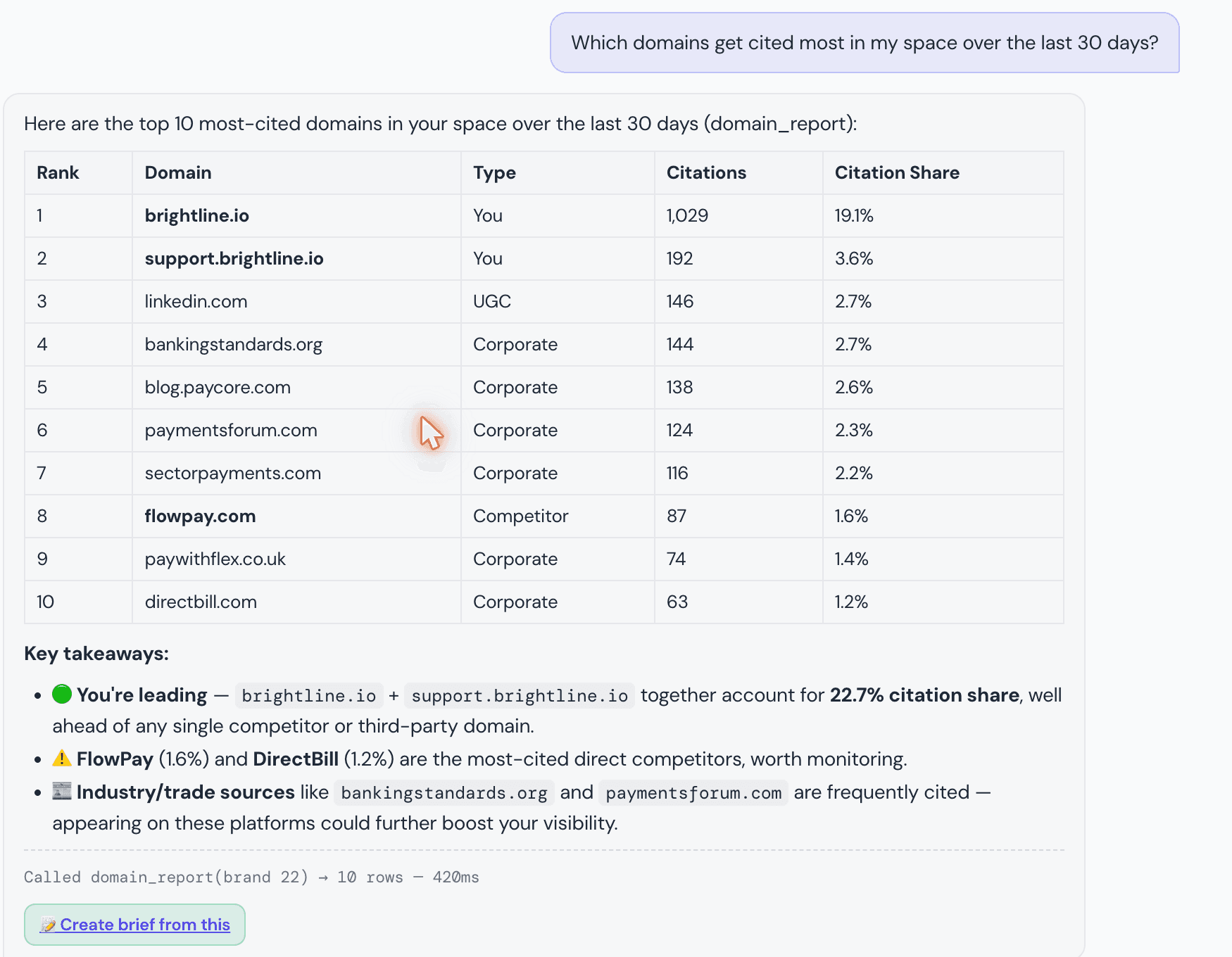
"Why did our citation rate drop last week?" "Which domains cite our competitor but not us?" Ask GeoToolBox answers in plain language, pulling only from your own tracked visibility data, and points back to the report behind every number.
From the Plus plan up · 10–300 questions/mo by tier
The dashboard problem
Your citation rate moved and you don't know why. So you open the Tracker, then Domain Overview, then Competitor Intel, cross-referencing three screens to answer one question — and by the time you have an answer, the client call already happened.
Ask GeoToolBox skips the cross-referencing. Ask the question directly and get an answer built from the same reports, in the time it takes to type a sentence.
From a question to a sourced answer
- 01Ask
A plain-language question
Type it like you'd ask a colleague: “why did our citation rate drop last week,” “which domains cite our competitor but not us,” “what should I fix first.” No filters, no dashboard to learn.
- 02Query
Your own tracked data, live
The analyst calls the same reports your Tracker and Domain Overview are built on — brand visibility, cited domains and URLs, citation gaps, week-over-week movers, and your prioritized action cards — scoped strictly to your account.
- 03Answer
With the report behind each answer
It answers in plain language and shows which report backs each number, so you can verify instead of just trusting a black box. If the data doesn't support a claim, it says so instead of guessing.
Grounded in your data, not a guess
Your account's data only
Every answer is scoped to your own tracked brands. A brand ID from your own account is validated before any report call runs — nothing ever crosses between accounts.
Answers point back to their source
Answers reference the specific report behind each number — brand visibility, cited domains and URLs, citation gaps, movers, or action cards — so you can verify instead of trusting a black box.
No hallucinated numbers
The analyst answers from what your reports actually return. If the data doesn't support a claim, it says so rather than inventing a figure.
Predictable, capped usage
Daily usage is capped and resets at midnight UTC, so a busy day of questions can't produce a surprise bill.
Act, don't just monitor
Most AI-visibility tools show you the gap and stop. GEO Toolbox shows you the gap — then hands you the fix.
A dashboard shows you the numbers and leaves the interpretation to you. Ask GeoToolBox does the cross-referencing — pulling from the Tracker, Domain Overview, and Opportunities data at once — so you get the interpretation, not just the raw report.
Ask “what should I fix first for this brand” and it pulls your prioritized action cards directly, with the rationale and suggested fix already attached — instead of you opening Opportunities and reading down the list yourself.
See how Opportunities builds those action cardsHow it compares
Ask GeoToolBox vs. digging it out yourself
| Manual dashboard digging | Generic AI chatbot | Ask GeoToolBox | |
|---|---|---|---|
| Answers in plain language, no dashboard filters | |||
| Reads your actual tracked visibility data | |||
| Points back to the report behind its answers | — | ||
| Scoped only to your own account's data | — | ||
| Knows your citation gaps & week-over-week movers | |||
| No copy-pasting exports into a separate chatbot |
FAQ
Frequently asked
- 01What is Ask GeoToolBox?It's an AI analyst built into the app. Ask it a question in plain language about your brand's AI search visibility, and it answers using your own tracked data — not a generic model guessing from training data.
- 02What data can it actually see?Only your account's own tracked data: brand visibility (mention rate, citation rate, average position), which domains and URLs AI engines cite for your prompts, citation gaps (where competitors are cited and you're not), week-over-week movers, and your prioritized action cards. It never has access to another customer's data.
- 03Does it make things up?It's instructed to answer only from what your reports actually return, citing the report behind each number — and if the data doesn't support an answer, to say so rather than inventing one.
- 04Is this the same as pasting my data into ChatGPT?No. It runs inside your account, calls your live tracked reports directly — no exporting, no copy-pasting, no risk of pasting client data into a third-party chat window — and every answer is scoped to your own tenant only.
- 05Which plans include Ask GeoToolBox?Every plan from Plus up: 10 questions a month on Plus, 50 on Pro, 100 on Growth, 300 on Scale, unlimited on Enterprise. Each question draws 40 credits from your monthly pool. It's not available on Starter.
- 06Is there a limit to how much I can ask?Usage is capped to a daily allowance that resets at midnight UTC, so cost stays predictable. You'll see a clear message if you hit the daily limit for the day.
Ask, don't dig.
From Plus up — 10 to 300 questions a month by tier.