
An XML sitemap is a file that lists the URLs on your site so search engines can find them. That is the whole job. Most of what gets written about sitemaps oversells it from there, so this guide sticks to what is actually true in 2026: what the file is, what each tag does (and which ones Google ignores), how to find and validate one, and the real answer to whether a sitemap helps your rankings or your visibility in AI search.
Want to see a real one right now?
Paste any domain into the free Sitemap URL Extractor & Validator and it finds the sitemap, pulls every URL out, and flags what is broken. No sign-up.
What an XML Sitemap Actually Does
An XML sitemap is a machine-readable list of the URLs you want search engines to know about, saved as an XML file and usually served at /sitemap.xml. It exists so crawlers can discover your pages without relying entirely on following links.
That is the useful part. Here is the part most guides skip: a sitemap is a discovery aid, not a command. Google's own documentation says a sitemap "doesn't guarantee that all the items in your sitemap will be crawled and indexed." Listing a URL is a hint that the page exists and is worth looking at. It does not force Google to crawl it, index it, or rank it.
So a sitemap earns its keep in specific situations. New sites with few inbound links get discovered faster, because there are not many other paths to the pages yet. Large sites get more complete coverage, because a crawler following links alone can miss deep or poorly-linked pages. The same is true for JavaScript-heavy or single-page sites, where a crawler may not follow client-rendered navigation, so the sitemap becomes the main way pages get found. For a small, well-linked site, the file often changes nothing, which is a point we come back to.
What a sitemap does not do is worth stating plainly, because the myths are persistent. It is not a ranking factor. It does not fix "not indexed" pages on its own. And it does not push a page into the index that Google has decided not to keep. When a page in your sitemap stays unindexed, the URL was still found; the problem is downstream, usually page quality, duplication, or internal linking.
What an XML Sitemap Looks Like
At its core, a sitemap is a <urlset> element wrapping one <url> block per page. Each block needs a <loc> (the address) and can carry a few optional hints. Here is a minimal, valid example:
<?xml version="1.0" encoding="UTF-8"?>
<urlset xmlns="http://www.sitemaps.org/schemas/sitemap/0.9">
  <url>
    <loc>https://example.com/</loc>
    <lastmod>2026-07-18</lastmod>
  </url>
  <url>
    <loc>https://example.com/blog/xml-sitemap</loc>
    <lastmod>2026-07-20</lastmod>
  </url>
</urlset>
A few rules from the sitemaps.org protocol that trip people up. The file must be UTF-8 encoded. URLs must be fully-qualified and absolute (https://example.com/page, not /page). And any special characters in a URL have to be entity-escaped: an ampersand becomes &, a < becomes <, and so on. An unescaped & is a common reason a hand-built sitemap fails to parse. In practice you rarely write this file by hand: a CMS or an SEO plugin generates it for you, and standalone generators exist for static sites. Knowing the shape still matters, because it is how you spot when a generated one is wrong.
The xmlns attribute on <urlset> is the sitemap namespace and is required. It is not decoration; it tells parsers which schema the file follows. Every entry after that is just a <url> with its <loc> and, optionally, the four hint tags below.
The standard <urlset> format above covers almost every site. There are also specialized sitemaps for particular content: image, video, and Google News sitemaps (each adds its own XML namespace), plus hreflang sitemaps that declare alternate-language versions of a page for international sites. Most sites never need them, and they are beyond this guide's scope, but it helps to know they exist if you run a news, media-heavy, or multilingual site.
| Tag | Required? | What it is for | Does Google use it? |
|---|---|---|---|
| <loc> | Yes | The absolute URL of the page | Yes, this is the point of the file |
| <lastmod> | No | When the page last changed, in W3C datetime format | Yes, but only if it is consistently accurate |
| <changefreq> | No | A hint at how often the page changes | No, ignored |
| <priority> | No | Relative importance, 0.0 to 1.0 | No, ignored |
The Four Tags, and Which Ones Still Matter
The changefreq and priority tags are not worth tuning, and Google says so directly. Its sitemap documentation states that "Google ignores <priority> and <changefreq> values." Setting every page to priority 1.0 does nothing. Declaring changefreq as daily does not make Googlebot visit daily. Other engines may read them, but none give them enough weight to matter. If your generator emits them, it is harmless; just do not spend time on them.
That leaves <lastmod>, the one metadata tag that actually earns attention, precisely because Google does use it, with a catch. Google treats <lastmod> as a signal only when it is demonstrably accurate, meaning the date reflects a real, significant change to the page content. When the dates are trustworthy, they help Google prioritize what to re-crawl.
The catch is what happens when they are not. Plenty of CMS setups stamp today's date on every URL in the sitemap on every rebuild, so the whole file claims everything changed this morning. Google notices that pattern, concludes the <lastmod> values are noise, and stops trusting them for your site. An inflated <lastmod> is no better than none, because Google learns to ignore it and you lose the signal you were trying to send. If your platform bumps every date automatically, that is a real thing to check, and it shows up clearly when you pull the full URL list and see identical dates down the whole column.
So the 2026 rule for tags is short. Get <loc> right, keep <lastmod> honest or leave it off, and ignore <changefreq> and <priority> completely.
Big Sites: Index Files, Gzip, and the Limits
A single sitemap file is capped. The protocol allows a maximum of 50,000 URLs or 50MB uncompressed per file, whichever you hit first (that byte ceiling is exactly 52,428,800 bytes). A 200,000-page site therefore cannot use one flat file. It splits into several, grouped under a sitemap index.
A sitemap index is a file whose entries point at other sitemap files instead of at pages. It uses a <sitemapindex> root, and each <sitemap> entry has a <loc> for the child file and an optional <lastmod> for when that child last changed:
<?xml version="1.0" encoding="UTF-8"?>
<sitemapindex xmlns="http://www.sitemaps.org/schemas/sitemap/0.9">
  <sitemap>
    <loc>https://example.com/sitemap-posts.xml</loc>
    <lastmod>2026-07-20</lastmod>
  </sitemap>
  <sitemap>
    <loc>https://example.com/sitemap-products.xml.gz</loc>
    <lastmod>2026-07-19</lastmod>
  </sitemap>
</sitemapindex>
This is the normal setup on any site past a few hundred pages. WordPress, Shopify, Yoast and Rank Math all publish an index by default. It matters because it is where a lot of tools quietly fail: paste an index into a basic extractor and you get back a list of five child sitemap URLs instead of your five thousand pages. The file did what it was told; it just did not do the job you wanted.
| Limit | Value | Applies to |
|---|---|---|
| URLs per file | 50,000 | A single sitemap |
| Uncompressed file size | 50MB (52,428,800 bytes) | A single sitemap or index |
| Sitemaps per index | 50,000 | A sitemap index file |
<loc> URL length | Under 2,048 characters | Each URL |
Two more details save headaches. Sitemaps can be gzip-compressed and served as .xml.gz, which helps on large files, but the 50MB limit is measured on the uncompressed size, not the .gz. And all the URLs in a sitemap must sit on the same host as the sitemap itself; crawlers ignore off-host URLs unless you have authorized cross-submission, either by verifying both sites in Search Console or by referencing the sitemap from the other host's robots.txt.
How to Find the Sitemap of Any Website
Most people start by typing /sitemap.xml and give up if it 404s. That is the wrong first move, because a site can put its sitemap anywhere and tell you exactly where. The order that actually works:
- Read
robots.txtfirst. Fetchexample.com/robots.txtand look forSitemap:lines. A site can declare one or several, pointing anywhere, including a different host. This is the site telling you directly, so it beats guessing. - Probe the common paths. If robots.txt is silent, try
/sitemap.xml,/sitemap_index.xml,/sitemap-index.xml, and/wp-sitemap.xml. That last one is WordPress core since version 5.5 and is an easily missed location. - Check Search Console. If it is your own site, the Sitemaps report shows what you actually submitted, which is often a different set from what robots.txt advertises. Comparing that list with a crawl is the first gap check in an SEO audit.
One thing not to bother with: a site: search does not reliably surface a sitemap. Sitemaps are XML files, not pages, so an empty site: result tells you nothing about whether one exists.
That bare-domain-to-URL-list step is exactly what our free sitemap extractor automates: give it just a domain, and it reads robots.txt, probes the common paths including wp-sitemap.xml, walks nested index files (the ones a basic extractor stops at), decompresses .xml.gz, and hands you every URL, then tells you which method found the file.
Validating a Sitemap: Two Things "Valid" Means
"Is my sitemap valid?" is really two questions, and most tools only answer the first one.
The first is spec conformance: does the XML match the schema? Required <loc>, well-formed dates, priority inside 0.0 to 1.0, a recognized changefreq, escaped ampersands, under 50,000 URLs and 50MB. This is the easy part, and a syntax validator or Search Console will catch most of it.
The second is truthfulness, and it is where the real damage hides: are those URLs telling the truth? A sitemap can be flawless XML and still be useless if every URL in it 404s, redirects, points at a noindex page, or sits on a host you did not intend. Search engines treat a sitemap full of non-200 URLs as a low-quality signal about the whole file. So the questions that matter are: do the URLs still resolve, are they on the right host, and does anything else on the site contradict them? A canonical tag pointing at a different URL is one such contradiction, and one the tool below does not check.
That contradiction check is the one people skip, because it means cross-referencing the sitemap against robots.txt and against live HTTP status codes, not just reading the XML. The same free tool runs both passes in one go: it scores the file against the sitemaps.org spec, cross-checks robots.txt, and lets you fire live status checks at the URLs, so you catch the "valid but lying" cases before you submit. The most useful time to run it is right before submitting to Search Console, so errors never get logged against your property in the first place.
Sitemaps and robots.txt: The Conflict That Blocks Pages
The sitemap and robots.txt are really one job seen from two sides. The sitemap says what exists; robots.txt says what may be fetched. The damage happens where they disagree.
The classic own-goal is a URL that appears in your sitemap while being blocked by a Disallow rule in robots.txt. You are asking Google to crawl a page and, in the same breath, telling it not to fetch that page. In Search Console this shows up as "Blocked by robots.txt" or, if Google indexed the URL anyway on the strength of links pointing at it, the "Indexed, though blocked by robots.txt" warning.
That second warning confuses people because it looks contradictory, so be precise about what robots.txt actually controls. Per Google, "a page that's disallowed in robots.txt can still be indexed if linked to from other sites." Robots.txt governs crawling, not indexing. It is, in Google's words, "not a mechanism for keeping a web page out of Google."
That distinction dictates the fix, and the fix is the opposite of most people's instinct. If the page should be indexed, remove the Disallow rule that blocks it, and make sure the URL belongs in the sitemap. If the page should not be indexed, do not leave it blocked; unblock it in robots.txt and add a noindex tag instead, because Google has to be able to crawl the page to see the noindex. Then take that URL out of the sitemap. A URL that is both submitted and disallowed is the contradiction to eliminate either way. If you are not sure which rule is doing the blocking, the free robots.txt tester names the exact line.
How to Submit Your Sitemap to Google
There are two methods that still work, and you should use both. First, declare the sitemap in robots.txt with a Sitemap: line pointing at the absolute URL (you can list more than one). This is passive discovery for any crawler that reads the file. Second, submit it in Google Search Console under Indexing, then Sitemaps. This is the one that gives you feedback: fetch status, how many URLs Google read, and the errors it found.
If you have read an old tutorial, you may have seen a third method, "pinging" a special Google URL to announce an update. That is gone. Google deprecated the sitemaps ping endpoint on June 26, 2023, and switched it off roughly six months later; requests to it now return a 404. Google's stated reason was that the unauthenticated pings were rarely useful and mostly generated spam. So do not wire a ping into your publishing pipeline, and if you have one, remove it.
The replacement for "tell Google I changed something" is the ordinary path: keep an accurate <lastmod> and let Search Console and normal recrawling do the rest. Note that IndexNow, which Bing and some other engines support, is a separate mechanism that still exists; Google's ping going away does not affect it. Our Bing Webmaster Tools guide shows how to set IndexNow up.
Do Sitemaps Help Rankings or AI Search?
No, and a lot of guides fudge this. A sitemap is not a ranking factor. You will see claims that submitting a sitemap "boosts rankings" or "signals trust and authority." Google's position is the opposite: a sitemap is a discovery hint, and the protocol itself notes that priority values are "not likely to influence the position of your URLs." A sitemap can help a page get found, which is a prerequisite for ranking, but finding is not ranking. If a page is already discoverable through internal links, the sitemap adds nothing to how it ranks.
The AI-search version of the question deserves the same candor. A sitemap is not a citation signal, and no AI provider documents it as one. The one carve-out is news publishing: a Google News sitemap speeds timely inclusion in Google News (it is not required, but it helps), and that content can surface in AI answers, so for a news site it does have an indirect effect. For everyone else, it does not. What decides whether ChatGPT, Perplexity, or Google's AI answers can use your pages is reachability: whether their crawlers are allowed to fetch you and whether the page renders into readable content. That is a robots.txt and rendering question, not a sitemap one. A perfect sitemap in front of pages that block AI crawlers does nothing for AI visibility.
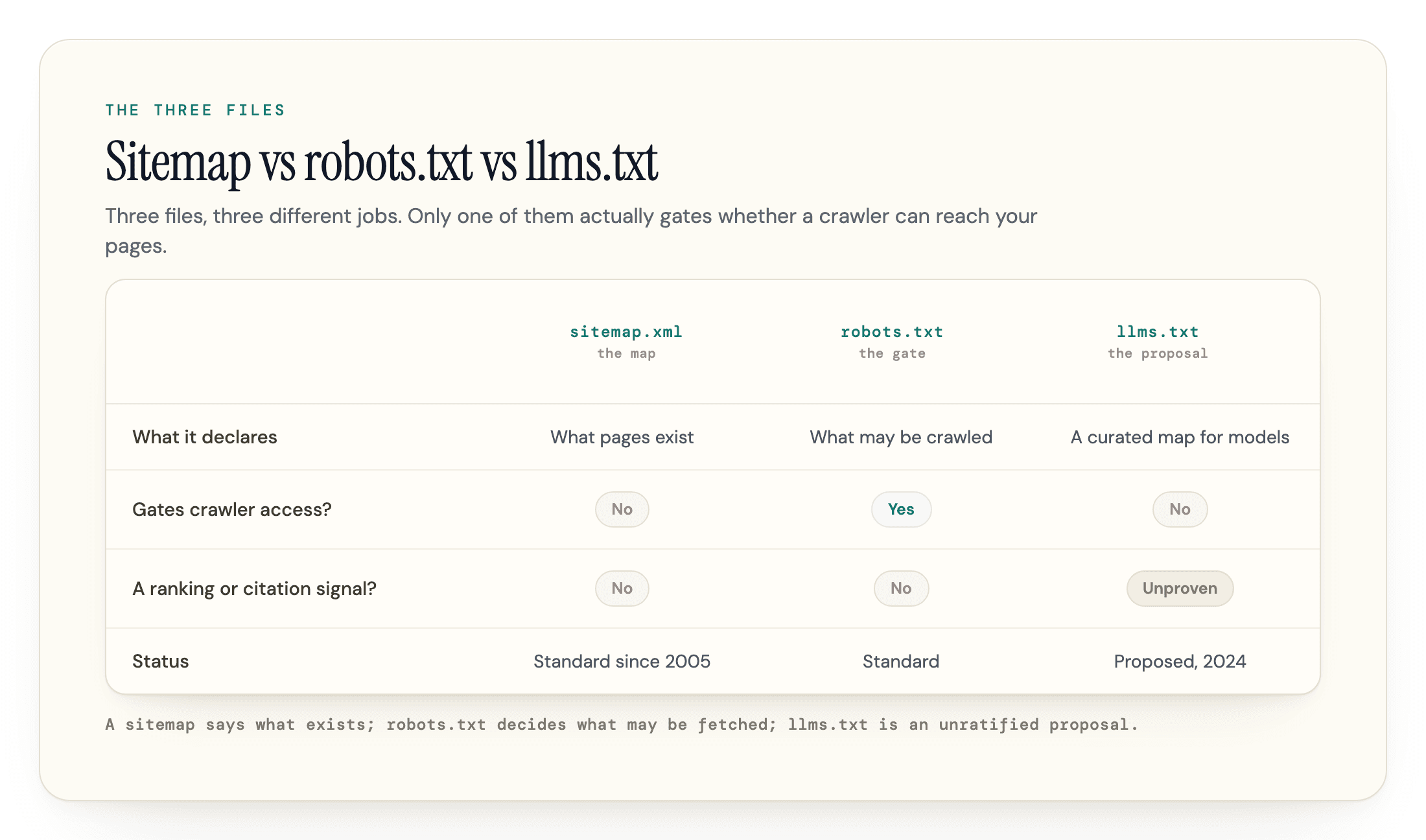
This is where the files stack up, and keeping them straight helps. The sitemap says what exists. robots.txt decides who is allowed to fetch it. llms.txt, the newer proposal, tries to hand models a curated map, though the measured evidence that AI engines read it is thin. Of these, the one that actually gates AI access today is robots.txt. When we audit sites for AI visibility, a recurring blocker we see is not a missing or malformed sitemap; it is a robots.txt rule quietly disallowing an AI crawler the owner never meant to block. If you want to check that side, our free AI Crawler Checker shows which of 34 AI crawlers your robots.txt allows or blocks, with the exact line to change.
Frequently Asked Questions
Do I need a sitemap for a small website?
Often not. Google says a site that is "small" (about 500 pages or fewer) and thoroughly linked internally, so Googlebot can reach every important page from the home page, may not need a sitemap at all. If that describes you, a sitemap will not hurt, but it is not the thing holding your indexing back. It matters most for large sites, brand-new sites with few inbound links, and deep pages that internal linking misses.
How often should an XML sitemap update?
Automatically, whenever your content changes, which is what any CMS or sitemap plugin handles for you. There is no schedule to set and no benefit to regenerating it on a timer. The one thing to keep honest is <lastmod>: it should reflect real changes, not today's date stamped on every URL, or Google learns to ignore it.
What is the difference between a sitemap and a sitemap index?
A sitemap lists page URLs. A sitemap index lists other sitemap files. Once a site passes 50,000 URLs (or 50MB), it must split its pages across multiple sitemaps and publish an index that points at all of them. In practice CMSs do this long before the limit, so most sites above a few hundred pages ship an index by default, which is why an extractor has to follow the children to give you the actual pages.
Does an XML sitemap help my site get cited by ChatGPT or Perplexity?
Only indirectly, and less than people hope. A sitemap can help your pages get discovered and indexed, which is a precondition for being used in AI answers, but it is not a citation signal and no AI engine documents it as one. What decides whether an AI crawler can use your content is whether it is allowed to fetch the page and whether the page renders cleanly, which is a robots.txt and rendering matter, not a sitemap one.
The Bottom Line
An XML sitemap is plumbing, not strategy. Get it complete and accurate, keep <lastmod> honest, make sure nothing in it is contradicted by robots.txt, and then stop tuning tags that Google ignores. Most of the effort people spend "optimizing" a sitemap is better spent making sure the URLs in it resolve and are allowed to be crawled.
If you want to see the state of any sitemap in one pass, that is what we built the free Sitemap URL Extractor & Validator for: paste a domain, get every URL out, and see what is broken, off-host, or blocked by your own robots.txt, before Google does. It is free, with no sign-up.
Sources
- Build and Submit a Sitemap - Google Search Central (limits, ignored tags, lastmod, submission, cross-submission) -
developers.google.com/search/docs/crawling-indexing/sitemaps/build-sitemap - Sitemaps overview / Do you need a sitemap? - Google Search Central (no crawl or index guarantee; the ~500-page threshold) -
developers.google.com/search/docs/crawling-indexing/sitemaps/overview - Sitemaps XML format - sitemaps.org Protocol (tags, limits, entity escaping, sitemap index, gzip, same-host rule) -
sitemaps.org/protocol.html - Sitemaps ping endpoint is going away - Google Search Central Blog (deprecation announced June 26, 2023) -
developers.google.com/search/blog/2023/06/sitemaps-lastmod-ping - Introduction to robots.txt - Google Search Central (robots.txt controls crawling, not indexing; use noindex to keep pages out) -
developers.google.com/search/docs/crawling-indexing/robots/intro