
A canonical tag tells search engines which of several URLs with the same content is the one that counts. Google treats it as a strong hint rather than an order, and AI answers that cite your page can point to a different URL than the one you declared.
When Google overrules your tag, Search Console says so, and the cause is often a conflicting signal elsewhere on the site. AI engines add a second question: which version they cite.
What Is a Canonical Tag?
A canonical tag is a line of HTML that tells search engines which URL is the main version of a page when the same content loads at several addresses. It sits in the <head> and looks like this:
<link rel="canonical" href="https://example.com/dresses/green-dress" />"Canonical" means the standard, authoritative version; a canonical identifier is the one agreed name for a thing that goes by several. The tag is also called rel="canonical" or the canonical link element. Three terms get mixed up:
- Canonical tag: your declaration, the
<link>element (or its HTTP-header equivalent). - Canonical URL: the address that ends up representing the content in search results.
- Canonicalization: the selection process itself. Google describes it as "the process of selecting the representative" URL of a piece of content, "often called deduplication."
The gap between the first two is the whole story. In Google's words, "indicating a canonical preference is a hint, not a rule."
A Canonical URL Example
Say one product page answers at all of these:
https://example.com/dresses/green-dresshttps://example.com/dresses/green-dress?utm_source=newsletterhttps://example.com/dresses/cocktail?color=green&sort=pricehttp://www.example.com/dresses/green-dress
To a crawler these are four URLs: duplicate content, the same primary content at more than one address. Every variant carries a canonical tag pointing to the first, and the first points to itself, a self-referencing canonical, which Google recommends on every indexable page.
How Google Picks the Canonical URL
Google starts from the content. It groups pages whose primary content looks the same into a cluster, then marks the one that is "objectively the most complete and useful for search users" as canonical, according to Google's canonicalization documentation.
Your signals feed that choice. Google's guide to consolidating duplicate URLs ranks three methods by strength and lists a few other signals it weighs:
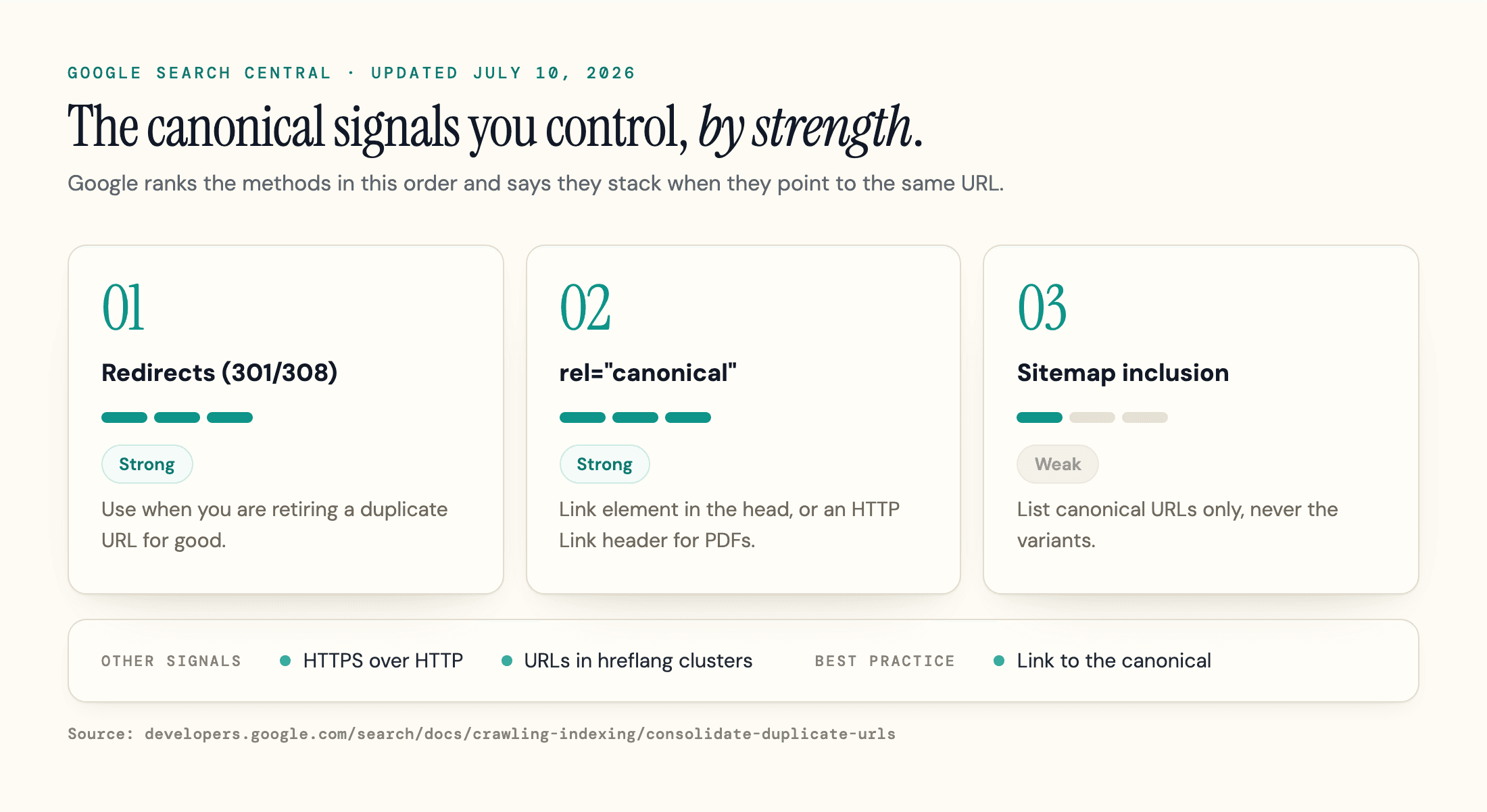
| Signal | How Google describes it | What undermines it |
|---|---|---|
| Redirect (301/308) | Strong signal | Redirect chains, or internal links that keep pointing at the old URL |
| rel="canonical" (link element or HTTP header) | Strong signal | A target that is blocked, noindexed, redirected, erroring, or not actually a duplicate |
| Sitemap inclusion | Weak signal | Listing non-canonical URLs, or a different URL than your tag declares |
| HTTPS over HTTP | Other signal: preferred by default | Invalid certificate, HTTPS-to-HTTP redirects, or a canonical pointing at the HTTP version |
| hreflang cluster membership | Other signal: preferred | Missing return links, or a canonical pointing at another language |
| Internal links | Best practice: link to the canonical | Navigation and body links that point at a duplicate instead of the canonical |
Two details matter most. First, the methods "can stack and thus become more effective when combined." A 301 from the www host, a self-referencing canonical and a canonical-only sitemap all agree. Bing's Webmaster Guidelines make the sitemap rule explicit: sitemaps should "list only canonical URLs." Our XML sitemap guide shows how.
Second, conflicting signals blur your preference and can push Google toward another URL. Google tells you not to "specify one URL in a sitemap, but a different URL for that same page using" a rel="canonical" tag. Internal links count too: a menu that links to /dresses/green-dress?ref=nav on every page keeps pointing Google at the wrong URL.
Why the Choice Changes How Google Crawls You
Google states that "the canonical page will be crawled most regularly; duplicates are crawled less frequently in order to reduce the crawling load on sites." If Google settles on the wrong canonical, the URL you update most can be the one revisited least.
Link signals follow the same choice. Google's guide says signals pointing at a duplicate get "consolidated with links to" the preferred URL once that URL becomes canonical. So canonicals do pass link equity, but only after Google accepts them.
Which URL Do AI Search Engines Cite?
In our October 2026 test, ChatGPT cited a URL other than the declared canonical in 13 of 20 API citations and 11 of 22 consumer citations, while the URLs Gemini and Perplexity cited matched the declared canonical whenever we could check. The URL an engine cites can differ from the one you declared, and only some engines publish how they choose it.
Google AI Overviews and AI Mode build on Google's index. Google's AI features documentation says a page must be "indexed and eligible to be shown in Google Search with a snippet" to appear as a supporting link, and that there are "no additional technical requirements." Canonicalization shapes that index, so a URL Google did not select is unlikely to be the one these features link. That is our inference: the docs do not say which exact URL a supporting link displays, and links can carry extras such as video timestamps. Our Google AI Overviews SEO guide covers the indexing side.
Bing and Copilot document the link. Bing's Webmaster Guidelines now cover Copilot and grounding results (Search Engine Roundtable reported the new framing in February 2026) and state: "Duplicate URLs dilute signals and reduce Bing's confidence in selecting a URL for grounding results or citations." Our Copilot SEO guide covers the rest of Bing's grounding rules.
ChatGPT search and Perplexity say nothing about rel="canonical" for web results in OpenAI's publisher FAQ or Perplexity's crawler documentation. In a case study published February 16, 2026, Glenn Gabe found that when Google ignored a site's canonical, ChatGPT surfaced the URL Google had picked, which he reads as ChatGPT leaning on Google's results.
What We Found When We Checked 181 AI Citations
On October 4, 2026, we sent 8 canonical-tag questions through DataForSEO's AI endpoints (3 to every engine, the rest split) and ran the first 3 through ChatGPT's consumer interface. Then we compared every cited URL, character for character, with the canonical that page declares, after stripping ChatGPT's own tracking tag.
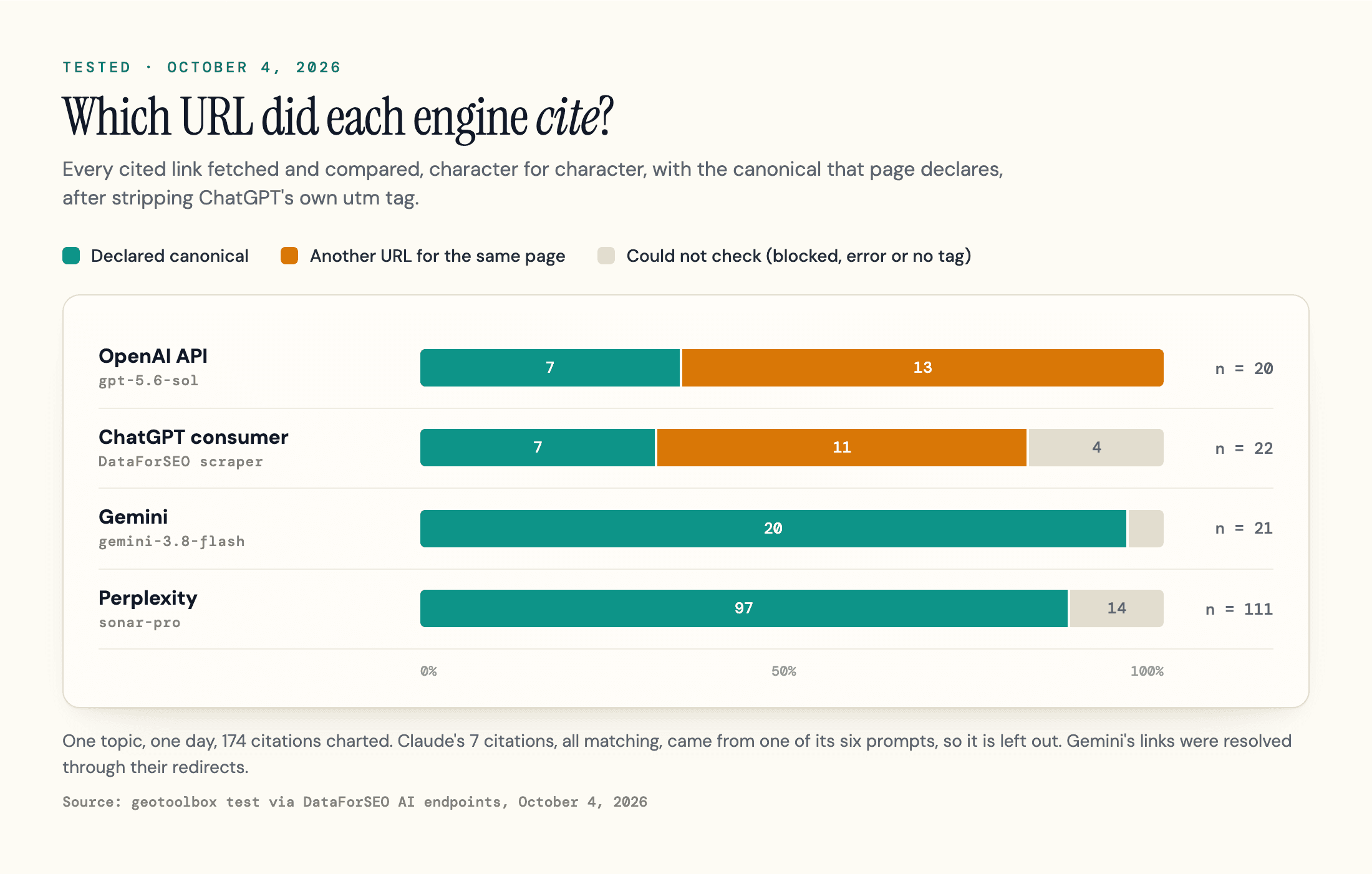
| Engine (model) | Citations checked | Cited the declared canonical | Cited another URL for the same page | Could not check (blocked, error or no tag) |
|---|---|---|---|---|
| OpenAI API (gpt-5.6-sol) | 20 | 7 | 13 | 0 |
| ChatGPT consumer (scraper) | 22 | 7 | 11 | 4 |
| Gemini (gemini-3.8-flash) | 21 | 20 | 0 | 1 |
| Perplexity (sonar-pro) | 111 | 97 | 0 | 14 |
| Claude (claude-opus-5) | 7 | 7 | 0 | 0 |
ChatGPT's 24 off-canonical citations used 10 distinct URLs for five Google documentation pages, mostly with added parameters like rd, visit_id, post_id=noID and missing=undefined; three of those citations (two URLs) differ only by a capitalized or missing hl=en. Perplexity cited the declared URLs of four of those five pages instead.
Perplexity supplied most of the 181 citations, Gemini's links were resolved through their redirects first and came from 2 of its 5 prompts, and Claude returned citations on only 1 of its 6 prompts. This is one topic on one day: it shows which URL each engine cited, not whether a canonical tag changes what ChatGPT retrieves or how it ranks sources.
ChatGPT also tags cited links. OpenAI's publisher FAQ documents utm_source=chatgpt.com on ChatGPT referrals, and our API runs returned utm_source=openai instead. A self-referencing canonical covers that parameterized twin in Google. See how ChatGPT search works for the retrieval side.
The practical move is to give engines fewer URL versions to find: redirect retired variants, link internally to one address, and keep parameters out of your sitemap. We have not tested whether that changes ChatGPT's citations, but it is what Google and Bing ask for, and part of the technical base of AI SEO.
Search Console Canonical Statuses, Decoded
Google Search Console's Page indexing report sorts non-indexed URLs into statuses. Four relate to canonicalization, and only one usually needs work. The definitions below come from Google's Page indexing report help.
| Status | What Google means | What to do |
|---|---|---|
| Alternate page with proper canonical tag | This URL is an alternate (for example an AMP or mobile version) that correctly points to an indexed canonical. | Nothing, unless this URL should rank on its own. Do not click "Validate fix" on thousands of these. |
| Duplicate without user-selected canonical | Google found duplicates, you declared no canonical, so Google picked another URL and will not serve this one. | Inspect the URL to see Google's pick. Add a canonical if you disagree, or make the pages genuinely different. |
| Duplicate, Google chose different canonical than user | You declared a canonical, but Google indexed a different URL it considers a better fit. | The one worth investigating. See the workflow in the next section. |
| Page with redirect | A non-canonical URL that redirects elsewhere. It will not be indexed; the target may be. | Nothing, unless a URL you want indexed is redirecting by mistake. |
The first row causes the most panic: counts can reach hundreds of thousands, and forum threads show owners validating them. Google says "there is nothing you need to do," and notes that alternate language pages are not detected by Search Console.
"Duplicate without user-selected canonical" means Google made the call for you, and the help page says it "is not an error." It matters only if Google picked the wrong URL, or the page was never meant to be a duplicate.
Google also lists "100% coverage" under what not to look for: the goal is every important canonical indexed. Crawled, currently not indexed is a different status that does not by itself point to a canonical problem, so adding a canonical is not a fix for it.
How to Fix "Google Chose Different Canonical Than User"
Start by deciding whether Google is wrong. Google's troubleshooting guide asks you to check "whether the Google-selected canonical makes more sense than your preferred canonical URL" for your users. If not:
- Inspect the indexed URL, not the live test. In the URL Inspection tool, read the Google-selected canonical and the User-declared canonical under Page indexing. The URL Inspection help says "the live test cannot predict whether or not the tested version will be considered canonical." Only the indexed data shows Google's choice.
- Open all three pages side by side: the inspected URL, your declared canonical, and Google's pick. Google's Page indexing help adds: "If the user-declared canonical is not similar to the current page, then Google won't ever choose that URL as canonical." A canonical only works between real duplicate pages.
- Hunt for conflicting signals. Check redirects, internal links, sitemap entries, hreflang and HTTPS against the signal table.
- Check the raw and rendered head. View the source, the rendered DOM and the response headers; a plugin or script can print a second, different canonical.
- Make pages different, or merge them. If the pages should both rank, differentiate the primary content. If not, pick one and 301 the other.
- Request indexing for the important URLs, then wait. Click "Request indexing" in URL Inspection. Google says it "might hold pages in a duplicate cluster for up to two weeks" even after you fix content, and the button is quota-limited.
For more than a handful of URLs, the URL Inspection API returns the same field, with a quota of 2,000 calls per day per site.
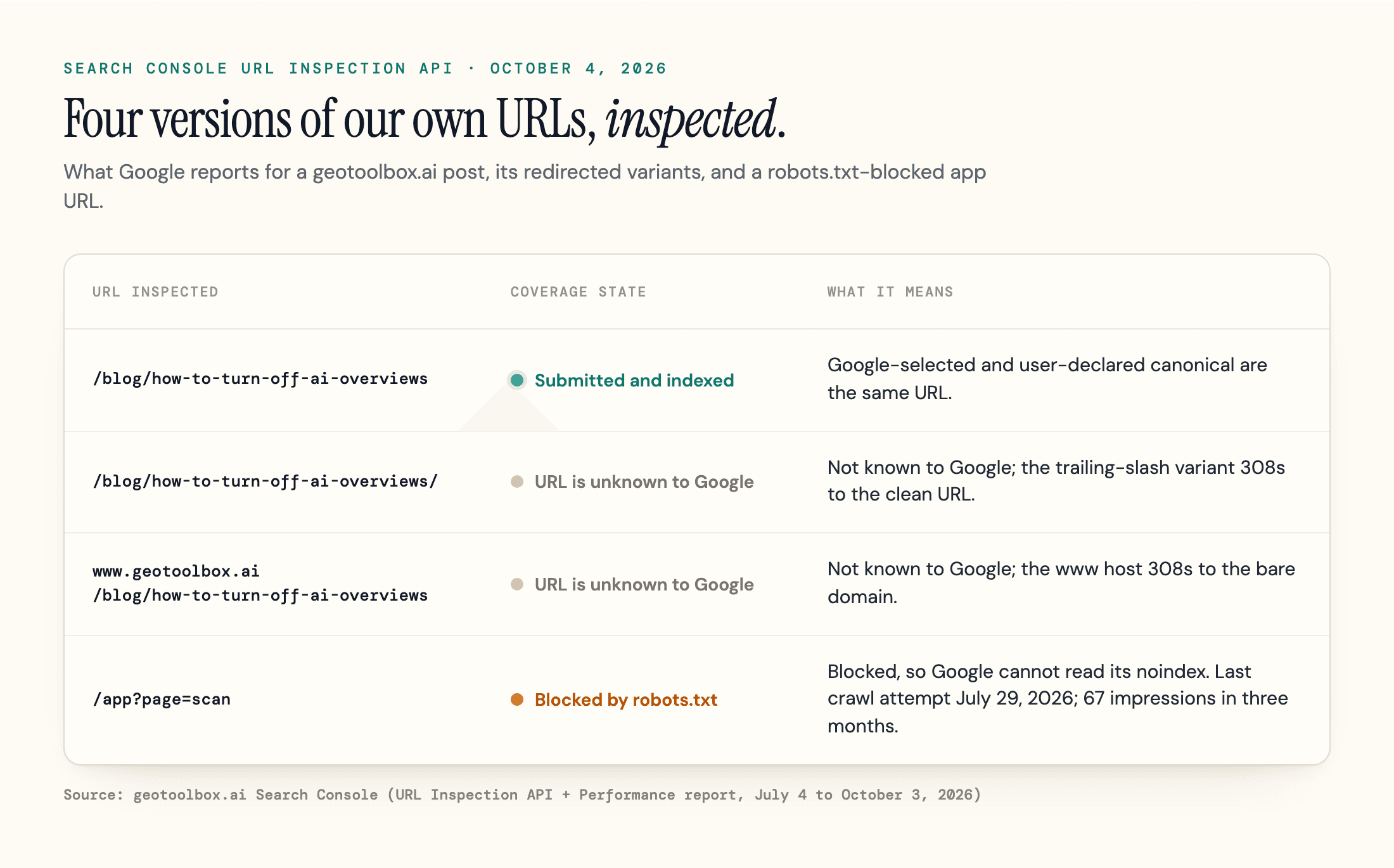
That figure is our own site. For our post on turning off AI Overviews, both canonicals match, and its trailing-slash and www variants are unknown to Google and 308 to the clean URL. The fourth row is covered in the robots.txt section.
When Google Picks a Canonical on Someone Else's Domain
The scariest version is a canonical on an unrelated site, often a casino or spam domain. Google's troubleshooting guide points to three likely causes: malicious hacking that injects a cross-domain rel="canonical" or 3xx redirect, a misconfigured server returning soft 404 pages identical to another site's, and occasionally a copycat site hosting your content (Google points you to the host and a DMCA request).
Check your raw HTML and headers for a canonical you did not write, then check what your error pages return: a "not found" page answering 200 can be clustered with anyone's.
How to Add Canonical Tags
For the annotation itself, pick either the HTML link element or the HTTP header, and keep redirects, internal links and sitemap entries consistent with it. Google's consolidation guide recommends absolute URLs over relative paths and only accepts the link element "if it appears in the <head> section of the HTML."
In HTML
Add the <link rel="canonical"> element shown earlier to the head of every duplicate and of the canonical page itself. Point it at a URL that returns 200 directly, not at a redirect, an error page, or a page that canonicalizes somewhere else.
Place it near the top: per Google's notes on valid page metadata, an invalid element such as an img or iframe in the head makes Google stop reading it, so a later canonical is lost.
In the HTTP Header
For PDFs and other non-HTML files, send a Link header instead:
Link: <https://example.com/downloads/white-paper.pdf>; rel="canonical"
Google calls using header and element together "more error prone," because they can drift apart. We use the header ourselves: each geotoolbox.ai blog post has a Markdown twin for AI agents at the same path plus .md, and the sitemap post's twin answers with link: <https://geotoolbox.ai/blog/xml-sitemap>; rel="canonical", naming the HTML page as canonical.
With JavaScript
Put the canonical in the server HTML, and never let JavaScript change it. If you cannot set it in the HTML source, Google's consolidation guide says to "leave it out and only set it with JavaScript." Several AI fetchers read only raw HTML in the tests our JavaScript SEO guide collects, one more reason to server-render it.
In Next.js
The App Router renders alternates.canonical from the Metadata API. Layout metadata is shallowly merged into pages, so a canonical set in the root layout can land on every page without its own, canonicalizing a whole site to the homepage.
Since Next.js 15.2, dynamic generateMetadata output can stream into the body for clients not detected as HTML-limited bots, so check responses with a crawler user agent. Set metadataBase to your production origin; in the threads we reviewed, a wrong base URL was a common reason canonicals pointed at localhost.
In Shopify
Themes output {{ canonical_url }} in the head, per Shopify's theme documentation. The common duplicate comes from collection pages linking to /collections/x/products/y through the within: collection filter, which Shopify's docs say has "the SEO implications" to consider. Linking to the plain {{ product.url }} keeps internal links on the canonical product URL.
In WordPress and Wix
WordPress core prints a self-referencing canonical on single posts and pages through rel_canonical(); SEO plugins extend it and allow custom ones, so let only one plugin print it. Wix sets a self-referencing canonical on every page, and Wix's help center recommends keeping it, with a custom one in the Advanced SEO tab for pages several URLs lead to.
Canonical vs 301 vs Noindex vs robots.txt
Each of these does one job:
| Your goal | Use | Why not the others |
|---|---|---|
Retire a duplicate URL for good (old slug, www, HTTP) | 301 or 308 redirect | A canonical leaves the duplicate live for users and crawlers |
| Keep a near-duplicate variant usable (tracking parameters, session IDs, print view) but rank one URL | rel="canonical" | A redirect would break the variant; noindex removes it from Search instead of consolidating it |
| Keep a page out of search entirely (internal search results, thank-you pages) | noindex | A canonical is a hint and only works between duplicates |
| Stop crawling of infinite or costly URL spaces | robots.txt | Never for canonicalization: Google cannot read a tag on a page it may not fetch |
On parameters, keep a query string in the canonical only when it changes the main content, such as a page number or a filter that builds a genuinely different product set. Tracking and session parameters belong on a canonical that points to the clean URL.
Do not use noindex as a canonicalization tool. Google advises against using it to steer canonical selection within a site, "because it will completely block the page from Search."
The robots.txt row hides the most surprises. Google warns that it "may still index URLs that are disallowed in robots.txt without their content." Our /app?page=scan URL sends an x-robots-tag: noindex header, but robots.txt disallows /app?, so URL Inspection reports "Blocked by robots.txt" (last crawl attempt July 29, 2026), and the URL drew 67 impressions in Search Console over the last three months. While the block stands, Google cannot fetch the page to read its noindex or any canonical. Our AI crawlers guide covers the same trade-off for AI bots.
Syndication, Pagination and hreflang
Syndication. Cross-domain canonicals are valid under RFC 6596, but Google's troubleshooting guide says the canonical element "is not recommended for those who want to avoid duplication by syndication partners, because the pages are often very different," and that partners should block indexing of your content instead. Ask partners for a noindex on their copy.
Pagination. Give page 2, 3 and onward their own self-referencing canonical. Google's pagination guidance treats each page in a sequence as a separate page and says: "Don't use the first page of a paginated sequence as the canonical page."
hreflang. Point each language version's canonical at itself, never at another language. Same-language regional versions are harder: Google treats them as duplicates and asks for both canonicals and hreflang, and in forum threads we reviewed it folded regional sites together (Austria into Switzerland, UK into US). That is not always a loss. In Glenn Gabe's bonus case, Google canonicalized a second country's same-language pages to the US version, but hreflang still served the right URL in each country while Search Console reported the clicks on the canonical. Check country-level results before treating consolidation as a fault.
Common Canonical Tag Mistakes and Myths
The mistakes that show up again and again:
- Canonical pointing at a redirect, a 404, or a page that canonicalizes elsewhere
- Two canonical tags on one page, often from a theme plus a plugin
- A canonical in the body, or after an invalid element in the head
- Relative canonical URLs that resolve to the wrong host or a staging site
- Canonical and sitemap naming different URLs for the same page
- Every paginated page pointing to page 1
Some popular advice does not match Google's documentation either.
"Set your preferred domain in Search Console." Google announced its retirement on June 18, 2019. Redirects and canonicals do that job now.
"Canonical tags help you track traffic." Only in Search Console, whose Performance report assigns click and impression data "to the canonical URL that Google selects," with some exceptions. GA4 still records the URL the visitor landed on.
"Duplicate content gets you penalized." Google states that "some duplicate content on a site is normal and it's not a violation of Google's spam policies." The cost of duplicates is split signals and wasted crawling, not a penalty.
What to Check First
Start with a short canonical audit: inspect your top URLs on the "Duplicate, Google chose different canonical than user" list, confirm one absolute canonical per template, and keep only declared canonicals in the sitemap.
Search Console cannot show which of your URLs each AI engine cites. Our AI Visibility Tracker runs your prompts through AI engines on a schedule and records the URLs each answer cites (3 engines on Starter, all 8 on Pro). A cited variant is a URL worth investigating, not proof that your signals conflict.
Frequently Asked Questions
Is a canonical tag important for SEO?
It matters most on sites that generate duplicate URLs through filters, tracking parameters, or syndicated and localized content, because it tells Google which URL should collect the links and appear in results. A small site with clean URLs can do without.
Do AI search engines use rel=canonical?
Indirectly, where they rely on a search index: Google's AI features use Google's canonicalized index, and Bing says duplicates reduce its confidence when choosing a URL for grounding results or citations. OpenAI and Perplexity document no rule, and in our one-day test of 181 citations, ChatGPT often cited non-canonical URLs.
What is a non-canonical URL?
Any URL in a duplicate cluster that Google did not select as canonical. It may still load as an alternate or redirect elsewhere, and Google generally represents the cluster with its selected canonical.
Sources
- Google Search Central - What is URL canonicalization (updated August 20, 2026) -
developers.google.com/search/docs/crawling-indexing/canonicalization - Google Search Central - How to specify a canonical with rel="canonical" and other methods (updated July 10, 2026) -
developers.google.com/search/docs/crawling-indexing/consolidate-duplicate-urls - Google Search Central - Fix canonicalization issues (updated August 21, 2026) -
developers.google.com/search/docs/crawling-indexing/canonicalization-troubleshooting - Google Search Central - AI features and your website (updated December 10, 2025) -
developers.google.com/search/docs/appearance/ai-features - Google Search Central - Pagination best practices for Google (updated December 10, 2025) -
developers.google.com/search/docs/specialty/ecommerce/pagination-and-incremental-page-loading - Google Search Central - Valid page metadata for Google Search (updated December 10, 2025) -
developers.google.com/search/docs/crawling-indexing/valid-page-metadata - Google Search Central Blog - Bye Bye Preferred Domain setting (June 18, 2019) -
developers.google.com/search/blog/2019/06/bye-bye-preferred-domain-setting - Google Search Console API - Usage limits (updated August 28, 2025) -
developers.google.com/webmaster-tools/limits - Search Console Help - Page indexing report (read October 4, 2026) -
support.google.com/webmasters/answer/7440203 - Search Console Help - URL Inspection tool (read October 4, 2026) -
support.google.com/webmasters/answer/9012289 - Search Console Help - What are impressions, position, and clicks? (read October 4, 2026) -
support.google.com/webmasters/answer/7042828 - Microsoft Bing - Bing Webmaster Guidelines (read October 4, 2026) -
bing.com/webmasters/help/webmaster-guidelines-30fba23a - Search Engine Roundtable - Microsoft Updates Bing Webmaster Guidelines (A Bit) (February 26, 2026) -
seroundtable.com/bing-webmaster-guidelines-updated-41002.html - GSQi (Glenn Gabe) - Rel Canonical Is Just A Hint, case studies (February 16, 2026) -
gsqi.com/marketing-blog/rel-canonical-hint-cascade-chatgpt/ - IETF - RFC 6596, The Canonical Link Relation (April 2012) -
rfc-editor.org/rfc/rfc6596.html - OpenAI Help Center - Publishers and Developers FAQ (read October 4, 2026) -
help.openai.com/en/articles/12627856-publishers-and-developers-faq - Perplexity - Perplexity crawlers (read October 4, 2026) -
docs.perplexity.ai/docs/resources/perplexity-crawlers - Next.js - Functions: generateMetadata (updated August 25, 2026) -
nextjs.org/docs/app/api-reference/functions/generate-metadata - Shopify - Add SEO metadata to your theme (read October 4, 2026) -
shopify.dev/docs/storefronts/themes/seo/metadata - Shopify - Liquid filter: within (read October 4, 2026) -
shopify.dev/docs/api/liquid/filters/within - WordPress Developer Resources - rel_canonical() (read October 4, 2026) -
developer.wordpress.org/reference/functions/rel_canonical/ - Wix Help Center - Changing the canonical tags for your site's pages (read October 4, 2026) -
support.wix.com/en/article/changing-the-canonical-tags-for-your-sites-pages - geotoolbox - AI citation canonical check: OpenAI API, ChatGPT, Gemini, Perplexity and Claude via DataForSEO, 181 citations (October 4, 2026) - first-party test