
GPTBot is OpenAI's web crawler that collects public pages to train its models. If you have seen it in your logs and wondered whether to let it in, the honest answer takes one distinction most guides skip.
Blocking GPTBot does not remove you from ChatGPT. Training and search run on different crawlers, so the choice is narrower than "block AI or not."
What Is GPTBot?
GPTBot is the crawler OpenAI uses to gather publicly available web content for training its generative models. It reads text to learn language and facts, and per OpenAI's crawler documentation it identifies itself with a user agent ending in +https://openai.com/gptbot.
Two things it is not. It is not a search indexer: unlike Googlebot, GPTBot does not build a ranking index; it feeds model training. And it is not a backdoor: when OpenAI launched GPTBot in 2023, it said crawled pages were filtered to remove paywalled sources and sources known to gather personally identifiable information, though that filtering language no longer appears in the current crawler doc.
It also respects robots.txt, so controlling GPTBot is a one-line decision you make at the root of your domain, not a firewall project.
What GPTBot Crawls, and What It Skips
GPTBot crawls publicly reachable pages, the same ones any visitor or search bot can open, and pulls the text into OpenAI's training data.
What it leaves alone matters as much as what it takes. It does not crawl pages disallowed in robots.txt or content behind authentication, and OpenAI's 2023 launch documentation said crawled sources were filtered to drop paywalled pages and known gatherers of personal data.
The practical read: if a page is public and not disallowed, assume GPTBot can use it for training. If it sits behind a login, it is already out of reach. Everything in between is what your robots.txt decision governs: the public marketing site, the blog, the docs.
GPTBot Is Not the Only OpenAI Bot, and That Changes Your Decision
This is the part that trips up almost every "should you block GPTBot" guide. OpenAI runs four crawlers, and they do different jobs; our AI crawler list covers how the other operators split theirs the same way.
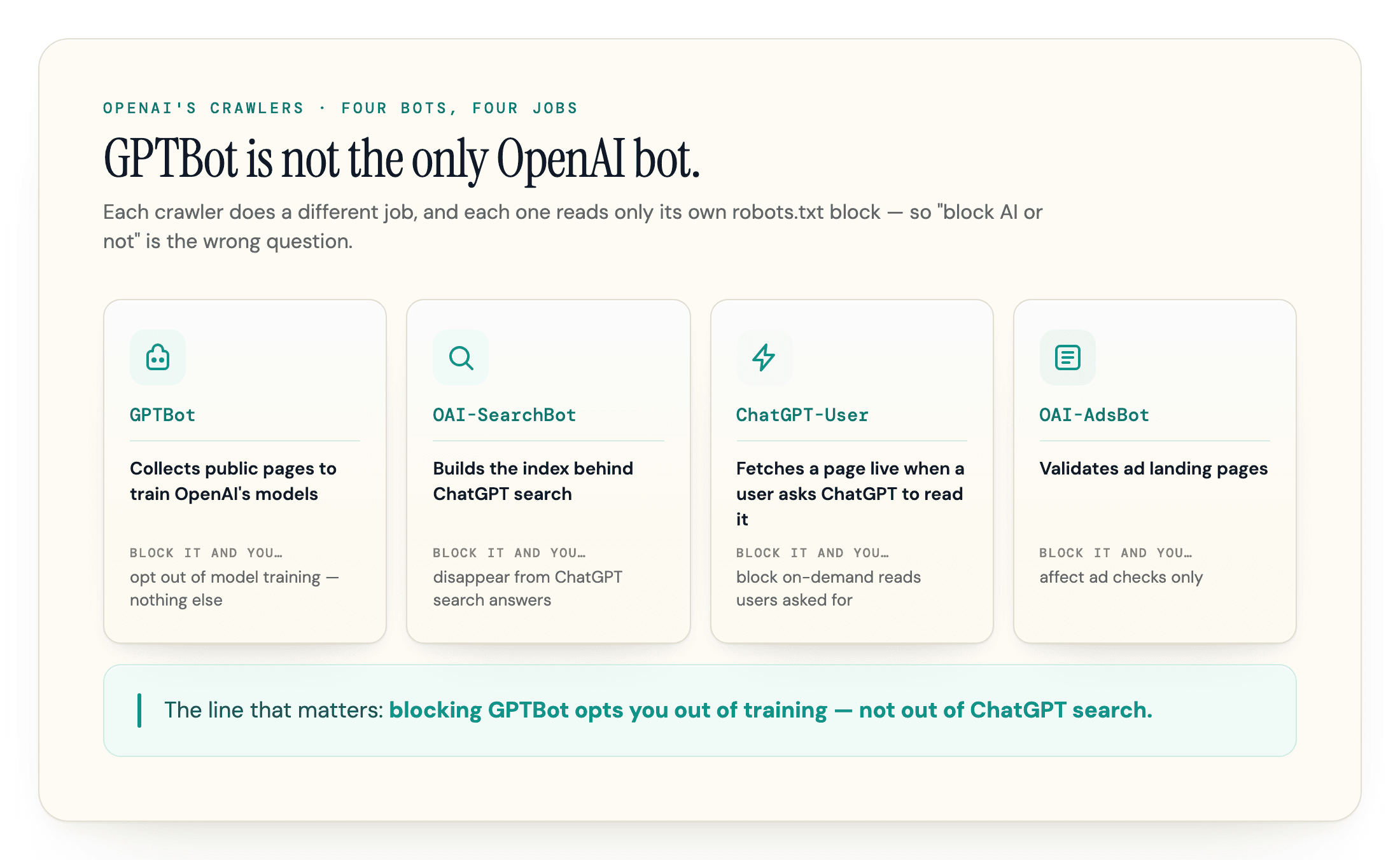
| Bot | What it does | Block it and you... |
|---|---|---|
| GPTBot | Collects content to train OpenAI's models | opt out of model training |
| OAI-SearchBot | Builds the index behind ChatGPT search | disappear from ChatGPT search answers (navigational links can still show) |
| ChatGPT-User | Fetches a page live when a user asks ChatGPT to read it | block the on-demand reads users asked for |
| OAI-AdsBot | Validates ad landing pages | affect ad checks only |
The line that matters: blocking GPTBot opts you out of training, not out of ChatGPT search. Visibility in ChatGPT's answers runs through OAI-SearchBot and ChatGPT-User, which are separate tokens. OpenAI is explicit that sites opted out of OAI-SearchBot will not be shown in ChatGPT search answers (though they can still appear as navigational links), and that this is independent from GPTBot. One nuance from the same doc: if you allow both bots, OpenAI may use the results of a single crawl for both jobs "to avoid duplicative crawling," so the separation lives in the opt-outs, not necessarily in the fetches you see in your logs.
Should You Allow or Block GPTBot?
Start from what blocking GPTBot actually costs and protects, not from a general unease about AI.
| Allow GPTBot | Block GPTBot | |
|---|---|---|
| Training | Your public content can train future OpenAI models | Your content is opted out of training |
| ChatGPT search visibility | Unaffected (that runs on OAI-SearchBot) | Unaffected (that runs on OAI-SearchBot) |
| Best fit | Most sites that want to be part of the AI ecosystem | Publishers protecting proprietary content, or sites under heavy crawl load |
| Main cost | Your text feeds models with no click back | Your content is absent from the model's trained knowledge over time |
Live citations come from OAI-SearchBot and ChatGPT-User (our ChatGPT citation guide covers earning them); allowing GPTBot only feeds the training corpus, a slower and fuzzier channel. Cloudflare put a number on the no-click-back side of that trade: as of July 2025, OpenAI's crawlers fetched about 1,091 pages for every visitor they referred back to a site. That said, do not overcorrect into "blocking GPTBot does nothing." It has one real effect: your content stops being absorbed into the model's trained knowledge, so it cannot surface from what the model simply knows, only from live search. That channel is harder to measure than a citation, but it is not zero.
So the trade is narrow. Allow GPTBot if you want your content in the training corpus and have the server capacity. Block it if you are protecting content from training, or if the crawl itself is costing you, since aggressive AI crawling that drives up bandwidth and server load has become a common complaint among site owners. The load is not hypothetical: Botify's April 2026 analysis of about 7 billion log files found OpenAI's total crawling roughly tripled after GPT-5 launched in August 2025, with GPTBot alone up 2.9x. Most teams end up selective rather than all-or-nothing: block the bots whose job you object to, keep the ones that put you in answers.
How to Allow or Block GPTBot in robots.txt
Allowing GPTBot is the default. If you do nothing, it crawls whatever the rest of your robots.txt already permits. To block it from training on your site, disallow it at the root:
User-agent: GPTBot
Disallow: /
To opt out of training but stay in ChatGPT search, block only GPTBot and leave OAI-SearchBot and ChatGPT-User alone. That selective setup is what most publishers actually want. To opt out of everything OpenAI controls via robots.txt, block all three:
User-agent: GPTBot
Disallow: /

User-agent: OAI-SearchBot
Disallow: /

User-agent: ChatGPT-User
Disallow: /
Put the file at the root of your domain, at yourdomain.com/robots.txt, and remember each crawler reads only its own block. Give the change a day to land: OpenAI notes it can take roughly 24 hours from a robots.txt update for its search systems to adjust. Before and after you edit, confirm what your live robots.txt actually says to every AI crawler, because a stray rule or an inherited template often blocks more than you meant:
One caveat on the third block: ChatGPT-User fetches are initiated by a person, and OpenAI says robots.txt rules may not apply to them, so treat that line as a request rather than a guarantee.
Does Blocking GPTBot Actually Work?
Mostly yes, with two caveats.
GPTBot honors robots.txt, so a correct Disallow stops the real crawler, and that behavior is reliable in practice. But robots.txt is a published policy, not a wall, and two things sit outside it.
First, your content delivery network (CDN) may already be deciding for you. Cloudflare now blocks AI crawlers by default for new domains, so GPTBot can be stopped at the edge even when your robots.txt says nothing, which surprises owners who never set it. If you want GPTBot in and it is missing, check your CDN's bot rules, not just your robots.txt. Across scans run through our crawler checker, this is the most common GPTBot surprise at geotoolbox: a site that meant to allow the crawler but is quietly blocked at the edge by a default it never set.
Second, robots.txt does nothing against impostors. The GPTBot user agent is trivially copied, and HUMAN Security found about one in six requests claiming to be ChatGPT-User is a fake, about two million spoofed requests a day. A Disallow stops the real, well-behaved GPTBot; it does not stop a scraper wearing its name. For that you need the next step.
How to Confirm a Request Is Really GPTBot
Because the user agent can be spoofed, do not trust the name alone. OpenAI publishes the IP ranges its crawlers use, so you can verify any request claiming to be GPTBot against the official list at openai.com/gptbot.json. If the requesting IP is not in that range, it is not GPTBot, whatever the user agent says.
In your access log, genuine traffic looks like Mozilla/5.0 AppleWebKit/537.36 (KHTML, like Gecko); compatible; GPTBot/1.3; +https://openai.com/gptbot arriving from an address inside the published range. The check that holds up is the standard one for any crawler: confirm the IP appears in the published range, and where supported, that a reverse DNS lookup resolves to the operator and forward-resolves back. Genuine GPTBot traffic passes; a scraper borrowing the name does not. This matters most when you are deciding whether to rate-limit at the server: you want to throttle the impostors, not the real crawler you chose to allow.
Frequently Asked Questions
Can I block GPTBot for only part of my site?
Yes; robots.txt rules are path-based, so you can disallow GPTBot from /research/ or /pricing/ while leaving the blog open. Partial blocks are the practical middle ground for sites that want general visibility but have sections they consider proprietary.
Does blocking GPTBot remove content already used in training?
No. A robots.txt block only affects future crawls; anything absorbed in past training runs stays in those models. Your content may also have entered training sets through CCBot (Common Crawl), which needs its own Disallow if that matters to you.
What is the GPTBot user agent?
GPTBot identifies itself with a user agent ending in +https://openai.com/gptbot (currently a GPTBot/1.x token on a Mozilla/AppleWebKit string). The version changes, so match on the GPTBot token and the openai.com URL rather than the full string, and verify by IP for anything you act on.
Does GPTBot execute JavaScript?
No; like most AI training crawlers it reads raw HTML. Content that only appears after scripts run is invisible to it, which matters more for the citation bots, but it means a JavaScript-heavy site contributes less to training than its rendered pages suggest.
Will blocking GPTBot hurt my Google SEO?
No. GPTBot is OpenAI's crawler and has nothing to do with Googlebot or Google rankings. Blocking GPTBot only affects whether OpenAI can use your content for training; your Google Search visibility is governed by Google's own crawlers.
How often does GPTBot crawl a site?
There is no published schedule; frequency tracks how often your content changes and how OpenAI prioritizes domains. If crawl load is the concern, rate-limiting verified GPTBot IPs at the server is safer than a robots block, since it caps the cost without opting you out of training entirely.
Where to Start
The fastest first step is to see what your site tells GPTBot right now. Run your domain through geotoolbox's free AI Crawler Checker above: it reads your robots.txt against GPTBot and 33 other AI crawlers and shows the exact blocking line for every crawler it blocks. Decide what you want to opt out of, set robots.txt to match, and if visibility is the goal, make sure OAI-SearchBot and ChatGPT-User are the ones you keep open. For the full roster of bots and how they differ, see our AI crawler list; for getting cited once they can reach you, the ChatGPT citation guide; and to watch whether the engines actually name you, ongoing AI visibility tracking.
Sources
- Overview of OpenAI Crawlers - OpenAI developer documentation -
developers.openai.com/api/docs/bots - GPTBot IP ranges (gptbot.json) - OpenAI -
openai.com/gptbot.json - Cloudflare Just Changed How AI Crawlers Scrape the Internet - Cloudflare, 2025 -
cloudflare.com/press/press-releases/2025/cloudflare-just-changed-how-ai-crawlers-scrape-the-internet-at-large - The crawl-to-click gap: Cloudflare data on AI bots, training, and referrals - Cloudflare, August 2025 -
blog.cloudflare.com/crawlers-click-ai-bots-training - OpenAI Has Tripled Their Crawl of the Web: An Analysis of 7B+ Log Files - Botify, April 2026 -
botify.com/blog/openai-tripled-web-crawl - AI Crawler Spoofing: ChatGPT, Mistral, Perplexity - HUMAN Security -
humansecurity.com/learn/blog/ai-crawler-spoofing-chatgpt-mistral-perplexity - No Robots.txt: How to Ask ChatGPT and Google Bard Not to Use Your Website for Training - Electronic Frontier Foundation, 2023 -
eff.org/deeplinks/2023/12/no-robotstxt-how-ask-chatgpt-and-google-bard-not-use-your-website-training