
AI crawlers are the bots that fetch your pages for AI companies, and there are now well over a hundred of them. Some collect training data, some build the index an assistant cites in its answers, and some grab a page the moment a user asks. The difference matters more than most site owners realize, because blocking the wrong one quietly drops you out of AI answers while doing nothing you actually intended. This is the current list of every major AI bot, what each one does, and how to control them in your robots.txt without cutting off the traffic you want.
What Is an AI Crawler, and the Three Jobs They Do
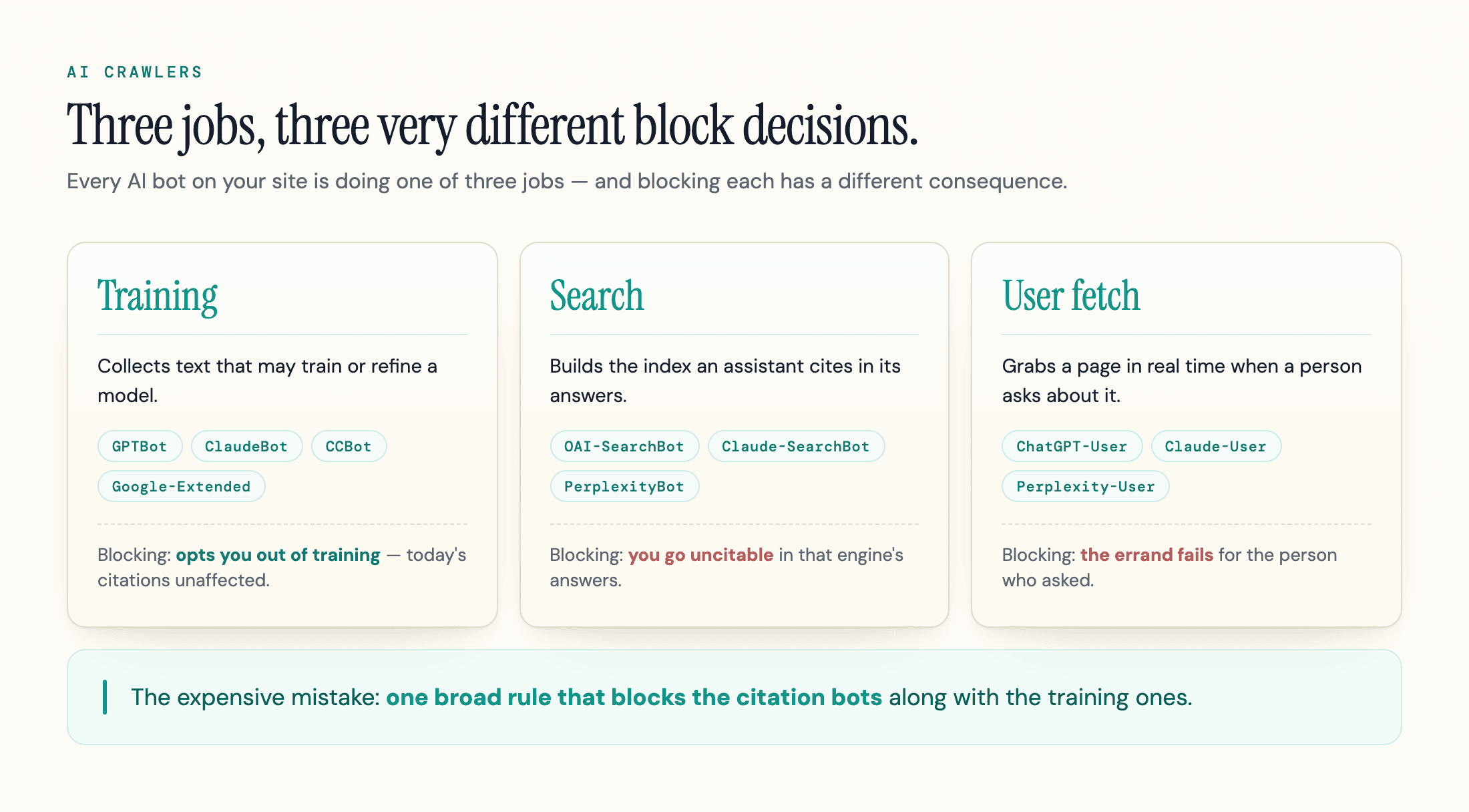
An AI crawler is a bot that fetches your pages on behalf of an AI company. The label covers a lot of different machines doing three very different jobs, and that difference is the whole game.
The first job is training. These crawlers collect text that may train or refine a model. GPTBot, ClaudeBot, and CCBot are training crawlers. Blocking them opts your content out of future model training. It does nothing to whether an AI tool cites you today.
The second job is search and retrieval. These crawlers build the index an assistant searches when it answers a live question, then links its sources. OAI-SearchBot, Claude-SearchBot, and PerplexityBot do this. Block one of these and you go uncitable in that engine's answers, which is usually the opposite of what a site owner wants. How AI search works walks through the retrieve-and-cite loop these bots feed.
The third job is the user-triggered fetch. When someone asks ChatGPT or Claude about a specific page, a fetcher grabs it in real time. ChatGPT-User and Claude-User do this. They are not crawling the web on a schedule; they are running an errand for a person who asked.
Keep those three jobs straight and every block decision gets simpler. Most of the confusion around blocking AI bots comes from treating one bot as if it did all three.
That third job is evolving fast, though. Agentic browsing takes the user-triggered fetch further: instead of grabbing one page and stopping, the bot navigates a site, clicks through, and takes actions on a person's behalf, less like a fetcher and more like the person themselves at the keyboard. It is the same job, just a harder version of it, and the robots.txt section below covers why robots.txt alone cannot reach it.
The AI Crawler List: Every Major Bot in 2026
Here is the current roster of AI crawlers worth knowing, with the job each one does and the robots.txt token associated with it. The Type column maps to the three jobs above, and the Default call column shows the recommendation per bot.
| Crawler | Operator | Type | robots.txt token | Default call |
|---|---|---|---|---|
| GPTBot | OpenAI | Training | GPTBot | Block to opt out of training |
| OAI-SearchBot | OpenAI | Search | OAI-SearchBot | Allow (ChatGPT citations) |
| ChatGPT-User | OpenAI | User fetch | ChatGPT-User | Allow |
| ClaudeBot | Anthropic | Training | ClaudeBot | Block to opt out of training |
| Claude-SearchBot | Anthropic | Search | Claude-SearchBot | Allow (Claude citations) |
| Claude-User | Anthropic | User fetch | Claude-User | Allow |
| PerplexityBot | Perplexity | Search | PerplexityBot | Allow (Perplexity citations) |
| Perplexity-User | Perplexity | User fetch | Perplexity-User | Allow (ignores robots.txt anyway) |
| Googlebot | Search | Googlebot | Never block (Search + AI Overviews) | |
| Google-Extended | Training | Google-Extended | Block to opt out of Gemini training | |
| Bingbot | Microsoft | Search | Bingbot | Never block (Bing + Copilot) |
| Applebot | Apple | Search | Applebot | Allow (Siri, Spotlight) |
| Applebot-Extended | Apple | Training | Applebot-Extended | Block to opt out of Apple AI training |
| DuckAssistBot | DuckDuckGo | Search | DuckAssistBot | Allow (DuckDuckGo AI answers; not used for training) |
| Amazonbot | Amazon | Training | Amazonbot | Block to opt out of Amazon AI training |
| Amzn-SearchBot | Amazon | Search | Amzn-SearchBot | Allow (Alexa and Amazon search) |
| Amzn-User | Amazon | User fetch | Amzn-User | Allow (may not follow all robots.txt directives) |
| Meta-ExternalAgent | Meta | Training | Meta-ExternalAgent | Block to opt out of Meta AI training |
| Meta-ExternalFetcher | Meta | User fetch | Meta-ExternalFetcher | Allow (real-time user-triggered fetch, not described as a training crawler; may bypass robots.txt anyway) |
| CCBot | Common Crawl | Training | CCBot | Block to opt out (feeds many models) |
| Bytespider | ByteDance | Training | Bytespider | Block (but it often ignores robots.txt) |
| GoogleOther | Research | GoogleOther | Your call | |
| Google-Agent | User fetch (agentic) | Google-Agent | Not controllable via robots.txt; Google says it generally ignores it, same as other user-triggered fetchers |
That is the set that matters for most sites, but it is not the whole field. Mistral now runs the same three-bot split as OpenAI and Anthropic (MistralAI-Training, MistralAI-Index, MistralAI-User), and Moonshot AI's Kimi does too (KimiBot, Kimi-SearchBot, Kimi-User). DeepSeekBot crawls for training, but unlike GPTBot or ClaudeBot, DeepSeek has not published clear robots.txt compliance documentation, and site owners report mixed results blocking it. xAI's Grok and Cohere are active too. The names change often: bots launch, rename, and split into separate training and search agents. The community-maintained ai.robots.txt list on GitHub tracked 150 AI user agents in early June 2026 and tracks 175 today, and it generates ready-to-use robots.txt and server configs; Known Agents (formerly Dark Visitors) keeps a similar live directory. Treat any static list, including this one, as a snapshot.
A few numbers put the traffic in perspective, though the share shifts fast enough that any snapshot dates quickly, so check a live tracker before quoting it. In Cloudflare's May 2026 crawler data, Googlebot was the single largest AI-adjacent bot at 27.26 percent of requests, followed by GPTBot at 11.48 percent and ClaudeBot at 9.73 percent, a reversal from April 2026, when ClaudeBot led at 11.69 percent against GPTBot's 9.84 percent. These bots are now a real share of who visits your site. The single-site picture is telling: SEO consultant Suganthan Mohanadasan counted 8,060 AI-crawler requests in one week from at least eight organizations in his own server logs, against 1,421 across the previous 44 days. Bots in total now outnumber people: in early June 2026, Cloudflare reported that automated traffic of all kinds passed human traffic for the first time in its data, at 57.5 percent of web requests.
OpenAI: GPTBot, OAI-SearchBot, and ChatGPT-User
OpenAI runs three crawlers, and the OpenAI bots documentation names each one. GPTBot is the training crawler: disallow it and your content should not be used to train future models. OAI-SearchBot is the one that matters for visibility. It builds the index behind ChatGPT search, and OpenAI is explicit that sites opted out of OAI-SearchBot will not appear in ChatGPT search answers (though they can still show up as navigational links). ChatGPT-User is the real-time fetcher that runs when a person asks ChatGPT to read a page.
The practical takeaway is the one most "block ChatGPT" guides get wrong: blocking GPTBot does nothing to your presence in ChatGPT search. Training and citation run through different bots. If you want to keep your content out of training but stay citable, block GPTBot and leave OAI-SearchBot and ChatGPT-User alone. Our guide to getting cited in ChatGPT covers the citation side. OpenAI also runs OAI-AdsBot, which only validates ad landing pages and does not train models.
Anthropic: ClaudeBot, Claude-SearchBot, and Claude-User
Anthropic follows the same pattern with three separate crawlers, documented on its crawler page. ClaudeBot collects training data. Claude-SearchBot indexes pages so they can surface in Claude's web search. Claude-User fetches a specific page when a user's question points to it.
The trap is treating them as one. Many sites block ClaudeBot to opt out of training and assume they have blocked Claude, when they have only opted out of training; citations still flow through Claude-SearchBot and Claude-User. The reverse mistake is worse: blocking those two, often through an overbroad firewall rule, quietly removes you from the answers you wanted to win. If you find older advice about anthropic-ai or Claude-Web, those are legacy names no longer in Anthropic's current set. Our Claude SEO guide goes deeper on what Claude actually cites.
Google: Googlebot vs Google-Extended
Google is where the most expensive mistake happens. Google-Extended is not a crawler at all; it is a robots.txt token that controls whether your content can be used to train and ground Google's Gemini models. Google introduced it as a dedicated robots.txt control so publishers could opt out of that use, and because it is separate from Googlebot, disallowing it does not affect your Search rankings or indexing.
Googlebot is the crawler that actually fetches your pages, and it now feeds two things at once: classic Google Search and the AI Overviews that sit above it. That dual role is the footgun. Owners who want to keep Google's AI out sometimes block Googlebot and remove themselves from Google Search entirely, AI Overviews included. The right lever is Google-Extended for training, and nothing else. Leave Googlebot alone. Our guide to getting cited in Google AI Overviews covers the visibility side.
Perplexity and the Rest of the Pack
PerplexityBot indexes pages for Perplexity's answers and, per Perplexity's documentation, is not used to crawl content for AI foundation models, so blocking it only costs you Perplexity citations. Perplexity-User is the user-triggered fetcher, which Perplexity says generally ignores robots.txt because a person requested the page. Perplexity has also drawn scrutiny: Cloudflare reported it using undeclared crawlers to reach sites that had blocked it, a reminder that a published policy and real behavior are not always the same thing. Our Perplexity SEO guide covers the citation mechanics.
The rest of the field divides along the same lines. CCBot is Common Crawl, an open dataset that feeds many models, which is why blocking GPTBot alone does not keep your text out of training. Amazon is the one most people get backwards, because it splits the job across three tokens rather than one. Per Amazon's documentation, Amazonbot is the general crawler that improves Amazon's products and services and whose data may be used to train Amazon's AI models, which makes it the training-eligible one. Amzn-SearchBot is what makes your content eligible to appear in Amazon search experiences such as Alexa, and Amazon states it does not crawl for generative AI training. Amzn-User handles live user actions, such as an Alexa query that needs current information, and Amazon warns it may not follow all robots.txt directives. The allow-search, block-training split therefore works here exactly as it does at OpenAI or Anthropic: block Amazonbot to opt out of training, keep Amzn-SearchBot open if you want Alexa able to surface you. Applebot powers Siri and Spotlight and should stay allowed; the separate Applebot-Extended token is what opts you out of Apple's model training. Meta-ExternalAgent is Meta's training crawler, now one of the most active on the web; the separate Meta-ExternalFetcher handles real-time user requests instead and, per Meta's own documentation, may bypass robots.txt to do it. Bingbot feeds both Bing and Microsoft Copilot, so blocking it costs you both. DuckAssistBot is DuckDuckGo's real-time crawler for its AI-assisted answers; DuckDuckGo states the content it fetches is not used to train AI models, which makes it a retrieval and search bot rather than a training one. And Bytespider, ByteDance's crawler, is the one site owners complain about most: it has been documented ignoring robots.txt and hammering sites with traffic, which is why a robots.txt rule alone rarely stops it.
Should You Block AI Crawlers? The Honest Answer
Start with what you are actually trading. Blocking training crawlers protects your content from model training and cuts bandwidth, and some sites have reported real savings from it. Blocking search and citation crawlers does something very different: it makes you invisible in the AI answers that increasingly stand in for a search click.
The economics help clarify the call. Training crawlers take more than they return: in Cloudflare's crawl-to-referral data for July 2025, Anthropic's bots crawled roughly 38,000 pages for every visitor they referred, OpenAI's about 1,091, and Google's about 5. A single site's logs bear this out: Suganthan Mohanadasan measured OpenAI's crawlers at 43 percent of AI crawl volume but just 3 human referrals in a week. The search and citation bots are the ones that actually route a reader to you. If a bot takes your content to train a model and never sends anyone, blocking it is an easy call. Blocking the bot that puts you in the answer is much harder, because that traffic is the point.
That leaves three workable strategies:
- Allow everything. The simplest choice, and the right one if your goal is maximum AI visibility and bandwidth is not a concern. The trade is that your content can be used for training.
- Block training, allow search. The selective default for most sites: disallow GPTBot, ClaudeBot, Google-Extended, CCBot, and the other training tokens, but keep OAI-SearchBot, Claude-SearchBot, PerplexityBot, Googlebot, and Bingbot reachable. You opt out of training while staying citable.
- Block everything. Right only when protecting content or controlling server load matters more than any AI visibility, which is common for paywalled archives and large media libraries.
These three strategies are all about training versus search. Agent traffic, live at the network level on Cloudflare, is a separate lever again: for most sites the reasonable default is to allow it, since an agent bot is fulfilling a live request someone made, but a site that wants to shut down automated actions specifically now has a dedicated control for that too.
One second-order cost worth naming: content a model never trained on is less likely to surface as an unprompted brand mention in answers that do not run a live search. For most sites that effect is small next to citations, but it is not zero.
Most site owners want option 2. The expensive mistake is landing on option 3 by accident, through one broad rule that takes the citation bots down with the training ones. If your aim is to be found in AI answers, the rest of your AI search optimization work is wasted the moment the wrong bot is blocked.
How to Block or Allow AI Crawlers in robots.txt
Before you hand-edit anything, see where your domain stands now. This free checker reads your robots.txt server-side and shows which of 34 AI crawlers it allows or blocks, with the exact line to change:
The control surface for most of these bots is robots.txt at the root of your domain. Each crawler watches for its own token, so you allow or block them line by line. A selective setup, blocking training while keeping citation bots reachable, looks like this:
# Opt out of AI model training
User-agent: GPTBot
Disallow: /

User-agent: ClaudeBot
Disallow: /

User-agent: Google-Extended
Disallow: /

User-agent: CCBot
Disallow: /

User-agent: Bytespider
Disallow: /

# Leave the search and citation bots allowed by saying nothing:
# OAI-SearchBot, Claude-SearchBot, PerplexityBot, Googlebot, Bingbot
To block every AI crawler instead, add a Disallow block for each search and user token as well. To allow everything, add nothing.
Rather than hand-editing, our free robots.txt generator builds this file with each AI crawler labelled by the job it does, so you can see what blocking any given one actually costs before you commit to it. Once the file is live, the free robots.txt tester checks a specific URL against it per crawler and names the exact rule that decided the verdict. That second step catches something this snippet format hides: if your file also has a User-agent: * group, a named group like GPTBot above replaces it for that crawler rather than adding to it, so any path you thought was blocked site-wide is not blocked for the bots you named.
Two cautions before you trust that file. First, robots.txt is a voluntary standard: well-behaved bots obey it, but it is a request, not a wall. Some bots ignore it outright, and user-triggered fetchers like ChatGPT-User and Perplexity-User are built to. Second, changes take time to register; a robots.txt edit is not instant, and a crawler may keep running on its old rules for up to a day.
So treat robots.txt as necessary but not sufficient. When you need an actual block rather than a polite request, escalate:
| Tool | Stops bots that ignore robots.txt? | Cost | Best for |
|---|---|---|---|
| robots.txt | No, advisory only | Free | Opting out well-behaved crawlers |
| WAF or edge rule (block by user-agent or IP) | Yes | Free to mid | Stopping one abusive bot like Bytespider |
| Cloudflare AI Crawl Control | Yes | Free tier and up | Managed blocking across many bots |
| Pay-per-crawl (HTTP 402) | Yes | Varies | Charging AI firms for access instead |
Cloudflare's September 2026 Policy Change, and the Bots robots.txt Cannot Touch
If your site runs through Cloudflare, that AI Crawl Control row above is not a hypothetical add-on anymore. Cloudflare already split AI bot controls into Search, Training, and Agent categories, but on September 15, 2026 it deprecated the old one-click "Block AI bots" toggle, added a new "Disallow AI Training" setting, and, for the first time, let Block and Block-on-ads apply to mixed-use crawlers that were previously excluded, available to every customer on every plan. A brand-new domain now gets a preset based on whether it monetizes with ads: an ad-supported site defaults to Training disallowed and Agent blocked on ad pages, Search still allowed; a non-ad site defaults to allowing all three. An existing domain is migrated based on what it already had configured, not on plan tier: a site that had the old toggle on carries that intent into the new Training control, and a site that never touched it keeps allowing everything. Nothing changes for most existing sites unless they act.
The catch is what Cloudflare calls a mixed-use crawler. Googlebot, Bingbot, and Applebot each crawl for both search and training under one bot, so a Training block can catch all three at once. Cloudflare's fix is an "Accountable" designation it grants to crawler operators, not a per-site setting: an operator that meets Cloudflare's criteria (an opt-out mechanism, transparency, a guarantee that opting out of training does not cost search visibility) gets its crawler read as two behaviors instead of one. Google, Apple, and Microsoft all already qualify as Accountable. For Google and Apple that already means something concrete: selecting Disallow AI Training makes Cloudflare publish that no-training preference straight into your robots.txt through what it calls Bot Preference Sync, the network-layer equivalent of hand-adding a Google-Extended or Applebot-Extended line yourself. Microsoft is still building the mechanism to do the same for Bing, targeted for early 2027, so until then Disallow AI Training will not reach Bing through robots.txt; that still means NOARCHIVE or Bing's own removal tools instead. It is the same Googlebot-versus-Google-Extended problem from earlier in this piece, now handled for you at the network layer instead of by hand. If you are on Cloudflare, check the AI Crawl Control dashboard directly rather than assuming robots.txt tells the whole story, and check what it wrote into your robots.txt while you are there.
Cloudflare's Agent category exists for a problem robots.txt never solved in the first place: agentic bots. Google-Agent, Google's own token for agents that navigate a site and take action on a person's behalf, generally ignores robots.txt, the same way Perplexity-User does. ChatGPT Agent, OpenAI's cloud browser, goes further: it has no fixed, blockable token at all. Independent inspection of its outbound requests found it presenting as an ordinary Chrome browser, and instead of a token it signs every request with an HTTP Message Signature carrying a Signature-Agent: "https://chatgpt.com" header, verifiable against a published key rather than a user-agent string or an IP range, which is enough for a CDN or WAF to build an allow or block policy on even though robots.txt cannot. Perplexity's own agentic browser, Comet, and ChatGPT's agent mode (a Chrome extension and a ChatGPT app feature since OpenAI discontinued the standalone Atlas browser in August 2026) raise the stakes further: both run on or alongside Chromium and, in most configurations, produce traffic indistinguishable from an ordinary human session, with no reliable signal to filter on at all (our Perplexity Comet piece covers what that means for site owners). Anthropic and Microsoft have their own agentic products (Claude's computer use, Copilot Actions) but neither has published a distinct crawler signature for them yet. For all of it, network-level detection, not a robots.txt line, is the only lever that actually reaches this traffic.
How to Tell a Real AI Crawler from a Fake One
A user agent is just a line of text, and anyone can send it. Plenty of scrapers crawl the web announcing themselves as GPTBot to borrow its reputation, and blocking the name does nothing to them. So before you trust an entry in your server logs, confirm the request actually came from the company it claims.
The real crawlers publish their IP ranges for exactly this purpose. OpenAI lists the address ranges for GPTBot, OAI-SearchBot, and ChatGPT-User as JSON files, and Perplexity, Amazon, and others do the same. The check is a reverse-DNS and IP match: take the source address of a request claiming to be an AI bot, confirm it falls inside the operator's published range, and treat anything outside that range as a spoof to challenge or rate-limit at the firewall.
In practice you pull the published list, for example OpenAI's at openai.com/gptbot.json, and compare it against the addresses hitting your logs under that user agent. A request waving the GPTBot flag from an address OpenAI does not own is not GPTBot, and a name-based robots.txt rule was never going to stop it. This is the step most crawler lists skip, and it is the difference between knowing who is really crawling your site and trusting a label.
Keeping Your AI Crawler List Current
A list like this is accurate the day it ships and a little wrong a quarter later. The community trackers exist because the roster keeps moving; syncing your robots.txt against ai.robots.txt or Known Agents every few months beats maintaining it by hand.
The list is the easy part, though. The harder question is whether the bots you want can actually reach your pages, and that fails more often than people expect. A stray Disallow line, a firewall that challenges non-browser traffic, or content that only renders after JavaScript can all leave a citation bot looking at an empty page. Our JavaScript SEO guide covers which bots run scripts. In our experience auditing sites for AI visibility, the most common cause of "we are not cited anywhere" is not weak content; it is a search or user bot blocked by accident. geotoolbox's Content Analyzer fetches a page as each major AI crawler and reports whether they can reach and render it (its AI Readability score), alongside a grade for how citable the page is once they do. For a site-level read, the Agent Readiness scan (free with an account) tests that same crawler access from your root URL.
Frequently Asked Questions
Do I need a separate robots.txt rule for every AI bot?
Yes, robots.txt has no wildcard for "all AI bots": each user-agent token needs its own block, which is why generated configs from the community trackers are worth using. A single Disallow under User-agent: * also hits Googlebot and Bingbot, the classic accidental-option-3 mistake. Our Bing Webmaster Tools guide covers how to check that Bing can still reach you.
If I block GPTBot, am I out of ChatGPT?
No. GPTBot is the training crawler. ChatGPT's search answers come through OAI-SearchBot and ChatGPT-User, so blocking GPTBot leaves your ChatGPT visibility intact. One caveat: your content may already sit in training sets through CCBot, which blocking GPTBot today does not undo.
Does blocking AI crawlers in robots.txt actually work?
For the major operators, yes, and you can verify it: their published IP ranges let you confirm in your server logs whether requests stopped after the change. If a blocked bot keeps appearing, check the IP before blaming the operator; it is usually a spoofer borrowing the name.
Which exact user agent does each AI engine use?
The full strings carry version and contact info beyond the token, for example "Mozilla/5.0 AppleWebKit/537.36 (KHTML, like Gecko); compatible; GPTBot/1.2; +https://openai.com/gptbot". For robots.txt you only need the token (GPTBot, OAI-SearchBot, Claude-SearchBot, and so on per the table above); for log analysis, match on the token plus the operator's published IP ranges.
Where to Start
The list will keep changing, but the logic under it will not: training, search, and user crawlers do different jobs, and the only real mistake is blocking the ones that put you in the answer. Decide what you want to opt out of and write the robots.txt to match. Reachability is only the first half, though; once a bot is in, whether an agent can actually use your site is the next question.
That last step is the one most checklists skip. Before you spend time on content, confirm the AI crawlers you care about can actually reach your pages. Start with geotoolbox's free AI Crawler Checker, which reads your robots.txt against all 34 AI crawlers in seconds (it checks the homepage path, so spot-check key subpaths too). Then, because robots.txt can say yes while a firewall says no, the free Agent Readiness scan tests live crawler access at the site level from your root URL.
Sources
- OpenAI bots and crawlers - OpenAI (GPTBot, OAI-SearchBot, ChatGPT-User) -
developers.openai.com/api/docs/bots - Does Anthropic crawl data from the web, and how can site owners block the crawler? - Anthropic -
support.claude.com/en/articles/8896518-does-anthropic-crawl-data-from-the-web-and-how-can-site-owners-block-the-crawler - Perplexity Crawlers - Perplexity -
docs.perplexity.ai/guides/bots - Amazonbot, Amzn-SearchBot and Amzn-User - Amazon -
developer.amazon.com/amazonbot - An update on web publisher controls (Google-Extended) - Google -
blog.google/technology/ai/an-update-on-web-publisher-controls - From Googlebot to GPTBot: who's crawling your site in 2025 - Cloudflare, 2025 -
blog.cloudflare.com/from-googlebot-to-gptbot-whos-crawling-your-site-in-2025 - The crawl-to-click gap: Cloudflare data on AI bots, training, and referrals - Cloudflare, August 2025 -
blog.cloudflare.com/crawlers-click-ai-bots-training - Robots Exclusion Protocol (RFC 9309) - IETF -
rfc-editor.org/rfc/rfc9309.html - ai.robots.txt - community-maintained AI crawler list -
github.com/ai-robots-txt/ai.robots.txt - Known Agents (formerly Dark Visitors) - live AI agent and crawler directory -
knownagents.com/agents - How to Make Your Website Agent-Ready (single-site AI-crawler traffic logs) - Suganthan Mohanadasan -
suganthan.com/blog/how-to-make-website-agent-ready - Have it both ways: stay discoverable in search while disallowing AI training - Cloudflare, September 2026 -
blog.cloudflare.com/accountable-mixed-use-ai-crawlers - Google's user-triggered fetchers (Google-Agent) - Google -
developers.google.com/crawling/docs/crawlers-fetchers/google-user-triggered-fetchers - ChatGPT agent's user-agent (Signature-Agent / RFC 9421) - Simon Willison, August 2025 -
simonwillison.net/2025/Aug/4/chatgpt-agents-user-agent - Mistral crawlers (MistralAI-Training, MistralAI-Index, MistralAI-User) - Mistral AI -
docs.mistral.ai/robots - Kimi crawlers (KimiBot, Kimi-SearchBot, Kimi-User) - Moonshot AI -
kimi.ai/policies/kimi-crawlers - Meta's web crawlers (Meta-ExternalAgent, Meta-ExternalFetcher) - Meta -
developers.facebook.com/docs/sharing/webmasters/web-crawlers