
Gemini Omni went from I/O stage demo to a model you can bill against in six weeks, and most of what ranks about it is already out of date. Here's what Gemini Omni is, which Google AI plans include it, what the API costs, and where the sharp edges are, verified against Google's launch and pricing documentation and what users have hit in practice since, updated for Omni Flash's move to general availability.
What Is Gemini Omni?
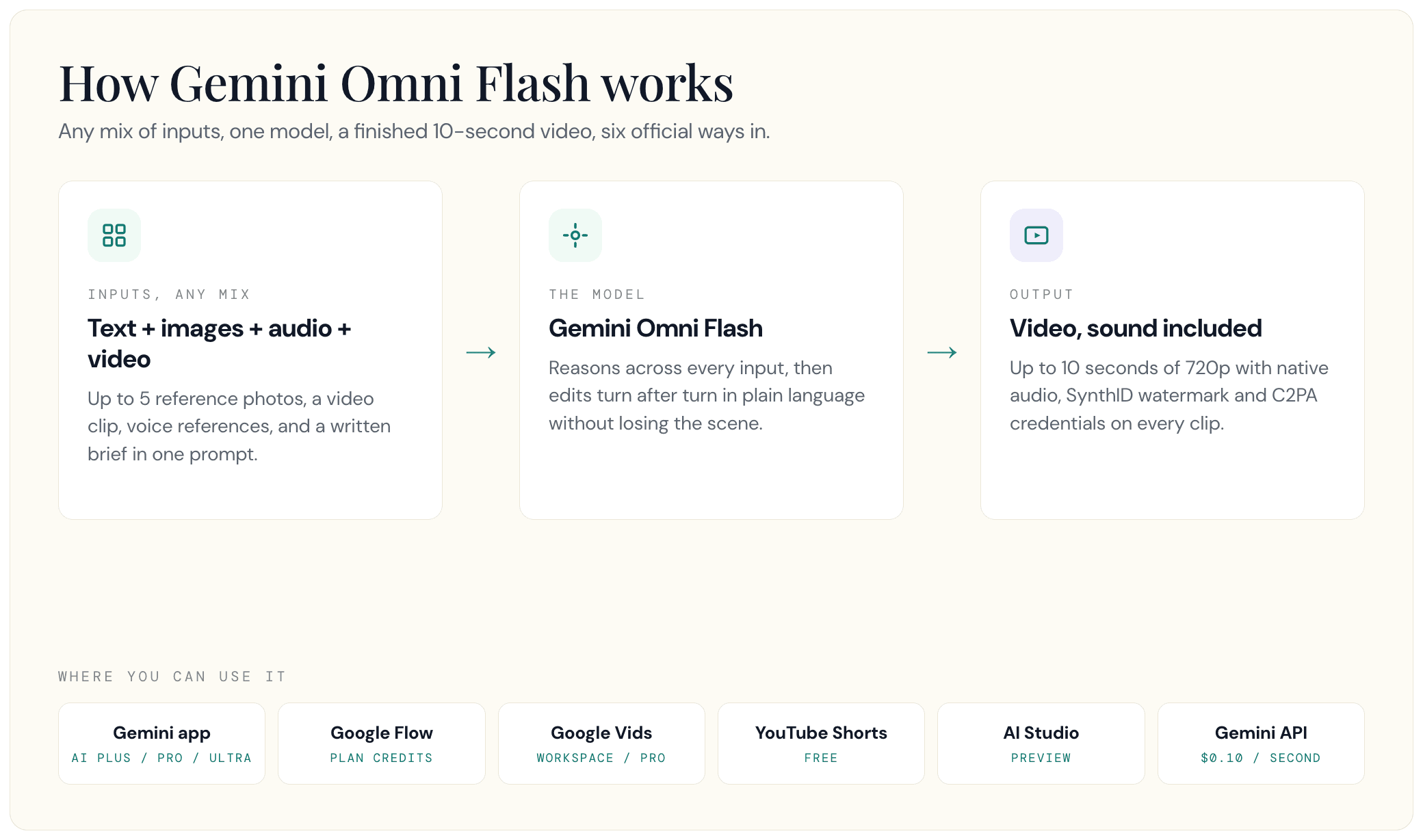
Gemini Omni is Google DeepMind's "any-to-any" model family: you feed it any mix of text, images, audio, and video, and it generates a finished video. Google announced the family at Google I/O 2026 with the tagline "create anything from any input, starting with video," and began rolling the first member, Gemini Omni Flash, out to consumers the same day, May 19, 2026.
Video is only the starting point. Google says image and audio output are on the Omni roadmap, which is why the family carries the "anything from anything" framing rather than a video-generator label.
The internal pitch is simple: Nano Banana, but for video. Where Nano Banana handles image generation and editing inside the Gemini app, Omni does the same for moving pictures, drawing on what Google describes as Gemini's world knowledge of physics, history, and science. Google positions it as a native multimodal AI model rather than a text-to-video engine with adapters bolted on. And despite the name, this is not a GPT-4o-style live voice mode: "Omni" describes what the model accepts, not how you talk to it.
One point worth clearing up, because early coverage muddied it: Gemini Omni is an official Google product line, with its own DeepMind model page and API. Several explainers written before I/O treated "Gemini Omni" as a community nickname for Gemini-plus-Veo pipelines. That framing is now wrong, and some of those pages still rank.
Omni sits inside the wider Gemini stack alongside the chat models, Veo, Imagen, and Lyria. If you want the full map of what Google ships under the Gemini name, we broke down the wider Gemini ecosystem separately.
Gemini Omni vs Veo: What Happened to Veo?
The short version: Omni replaces Veo inside the Gemini app, and Veo carries on as the high-fidelity specialist everywhere else.
Google's own product FAQ states it plainly: Gemini Omni is the newest video generation and editing model, and it takes over from Veo 3.1 as the default when you ask the Gemini app for video. As the rollout completes, video prompts in the app route to Omni Flash instead.
Veo is not dead, though. The DeepMind lineup still lists Veo as a separate specialized model, and the Gemini API sells both. The practical split looks like this: Veo 3.1 is the realism engine, generating up to 4K broadcast-quality clips natively. Omni Flash generates natively at 720p and can upscale to 1080p or 4K since its August GA release, but its real edge is that it accepts any input mix and lets you edit the result by talking to it.
Here's the way to think about it. Veo is the cinematographer you hand a finished shot list. Omni is the editor sitting next to you who keeps the whole scene in its head while you change your mind, turn after turn.
The cost gap runs the same direction: at 720p, standard Veo 3.1 output costs four times as much per second as Omni Flash.
What Gemini Omni Flash Can Do
The headline capability is conversational video editing. Every instruction builds on the last one, and the scene keeps its continuity. DeepMind's demo sequence shows the pattern: "Transport the violinist to the image environment," then "Make the violin invisible," then "Change the camera angle to be over the violinist's shoulder," three plain-language turns on one shot. In those demos, characters hold their faces and clothing across edits without re-uploading references each turn.
The reference system is the second pillar. In the consumer apps you can feed Omni Flash up to five reference photos, one video clip, and a text brief in one prompt, and it merges them into a single coherent output. Audio support starts narrow: voice references only, including Avatars, a digital version of you that looks and sounds like you in generated clips. Google gates avatar creation behind an onboarding flow intended to stop people from cloning someone else, and avatars are bound to the account holder's own likeness. From July 16, 2026, Google extended personal avatars into Google Vids: upload a selfie and a short voice recording, type a script, and your avatar delivers it. That feature is English-only, restricted to users 18 and over, and unavailable in the European Economic Area, Switzerland, and the UK.
Native audio ships with every clip: sound is generated in the same pass as the video, so you get synchronized dialogue and effects rather than silent footage you dub later. Multi-turn character consistency rounds out the pitch.
On quality, the benchmark numbers are strong, and for once Google published the methodology. On DeepMind's evaluations, human raters preferred Omni's edits over rival models across 504 side-by-side editing examples, and ranked it first for overall preference and instruction following on MovieGenBench's 1,003 text-to-video prompts. On the VBench image-to-video test (355 pairs), Omni Flash tied with Grok-Imagine-Video and Kling. Third-party signal agrees: VentureBeat reported Omni Flash at number one on LMArena's Text-to-Video Arena with a score of 1527.
Now the part the launch posts skip. Power users are split. In the 323-point Hacker News thread on the announcement, commenters picked apart the marketing demos: in the marble-physics showcase, "the marble jumps up for no reason." One heavy Seedance user was blunter:
"I've probably spent a couple grand on Seedance 2 to date, and I can't find anything google omni flash does better than Seedance from running a handful of samples through the system."
The other recurring complaint is the content filter, and it has grown into the dominant theme of Google's own developer forum since launch. Our read of the tester consensus: Omni's real edge is editing and manipulating footage conversationally, not raw text-to-video quality, and "follows real-world physics" is a goal, not a guarantee.
The Filter Problem Is Really a Billing Problem
Weeks of actual use have surfaced something launch coverage did not: a generation blocked by the safety filter still costs you credits. Google's May fix exempted technical failures from app quota, but a policy block is a different path, and it does not trip the refund logic, so the failure is billed exactly like a success. One user's prompt for a porcelain statue in an orbital museum was flagged as potentially harmful and, in their words, "the 30 AI credits were not refunded." Another described a request for a green cinematic color grade being rejected instantly. The thread reporting this opened on May 20, 2026 and was still collecting replies in mid-July with no response from Google.
The framing matters. This reads as a content-moderation argument and it is not one. Reasonable people disagree about where a filter should sit. Almost nobody thinks you should pay full price for an output you were never given. A related single report, worth less weight but the same root cause, describes a video-to-video edit returning the completely unmodified input while charging full cost, because a video came back and so nothing registered as a failure.
The "Prominent People" Filter and the Flow-vs-App Split
The best-documented bug in the window is a safety filter misfiring badly. Since late June, paying subscribers have reported that Google Flow's "prominent people" filter blocks original fictional characters, and in at least one case a user's own avatar after three prior successes. The error reads: "This prompt might violate our policies about generating prominent people." It survives prompt rewrites and character renaming. One user reported production halted for over a week; another, more than 20 days, and said they downgraded their plan and moved to a different engine.
The workaround, which no launch coverage mentions, is a surface split: the same prompts frequently succeed in the Gemini app while failing in Google Flow. If you are blocked in Flow, try the app before you rewrite the prompt.
That sits awkwardly beside the product direction. Google's July 16 update leans further into personal avatars while some paying users report being blocked from generating their own.
Watermarks: Two of Them, and Only One Comes Off
Google documents an invisible SynthID watermark on every generated clip. Users additionally report a visible Gemini logo on the frame, which is the one that actually blocks commercial work: as one put it, it "prevents it from being used in anything, from an Instagram post to a feature film." Google has not documented the visible mark, so treat it as a widely reported user observation rather than a published spec, but a small market of removal tools targeting Omni specifically has already appeared, which tells you how real it is.
Worth knowing if you are tempted: those tools strip the visible overlay via reverse alpha blending. SynthID survives, because it lives in the pixel values rather than as an overlay. Removing the logo does not make a clip untraceable.
Conversational Editing Holds for About Three to Five Turns
The multi-turn editing is the genuine differentiator, and it has a shorter runway than the marketing implies. Users consistently report characters and environments being redesigned between turns, objects appearing mid-scene, and face consistency breaking down. One independent test put the reliable ceiling at four turns with drift beginning at the fifth. Google's own guidance of roughly three sequential edits is the honest number to plan against. That is still useful, and it is still ahead of the alternatives; it is just not the unbounded conversation the demos suggest.
Specs and Current Limits
The spec sheet, as the model ships today:
| Spec | Gemini Omni Flash today |
|---|---|
| Model ID | gemini-omni-1.1-flash, shipped as Gemini Omni 1.1 Flash (general availability). The original preview ID, gemini-omni-flash-preview, is deprecated September 30, 2026 |
| Output | Video with native synchronized audio |
| Resolution | 360p, 720p (default), 1080p, or 4K (1080p and 4K are upscaled), in 16:9 or 9:16. Resolution control shipped with the August 27 GA release |
| Clip length | 3 to 10 seconds per generation, at any of the supported resolutions. Video extension shipped with the GA release: chain extensions in 10-second increments up to 40 seconds cumulative |
| Inputs | Any mix of text, images (up to 5 reference photos), video, and voice references |
| Provenance | SynthID watermark on every clip; C2PA Content Credentials on Gemini app, Flow, and YouTube output, verifiable in the Gemini app |
| Age gate | 18+ |
The API still carries a list of caveats, though it's shorter than it was at preview. Per Google's GA announcement and the API docs: the August 27 GA release, which Google calls Gemini Omni 1.1 Flash, added video extension and interpolation, which were unsupported at preview. What's still unsupported as of September 17, 2026: audio reference uploads (the live docs state "uploading audio references is unsupported in the current version of the API"), and multi-video reasoning ("referencing or reasoning across multiple videos is not supported"). In the API, video references support up to 3 clips of up to 3 seconds each, though the docs note audio in a video reference is ignored. Google's launch materials described character consistency degrading on scene changes and panning shots; that has not been re-addressed in the GA changelog. English remains the only evaluated language.
App-side, the limits are fuzzier by design. Gemini subscriptions use compute-based usage limits that refresh every 5 hours under a weekly cap, with AI Plus at 2x standard limits, Pro at 4x, and Ultra at 5x to 20x Pro's limits depending on the specific Ultra plan. Google publishes no per-video quota, and video generation burns compute fast.
After the May 17 limits overhaul, subscribers filled Google's forums with complaints that one or two Omni generations emptied a full 5-hour window. Google's Gemini app VP Josh Woodward acknowledged the bug by late May: failed requests no longer count against Gemini app quotas, and Ultra subscribers had their Omni video allowance doubled. Note the scope, because it is narrower than it sounds. That fix covers technical failures against the app's usage window. It does not cover generations stopped by the safety filter, and it does not cover Google Flow credits, which is where the complaints above are still coming from.
How to Get Gemini Omni
There are six official doors in, and one of them is free.
| Access path | Who gets it | Cost |
|---|---|---|
| Gemini app | Google AI Plus, Pro, and Ultra subscribers, globally, 18+ | From $4.99/mo (AI Plus) |
| Google Flow | Same subscribers; Flow AI credits: 200/mo on Plus, 1,000 on Pro, 10,000 to 25,000 on Ultra | Included in plan |
| YouTube Shorts + YouTube Create | YouTube users as the rollout reaches them | Free |
| Google AI Studio + Gemini API | Developers, generally available | $0.10 per second of 720p video, paid tier only (other resolutions priced separately) |
| Google Vids | Workspace Business, Enterprise, Education Plus and Nonprofits tiers, plus consumer AI Pro and Ultra. Rolling out from July 16, 2026 | Included in plan |
| Gemini Enterprise Agent Platform | Enterprise customers | Enterprise terms |
The cheapest paid route is Google AI Plus at $4.99 a month (cut from $7.99 in June 2026), which includes Omni Flash with the lowest usage ceiling. Pro at $19.99 raises the limits and the Flow credit pool. We keep the full tier-by-tier breakdown current in our Gemini pricing breakdown, including what Ultra actually costs.
Two access restrictions catch people out. First, per the official API documentation, editing uploaded videos is not available in the European Economic Area, Switzerland, or the UK, and Google's app help page adds some US states to that list; images containing minors are blocked from upload in the EEA, Switzerland, and the UK. Second, business access has its own rules: personal accounts need a Google AI plan, while work and school accounts need a qualifying Workspace license, a distinction that filled Google's support forum with locked-out business users in the launch window.
There is no official Gemini Omni APK, login portal, or desktop app. "Gemini omni apk" and "gemini omni app download" searches lead to squatter sites, and as of July 2026 unofficial domains still rank on page one for the model's name. Consumer access runs through Google's surfaces listed above; developers can also reach the model through licensed API platforms, never through download portals.
Gemini Omni API Pricing
Developer access arrived on June 30, 2026, when Google brought Omni Flash to the Gemini API and AI Studio in public preview, priced at $0.10 per second of generated 720p video. The model reached general availability on August 27, 2026 as Gemini Omni 1.1 Flash, model ID gemini-omni-1.1-flash; the original preview ID is deprecated September 30, 2026 (Google's deprecation table lists that as the earliest possible retirement date). A 10-second clip at 720p, the maximum length of a single generation, still costs about a dollar; chained extensions can now run the total up to 40 seconds.
Under the hood that dollar is token math: video output is billed at 5,792 tokens per second of 720p footage against a $17.50 per million video-output-token rate, with input at $1.50 per million tokens across text, image, video, and audio.
Here's how that sits against the rest of Google's video lineup at 720p:
| Model | 720p, per second | Positioning |
|---|---|---|
| Veo 3.1 Lite | $0.05 | Cheapest, 1080p max |
| Gemini Omni Flash | $0.10 | Any-input generation + conversational editing, now with resolution control |
| Veo 3.1 Fast | $0.10 | Speed-tier realism, up to 4K at $0.30 |
| Veo 3.1 | $0.40 | Full realism tier, up to 4K at $0.60 |
Since the August 27 GA release, Omni Flash bills each resolution at its own rate rather than a single 720p price: about $0.034/sec at 360p, $0.10/sec at 720p (unchanged), $0.152/sec at 1080p, and $0.304/sec at 4K, all derived from the per-resolution token counts Google publishes on its enterprise pricing page at the same $17.50-per-million-output-token rate. That 4K rate lands almost exactly on Veo 3.1 Fast's 4K price ($0.30/sec) and well under standard Veo 3.1's ($0.60/sec), though Omni's 4K is an upscale of a 720p-native generation, not Veo's native 4K output.
The multi-turn editing runs on Google's Interactions API, a stateful interface that carries the previous video and its references into each new turn, which is what lets you stack sequential edits. It is the same multimodal session layer Nano Banana uses, which is what makes the two models chainable.
Google's intended pattern is chaining: generate stills with Nano Banana 2 Lite, the sibling image model launched alongside it at $0.034 per 1K-resolution image with 4-second latency, then hand them to Omni Flash to animate and refine. Google shipped three remixable demo apps (Anywhere, Space Lift, and Omni Product Studio) to show the image-to-video pipeline end to end.
For enterprise buyers, Omni Flash is live in the Gemini Enterprise Agent Platform, and this API release is the moment the model stopped being a consumer toy. As VentureBeat put it, the missing programmatic interface was "the catch" at I/O; the API rollout is what puts conversational editing in front of the marketing and training teams that produce most corporate video. One naming trap if you build on Google Cloud: searching for "Vertex AI Omni" returns false negatives, because Google renamed Vertex AI to the Gemini Enterprise Agent Platform in April 2026. It is the same product. gemini-omni-1.1-flash is documented there, now at general availability.
How Gemini Omni Stacks Up Against Rivals
The competitive backdrop shifted twice in spring 2026. OpenAI shut down the Sora app on April 26, 2026, with the API following on September 24, 2026, taking the most famous consumer video generator off the board. Three weeks later, Google announced Omni.
That leaves a different rival at the top of power users' rankings: ByteDance's Seedance 2.0, which testers consistently cite for raw generation quality, higher resolution output, and bigger reference budgets per generation. The Hacker News verdict quoted earlier came from someone who had spent thousands of dollars on Seedance and saw no reason to switch.
The rest of the field: Kling and Grok-Imagine-Video tied Omni Flash on DeepMind's own image-to-video benchmark, so treat "leading results" claims from any of the three with that context. We covered xAI's entry separately in our Grok Imagine review. Runway remains the professional editing suite of the group.
Omni's genuine differentiators are narrower than the marketing but real: conversational editing with scene memory, the stateful Interactions API workflow, and a $0.10-per-second 720p price that undercuts most premium rivals. Native audio in a single pass helps, though it is no longer unique, and former Sora users rate Omni's generated voices as robotic. Omni now advertises up to 4K since GA, upscaled from a 720p-native generation. Where it still trails: single-generation length (10 seconds per call, even with chained extensions), stylized output, and, by heavy-user consensus, raw text-to-video fidelity.
What Gemini Omni Means for Brands and GEO
Video is becoming an answer surface, and Omni accelerates that. When we ran the LLM citation data for this exact topic through DataForSEO's mentions index (July 2026, tested), YouTube was the single most-cited domain in Google's AI answers about Gemini Omni: 483 of 737 tracked citations, ahead of Google's own blog. AI engines already lean on video pages to answer questions; a model that lets anyone produce credible product video at $1 per clip will flood that surface.
Three practical takeaways for anyone managing a brand's AI visibility:
Provenance becomes a trust signal. Every Omni clip carries SynthID, consumer-surface output adds C2PA Content Credentials, and Google is wiring verification into Search, Chrome, and the Gemini app. Brands publishing real footage should expect provenance signals to start separating them from synthetic filler.
Watch video citations, not just text. In our experience at GEO Toolbox, teams tracking AI visibility monitor text answers and skip video entirely, even though YouTube already dominates citations on queries like this one. If your competitors' clips get cited in AI answers and yours don't exist, that gap won't show up in any keyword-ranking report.
The ecosystem is a distribution channel. Picsart is putting Omni Flash in front of 130 million creators, with Artlist, OpusClip, and Higgsfield running similar integrations. Branded video volume is about to spike, and the same brand-kit consistency that Omni's partners sell is what keeps machine-generated brand mentions on-message.
The family is also just getting started: Google has teased image and audio output, launch coverage points to a heavier Omni model above Flash, and the drip-release cycle looks like the one we tracked with Gemini 3.5 Pro. If Omni content starts answering questions in your category, the playbook for getting cited in Gemini applies to your video the same way it applies to your pages.
Where This Goes Next
The model has moved since the API's June 30 preview launch. On August 27, 2026, Omni Flash reached general availability under a new model ID, gemini-omni-1.1-flash, and shipped three of the items that had been sitting on the roadmap: resolution control (360p through 4K), video extension, and interpolation. The old preview ID, gemini-omni-flash-preview, is deprecated September 30, 2026, so anything still pointing at it needs to migrate. Audio reference uploads in the API and image/audio output remain roadmap items, not shipped. Two smaller things also landed outside the roadmap list: developer logs on the Interactions API on July 6, aimed squarely at the opaque-rejection complaints above, and Omni landing in Google Vids with personal avatars on July 16. Expect the spec table to keep moving in weeks, not months. We update this page as the family grows.
Meanwhile, the searches AI engines answer about your brand are already being fed by whoever publishes first, in text and now in video. If you want to know where you stand before that wave hits, you can check how AI systems see your site with GEO Toolbox's free AI readiness scan; it takes about a minute and shows what the crawlers behind these answers can actually reach.
FAQ
Is Gemini Omni released?
Yes. Google announced the Omni family at I/O 2026 on May 19 and began rolling Gemini Omni Flash out to Google AI subscribers in the Gemini app the same day, then opened developer access via the Gemini API on June 30, 2026 as a preview. It reached general availability on August 27, 2026 under the model ID gemini-omni-1.1-flash.
Is Gemini Omni free?
Partly. Omni Flash video generation is rolling out at no cost inside YouTube Shorts and the YouTube Create app. Using it in the Gemini app or Google Flow requires a Google AI Plus ($4.99/mo), Pro, or Ultra subscription, and API use is paid-tier only.
How much does the Gemini Omni API cost?
$0.10 per second of generated 720p video, billed as 5,792 video tokens per second at $17.50 per million output tokens, the same per-second rate as Veo 3.1 Fast. Since the August 27, 2026 GA release, other resolutions bill at their own token rate: about $0.034/sec at 360p, $0.152/sec at 1080p, and $0.304/sec at 4K.
What is the difference between Gemini Omni and Veo?
Omni replaces Veo as the video model inside the Gemini app and focuses on any-input generation and conversational editing. Since its August 2026 GA release Omni also outputs up to 4K, at $0.304 per second, upscaled from a 720p-native generation. Veo 3.1 continues separately as Google's realism specialist, generating natively up to 4K clips at up to $0.60 per second via the API.
Can you use Gemini Omni with a Google Workspace account?
Yes, with the right license. Google's video generation help page says work and school accounts need a qualifying Workspace license, while personal accounts need a Google AI plan (Plus, Pro, or Ultra). Many Workspace users reported being locked out in the launch window before licensing caught up, and developers on any account type can use the paid Gemini API.
Why does Gemini Omni say my prompt violates the prominent people policy?
This is a known filter misfire that has been affecting paying Google Flow users since late June 2026, and it blocks original fictional characters and even users' own avatars, not just real public figures. Renaming the character or rewriting the prompt generally does not clear it. The workaround users report is a surface split: the same prompt often succeeds in the Gemini app while failing in Flow, so try the app before you rewrite anything.
Do I get my credits back if Omni blocks my video?
No. A generation stopped by the safety filter is billed the same as a successful one, because a policy block does not trigger the refund path. Users have been reporting this on Google's own developer forum since May 2026 without resolution. Budget for it: if you are running prompts that sit anywhere near the filter's boundaries, some share of your credits will buy you nothing.
How do I remove the Gemini Omni watermark?
There are two watermarks, and only one is removable. Users report a visible Gemini logo on the frame, and third-party tools do strip it. The invisible SynthID watermark that Google embeds in every clip lives in the pixel values rather than as an overlay, so it survives removal. Taking the logo off does not make a clip untraceable or unattributable.
How many edits can Gemini Omni handle before it breaks?
Plan for about three sequential edits, which matches Google's own guidance. Users and independent testers report drift starting around the fourth or fifth turn: characters get redesigned, objects appear mid-scene, and faces stop matching. Conversational editing is genuinely Omni's best feature, but it has a shorter runway than the demos suggest.
Can you make Gemini Omni videos longer than 10 seconds?
Yes, since the August 27, 2026 GA release. A single generation still runs 3 to 10 seconds at 24fps, but you can now chain extensions in 10-second increments up to 40 seconds cumulative. Before GA, extension was announced but unavailable.
Is Gemini Omni available on Vertex AI?
Yes, though the name is the problem. Google renamed Vertex AI to the Gemini Enterprise Agent Platform in April 2026, so searching for "Vertex AI Omni" turns up nothing useful. The model is documented there as gemini-omni-1.1-flash, now at general availability.
Can you use Gemini Omni videos commercially?
Generally yes. Google's terms do not claim ownership of generated output, and commercial use is allowed within its content policies. Every clip carries the invisible SynthID watermark no matter where it was made (users report a visible badge on consumer-app clips too), and purely AI-generated footage may not qualify for copyright protection on its own.
Sources
- Introducing Gemini Omni - blog.google -
blog.google/innovation-and-ai/models-and-research/gemini-models/gemini-omni - Start building with Nano Banana 2 Lite and Gemini Omni Flash - blog.google -
blog.google/innovation-and-ai/models-and-research/gemini-models/gemini-omni-flash-nano-banana-2-lite - Gemini Omni Flash API documentation - ai.google.dev -
ai.google.dev/gemini-api/docs/omni - Gemini API changelog (GA transition, Aug 27, 2026) - ai.google.dev -
ai.google.dev/gemini-api/docs/changelog - Gemini Omni 1.1 Flash lets you build with more control (GA announcement) - blog.google -
blog.google/innovation-and-ai/technology/developers-tools/build-with-gemini-omni-1-1-flash - Gemini Enterprise Agent Platform pricing (per-resolution token counts) - cloud.google.com -
cloud.google.com/gemini-enterprise-agent-platform/generative-ai/pricing - Gemini Omni model page and benchmarks - Google DeepMind -
deepmind.google/models/gemini-omni - Gemini Apps limits and upgrades for Google AI subscribers - Google Support -
support.google.com/gemini/answer/16275805 - Generate videos with Gemini Apps - Google Support -
support.google.com/gemini/answer/16126339 - Gemini Developer API pricing - ai.google.dev -
ai.google.dev/gemini-api/docs/pricing - Google AI plans - Google One -
one.google.com/about/google-ai-plans - Google's Gemini Omni Flash hits the API - VentureBeat -
venturebeat.com/technology/googles-gemini-omni-flash-hits-the-api-turning-enterprise-video-production-into-a-conversation - Gemini Omni discussion - Hacker News -
news.ycombinator.com/item?id=48196609 - Google may have fixed the issue exhausting Gemini usage limits - Android Authority -
androidauthority.com/gemini-usage-limit-changes-3672488 - OpenAI sets two-stage Sora shutdown - The Decoder -
the-decoder.com/openai-sets-two-stage-sora-shutdown-with-app-closing-april-2026-and-api-following-in-september