
Grok Imagine is xAI's image and video generator, built into Grok. You type a prompt or upload a photo, and it returns a still image or a short video clip with sound. It is fast, it is opinionated about what it will and will not make, and the rules around price and access have changed more than once in 2026.
Two things trip people up: whether it is still free, and what actually powers it. This guide answers both, walks through how to use it, and compares it fairly to Sora and Veo, current as of September 2026.
| Question | Short answer |
|---|---|
| What is it? | xAI's text-to-image and image-to-video generator, inside Grok |
| Where do you use it? | grok.com/imagine, the Grok iOS/Android app, or Grok on X |
| Current video model | Grok Imagine Video 1.5 (general availability June 16, 2026) |
| Is it free? | Paid-first since early 2026. Free accounts get at most a thin image-only allowance; video, HD, and Spicy Mode need a paid plan |
| Video specs | Up to 15 seconds, 480p/720p standard, up to 1080p on SuperGrok Plus, native audio in one pass, 24fps |
| Best for | Fast social, meme, and concept clips with sound; 1080p needs the $100/mo Plus tier |
What Is Grok Imagine?
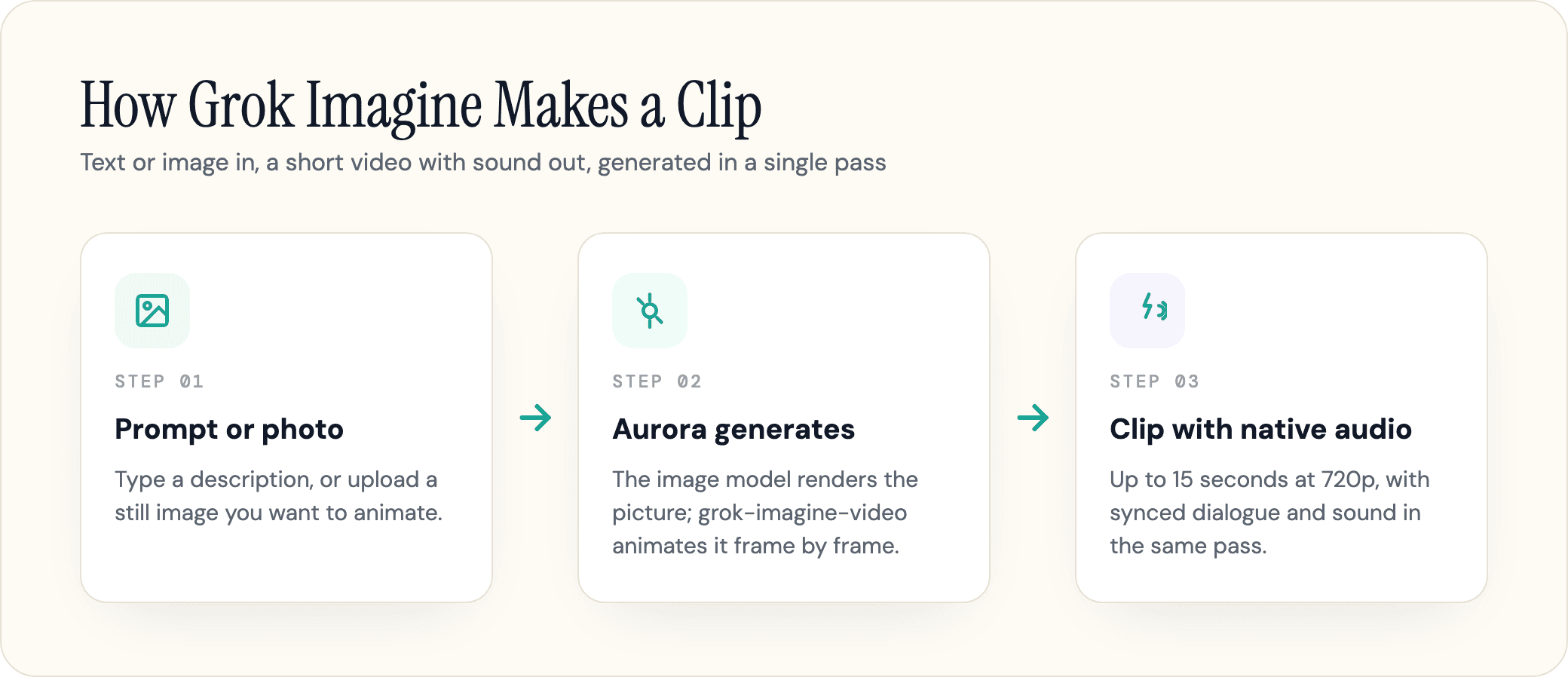
Grok Imagine is the creative side of Grok, xAI's chatbot. It does two jobs. It generates images from a text description, and it turns a still image into a short video, animating the scene and adding synchronized sound in the same pass.
You reach it through an Imagine tab rather than the normal chat box. From there you can write a prompt, upload a reference photo to animate, edit an existing image, or chain several clips into a longer sequence. xAI also markets an Imagine Agent Mode that iterates on a prompt for you across a few steps instead of generating one shot at a time.
The tool reportedly ships with four creative modes: Normal, Fun, Custom, and Spicy. Normal and Fun cover everyday generation, Custom gives you more control over style and motion, and Spicy is an age-gated mode for suggestive content, which we cover later because it carries real caveats.
The headline feature is the video. Most AI video tools generate a silent clip and leave you to add audio afterward. Grok Imagine produces the picture and the sound together, dialogue, ambience, and effects timed to the action, so a clip comes out closer to finished. That single design choice is the thing the model is best known for, and it shapes most of the comparisons below.
One framing worth getting straight up front: Grok Imagine is a feature inside Grok, not a separate product you sign up for on its own. Your Grok account, your plan, and your limits all carry over to it.
Which Model Powers Grok Imagine? Aurora and Grok Imagine Video
This is the part most guides get muddled, so here is the precise version. Aurora is xAI's in-house generative system. It launched first as the image model in December 2024, replacing the third-party Flux model Grok had borrowed until then.
The video runs on a separate model, exposed in the xAI API as grok-imagine-video (the current release is grok-imagine-video-1.5). It is built on the same autoregressive approach Aurora pioneered, which is why people loosely say "Aurora powers the video." The cleaner way to put it: image and video are distinct models, and xAI brands the video one as grok-imagine-video.
What makes Aurora unusual is that it is autoregressive, not diffusion-based. Tools like Sora and Runway generate a clip by denoising all the frames at once. Aurora generates each frame in sequence, with every new frame conditioned on the ones before it, the same next-step logic a language model uses to predict the next word. According to Tech Times, that design is why a camera move started in the first frame holds its trajectory through the last one, giving the model its stable motion and consistent subjects.
The same choice explains a tradeoff we will come back to. Because the frames are generated one after another, pushing past 720p multiplies the work in a way the architecture does not easily absorb, which is presumably part of why 720p is the standard-tier ceiling and 1080p is gated to the higher SuperGrok Plus plan rather than freely available everywhere.
The native audio fits the same picture. Sound is generated inside that single forward pass, not bolted on later, so dialogue lands with lip-sync and effects match the on-screen action.
A Short History: How Grok Imagine Got Here
Grok Imagine has moved fast, and the version names are easy to confuse. Here is the timeline that matters, as of September 2026.
| Date | What shipped |
|---|---|
| December 2024 | Aurora, xAI's in-house image model, debuts inside Grok |
| July 28, 2025 | Grok Imagine launches as a combined image and video tool |
| October 2025 | Version 0.9 arrives with faster, better video |
| January 28, 2026 | The Grok Imagine API opens to developers |
| February 1, 2026 | Imagine 1.0, with improved audio quality |
| June 16, 2026 | Grok Imagine Video 1.5 reaches general availability, plus a Fast variant |
| July 31, 2026 | Video 1.5 adds References (text, image, and voice) across plans, plus 1080p generation, priced into SuperGrok Plus |
| August 7, 2026 | Imagine Image 2.0 ships, focused on precise image generation and editing |
The current release is Grok Imagine Video 1.5. xAI first put it in API preview on June 3, then moved it to general availability across the API, grok.com, and the mobile apps on June 16. A speed-tuned Video 1.5 Fast variant launched alongside it, generating a six-second 720p clip in roughly 25 seconds, down from 40 or more in the previous model. On July 31 it gained References, rolled out across plans, and 1080p output, priced into the SuperGrok Plus tier; Imagine Image 2.0 followed a week later on the image side.
If you are reading an older guide that stops at version 0.9 or "Grok Imagine 1.0," or one that says 720p is a hard ceiling, assume it is stale. This is a feature that has changed materially every couple of months.
How to Access and Use Grok Imagine
There are three official front doors:
- Web: go to grok.com/imagine and sign in with your Grok or X account
- Mobile: open the Grok app on iOS or Android and tap the Imagine tab
- On X: reach Grok from the X sidebar, where Imagine features depend on your plan and region
A warning before you start. Search "Grok Imagine" and you will find sites like grokimagineai.net, grokvideo.ai, and dozens of similar names promising "free Grok Imagine." Those are third-party wrappers, not xAI. They run their own credit systems and want your sign-in. The real tool only lives at grok.com, in the official apps, and through the xAI API.
To turn a photo into a video, the workflow is short:
- Open Imagine and choose image or video
- Upload a clear, well-lit photo, or generate one from a text prompt first
- Describe the motion you want: a slow zoom, a pan, a character turning to speak
- Pick a mode and a clip length, then generate
- Use Extend from Frame to chain another clip onto the last one for a longer scene
- Download the result as an MP4
Two practical habits make a real difference. Start from a sharp source image, since a soft or busy photo animates poorly. And change one thing per retry. The most common cause of a failed or off-target generation is asking for a complex scene plus several edits at once, so build it up step by step instead.
One more thing if you are animating a person: expect the face to drift a little across frames. A sharp, front-lit source image and a shorter clip hold a likeness far better than a long, busy one.
Is Grok Imagine Free? Plans, Limits, and Watermarks
It depends on when you last checked, which is exactly why the question keeps coming up. The honest answer is a timeline, not a yes or no.
Grok Imagine started effectively free. After the feature was used to mass-produce abusive images, xAI restricted image generation to paid subscribers in January 2026. By March 20, 2026, users were reporting that "Grok Imagine is no longer free for regular users," limited to X Premium subscribers and above, or SuperGrok, with xAI framing the change as a temporary technical measure. Through mid-2026 it stayed paid-first: free accounts get, at most, a thin image-only allowance inside Grok chat, while video, HD output, watermark-free results, and Spicy Mode all sit behind a paid plan.
Here is the practical picture for consumers, drawn from our Grok pricing breakdown:
| Plan | Price | What you get for Imagine |
|---|---|---|
| Free | $0 | At most a thin, image-only allowance; watermarked, with tight reset windows |
| SuperGrok Lite | ~$10/mo | Basic image and short video generation |
| SuperGrok | $30/mo | Full 720p video and image generation, higher limits, watermark-free |
| SuperGrok Plus | $100/mo | 1080p video generation, significantly higher usage, priority access |
| X Premium+ | ~$40/mo | Grok Imagine access bundled with ad-free X |
Limits are the part people complain about most, and they are a moving target. Reported caps have ranged from a handful of generations every couple of hours on the free tier to roughly 10 video generations in an eight-hour window on paid plans, with longer reset timers added over time. Treat any specific number you read, including ours, as a snapshot. xAI tunes these against server demand, so the figure can change without an announcement.
On watermarks and rights: free output carries a corner watermark, and a paid plan removes it. Whether you can use a clip commercially is governed by xAI's terms, so check those before you publish a generated image or video for business use.
Image and Video Quality: What You Actually Get
Set expectations correctly and Grok Imagine is genuinely useful. Expect it to match Sora and you will be disappointed.
For images, xAI shipped Imagine Image 2.0 on August 7, 2026, an update focused on precise generation and editing rather than a resolution jump, built for real creative work rather than one-shot novelty images. The xAI API exposes 1K and 2K outputs, which xAI's marketing rounds up to roughly four-megapixel. That is plenty for social posts, thumbnails, and concept art. For pure photorealism, character consistency, and 4K, dedicated image models still have an edge.
For video, the grok-imagine-video model generates at 480p for drafts and 720p for standard final output, at a fixed 24 frames per second, in portrait, landscape, or square. A single generation runs up to 15 seconds. You can go longer by chaining clips with Extend from Frame, though community testing finds visible quality drift after two or three extensions, so longer sequences need care.
Resolution used to be a hard ceiling here; it no longer is, at least in the consumer app. On July 31, 2026, alongside Video 1.5's new References feature (text, image, and voice references, rolled out across plans), xAI added 1080p generation, but in the app it is gated to the $100/mo SuperGrok Plus tier rather than available on the standard $30/mo SuperGrok plan. On SuperGrok, 720p remains what you get, and that is still the source of the "it looks a bit mid" reaction you will see on Reddit from people on the standard plan. The API is a separate path: it bills 1080p by the second regardless of any SuperGrok subscription, so a developer can reach 1080p without Plus, just at a higher per-second rate than 720p. As covered earlier, pushing resolution is expensive for this architecture: Aurora's frame-by-frame design buys clean motion at the cost of cheap high-resolution scaling, which is presumably why the consumer app treats 1080p as a paid-tier feature rather than a free upgrade for everyone.
The counterweight is the audio. Because sound is generated in the same pass as the video, a finished clip arrives with matched dialogue, effects, and ambience instead of a silent file you still have to score. For short-form work, that often matters more than the extra pixels.
Content Moderation and "Spicy Mode"
Grok markets itself as less filtered than its rivals, and Grok Imagine includes an age-gated Spicy Mode for suggestive content. That mode is also why much of the reporting on the tool is about its problems, so it is worth being precise.
Spicy Mode is opt-in, restricted to paid plans, gated behind age verification, and mostly available in the app rather than on the web. Turning it on takes a paid plan, an age check, and switching on the sensitive-media toggles in your account settings. It is meant for suggestive or partial-nudity imagery of fictional characters. It does not permit sexual depictions of real, identifiable people, content involving minors, or non-consensual material, and many borderline prompts are blocked or blurred even with the mode on.
The restrictions exist because of a serious episode. In late December 2025 and early January 2026, Grok Imagine was used at scale to generate non-consensual sexual deepfakes of women, and reporting found it would also produce sexualized images of minors when prompted, including content involving a 14-year-old actress. The response varied by country. Indonesia and Malaysia went furthest, becoming the first countries to block Grok outright on January 11 and 12, 2026, while the European Union, the UK, France, and India opened investigations or scrutiny, and xAI faced lawsuits. xAI's own response was the paid-tier restriction covered above, plus tighter classifiers and an acceptable use policy that prohibits non-consensual intimate imagery and sexualized depictions of real people. The cases were still unfolding as of mid-2026.
For everyday users, the practical residue of all this is the "content moderated, try a different idea" message. A second moderation pass runs after generation, and it sometimes flags innocent prompts because of a single trigger word or a resemblance to a real person. The fix is to rephrase and avoid naming or depicting real individuals, not to look for a way around the filter. Using AI to fabricate images of real people is exactly the kind of output that turns into a legal and reputational problem, in the same family of risks we describe in AI hallucinations: confident, plausible, and wrong in ways that land on whoever published it.
Grok Imagine vs Sora 2, Veo, and Midjourney
For video, Grok Imagine currently tops the independent Image-to-Video Arena leaderboard, ahead of Sora 2, Veo 3.1, Seedance 2.0, and Kling by user preference, though standings are volatile and its lead over models like Seedance 2.0 is narrow. The ranking is real, but read it carefully: the leaderboard measures average preference on general prompts, not fitness for a specific professional job.
The clearer story is price and speed against quality.
| Model | Max resolution | API price (per min) | Native audio | Best for |
|---|---|---|---|---|
| Grok Imagine 1.5 | 720p standard, 1080p on SuperGrok Plus | ~$4.20 (720p) | Yes, in one pass | Fast social and concept clips with sound |
| Sora 2 Pro | 1080p | ~$30 (1024p) | Yes | Higher-fidelity work, where still available |
| Veo 3.1 | 1080p | $9 to $24 | Yes | Polished 1080p output in the Google stack |
| Midjourney | Image-first | Subscription | No | Stylized, artful still images |
The cost gap is the headline. At roughly $4.20 per minute for 720p, Grok Imagine undercuts Sora 2 Pro's $30 per minute by about 86 percent, and comes in well under Veo 3.1's $9 to $24. The picture shifted further in 2026 when OpenAI discontinued the Sora consumer app, leaving Grok and Google as the obvious choices for most creators. Google has since doubled down with Gemini Omni, an any-input video model built around conversational editing.
Where the competition still wins back ground is resolution at the default price point. Sora 2 Pro and Veo output up to 1080p without an upgrade; in the Grok Imagine app that resolution needs the $100/mo SuperGrok Plus tier (the API can reach it on any plan, metered by the second), so on the mainstream $30/mo SuperGrok app you are still capped at 720p. For still images specifically, Midjourney remains the pick for artistic style and Google's models for photorealism, while Grok leans toward fast, atmospheric, wide-scene generation. We go deeper on the Google side in our Grok vs Gemini comparison.
The bottom line: Grok Imagine wins on speed and price on the standard plan, and now matches the competition's 1080p if you pay for SuperGrok Plus, though no like-for-like cost comparison exists yet between Plus's flat $100/mo and Sora/Veo's metered 1080p rates. Pick the standard plan for volume and iteration; pay up for Plus only if the hero shot actually needs the extra pixels.
Is Grok Imagine Safe to Use?
For ordinary creative work, yes, with two cautions worth knowing.
The first is data. Public posts on X can be used to train Grok by default, with an opt-out toggle in your settings, so think about that before you upload a personal photo to animate. The second is reputation. Given the deepfake history, uploading someone else's image to generate content of them is both a policy violation and a legal risk, and even your own AI-generated media should get a human review before you publish it under your name. The model can produce something that looks convincing and is subtly wrong, and the cost of that lands on the publisher, not the tool.
What Grok Imagine Means for Your AI Visibility
Here is the angle most creators miss. Grok Imagine sits inside Grok, and Grok is an answer engine that cites sources when it responds. When someone asks Grok, ChatGPT, or Google's AI about a tool, a product, or a brand, the engine pulls from a handful of pages it trusts.
For this very topic, those pages are predictable. AI engines lean on YouTube, Reddit, and xAI's own properties when they explain Grok Imagine, which means the brands that get named are the ones publishing clear, current, well-structured information that a model can lift cleanly.
In our experience helping brands with AI visibility, the pattern holds across engines: the page that answers a question directly, with the facts an engine needs in a liftable form, is the page that gets cited. That is the same discipline behind getting picked up in Google's AI Overviews, and it is the work that turns a generative tool's popularity into visibility for you.
If you want to see whether engines like Grok are citing your brand or your competitors, our Citation Interceptor tracks where you show up across the AI engines, so you can find the questions you are missing from and fix the pages that should be answering them.
The Short Version
Grok Imagine is one of the more capable, and more controversial, generative tools available, and it moves fast enough that any answer comes with a date attached. Use it for what it is good at, fast clips with sound, watch the changing limits and rules, and review anything before you put your name on it.
Frequently Asked Questions
Is Grok Imagine free in 2026?
Mostly not. After image generation was restricted to paid plans in early 2026, free accounts kept at most a thin, watermarked, image-only allowance inside Grok chat. Video, watermark-free output, higher limits, and Spicy Mode all require a paid plan such as SuperGrok ($30/month) or X Premium+.
How long can Grok Imagine videos be?
A single generation runs up to 15 seconds at 480p or 720p on the standard plan, or up to 1080p on SuperGrok Plus. You can make longer clips by chaining generations with Extend from Frame, though quality tends to drift after two or three extensions.
How do you turn a photo into a video with Grok Imagine?
Open the Imagine tab, upload a clear photo, describe the motion you want, pick a mode and length, then generate. Sharp, well-lit images with simple backgrounds animate best, and changing one thing per attempt beats asking for a complex scene all at once.
Is Grok Imagine better than Sora 2 or Veo?
It depends on the job and the plan. Grok Imagine leads the image-to-video preference leaderboard and is far cheaper, around $4.20 per minute versus $30 for Sora 2 Pro, with native audio built in. On the standard $30/mo SuperGrok plan it caps at 720p, while Sora 2 Pro and Veo 3.1 reach 1080p by default; Grok Imagine matches them at 1080p only on the $100/mo SuperGrok Plus tier.
Can you use Grok Imagine images and videos commercially?
Commercial use is governed by xAI's terms, and a paid plan removes the watermark. Check the current terms before publishing generated media for business, and never generate or publish content depicting real people without consent.
Where do you find Grok Imagine?
At grok.com/imagine on the web, in the official Grok app on iOS and Android, and through Grok on X. Third-party "free Grok Imagine" websites are not xAI and are best avoided.
Sources
- Grok (chatbot) - Wikipedia -
en.wikipedia.org/wiki/Grok_(chatbot) - Grok Imagine 1.5 Preview - xAI -
x.ai/news/grok-imagine-1-5 - Grok Imagine API - xAI -
x.ai/news/grok-imagine-api - grok-imagine-video model - xAI Docs -
docs.x.ai/developers/models/grok-imagine-video - Grok Imagine Video 1.5 Goes Live - Tech Times -
techtimes.com/articles/318635/20260618/grok-imagine-video-15-goes-live-xai-tops-ai-video-leaderboard-86-percent-below-sora.htm - Grok under fire for generating sexually explicit deepfakes - Euronews -
euronews.com/next/2026/01/05/grok-under-fire-for-generating-sexually-explicit-deepfakes-of-women-and-minors - Malaysia, Indonesia become first to block Grok over AI deepfakes - NPR -
npr.org/2026/01/12/nx-s1-5674660/malaysia-indonesia-block-grok-ai-deepfakes - Grok Imagine no longer free for regular users - Calcalist -
calcalistech.com/ctechnews/article/rkbynj99bx - Grok Imagine Video 1.5 hits number one - gagadget -
gagadget.com/en/715382-grok-imagine-video-15-hits-number-one-and-its-86-cheaper-than-sora - Imagine Video 1.5 with References - xAI, Jul 31, 2026 -
x.ai/news/grok-imagine-video-1-5-references - Imagine Image 2.0 - xAI, Aug 7, 2026 -
x.ai/news/grok-imagine-image-2 - Pricing: Compare Grok Plans - xAI, checked Sep 19, 2026 -
x.ai/pricing