
Copilot vs Gemini usually comes down to one question that has nothing to do with which AI is "smarter": which software do you already use all day? Microsoft Copilot is built into Windows and Office; Google Gemini is built into Android and Google Workspace. Both write, code, research, and generate images, and after a year of fast updates the feature gap is small.
This is an honest, current comparison of the two as of July 2026, covering the models behind each, what they cost, who wins for coding, writing, research, and meetings, how they handle your data, and the one thing neither comparison usually mentions: how to get your own brand recommended when people ask these assistants for advice.
Copilot vs Gemini at a Glance
The short version: Microsoft Copilot wins if your work lives in Windows and Microsoft 365, and Google Gemini wins if it lives in Google Workspace or you need heavy research, long documents, and video. Almost everything else follows from that one fact.
The differences that matter now are which suite they plug into, which underlying models they run, how they price, and how they treat your data.
| Dimension | Microsoft Copilot | Google Gemini |
|---|---|---|
| Maker | Microsoft | |
| Lives in | Windows, Microsoft 365 (Word, Excel, Outlook, Teams) | Android, Google Workspace (Gmail, Docs, Sheets, Meet) |
| Default chat model (July 2026) | OpenAI's GPT-5.6 family, with Anthropic Claude as an option | Gemini 3.6 Flash, with 3.1 Pro and Deep Think for harder tasks |
| Strongest at | Office documents, meetings, enterprise data grounding | Research, large files, image and video generation |
| Free tier | Yes (Copilot Chat) | Yes (Gemini app) |
| Main paid consumer plan | Microsoft 365 Premium, $19.99/mo | Google AI Pro, $19.99/mo (AI Plus from $4.99) |
| Business AI | Microsoft 365 Copilot, around $30/user/mo | Gemini in Workspace, about $14-22/user/mo |
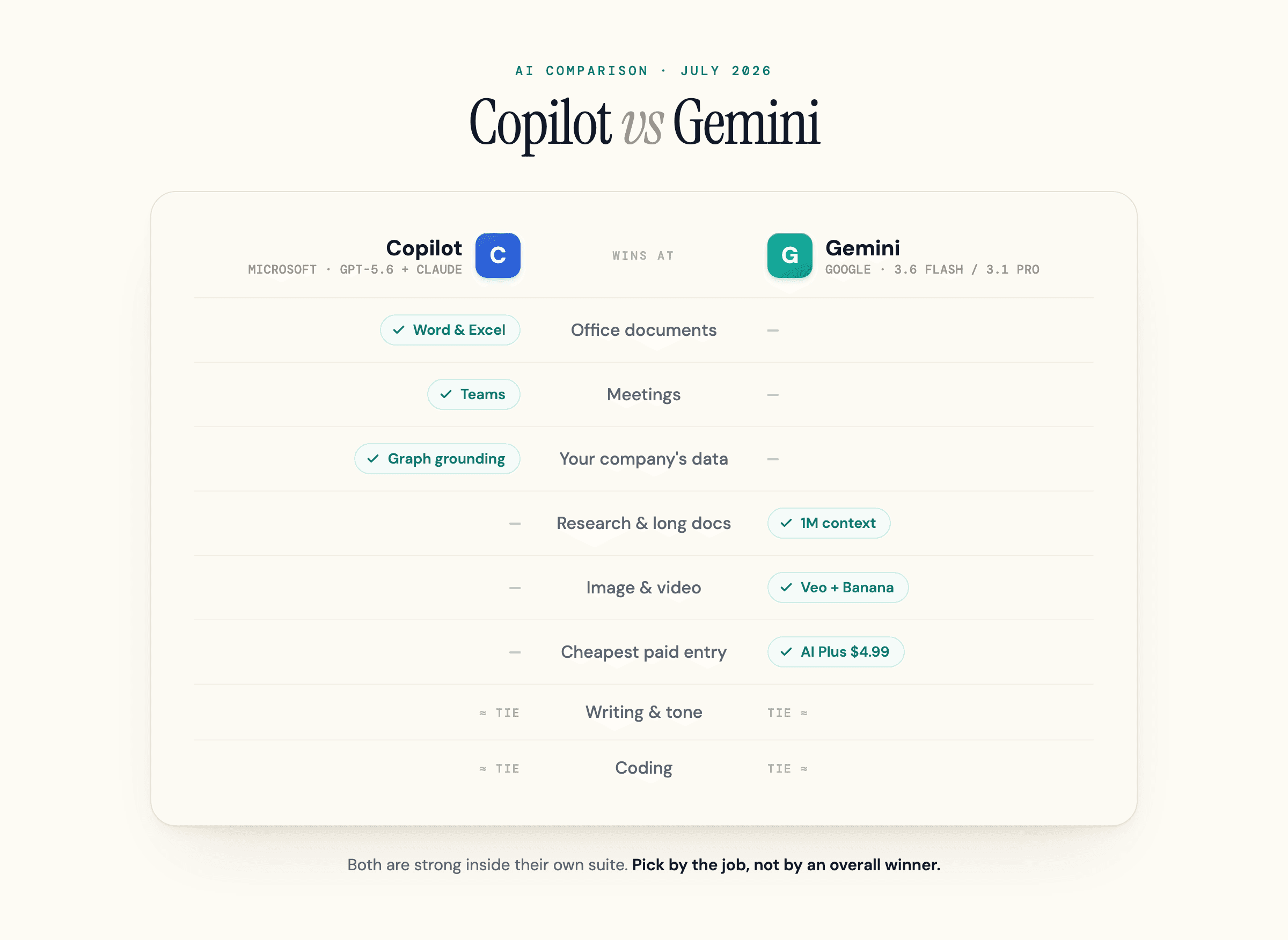
If you already know which ecosystem you live in, jump to the pricing and privacy sections below. The model rosters move almost monthly, so check the update date at the top of this page before you act on anything here.
What You're Actually Comparing
Before the head-to-head, clear up the names. "Copilot" and "Gemini" each refer to a family of products, and people argue past each other because they are comparing different members of those families.
On the Microsoft side there are three things called Copilot:
- Microsoft Copilot is the free consumer chatbot in Windows, Edge, and the Copilot app. It searches the web and reads files you upload, but it does not see your company's data.
- Microsoft 365 Copilot is the paid business add-on. This is the one that reads your emails, meetings, and files through Microsoft Graph and works inside Word, Excel, and Teams. When Microsoft markets "Copilot for work," this is what it means. We cover what that is in our guide to Microsoft Copilot.
- GitHub Copilot is a separate developer product that lives in your code editor. It shares a name and an owner with the others, but it is bought, priced, and used on its own.
On the Google side the split is similar:
- The Gemini app is the free consumer assistant on the web and on Android and iOS.
- Gemini for Workspace brings Gemini into Gmail, Docs, Sheets, and Meet for individuals and businesses. We break down the lineup in our guide to Google Gemini.
- Gemini Code Assist (plus the Gemini CLI and Google's Antigravity editor) is the developer-facing side, the direct rival to GitHub Copilot.
Most people typing "copilot vs gemini" mean the everyday assistants and their work versions, so that is what this comparison centers on. We give coding its own section, because the developer tools answer a different question.
The Models and Tech Behind Each
The rosters move fast, so here is where they stand in July 2026.
Copilot is not a single model. It is an orchestration layer that routes your request to the best engine. By default it runs on OpenAI's GPT-5.6 models, and where an admin has enabled it, Microsoft 365 Copilot users can select Anthropic's Claude from the model picker in Copilot Chat, the Researcher agent, and Copilot Studio. Microsoft has also begun adding its own in-house MAI models to the mix. The newer agent layer, Copilot Cowork, which runs multi-step jobs in the background, became generally available on June 16, 2026. It launched on Anthropic's Claude Opus 4.8 and Sonnet 4.6, with Sonnet 5 replacing Sonnet 4.6 on July 2, 2026, and OpenAI's GPT-5.6 became its preferred model on July 9, 2026.
Gemini runs on Google's own models end to end. As of July 2026 the default is Gemini 3.6 Flash for speed, with Gemini 3.1 Pro and 3.1 Deep Think handling heavier reasoning, per Google DeepMind; a higher-end Gemini 3.5 Pro is coming soon. Around it sit Google's creative engines: Veo for video, Lyria for music, and Nano Banana for images. At its 2026 developer conference Google also previewed Gemini Spark, an agent that acts across your apps, and a more multimodal Omni layer.
The one technical gap that still matters is context. Gemini handles up to roughly a million tokens of explicit context, so you can paste a long contract, a full research report, or a stack of documents into one prompt. The consumer Copilot chat sits closer to 128K tokens. Copilot makes up for that a different way: in the business version, Microsoft Graph quietly pulls in the relevant email, file, or meeting without you uploading anything. One approach wins on raw volume you control; the other wins on ambient awareness of your work.
| Capability | Microsoft Copilot | Google Gemini |
|---|---|---|
| Default chat model | GPT-5.6 family (routed) | Gemini 3.6 Flash |
| Heavy reasoning | GPT-5.6 (deep-reasoning mode); Claude option | Gemini 3.1 Pro, 3.1 Deep Think |
| Other models | Anthropic Claude (Opus / Sonnet); Microsoft MAI | Veo (video), Lyria (music), Nano Banana (image) |
| Agent layer | Copilot Cowork (Claude Opus 4.8 / Sonnet 5; GPT-5.6 now preferred) | Gemini Agent Mode, Gemini Spark |
| Explicit context | ~128K tokens (consumer chat) | ~1 million tokens |
| Ambient context | Microsoft Graph (mail, files, meetings) | Large file and multi-file uploads |
| Native video generation | No (images via OpenAI's GPT-4o) | Yes (Veo) |
Head-to-Head by Job
No single tool wins every task. Here is how they split, based on independent hands-on reviews and our own testing.
Writing and Content
Gemini is the stronger creative writer. It tends to produce more natural, varied prose, which is why marketers and content teams lean on it for drafts, social copy, and brainstorming. Copilot is the stronger business writer: tighter on structured documents, executive emails, and reports, and it can turn a Word doc into a formatted slide deck with speaker notes in one step.
The twist is that Copilot lets paid users swap in Anthropic's Claude, widely regarded as one of the most natural writers among frontier models. So "who writes better" partly depends on which model you point Copilot at. For everyday drafting, call it a tie that tilts to Gemini for creative work and Copilot for polished business output.
Research
Gemini has the clearer edge for open-web research and long-document analysis. Its Deep Research mode autonomously reads dozens of live pages and returns a structured brief, the million-token context lets you load entire documents in one pass, and NotebookLM turns your own sources into a study-ready notebook. In ZDNET's hands-on test, Gemini produced an accurate multi-city train itinerary while Copilot got it wrong, citing direct connections that did not exist and a map that misplaced whole cities.
Copilot's research edge is narrower but real: inside a business, it grounds answers in your own files and meetings through Microsoft Graph, which Gemini cannot do for Microsoft data. For open-web research, reach for Gemini. For "what did we decide in last week's planning meeting," Copilot is the only one that can answer.
Coding
This is the one place the everyday-assistant comparison breaks down, because the real contest is between GitHub Copilot and Gemini Code Assist, and they suit different developers.
GitHub Copilot remains the smoother day-to-day tool: fast inline completions, mature Visual Studio and VS Code integration, and a tight GitHub workflow. Gemini Code Assist (with the Gemini CLI and Google's Antigravity editor) leans on that million-token context to reason across an entire repository, explain unfamiliar code, and debug multi-file problems. Developers tend to report the same split: Gemini can hold a whole project in context, while GitHub Copilot works best when you feed it a file at a time. Pick GitHub Copilot for shipping features quickly in an existing workflow; pick Gemini for understanding a large or unfamiliar codebase.
Office vs Workspace
This is decided by where your documents already live, and the reality is that each tool dominates its own suite. Copilot edits natively inside Word and Excel, building formulas and reformatting tables in the document you are already in. Gemini does the same inside Docs, Sheets, and Gmail.
Microsoft's own comparison page leans hard on this, claiming Gemini "creates a new file instead of updating" when asked to work on an Office document. That is true of Gemini reaching into Microsoft's files, and it is Microsoft's framing of its own test, not a neutral finding. Inside Google's own apps, Gemini edits Docs and Sheets just as natively. The takeaway is not that one tool is broken; it is that neither reaches cleanly into the other company's file formats. Stay in your suite and both work well.
Image and Video
Gemini is ahead on creative media. It generates images through Nano Banana and is one of the few assistants with native video generation through Veo, useful for anyone producing visual content. Copilot handles images with OpenAI's GPT-4o image generation and added Copilot 3D for turning images into simple 3D models, but it has no native video generation. If visuals are central to your work, Gemini is the more complete creative studio.
Meetings
Copilot wins meetings, mostly because of Teams. It transcribes and summarizes calls in real time, tracks action items and owners, and can recap up to a month of chat history. Gemini summarizes inside Google Meet but the experience is lighter. If your team runs on Teams, this alone can decide the comparison.
Pricing Compared (2026)
Headline consumer pricing is nearly identical: both charge $19.99 a month for their main paid plan. The differences are at the edges, and the labels changed in late 2025, which is where the confusion starts.
On the Microsoft side, the standalone Copilot Pro plan is gone. Microsoft retired it on October 1, 2025 and folded its AI features into Microsoft 365 Premium at the same $19.99, which now also bundles the Office apps and storage. Existing Copilot Pro subscribers kept access until support ended on August 1, 2026. For deeper detail see our Microsoft Copilot pricing guide.
On the Google side, Google's plan lineup added a cheaper entry in 2026: Google AI Plus at $4.99 a month sits below AI Pro at $19.99, and AI Ultra starts at $99.99 for heavy users. Our Gemini pricing guide breaks down what each tier includes.
| Plan level | Microsoft Copilot | Google Gemini |
|---|---|---|
| Free | Copilot (Chat) - $0 | Gemini app - $0 |
| Entry paid | Microsoft 365 Personal - $9.99/mo | Google AI Plus - $4.99/mo |
| Main consumer | Microsoft 365 Premium - $19.99/mo | Google AI Pro - $19.99/mo |
| Top consumer | (folded into Premium) | Google AI Ultra - from $99.99/mo |
| Business | Microsoft 365 Copilot - $30/user/mo (or $21 Business, $18 promo through Sep 30 2026) | Workspace plans that bundle Gemini - about $14-22/user/mo; Enterprise custom |
Two things to watch on the business side. Microsoft is raising its base Microsoft 365 plan prices on July 1, 2026, though the Microsoft 365 Copilot add-on price holds steady, so a Copilot rollout may cost more than last year through the underlying license. And Google now bundles Gemini into several Workspace tiers, so many businesses already have it without a separate add-on. Before you buy either, check what your existing subscription already includes; a lot of teams are paying for AI they already own. For personal use, the free tiers cover most everyday tasks, so pay only when you hit usage limits or need the top models, longer context, or video.
Privacy and Data Training
Privacy is the one area where the two are genuinely different, and it depends entirely on whether you are a consumer or a business.
For business and enterprise tiers, the two are close. Microsoft 365 Copilot keeps prompts and company data inside your tenant under Enterprise Data Protection and does not use them to train its foundation models. Gemini for Workspace and Gemini Enterprise make the same promise: your content stays governed by Workspace controls and is not used for training. On governance, Copilot leans on Microsoft Purview sensitivity labels and data-loss-prevention policies, which Microsoft positions as an enterprise edge; Google offers its own Workspace admin and DLP controls. If you are buying for a company, the privacy posture is much closer than the headlines suggest.
For consumers, the gap is real, and it is where the "Gemini red flag" question comes from. On free and paid individual Gemini plans, Google treats your chats as consumer data: a subset is reviewed by humans and used to improve its models, and the main control is turning off Gemini Apps Activity, which also stops new chats from being saved to your history. Paying for AI Pro buys you better models, not better privacy.
The concern sharpened in late 2025 and 2026 over Gemini's reach into Gmail. A lawsuit, Thele v. Google, alleges Google used an existing "Smart Features" toggle to switch on deeper Gemini data access without a clear, separate consent prompt; as of mid-2026 the case is at an early stage, and Google disputes the claims, saying it did not change any setting to train on Gmail. Treat it as an open allegation, not a settled fact, but it is a fair reason to check your settings.
Microsoft's consumer Copilot is not automatically cleaner. Free Copilot interactions can be processed under standard Bing terms unless you are signed in with a work or school account. The summary: for either tool, business tiers protect your data and consumer tiers ask you to manage your own settings. If privacy is the deciding factor and you are an individual, read the controls before you commit.
Which Should You Choose?
The decision is less about which model is smarter this month and more about where you already work. Match your situation to the table.
| If you... | Choose |
|---|---|
| Live in Word, Excel, Outlook, and Teams | Microsoft Copilot |
| Live in Gmail, Docs, Sheets, and Meet | Google Gemini |
| Do heavy research or work with very long documents | Google Gemini |
| Need meeting transcription and follow-up | Microsoft Copilot (Teams) |
| Produce images or video | Google Gemini |
| Want your company's own data in answers | Microsoft 365 Copilot |
| Ship code daily in an existing GitHub workflow | GitHub Copilot |
| Need to reason across a large codebase | Gemini Code Assist |
| Want the cheapest paid entry point | Google AI Plus ($4.99) |
For many people, the answer is "use both." The free tiers cost nothing, so a common split is Gemini for research, long documents, and creative work and Copilot for Office files and meetings, rather than forcing every task through one assistant. If ChatGPT is on your shortlist too, it is the neutral third option for anyone not committed to either suite; we compare it in Gemini vs ChatGPT and Microsoft Copilot vs ChatGPT.
In our experience helping brands track AI assistants, the "which is better" question matters far less than people expect, because most users never switch ecosystems for an AI tool. They keep the suite they already pay for and use whichever assistant ships with it. Because of that inertia, the more useful question for a business is not which tool to use, but whether these assistants can find and recommend you when your customers ask them.
How to Get Cited by Copilot and Gemini
When someone asks Copilot or Gemini "what's the best tool for X," both name specific brands and link to sources. If your competitors show up in that answer and you do not, you are losing customers before they ever reach a search results page. The mechanics of getting named are different for each, because they read different parts of the web.
Copilot grounds its web answers on the Bing index. Microsoft's Bing Webmaster Guidelines state that Bing and Copilot search rely on the same crawling, indexing, and ranking foundation. So the entry ticket to a Copilot citation is being well-indexed by Bing, not just Google. Our Copilot SEO guide covers the specifics.
Gemini grounds on the Google index and the same content feeds Google's AI features, including AI Overviews and AI Mode. Being cited by Gemini and by Google's AI surfaces is largely the same job: earn a place in Google's index and write passages an AI can lift cleanly. Our Gemini SEO guide goes deeper.
The work that pays off in both engines overlaps. Write answer-first, self-contained passages that state a fact and back it up, because that is what these assistants quote. Earn corroboration from the third-party sources they trust, since both engines cross-check claims against the wider web rather than taking your word for it. And keep your entity and facts consistent across the sites that describe you. This is the same discipline behind how AI search works generally, and it matters more as agentic assistants start acting on these answers, not just displaying them.
This is the gap most Copilot-versus-Gemini comparisons miss entirely. They tell you which assistant to use; they never tell you how to be the brand those assistants recommend. That second question is where the commercial value is, and it is what our Citation Interceptor was built to answer: it queries the engines your customers actually use, including Gemini and Bing Copilot, shows which sources each one cites in your category, and flags where your brand is missing from those answers.
Frequently Asked Questions
Is Gemini better than Copilot?
Neither is better across the board. Gemini wins on research, long documents, and image and video. Copilot wins on Microsoft 365 work, meetings, and grounding answers in your company's own data. The right pick is the one that lives in the suite you already use.
What can Microsoft Copilot do that Google Gemini can't?
Three things stand out. It edits natively inside Word and Excel, it can read your organization's emails, files, and meetings through Microsoft Graph (in the paid business version), and it lets you switch the underlying model to Anthropic's Claude. Gemini cannot reach into Microsoft 365 data the way Copilot does.
Why is Copilot shutting down?
It is not. The confusion comes from Microsoft retiring the standalone Copilot Pro consumer plan on October 1, 2025 and folding its features into Microsoft 365 Premium. Existing Copilot Pro subscriptions kept working until support ended on August 1, 2026, and the business Microsoft 365 Copilot your employer deploys is a separate product that is unaffected.
Is Microsoft Copilot just ChatGPT?
No. Copilot uses OpenAI's GPT-5.6 family by default, the same model family behind ChatGPT, but it adds Microsoft Graph grounding, Anthropic Claude as a switchable option, Microsoft's own MAI models, and deep Office integration. It is an orchestration layer over several models, not a rebadged ChatGPT.
Can I use Copilot and Gemini together?
Yes, and many people do. The free tiers cost nothing, so a common setup is Gemini for research and creative drafting and Copilot for Office documents and meetings. You do not have to commit to one ecosystem to benefit from both.
More Questions
Why does Copilot feel weaker than ChatGPT if they use the same models?
They share the GPT-5.6 family, but the experience differs. Consumer Copilot wraps the model in heavier web grounding and tighter guardrails and can route simpler prompts to lighter models, so on open creative or reasoning tasks raw ChatGPT can feel more capable. Microsoft 365 Copilot trades some of that raw feel for something ChatGPT cannot do: answer using your own company's files and meetings.
Why do people call Gemini a privacy red flag?
Because on free and paid consumer plans, Google treats your chats as consumer data that can be reviewed by humans and used to improve its models unless you turn off Gemini Apps Activity. A 2026 lawsuit also alleges Google enabled deeper Gmail access without clear consent, a claim Google disputes and that is still in court. Business and enterprise Gemini tiers do not train on your data.
The Bottom Line
Microsoft Copilot and Google Gemini are both strong, and after a year of rapid updates they do most of the same jobs. The choice comes down to where your work already lives, with Gemini pulling ahead on research, large files, and creative media, and Copilot pulling ahead on Office work, meetings, and grounding answers in your own data. Pick the one that matches your suite, keep the other open for the tasks it does better, and check the privacy settings either way.
For brands, the more important shift is that buyers now ask these assistants for recommendations directly. Whether Copilot and Gemini name you, link you, or skip you is becoming its own visibility channel. If you want to see which sources they cite in your category and where your brand is absent, that is exactly what geotoolbox's Citation Interceptor is for.
Sources
- Microsoft 365 blog: Expanding model choice in Microsoft 365 Copilot -
microsoft.com/en-us/microsoft-365/blog/2025/09/24/expanding-model-choice-in-microsoft-365-copilot - Microsoft 365 blog: Meet Microsoft 365 Premium -
microsoft.com/en-us/microsoft-365/blog/2025/10/01/meet-microsoft-365-premium-your-ai-and-productivity-powerhouse - Microsoft 365 blog: Copilot Cowork is now generally available -
microsoft.com/en-us/microsoft-365/blog/2026/06/16/copilot-cowork-is-now-generally-available - Microsoft Support: About Microsoft Copilot Pro -
support.microsoft.com/en-us/microsoft-365-copilot/about-microsoft-copilot-pro - Microsoft 365 Copilot pricing -
microsoft.com/en-us/microsoft-365-copilot/pricing - Microsoft Learn: Data, privacy, and security for Microsoft 365 Copilot -
learn.microsoft.com/en-us/microsoft-365/copilot/microsoft-365-copilot-privacy - Bing Webmaster Guidelines -
bing.com/webmasters/help/webmaster-guidelines-30fba23a - Microsoft: Copilot vs Gemini Enterprise (Microsoft's own comparison) -
microsoft.com/en-us/microsoft-365-copilot/copilot-vs-gemini-enterprise - Google DeepMind: Gemini models -
deepmind.google/models/gemini - Google: Google AI plans and pricing -
one.google.com/about/google-ai-plans - Google blog: Google I/O 2026 announcements -
blog.google/innovation-and-ai/technology/ai/google-io-2026-all-our-announcements - Google Search Central: AI features and your website -
developers.google.com/search/docs/appearance/ai-features - Google Help: Gemini Apps privacy -
support.google.com/gemini/answer/13594961 - ZDNET: Gemini vs Copilot, 7 everyday tasks -
zdnet.com/home-and-office/work-life/gemini-vs-copilot - PCWorld: Microsoft adds 365 Premium, cuts Copilot Pro -
pcworld.com/article/2925962/microsoft-adds-microsoft-365-premium-cuts-copilot-pro.html - National Law Review: lawsuit alleges Gemini read Gmail, Chat, and Meet (Thele v. Google) -
natlawreview.com/article/silent-switch-new-lawsuit-alleges-google-uses-gemini-ai-secretly-read-gmail-chat