
Google Gemini is the AI that now answers in Google Search, lives in the Gemini app, and quietly turned on inside Gmail, Docs, and your Android phone. If you want the plain version of what Gemini actually is, which models are current, what it costs, and whether you can trust it, this is it, current as of July 2026.
First, the name. "Gemini" is also the zodiac sign, a 1960s NASA program, and a crypto exchange, and the search results mix them together. This article is about Google's AI, not the constellation, the spacecraft, or the Winklevoss exchange. And there is a part most "what is Gemini" explainers skip: because Gemini powers the AI answers in Google Search, what it says about your company is increasingly what searchers see. We will cover what Gemini is, the current models, pricing, how to use it, the honest take on privacy and safety, how it compares to ChatGPT and Claude, where it lands among the best AI search engines, and what all of it means for whether AI mentions your brand.
What Is Google Gemini?
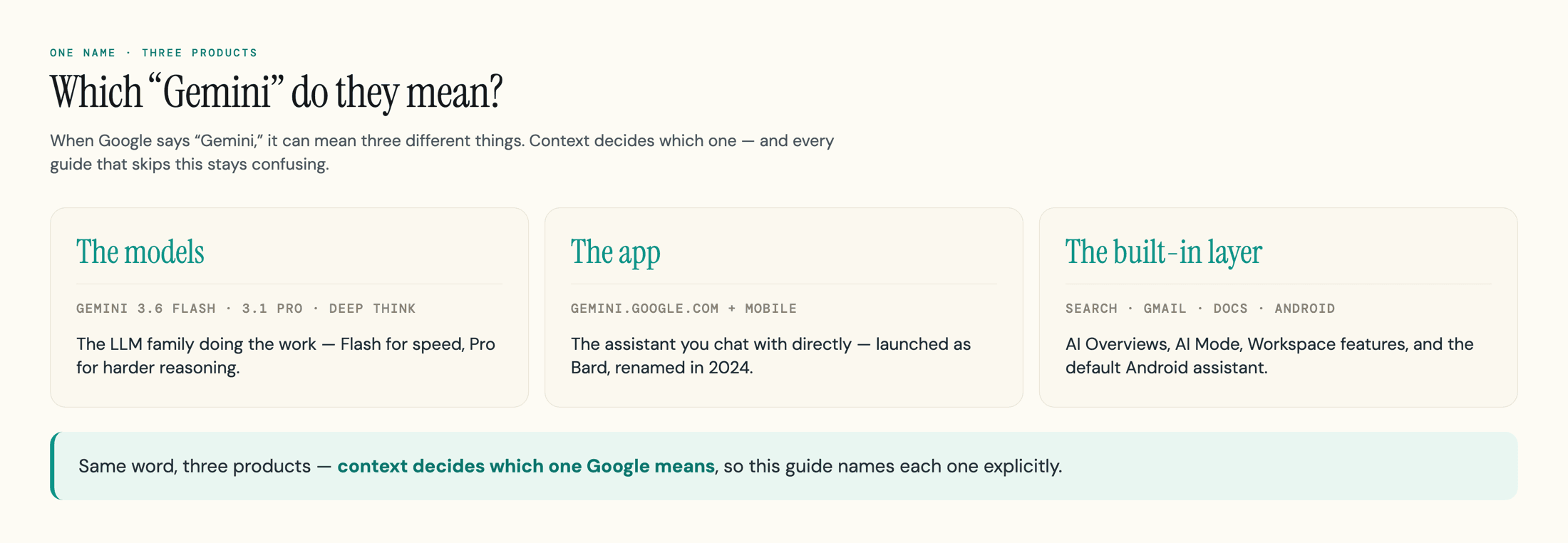
Google Gemini is a family of multimodal AI models built by Google DeepMind, plus the assistant app and features built on top of them. It is Google's direct answer to ChatGPT and Claude. "Multimodal" means it was built to handle text, images, audio, and video together, rather than text alone, so you can paste a screenshot, share a PDF, or talk to it and get a useful answer back.
If the name feels new, the product is not. Gemini is the assistant Google launched in 2023 as Bard, then renamed to Gemini in February 2024 when it moved onto the Gemini model family. Bard no longer exists as a separate thing; everything folded into Gemini.
The word "Gemini" does double duty, which is the first source of confusion. It can mean the underlying model (the large language model doing the work), the app you chat with at gemini.google.com, or the assistant baked into Google's other products. When Google says "Gemini," context decides which one. Throughout this guide, we will be specific about whether we mean a model, the app, or a feature.
The single most important thing to understand up front is reach. ChatGPT is a place you go; Gemini shows up where you already are, inside Search, Gmail, Docs, and Android, whether you went looking for it or not. Whether that is convenient or intrusive depends entirely on how much of your life already runs on Google, which is the real question this article will help you answer. If your work runs on Microsoft instead, our Copilot vs Gemini comparison weighs the two side by side, and our best ChatGPT alternatives roundup covers the wider field sorted by job.
Who Makes Gemini, and Where the Name Comes From
Gemini is made by Google DeepMind, the AI division Google formed in 2023 by merging its two research labs, DeepMind and Google Brain. That merger is the answer to "who owns Gemini AI": it is Google's own AI, not a startup Google bought and not a partnership. The same group builds the Gemini models, and Google's product teams put them in the consumer app, Search, Workspace, and the developer tools other companies build on.
The name is a small Easter egg with three layers. "Gemini" is Latin for "twins," and it is both a zodiac sign and a northern constellation whose two brightest stars, Castor and Pollux, are named for mythological twins. Google leaned on that "twin" idea two ways: the model was built to pair different abilities, like reading text and images at once, and the project itself was the pairing of the two merged research teams. Google has also said the name nods to NASA's Project Gemini, the two-astronaut spacecraft that bridged the early space program and the Apollo missions.
That overlap is exactly why the search results are messy. Type "what is Gemini" and you will get the AI, the star sign, and the space program in the same breath. For the rest of this guide, Gemini means Google's AI.
The Gemini Models, Explained (As of September 2026)
Gemini is not one model; it is a lineup, and Google ships new versions almost every month, which is why so many guides are out of date. The honest starting point: most explainers you will find still describe Gemini 1.5 or 2.5 as current. They are not. Here is the shipped lineup as of September 2026, straight from Google DeepMind's model page. Google shipped two new Flash models in three weeks, 3.7 Flash on 13 August and 3.8 Flash on 2 September 2026, which is exactly why the version you are handed keeps moving.
| Model | Best for | Status (September 2026) |
|---|---|---|
| Gemini 3.8 Flash | Complex agentic tasks at scale, coding | Newest Flash model (launched 2 September 2026); in the Gemini app it requires a Google AI Pro or Ultra plan, and it is also in Sheets and selectable in AI Mode. Gemini 3.7 Flash shipped 13 August 2026, also paid-only in the app |
| Gemini 3.6 Flash | Fast, everyday answers; the default you get most of the time | Still what the free tier gets (September 2026), successor to 3.5 Flash; neither 3.7 nor 3.8 Flash reached free users. Google Search's AI Mode still runs on Gemini 3.5 Flash as its default, with 3.7 and 3.8 Flash selectable from the model menu |
| Gemini 3.1 Pro | Harder reasoning, complex and creative tasks | The current "Pro" model on paid plans |
| Gemini 3.1 Deep Think | The hardest problems in science, math, and engineering; it weighs several approaches before answering | Available on the top tier |
| Gemini 3.5 Flash-Lite | High-volume, cost-sensitive tasks that still need decent intelligence | New budget tier (July 2026), mostly used by developers; succeeds 3.1 Flash-Lite |
| Gemini 3.5 Pro | The next reasoning flagship, with a larger context window | Announced; "coming soon" per Google, not yet generally available |
A few things help cut through the version soup. Flash means fast and cheap, Pro means slower and stronger, and that split holds across every generation. Within Flash itself there is now a further split between the workhorse and the budget tier, which our Gemini 3.6 Flash vs 3.5 Flash-Lite guide breaks down. The version numbers do not sort across the two tracks: Gemini 3.5 Flash is newer than 3.1 Pro, but it is not "better than Pro," it is the fast model in a later release. You rarely choose by hand anyway; the app defaults to Flash and reaches for Pro on harder questions or when you are on a plan that allows it.
The other number that matters is the context window, which is how much text the model can hold in mind at once. Today's top Gemini models support up to a roughly one-million-token window, enough for a long book or a large codebase in a single go, though the limit you actually get varies by plan and surface, and Google has said the upcoming 3.5 Pro pushes the ceiling further. If you want the mechanics of how any of these models turn your prompt into an answer, our explainer on how ChatGPT works covers the same transformer machinery Gemini uses.
Model names move fast
Google reprices and renames Gemini models constantly. The shape stays stable, Flash for speed and Pro for reasoning, but the exact version you are handed depends on your plan, your region, and the week. Check Google's own model page before quoting a specific version.
What Can You Do With Gemini?
Gemini does what you expect from a modern assistant, and then a layer more because it is wired into Google's products. At the core, it answers questions, writes and edits text, summarizes long documents, writes and debugs code, reads images and screenshots, and holds a back-and-forth conversation. That part is table stakes across ChatGPT, Claude, and Gemini.
The differences are at the edges, and most of them come from Google's ecosystem. Inside Google Workspace, Gemini drafts and rewrites in Docs, builds formulas and pivot tables in Sheets, generates slides, and summarizes long threads or writes replies in Gmail. In Google Search, Gemini powers the AI Overviews at the top of results and the conversational AI Mode, so most people use Gemini without ever opening the app. It also runs on Android as the default assistant and inside Chrome.
On top of chat, Gemini has a set of named features worth knowing:
- Image and video generation through Google's media models: the viral Nano Banana image models, Veo for video, and the newer Gemini Omni, which Google pitches as creating "anything from any input," starting with video
- Deep Research, an agent that runs many searches and writes up a cited report, which you can point at your own uploaded files
- Gemini Live, real-time voice conversation that can also see through your camera or screen
- Gems, custom versions of Gemini you set up for a recurring task, like a writing editor or a study coach
Google is also pushing into agentic tools that act, not just answer: Gemini Spark, pitched as a personal agent that takes actions on your behalf, plus the Gemini CLI for developers and Project Mariner for browser tasks. One caveat worth knowing before you shop for a plan: as of September 2026 Spark is not available in the European Economic Area, the UK, or Switzerland at any price, and the same goes for Personal Intelligence, Gemini's feature for drawing on your own Gmail, Photos, and Drive. Those are early and change quickly, so treat them as direction rather than finished products. For everyday use, the durable value is the combination of a capable model and the fact that it already lives inside the Google apps you open every day.
Gemini Pricing and the Free Tier
Yes, Gemini has a genuinely useful free tier, and for a lot of people it is all they need. The free plan gives you Gemini 3.6 Flash as the default, a daily allotment of the stronger Pro model for harder questions, image generation, voice mode, and a small number of Deep Research reports per month. The catch is throttling: heavy use of the Pro model hits daily caps, and during busy periods you can get bumped to the lighter model. For casual questions you will rarely notice; for all-day, document-heavy work you will.
If you outgrow free, the paid plans look like this as of July 2026. Google reshuffled and repriced these tiers more than once in 2026, so treat the figures as the current shape, not a permanent quote, and check Google's own plans page before paying. For a full tier-by-tier breakdown, including the developer API token costs, see our Gemini pricing guide.
| Plan | Price (US, July 2026) | What you get |
|---|---|---|
| Free | $0 | Gemini 3.6 Flash default, daily Pro access, image and voice, limited Deep Research |
| Google AI Plus | $4.99/mo | Higher limits and more storage; the cheap step up (cut from $7.99 in June 2026) |
| Google AI Pro | $19.99/mo | Gemini 3.1 Pro access, Deep Research, Workspace integration, 5 TB storage |
| Google AI Ultra | from $99.99/mo | Highest limits, Deep Think, Veo video, large storage; top configuration runs higher |
The two numbers people miss: Google AI Plus dropped to $4.99 a month in June 2026, per 9to5Google, making it one of the cheapest serious AI subscriptions from a major lab, and Google AI Ultra now starts around $99.99 a month, after Google added a cheaper entry tier and cut its premium plan from the earlier $249.99. Developers do not use these consumer plans at all; they pay per token through the Gemini API, which is billed separately.
The honest recommendation: start on the free tier, use it hard for a couple of weeks, and only pay once you actually hit a wall. Most people do not.
Gemini on Your Phone, and How to Turn It Off
If Gemini showed up on your Android phone without you installing it, that is by design: Google is replacing Google Assistant with Gemini as the default assistant. That is why so many people meet Gemini not by choosing it but by long-pressing the power button and finding a new assistant staring back. It is the single most common complaint about Gemini, and it is a fair one.
What the phone app actually does is the same as the web version: answer questions, set things up by voice, read what is on your screen if you allow it, and tie into your Google apps. The friction is that it asks for access to do the useful parts, and the prompts can feel pushy.
You are not stuck with it. You can switch your default assistant back in your phone's settings under the digital assistant or default apps options, and you can pause or limit what Gemini can reach. On most phones Gemini is a system-level app you cannot fully uninstall, but you can disable it, revoke its permissions, and stop it from being the assistant that pops up. Uninstalling or disabling the app does not delete your account history; that is managed separately in your Google account, which we cover next.
The short version: Gemini being on your phone is Google's push, not a virus or a setting you broke, and you can turn the assistant role off without much trouble even if you cannot make the app disappear entirely.
Is Gemini Safe? Privacy and Your Data
Gemini is safe to use in the ordinary sense, but "safe" and "private" are not the same thing, and the privacy defaults are worth understanding. By default, your conversations with the consumer Gemini app can be used to improve Google's AI, and a sample of chats may be read by trained reviewers. Google's own guidance is blunt about the implication: do not enter anything confidential you would not want a reviewer to see.
You have controls, but you have to use them. You can turn off Gemini Apps Activity in your Google account, which stops future chats from being saved to your history, though Google has said human-reviewed conversations can be kept for up to three years even after you turn it off. The bigger flashpoint is Gmail: in late 2025, US users reported that Gemini's smart features in Gmail, Chat, and Meet were enabled by default, an opt-out rather than an opt-in, and a class-action lawsuit alleges the setting was buried. Google disputes the framing, says it did not change the setting, and says it does not use your Gmail content to train Gemini. The practical takeaway: check your smart-features and Personal Intelligence settings yourself rather than assuming they are off. Paid Workspace and enterprise accounts run on separate terms, and that data is not used to train the consumer models.
There is also the accuracy side of safety. Like every large language model, Gemini can state wrong things with total confidence, and because it powers AI Overviews, those mistakes sometimes show up at the top of Search. Google has had public stumbles, including pausing Gemini's ability to generate images of people in early 2024 after it produced historically inaccurate depictions. The practical rule is the same one that applies to any AI: treat it as a fast, capable starting point, and verify anything that actually matters before you rely on it.
Gemini vs ChatGPT and Claude
All three are excellent in 2026, and the gap between them is now small enough that fit matters more than raw capability. The right question is not "which is smartest," it is "which one already lives where I work." Here is the honest high-level split. For the full head-to-head, see our Gemini vs ChatGPT comparison.
| Pick | When it is the better fit |
|---|---|
| Gemini | You live in Gmail, Docs, and Google Search, or you need its very large context window for big documents |
| ChatGPT | You want the broadest ecosystem of apps and integrations and strong all-round performance |
| Claude | You prioritize careful long-form writing, nuanced analysis, and coding |
Gemini's real edge is not a benchmark score; it is the integration. It can summarize and draft from your Gmail, work inside your documents, and answer inside Search without you opening a separate app. For someone whose work already runs on Google, that convenience usually outweighs a few points on a leaderboard.
The flip side: if your writing standard is high or you are deep in a non-Google stack, you may prefer a competitor, and many people simply keep two open and switch by task. We dig into the head-to-heads in Claude vs Gemini and Grok vs Gemini, and if you are weighing the field more broadly, the brand explainers for Claude and Grok cover those engines the same way this guide covers Gemini. The practical advice: do not agonize. Pick the one that fits your daily tools, learn it well, and you will get more out of it than from constantly chasing the newest release.
Why Gemini Matters for Marketers and Brands
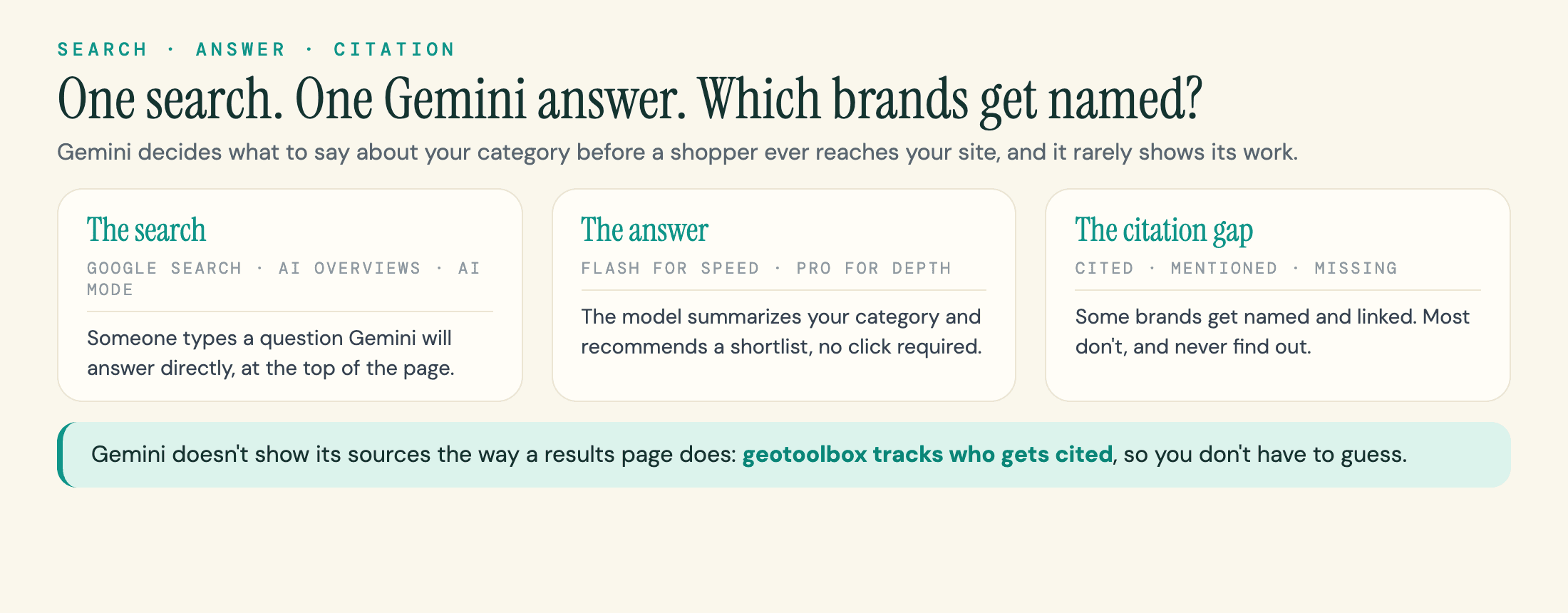
Here is the part the other "what is Gemini" guides leave out: Gemini is not just a chatbot people visit, it is the engine behind the AI answers in Google Search. AI Overviews and AI Mode are powered by Gemini, which means the model is already summarizing your category, recommending tools, and describing your company to people who never open the Gemini app. What Gemini "knows" about you is becoming what a huge share of searchers see first. The scale is the point: as of mid-2026, Google says AI Overviews reach more than 2.5 billion people a month and AI Mode has passed a billion, all powered by Gemini's models.
That changes the job. Classic SEO was about ranking a blue link; generative engine optimization is about being the source the AI trusts enough to cite and summarize. The mechanics overlap but they are not identical, which is why we treat GEO, AEO, and SEO as related but distinct disciplines. If you want the practical playbook, our guide on how to optimize for AI search, the engine-specific Gemini SEO walkthrough, and the case for a complete, consistent brand entity are the place to start.
One nuance trips up a lot of people. Google offers a crawler control called Google-Extended that lets you opt your content out of training Gemini and grounding its app answers. Google has said it is not a Search ranking signal, and it does not pull you out of AI Overviews, which run on the regular Search index. If you do want out of the AI answers, Google now offers a Search Console control that can pull your site from AI Overviews, AI Mode and generative AI in Discover while keeping your normal Search listing. It sits under Settings > Search generative AI, applies to the whole property rather than individual pages, and defaults to including your site; Google completed the worldwide rollout on 31 August 2026. Opting out means you forfeit any traffic from those AI features, so weigh it carefully. Google-Extended itself protects your content from model training without making you invisible in Search, a trade-off worth understanding before you touch your robots file.
The hard part is that you cannot fix what you cannot see. Gemini does not show its sources the way a search results page does, so most brands have no idea whether the AI describes them accurately, recommends a competitor, or invents a detail. That is the gap we built geotoolbox to close: it monitors how Gemini, AI Overviews, ChatGPT, and the other engines represent your brand, which sources they cite, and where you are missing from the answers, so you can act on real data instead of guesses.
If you want to see where AI engines mention your competitors but not you, geotoolbox's Citation Interceptor maps exactly that across Gemini, Google AI Overviews, ChatGPT, Perplexity, Claude, and more, so you know which conversations to get into. You can also learn the broader approach in our guide to tracking AI visibility.
Frequently Asked Questions
How much does Gemini cost per month?
Gemini has a free tier, and the paid consumer plans as of July 2026 are Google AI Plus at $4.99 a month, Google AI Pro at $19.99 a month, and Google AI Ultra starting around $99.99 a month, with higher configurations costing more. Google reprices these often, so confirm the current numbers on Google's plans page before subscribing. Developers pay separately, per token, through the Gemini API.
Is Google Gemini free?
Yes. The free tier gives you Gemini 3.6 Flash as the default model, a daily allowance of the stronger Pro model, image generation, voice mode, and a limited number of Deep Research reports. Heavy users hit daily caps and get throttled at busy times, which is the main reason to consider a paid plan. For most people the free tier is enough.
Why is Gemini on my phone, and how do I turn it off?
Google is replacing Google Assistant with Gemini as the default assistant on Android, which is why it can appear without you installing it. You can switch your default assistant back and revoke Gemini's permissions in your phone's settings. On most phones you cannot fully uninstall it because it is a system app, but you can disable it and stop it from being the assistant.
Is Google Gemini safe to use?
It is safe for everyday use, but by default your consumer chats can be used to improve Google's AI and a sample may be reviewed by humans, so do not paste confidential information. You can turn off Gemini Apps Activity to stop saving chats, but note Google switched Gemini's Gmail smart features on by default for US users in late 2025 (an opt-out that drew a class action), so check those settings yourself. As with any AI, verify important facts, because Gemini can be confidently wrong.
Who owns Gemini?
Gemini is made by Google, specifically Google DeepMind, the AI division formed in 2023 by merging DeepMind and Google Brain. It is Google's own AI, and it was previously called Bard before the February 2024 rebrand.
Is Gemini better than ChatGPT?
Neither is universally better in 2026; it depends on fit. Gemini wins if you live in Google's apps or need its very large context window, while ChatGPT has a broader integration ecosystem and Claude is often preferred for long-form writing. The honest move is to pick the one that fits your daily workflow rather than chasing benchmarks.
Sources
- Gemini models - Google DeepMind -
deepmind.google/models/gemini - Google Gemini - Wikipedia -
en.wikipedia.org/wiki/Google_Gemini - What is Google Gemini? - IBM -
ibm.com/think/topics/google-gemini - Google AI plans - Google One -
one.google.com/about/google-ai-plans - New controls and insights for website owners (AI Overviews reach) - blog.google -
blog.google/products-and-platforms/products/search/new-controls-website-owners - 100 things we announced at Google I/O 2026 (Gemini Spark, Omni) - blog.google -
blog.google/innovation-and-ai/technology/ai/google-io-2026-all-our-announcements - Lawsuit alleges Google's Gemini reads Gmail by default - National Law Review -
natlawreview.com/article/silent-switch-new-lawsuit-alleges-google-uses-gemini-ai-secretly-read-gmail-chat - Google AI Plus gets price drop to $4.99 (June 2026) - 9to5Google -
9to5google.com/2026/06/08/google-ai-plus-price-drop - Google chief admits 'biased' AI tool's photo diversity offended users - The Guardian -
theguardian.com/technology/2024/feb/28/google-chief-ai-tools-photo-diversity-offended-users