
The day after Moonshot released Kimi K3's weights, we asked three assistants how to run it. Queried on July 28, 2026 with web search off, Claude Opus 4.8 said it had no reliable information that a model called Kimi K3 exists and offered to help with K2 instead. Gemini 2.5 Flash got it backwards, insisting K3 is proprietary, cloud-only, and that "download size is irrelevant because you don't download the weights." ChatGPT with search on answered correctly.
The weights are 1.56TB, sitting public on Hugging Face right now. So the real question about the largest open-weight model ever released is not whether you can have it, but how you run it. Here is what that takes, route by route, with the numbers.
Update, October 24, 2026: Moonshot launched Kimi K3.1 Pro on October 23, a post-trained version of K3, and says its weights will be released by November 4. They are not published yet, so nothing in this guide (file sizes, GGUF builds, memory math, llama.cpp support) applies to K3.1 Pro today. Everything below is about K3.
The Short Answer: Can You Run Kimi K3 Locally?
Not on a normal machine. Kimi K3 is a 2.8-trillion-parameter model, and its weights ship as a 1.56TB download. Running them at full speed takes more fast memory than any workstation, gaming rig, or single Mac holds. Moonshot recommends production deployment on a supernode of 64 or more accelerators, eight 8-GPU nodes or more, though it has never published a minimum viable configuration.
But local runs on a spectrum, from pointing your editor at a hosted endpoint to buying a rack. The question is which of these routes matches your actual constraint: privacy, cost, speed, or curiosity.
| Route | What you need | Realistic speed | Rough cost | Best for |
|---|---|---|---|---|
| 5. Use a provider | Nothing, an API key | ~29-465 tok/s, provider-dependent | K3 at $3 in / $15 out per M tokens (K3.1 Pro: $2 / $10) | Almost everyone |
| 1. Rent a K3-capable node | 8x B300 or 16x B200, by the hour | Same as Route 2 | ~$70-$160 / hour | Trying it, short jobs |
| 2. Self-host on vLLM | One 8x B300 node (or 16x B200) | 111 tok/s TP8, 331 with spec decoding (vLLM, measured on GB300 NVL72) | Datacenter capex or cloud | Orgs with real GPU infra |
| 3. CPU + RAM offload | Big-RAM server + 1-4 GPUs | ~10 tok/s decode, slow prefill | ~$5k-$65k one-time | Homelab, overnight batch |
| 4. Mac Studio cluster | 4-5x 512GB M5 Ultra (option not yet shipping) | ~15 tok/s by analogy, unmeasured | Not yet priced | Unified-memory experiments |
Speeds for the self-hosted rows are the ceiling on the right hardware, not what a first build hits. Most people should land on a provider (Route 5), or a rented node (Route 1) to test first. The rest of this guide is why, and what the others cost.
Why It Takes So Much: The Memory Math
The number that decides everything is 1.56TB, the size of the Kimi K3 repository on Hugging Face, spread across 96 weight shards. A smaller figure, around 594GB, gets repeated in some launch coverage. That's not the full model; it's the size of Unsloth's aggressively quantized 1-bit GGUF build, and its repo now lists smaller ones still (UD-Q1_0 at 466GB, UD-TQ1_0 at 509GB, UD-TQ2_0 at 552GB; its docs page recommends the 594GB build and publishes no accuracy figure for the smaller ones). The arithmetic on the full weights rules out full fidelity at any of these sizes: 594GB would imply about 1.2 trillion parameters at 4-bit, and K3 has 2.8 trillion, so the official-weights route still means budgeting 1.56TB.
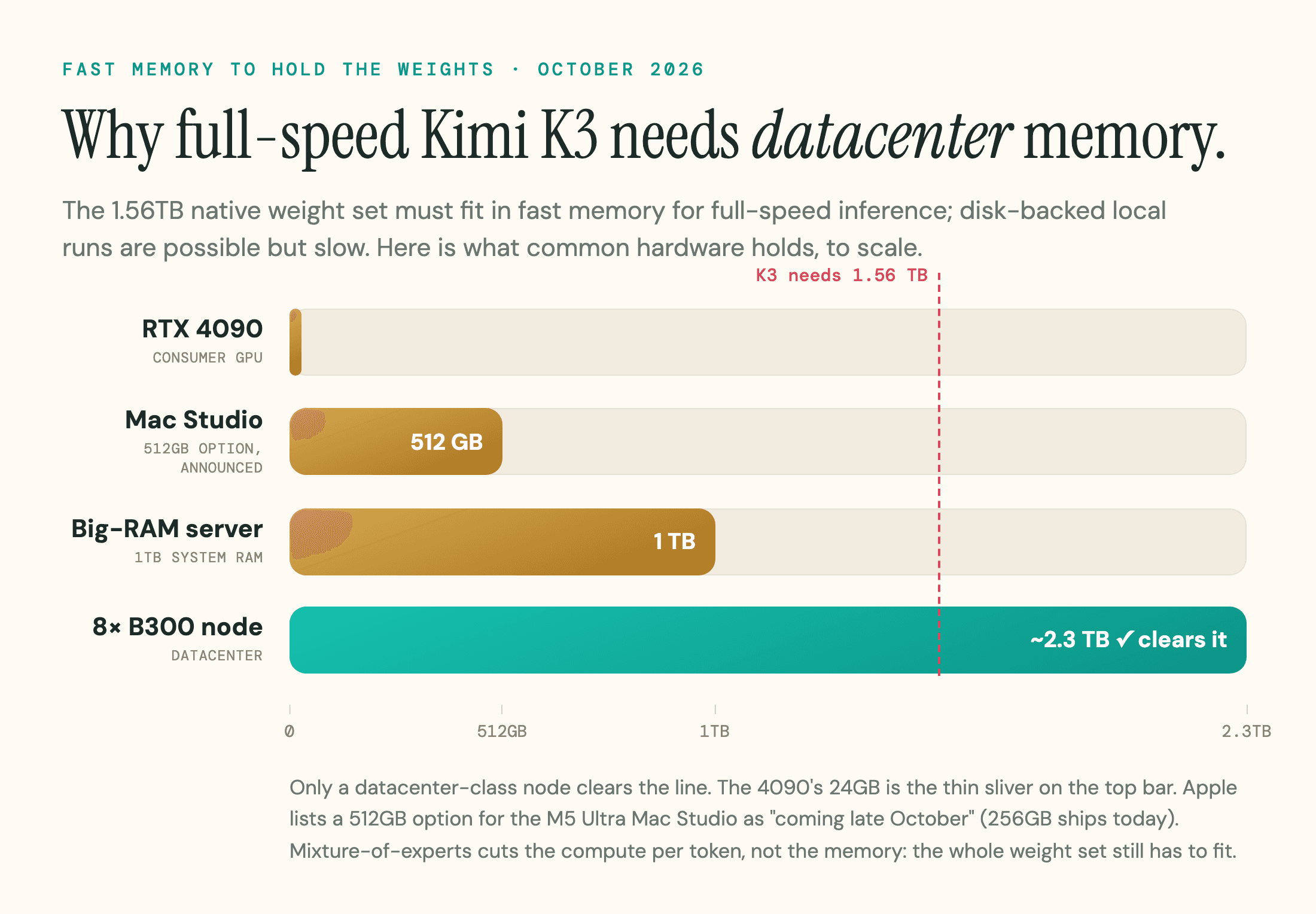
The naive calculation is 2.8 trillion parameters times 4 bits, which comes to 1.4TB. The actual repo is 1.56TB because MXFP4 stores a shared scale factor per block and the non-expert layers sit above 4-bit. So budget 1.56TB resident just for weights, and 1.8TB to 2TB once you add the KV cache and compute buffers. That is the wall, and it does not shrink. Because K3 is quantization-aware-trained at 4-bit (with 8-bit MXFP8 activations), there is no free halving from the usual 16-bit-to-4-bit step waiting for you; an 8-bit build is no smaller than what shipped (Unsloth's lossless Q8 rebuild lands at the same 1.56TB).
The mixture-of-experts design is the second trap. K3 activates only 16 of its 896 routed experts (plus two shared experts) per token, so it computes like a much smaller model. That saves compute, not memory. The full weight set still has to be resident, because any token might route to any expert. A sparse model gives you a cheaper forward pass, never a smaller footprint.
Then there is the context window. At 1,048,576 tokens, a filled context adds real memory pressure on top of the weights. Kimi Delta Attention, the hybrid design K3 uses, keeps a constant-size state for most layers and softens that cost, but a long-context job still needs headroom you have to plan for.
One more thing the self-host audience needs before building: K3 ships under a custom Kimi K3 License, which permits commercial use but is not OSI open source. A model-as-a-service operator whose revenue passes $20 million over any 12 months must negotiate a separate agreement with Moonshot, and any product above 100 million monthly users or $20 million in monthly revenue must display "Kimi K3" in its interface. For a team self-hosting to serve customers, that is a go/no-go detail, not trivia.
Route 1: Rent a K3-Capable Node (Try Before You Buy)
Before you spend a dollar on hardware, rent the model for an hour. This is the route the local-inference community reaches for first: at launch, before third-party providers came online, launch-week reports had Moonshot's own hosted K3 rate-limiting people mid-task, so renting was the reliable way to evaluate it before committing to a build.
The catch is what you rent. An 8x H100 box (RunPod lists an H100 SXM at $3.99 per GPU-hour, about $32 for eight) is the default SKU people reach for, but 8x H100 is 640GB, which cannot load a 1.56TB model at any precision this guide endorses. You need the same floor as Route 2, an 8x B300 or 16x B200 node: at RunPod's listed $8.99 per B300-hour and $7.99 per B200-hour that is about $72 and $128 an hour, and Lambda's 16-GPU B200 plan (two-week minimum) lists $9.86 per GPU-hour. You pay for the hour, not the tokens, which is exactly why this route is for measuring rather than production.
Load your real workload, not a toy prompt. Push your actual context length and concurrency through the rented node, measure throughput and time to first token, then decide whether owning hardware makes sense. An hour of rental is cheaper than a wrong build. If you only want K3 in your editor, a provider is cheaper still.
Route 2: Serve It Yourself With vLLM
This is the route Moonshot designed K3 for, and the only one that reaches full speed. vLLM shipped day-0 support and has the fullest documentation, though SGLang is a supported alternative. The serving stack is the least of your problems. The hardware is.
Moonshot's 64-accelerator supernode is a production-serving recommendation; the minimum config that merely fits the weights is different. Per the vLLM team, the floor is one 8x B300 node (or a GB300 NVL72), or a minimum of 16x B200 or GB200 on the previous generation, and AMD's MI355X carries ROCm support from launch if you are not on NVIDIA. Their own note is blunt: the model "can barely fit in a single NVIDIA DGX B300." No single H100, H200, or B200 holds it, so any real deployment is a distributed cluster, and the interconnect matters as much as the cards. Tensor parallelism over a slow fabric is a downgrade, not an upgrade: without high-bandwidth RDMA between nodes, the all-to-all traffic stalls and prompt processing collapses. On GB300 NVL72, vLLM measured 111 tokens per second per user at tensor-parallel size 8 (331 with DSpark speculative decoding), and 118 at TP16, rising to 370 with DSpark.
The serve command matters, because K3 needs flags most launch guides leave out:
vllm serve moonshotai/Kimi-K3 \
  --tensor-parallel-size 8 \
  --max-model-len 131072 \
  --trust-remote-code \
  --load-format fastsafetensors \
  --enable-prefix-caching \
  --enable-auto-tool-choice \
  --tool-call-parser kimi_k3 \
  --reasoning-parser kimi_k3
A few of those are easy to miss. Set --max-model-len below the full 1M (131072 is a safe start; raise it once you have measured KV-cache headroom) or the server tries to allocate cache for the entire context and OOMs on first launch. --load-format fastsafetensors needs the fastsafetensors package installed separately. Prefix caching is off by default for K3 because the hybrid cache design is still stabilizing, so pass the flag for the prefill savings, but validate output on repeated prefixes before trusting it in production. The kimi_k3 parsers are required for tool use and K3's always-on reasoning, and because the chat template is a Python program rather than a Jinja file, trusting remote code is not optional. One silent trap the flags do not cover: for multi-turn conversations you must pass the full reasoning_content back on each request, or quality degrades across the conversation with no error.
The realistic steps:
- Provision the cluster (8x B300 minimum, or 16x B200) with high-bandwidth RDMA between nodes.
- Pull the official vLLM container image; the dependency chain pulls pre-release libraries like FlashInfer, so bare-metal installs are painful.
- Download the weights from Moonshot's official repository only. Plan for it: 1.56TB across 96 shards is hours on a fast line and most of a day on a home connection, needs staging disk separate from where it runs, and is a prerequisite for the homelab route too.
- Serve with the command above, starting well below the 1M context.
- Load-test with your real concurrency before pointing production traffic at it.
Route 3: CPU + RAM Offload (The Homelab Route)
If you cannot put 1.56TB in VRAM, you can put most of it in system RAM. This is the homelab pattern: a big-memory server with roughly 1TB to 1.5TB of DDR RAM and one to four GPUs, keeping the routing and attention layers plus the KV cache on the GPU and offloading the routed experts to system RAM. The engine for this is mainline llama.cpp (K3 support merged August 15, 2026) with its expert-offload flags (-cmoe to keep experts on the CPU, --no-mmap for better throughput at the cost of a much longer load). Community estimates put K3 decode for this pattern around 10 tokens per second, which sounds usable.
It is not usable for interactive work, and the reason is prefill. Generating tokens at 10 per second is fine; processing your prompt is where these rigs collapse. At roughly 1 token per second of prompt processing, a 20,000-token context takes almost six hours before the model replies. Overnight batch jobs survive that. An agent loop that re-reads a large context on every step does not.
The clearest data point comes from deltafin, an open-source experiment that reads K3's experts from local disk on demand on an Apple M1 Max with 64GB of memory. The author's published per-token budget is the lesson: the repo's benchmark now sits around 3.4 seconds per token (0.29 tok/s). Most of that time goes to moving weights off the drive and unpacking them, not to the compute itself. This is a fast-moving experiment, so check the repo for the current number, and profile the I/O path before you buy a faster GPU.
A couple more numbers set expectations. Unsloth's 2-bit build runs about 861GB, so with KV cache and buffers you want at least 1TB of RAM to attempt it. And the real ceiling is memory bandwidth, not core count or capacity: builders report identical-RAM rigs differing 3x on throughput. Choose the platform by memory channels rather than cores, favor an EPYC or Xeon with enough CCDs and L3 to saturate the controller and with AVX-512 support, and avoid dual-socket NUMA penalties where one socket will do. One non-obvious constraint: at 5-10kW a full rig is 40-100A at the meter, which practitioners raise alongside dedicated circuits, cooling, and home insurance as real line items before the build ever runs. If you want a gentler on-ramp to local models first, our guide to running an LLM locally covers the tooling on hardware you already own.
Route 4: Can a Mac Studio Cluster Do It?
Apple Silicon is the obvious candidate for a memory-hungry model, because a Mac Studio with 512GB of unified memory holds far more than any single GPU. Apple's store now sells the M5 Max and M5 Ultra Mac Studio with up to 256GB and lists a 512GB M5 Ultra option as "coming late October", so this cluster cannot be bought today. One machine is not enough anyway. To reach the roughly 2TB of aggregate memory K3 needs, you are looking at four or five 512GB Mac Studios wired together.
That is where the plan meets physics, and the physics is latency, not weight bandwidth. Cluster tooling like EXO or mlx.distributed shards the model layer-wise, so each machine holds its own layers and their experts resident; what crosses the link is a small activation vector at each pipeline boundary, on every token. Thunderbolt is far slower than each machine's local memory bandwidth, and the round trips serialize across four or five hops. The cost is the stalls between machines, not moving the weights themselves.
Can it load? Probably, above about 2TB of usable aggregate memory. Is it a practical coding assistant? Nobody has published a K3 run on a Mac cluster yet. The closest datapoint is a prior-generation two-Mac rig with 1TB combined that reported about 15 tokens per second on other large models, plus an owner's own projection of a heavily-quantized K3 at a similar rate with, in their words, "abysmal" prefill. Treat 15 tokens per second as an analogy, not a measurement. For most people, a Mac cluster is a fascinating experiment, not a workstation.
Route 5: Just Use a Provider
For the overwhelming majority of use cases, the way to run Kimi K3 "locally" is to point your local tools at a hosted endpoint and keep working. K3 had been on OpenRouter through Moonshot's own API since mid-July; within days of the weights going public, independent providers like Together AI and Modal were serving it there too. You add one API key to Cursor, VS Code, or your own scripts, and K3 answers from someone else's cluster. Speed varies a lot by host: as of October 18, 2026 Artificial Analysis lists 17 providers, from a median of roughly 29 tokens per second at the slow end to about 465 at the fast end, and Moonshot's own endpoint (about 43 tokens per second) is the second slowest.
It is worth being precise about what open weights change here, because the popular version overstates it. The argument that held up best in launch-week discussion is that the payoff is not laptop inference, which almost nobody can do, but the option of many independent hosts. That has driven prices down for smaller open models. On K3 that pressure is now visible: as our Kimi API pricing breakdown documents, most of the 17 providers on Artificial Analysis still match Moonshot at $3 and $15, but as of October 18, 2026 OpenRouter lists 15 of its 26 K3 endpoints with a lower input or output price, from DeepInfra at $2.85 and $14.25 down to Relace at $0.25 and $8.00, and Artificial Analysis shows Makora at about $1.53 and $12.75 and LithosAI at $2.40 and $12.00. Several of the cheapest serve fp4 or fp8 builds, so compare the quantization and routing conditions before choosing a host. What you get today is durability, since a version cannot be silently retired, and the option of data residency for teams that need it. For K3, Moonshot's API runs $3.00 per million input tokens, $0.30 on a cache hit, and $15.00 per million output. Its newer K3.1 Pro is listed at $2.00, $0.20 and $10.00, and since its weights are not published yet, hosted access is the only way to run it for now.
Is Self-Hosting Kimi K3 Worth It?
For most people, no. Two conditions make it worth the trouble, and you need at least one: data you are legally required to keep in-house, or an existing GPU cluster that is already paid for. Absent both, the economics turn against you fast.
The clearest way to see it is per-token cost. Practitioners running the numbers land between roughly $80 and $200 per million tokens on electricity alone, before hardware: a heavy-offload rig producing tokens slowly, on the order of 1 token per second, while drawing 2-5kW at typical US rates near $0.10-$0.15 per kWh. A faster decode rate lowers that, but you are still paying for hardware the API does not charge you for. Moonshot's API and its third-party hosts sit well below that. The exact figure swings with your workload, decode-bound jobs land cheaper and prefill-bound jobs land at the high end, but running K3 at home to save money is, for most workloads, more expensive than the API once you count the hardware you also had to buy.
So the two legitimate self-host cases are narrow. If you have real GPU infrastructure and a data-custody reason, run K3 non-interactively, as an overnight batch job where the prefill wall does not matter. And split the decision by scale before you spec anything: a single-user batch setup is a $5,000 to $65,000 problem (current DDR prices push realistic 1TB+ builds toward the upper half), while serving a team with full context and real concurrency needs around 3TB of memory across the GPUs, for weights plus KV cache, and runs $300,000 to several million.
There is also a harder question than "how" that a fixed budget forces: at a given amount of memory, do you run K3 at a punishing 2-bit quant, or a smaller frontier model at a comfortable 4- or 8-bit on the same box? The community has not settled it. One camp calls a 2-bit K3 a lobotomy; another argues its 104B active parameters should hold up better than most models at Q2; nobody had published memory, speed, and quality numbers side by side at the time of writing. Treat it as an open question, and if the answer is not obviously K3, the smaller frontier models in our best open-source LLMs ranking will give you far more usable capability per dollar of hardware.
The patient option the community keeps raising is to wait. Memory prices are elevated enough that builders call it "RAMageddon," with enterprise acquisition costs up an estimated 50-80% since late 2025 and some deferring rigs to 2028 or later, and a distilled 100B to 600B version of K3, runnable on far less hardware, is the outcome many expect.
Frequently Asked Questions
Can I run Kimi K3 on a Mac?
Not at the official weights' native MXFP4 precision on a single Mac. Even a 512GB Mac Studio falls short of the 1.56TB the official weights need. Unsloth's recommended 594GB 1-bit GGUF quant (about 79% top-1 agreement with the lossless build) does not fit in 512GB either, and its smallest build, UD-Q1_0 at 466GB, leaves little room for the KV cache and publishes no accuracy figure. These are heavily degraded models, not the one this guide benchmarks. A cluster of four or five 512GB Mac Studios can hold the native-precision weights, but the Thunderbolt link between them is far slower than each machine's internal memory, so the interconnect sets the speed. Nobody has published a K3 run on a Mac cluster; the closest analogy, a prior-generation rig on other large models, sat around 15 tokens per second. It loads. Whether it is usable is another question.
Do Ollama and llama.cpp support Kimi K3 yet?
llama.cpp does, Ollama still does not run it locally. Mainline llama.cpp gained K3 support via an August 15, 2026 merge, less than three weeks after this guide first published, so the GGUF repos no longer require compiling from a feature branch. A September 8, 2026 follow-up (PR #28466) enabled K3's recurrent-state rollback during speculative decoding, a serving-performance feature vLLM and SGLang already had at their day-0 launch. Unsloth's dynamic GGUF quants run from a 466GB build up to a lossless 1.56TB Q8 rebuild; its recommended 594GB 1-bit build shows about 79% top-1 agreement with the lossless build. Ollama's cloud tag still routes to Ollama's own servers rather than running locally, and there is no dedicated Ollama build yet, so llama.cpp, directly or through Unsloth's own Studio app, is how you run it locally today.
How big is the Kimi K3 download?
The official repository is 1.56TB across 96 weight shards, in native MXFP4 4-bit precision. The widely repeated 594GB figure is not a separate or mistaken number: it's the size of Unsloth's 1-bit dynamic GGUF quant (UD-IQ1_S), which shows roughly 79% top-1 agreement with the lossless build in Unsloth's own test. Because K3 was quantization-aware-trained at 4-bit, there is no free halving from the usual 16-bit-to-4-bit step; Unsloth's 2-bit build (UD-Q2_K_XL) still runs about 861GB, and its lossless Q8 rebuild matches the full 1.56TB. Sub-4-bit community quants trade quality for the reduction rather than compressing a bloated original, and the repo also lists three smaller builds (466GB to 552GB).
What is the cheapest way to run Kimi K3?
A hosted provider, by a wide margin. Moonshot's API charges $3 per million input tokens for K3 ($2 for the newer K3.1 Pro), and many competing hosts listed on OpenRouter and Artificial Analysis charge less. Self-hosting on your own electricity can run $80 to $200 per million tokens on a slow rig once you count power, before hardware. Cheap local inference of a 2.8T model is not currently a thing.
What K3's Launch Says About AI Search
The hard question is the one we opened with. Any assistant answering from training data alone will keep getting K3 wrong for months, because a model cannot know about a release that happened after its cutoff, and retrieval only saves it if the engine can reach the page. That is not a trivia problem. It is the same mechanism that decides whether AI search engines describe your own product, pricing, and latest launch correctly, or repeat something stale. Whether engines get you right, and how often they name you at all, is what AI visibility measures.
The self-inflicted half of that is worth ruling out first: whether AI crawlers can reach your content at all. Our AI readiness checker scores that in one request, so a fixable reachability gap is not what is keeping you out of the answer.
Sources
- Kimi K3 model card - Moonshot AI / Hugging Face -
huggingface.co/moonshotai/Kimi-K3 - Kimi K3 day-0 support - vLLM Blog, July 2026 -
vllm.ai/blog/2026-07-27-k3 - Kimi K3: Open Frontier Intelligence (technical report) - arXiv -
arxiv.org/abs/2607.24653 - Introducing Kimi K3.1 Pro (post-trained from K3, weights promised by Nov 4) - Moonshot AI, October 2026 -
kimi.ai/blog/kimi-k3-1-pro - Model inference pricing (K3 and K3.1 Pro rates) - Moonshot AI developer docs, accessed October 24, 2026 -
platform.kimi.ai/docs/pricing/chat - Kimi K3 provider listing - OpenRouter -
openrouter.ai/moonshotai/kimi-k3 - Kimi K3 benchmarks, pricing, hardware requirements, and self-hosting - Northflank -
northflank.com/blog/what-is-kimi-k3-self-hosting - Kimi K3 provider output-speed benchmarks - Artificial Analysis, October 2026 -
artificialanalysis.ai/models/kimi-k3 - deltafin (expert-streaming Kimi K3 on Apple Silicon) - GitHub -
github.com/gavamedia/deltafin - Practitioner reports - r/LocalLLaMA, r/LocalLLM, r/kimi launch-week threads, July 2026
- Kimi K3 GGUF quantizations and benchmarks - Unsloth Documentation -
unsloth.ai/docs/models/kimi-k3 - Kimi-K3-GGUF repository file listing - Unsloth / Hugging Face -
huggingface.co/unsloth/Kimi-K3-GGUF - Mac Studio configurations - Apple -
apple.com/shop/buy-mac/mac-studio - GPU cloud pricing - RunPod and Lambda -
runpod.io/pricing,lambda.ai/pricing - model: add Kimi-K3 text model (PR #26185, merged August 15, 2026) - llama.cpp / GitHub -
github.com/ggml-org/llama.cpp/pull/26185 - model: support Kimi-K3 recurrent-state rollback (PR #28466, merged September 8, 2026) - llama.cpp / GitHub -
github.com/ggml-org/llama.cpp/pull/28466