
Microsoft Copilot Studio is the low-code tool for building your own AI agents, not the Copilot you chat with in Word or Teams. Microsoft attaches the word "Copilot" to a whole family of products, and this is the one people mix up most. This guide covers what Copilot Studio actually is, what you can build with it, what it really costs once you get past the headline price, and where it falls short. Everything below is current as of July 2026.
What Is Microsoft Copilot Studio?
Microsoft Copilot Studio is a low-code platform for building, managing, and publishing custom AI agents. Microsoft's own overview calls it "a graphical, low-code tool for building agents and agent flows." You describe the agent you want in plain language, point it at your data, give it a few actions, and publish it to the places your customers or employees already work.
It sits inside the Power Platform, the same family as Power Automate and Power Apps, and it is the direct successor to Power Virtual Agents, which Microsoft renamed in late 2023. If you ever built a "PVA chatbot," you have already used an early version of this.
An agent here is more than a scripted chatbot. Microsoft defines it as something that "coordinates language models, along with instructions, context, knowledge sources, topics, tools, inputs, and triggers" to get a job done. In plain terms, it can answer questions from your documents, decide what to do next, and take an action, like filing a ticket or updating a record.
Copilot Studio is the builder, not the assistant. You work in it as a maker, at copilotstudio.microsoft.com, and the agents you create show up elsewhere. That single distinction clears up most of the confusion around the product.
Copilot Studio vs Microsoft 365 Copilot
Both products carry the Copilot name and Microsoft sells them side by side, so they are easy to confuse. The difference is simple once you see it. Microsoft 365 Copilot is the ready-made assistant your employees use inside Word, Excel, Outlook, and Teams. Copilot Studio is the workshop where you build custom agents of your own. One you use; the other you build with. It is one branch of the wider Microsoft Copilot family.
They are designed to work together. An agent you build in Copilot Studio can be published straight into Microsoft 365 Copilot, so an employee asks it a question in Copilot Chat and never knows a maker assembled it. But the two are licensed differently and aimed at different people, which matters the moment you start budgeting.
| Aspect | Microsoft 365 Copilot | Microsoft Copilot Studio |
|---|---|---|
| What it is | A finished AI assistant | A platform to build custom AI agents |
| Who it is for | Every employee | Makers, IT, and business teams |
| What you do with it | Summarize, draft, and analyze inside Office apps | Design, ground, and publish your own agents |
| Where it runs | Inside Word, Excel, Outlook, Teams | A standalone web app; agents deploy to many channels |
| How it is licensed | A fixed price per user, per month | Consumption based, paid in Copilot Credits |
| Example | "Summarize this email thread" | An HR agent that answers policy questions on your website |
Most organizations end up with both. They give employees Microsoft 365 Copilot for everyday work, then reach for Copilot Studio when a specific job, like a customer-facing support agent or an internal IT helpdesk, needs more than the general assistant can do.
What You Can Build: The Agent Types
Copilot Studio is general enough to build very different things, which is part of why pricing is hard to pin down later. These fall into a few buckets, not official product tiers, just the shapes most agents take, and they sit on the broader idea of agentic AI.
Knowledge agents answer questions from your content. You point the agent at a SharePoint site, a public website, internal documents, or your Microsoft Graph data, and it uses retrieval to ground its answers in those sources rather than making things up. An HR agent that explains leave policy, or a product agent that answers from your manuals, lives here.
Workflow agents do more than talk. They connect to Power Automate and to systems like Dynamics 365, SAP, Salesforce, or ServiceNow, so they can reset a password, log a ticket, or submit an expense. This is where an AI agent stops being a chatbot and starts being a coworker that completes a task.
Autonomous agents are triggered by an event rather than a person. A new order arrives, and the agent confirms stock, checks the shipping date, and emails the customer, all without someone typing a prompt.
Customer-facing agents publish to your website, a mobile app, or a contact center, and in 2026 they can include real-time voice agents that take a phone call, answer, and hand off to a human when needed.
Microsoft also added computer-using agents, which operate a website or desktop app through its own interface, clicking and typing like a person. That lets them automate steps in systems that never exposed a clean API. They are billed at the same rate as a standard agent action, a detail that matters once you reach pricing.
These are not hypothetical. The UK's National Zakat Foundation built a Copilot Studio agent that scores aid applications by urgency, and with the wider automation around it cut grant wait times by 80%, down from four or five months, across roughly 10,000 applications a month.
How Copilot Studio Works
Building an agent follows the same four steps no matter how simple or ambitious it is.
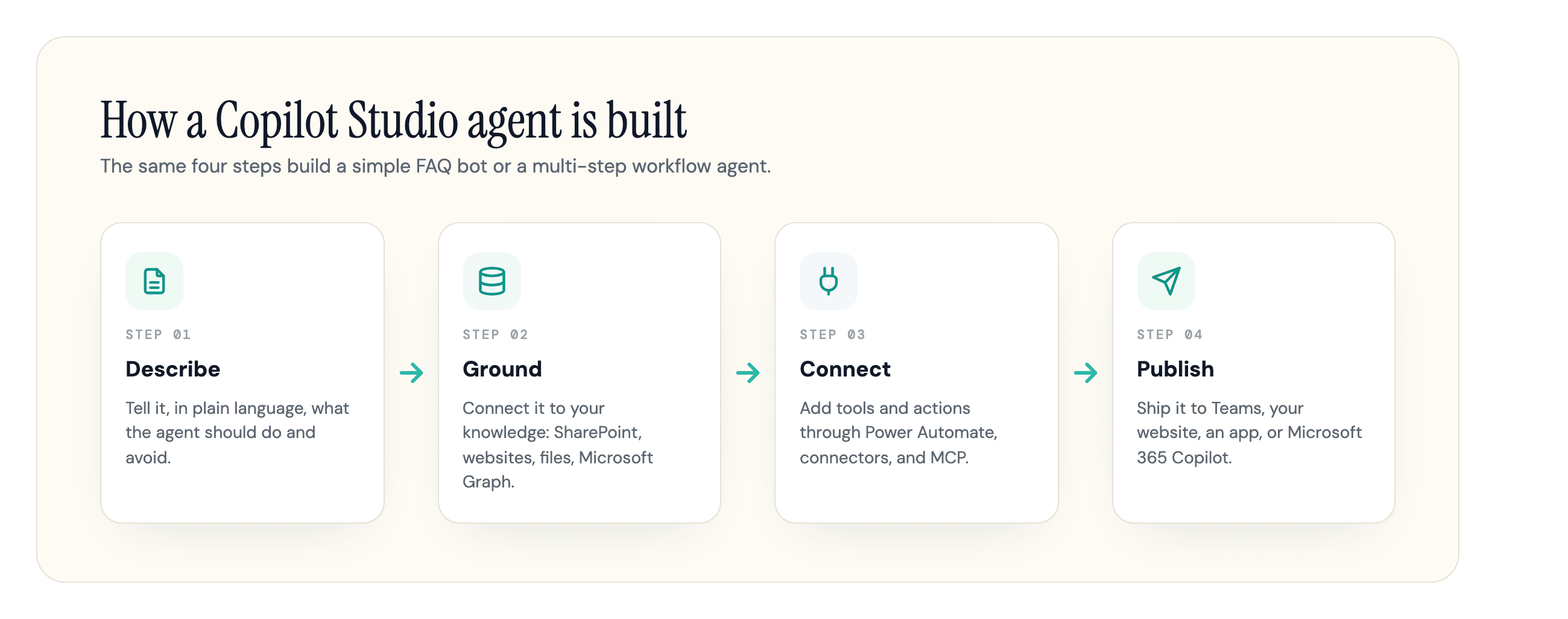
First you describe the agent. You tell Copilot Studio, in plain language, what it should do, what tone to use, and what it must not touch. The platform turns that into a working draft you can refine.
Then you ground it. An agent with no knowledge source is just a generic chatbot, so you connect it to the content it should answer from: a SharePoint library, a public website, uploaded files, or your tenant's Microsoft Graph. This is the step that decides whether answers are useful or vague, and it is where a lot of projects quietly succeed or fail.
Next you add tools and actions. Through Power Automate flows, prebuilt connectors, and newer options like Model Context Protocol (MCP) tools and the Work IQ layer, the agent gains the ability to do things rather than only describe them.
Finally you test and publish. You try the agent in a test panel, then publish it across the channels you need: Microsoft Teams, a website, a mobile app, or inside Microsoft 365 Copilot. Microsoft rebuilt this experience through 2026 around generative orchestration, where the agent plans which knowledge to pull and which tools to call to answer, rather than following only the scripted topic-by-topic flows of the older Power Virtual Agents model. Those classic topics still exist when you want tight, predictable control, but you rarely have to think in those terms to ship something useful.
Pricing and Licensing: Copilot Credits Decoded
Pricing is where the simple product gets complicated. Copilot Studio does not charge per user. It charges per Copilot Credit, a usage currency pooled across your whole tenant. The number of credits an agent burns depends on what it does, not how many people talk to it. For how Studio's credits sit alongside the rest of Microsoft's Copilot pricing, see our Microsoft Copilot pricing guide.
There is one common point of confusion here. On September 1, 2025, Microsoft renamed the unit from "messages" to "Copilot Credits." Per Microsoft's licensing documentation, there was "no change in the quantity per prepaid pack or to the pay-as-you-go rate." So older guides that talk about "25,000 messages" are describing the same 25,000 units, just under the old name. What the credit model makes visible is that not every interaction costs the same.
This is the table that explains your bill, taken from Microsoft's billing rates:
| What the agent does | Copilot Credits |
|---|---|
| Classic answer (a scripted, pre-written reply) | 1 |
| Generative answer (AI writes the reply) | 2 |
| Agent action (a tool or step, including computer use) | 5 |
| Microsoft Graph grounding (per message) | 10 |
| Agent flow actions (per 100 actions) | 13 |
| Standard AI tools (per 10 responses) | 15 |
| Premium / reasoning AI tools (per 10 responses) | 100 |
| Content processing (per page) | 8 |
Two things follow from that 1-to-100 spread. First, costs stack inside a single reply. Microsoft's own example is an agent that grounds in your Microsoft Graph and writes a generative answer: that one response costs 12 credits, 10 for grounding plus 2 for the answer. Reasoning models cost the most, metered on top of the feature rate at 10 credits per 1,000 tokens, so a heavy reasoning reply can run many times the price of a normal one.
Second, the same agent design can cost wildly different amounts. A scripted FAQ bot costs about a cent per answer, and runs free for internal users on the included path. Swap in reasoning and live grounding and the same bot can run into the hundreds a month. Microsoft's documented support-agent example, four scripted plus two generative answers across 900 customers a day, works out to 7,200 credits a day before anything fancy.
Before you build, run your design through Microsoft's free Copilot Studio agent usage estimator. It turns agent type, traffic, and grounding choices into a credit forecast, which is the only reliable way to predict a consumption bill.
Two more cost realities catch teams off guard. Unused credits do not roll over month to month, and when consumption hits 125% of your prepaid capacity, Microsoft disables the agents until you add credits. So one department's experimental reasoning agent can drain the shared pool and disable another team's live bot, unless you ring-fence capacity per environment.
Pricing Models: Packs, Pay-as-You-Go, and What's Included
You buy those credits in one of a few ways, and the right one depends on how predictable your usage is.
| Plan | Price | Best for |
|---|---|---|
| Free trial | $0 | Building and testing an agent (you cannot publish from the trial) |
| Capacity pack | $200 / month for 25,000 credits | Steady, predictable usage (about $0.008 a credit) |
| Pay-as-you-go | About $0.01 per credit, via Azure | Pilots and spiky usage, no upfront commitment |
| Pre-purchase (CCCU) | Annual commitment, up to 20% off | Large, committed deployments |
| Included with Microsoft 365 Copilot | No extra credits | Internal agents used by licensed employees |
A common play is to cover your expected usage with a pack at the cheaper rate, then leave pay-as-you-go switched on as a safety net so you never hit the 125% cutoff. One quirk worth knowing: the standalone maker license itself is free, but assigning it needs a tenant credit-pack subscription first (a Microsoft 365 Copilot license or the trial are other ways in).
The headline price is also not the whole bill, and how big the rest of it gets depends on how you license it. When you reuse Microsoft 365 Copilot seats for internal agents, the credits sit on top of those seats (around $30 per user a month for Enterprise, less for the Business tier) and your base Microsoft 365 plan. And if your agents call custom Azure OpenAI models or process documents through SharePoint, separate Azure and SharePoint charges land on different invoices. A 100-person enterprise can be paying thousands a month before a single standalone credit is used. That layering, not the $200 pack, is what makes a Copilot Studio budget hard to forecast.
Is Copilot Studio Free?
Partly, and only in specific cases. There is a free trial, but Microsoft's documentation is clear that it lets you build and test an agent without letting you publish it, so it is for evaluation, not production. Several guides get this wrong and say you can deploy for free; you cannot.
The bigger "free" path is the Microsoft 365 Copilot inclusion. If your users already have a Microsoft 365 Copilot license, their internal agent interactions inside Teams, SharePoint, and Copilot Chat, from classic answers to generative answers and Microsoft Graph grounding, are zero-rated and consume no credits. The moment an agent faces the outside world, runs autonomously, or serves people without a Copilot license, it starts spending credits. So "is it free" really means "who uses the agent, and where."
Do You Actually Need Copilot Studio?
Before you buy anything, check whether you need full Copilot Studio at all, because many people who search for it do not.
If you just want AI help inside your Office apps, that is Microsoft 365 Copilot, not Studio. If you want a simple internal question-and-answer agent, the lighter agent builder included with a Microsoft 365 Copilot license is often enough on its own. You only need full Copilot Studio, with its credit packs, when you cross into custom topics and branching logic, actions that reach external systems through Power Automate, publishing to a public website or app, or enterprise governance controls.
The fit also depends on your stack. Copilot Studio is strongest when you are already invested in Microsoft 365, SharePoint, and Dynamics, where the connections are close to native. Wiring agents into non-Microsoft systems like Salesforce or SAP is real engineering work, not a few clicks. And for a small team, the $200 monthly floor plus unpredictable credit usage is often more than the value it returns, which is why smaller shops sometimes pick a lighter third-party tool instead.
Copilot Studio vs the Other "Copilots"
Microsoft's naming is genuinely confusing, so it helps to place Copilot Studio next to the products it gets mistaken for. Microsoft 365 Copilot is the assistant employees use. GitHub Copilot is a separate product for writing code in your editor, unrelated to agent building. Azure AI Foundry is the pro-code path for engineers who want full control over models and orchestration, where Copilot Studio is the low-code path. And Agent 365, which Microsoft made generally available in May 2026, is the control plane IT uses to govern and secure the agents once they exist.
You also choose the brain inside the agent. Copilot Studio lets you pick the underlying model, including options like Anthropic's Claude alongside OpenAI's GPT models, though custom models you bring through Azure get billed separately.
One question keeps coming up in the search results: is Copilot shutting down? No. The confusion comes from Power Virtual Agents, the old product that became Copilot Studio in late 2023. Nothing was killed; it was renamed and absorbed. The one real sunset is small: since June 30, 2026, the legacy Copilot Studio for Teams app can no longer create classic chatbots. It redirects makers to the main web app instead, and agents built before then keep working.
Where Copilot Studio Falls Short
Copilot Studio is capable, but the demos are smoother than the reality, and it is worth going in clear-eyed. The clearest picture comes less from vendor blogs than from the people running it day to day.
The first issue is cost, as we saw. Microsoft publishes the per-credit rates but not the usage volume your agents will hit, and the "fair use" limits on included internal usage are never quantified, so finance teams are left forecasting in the dark.
The second is grounding. Pointing an agent at your data is easy; getting clean, current answers out is not. In community threads on Reddit's r/copilotstudio, makers report that SharePoint grounding can be uneven, that uploaded documents often outperform pointed sources, and that agents sometimes lose the thread of a conversation after a couple of turns. Treat those as reported experiences rather than fixed facts, but they recur often enough to plan around.
The third is the "low-code" promise. You can stand up a basic agent in an afternoon, but anything serious tends to pull in variables, expressions, JSON, and connector authentication, which is to say it needs someone technical after all.
A fourth is governance. An agent inherits the permissions of the data you ground it on, so a poorly scoped agent can surface SharePoint content a user was never meant to see, and a public agent published with no authentication can be used by anyone with the link, along with whatever it is grounded on. Microsoft's answer is Managed Environments, data loss prevention policies, and Agent 365, but those are controls you set up rather than defaults, and they are split between your Microsoft 365 and Power Platform admins.
None of this is unique to Microsoft. Gartner predicts that over 40% of agentic AI projects will be canceled by the end of 2027, citing escalating costs, unclear business value, and inadequate risk controls, and it warns about "agent washing," vendors rebranding old chatbots as agents. Copilot Studio is a real platform, not agent washing, but the same discipline applies: start with one clear, valuable use case, measure it, and expand only when it pays off.
What Copilot Studio Means for Your Brand's AI Visibility
There is one more angle worth covering, and it matters whether or not you ever build an agent yourself. Every Copilot Studio agent runs on content. The internal ones you build are only as good as the knowledge you feed them, which is a direct argument for keeping your documentation clean, current, and well-structured. Vague source content produces vague agents.
The more interesting side is the agents you do not control. When a partner, a customer, or Microsoft 365 Copilot itself grounds an answer on the open web, your public content is the raw material. Copilot's consumer surfaces lean on the Bing index, so the same work that earns you a citation there strongly influences whether an agent names your brand or a competitor's. That is the heart of getting cited in Microsoft Copilot, and it is why an agent-ready website is becoming a visibility surface in its own right.
In our experience, the brands that show up well in AI answers are not the ones with the cleverest agents. They are the ones whose content is reachable and structured cleanly enough for any agent to read and lift. That is the boring, durable lever underneath all the agent hype.
If you want to know whether agents and AI crawlers can actually reach and read your content, that is exactly what we built our tools to check. Run your site through the AI Readiness scan to check whether AI agents can reach, crawl, and parse your pages, and use the AI Crawler Checker to confirm you are not blocking the major AI crawlers before they ever get to your content.
Frequently Asked Questions
Is Copilot Studio free?
Only for evaluation and for licensed internal use. The trial builds and tests agents but cannot publish them, and internal use by Microsoft 365 Copilot license holders is included at no extra credit cost. Any external, autonomous, or unlicensed use spends Copilot Credits.
What is the difference between Copilot Studio and Microsoft Copilot?
Microsoft 365 Copilot is the finished assistant employees use inside Word, Excel, and Teams. Copilot Studio is the low-code platform you use to build your own custom agents.
Is Copilot Studio the same as Power Virtual Agents?
Yes. Power Virtual Agents was renamed Copilot Studio in late 2023 and expanded from chatbots into full AI agents. If you built a PVA bot, it now lives in Copilot Studio.
Is Copilot shutting down?
No. The confusion comes from Power Virtual Agents being renamed and folded into Copilot Studio, not removed. The only sunset is the legacy Copilot Studio for Teams app, which stopped creating classic chatbots on June 30, 2026 and now redirects makers to the web app.
How much does a Copilot Studio agent cost?
It depends entirely on what the agent does. A scripted answer costs 1 Copilot Credit, a generative answer costs 2, and a reasoning response is metered per token and costs many times more. A prepaid pack is $200 a month for 25,000 credits, so the same agent can run a few dollars or several hundred depending on its design.
Do you need a license to use Copilot Studio, and who needs one?
The maker license is free, but your tenant needs a Copilot Credit pack subscription in place first. End users do not need their own Copilot Studio license; only the people building agents do, and a Microsoft 365 Copilot license covers internal use.
More Questions
Can you build a Copilot Studio agent without coding?
For simple agents, yes, you describe what you want in plain language. More advanced agents tend to require variables, expressions, JSON, and connector setup, so "low-code" is accurate but "no-code" overstates it.
Sources
- Copilot Studio overview, Microsoft Learn -
learn.microsoft.com/en-us/microsoft-copilot-studio/fundamentals-what-is-copilot-studio - Copilot Studio billing rates and management, Microsoft Learn -
learn.microsoft.com/en-us/microsoft-copilot-studio/requirements-messages-management - Copilot Studio licensing, Microsoft Learn -
learn.microsoft.com/en-us/microsoft-copilot-studio/billing-licensing - Microsoft Copilot Studio pricing -
microsoft.com/en-us/microsoft-365-copilot/pricing/copilot-studio - Copilot Studio pay-as-you-go pricing, Microsoft Azure -
azure.microsoft.com/en-us/pricing/details/copilot-studio - Copilot Studio agent usage estimator, Microsoft -
microsoft.github.io/copilot-studio-estimator - National Zakat Foundation customer story, Microsoft -
microsoft.com/en/customers/story/23068-national-zakat-foundation-microsoft-copilot-studio - Gartner: over 40% of agentic AI projects will be canceled by the end of 2027 -
gartner.com/en/newsroom/press-releases/2025-06-25-gartner-predicts-over-40-percent-of-agentic-ai-projects-will-be-canceled-by-end-of-2027 - r/copilotstudio community discussion, Reddit -
reddit.com/r/copilotstudio/comments/1ip7y97/what_is_your_experience_with_copilot_studio_does