
Agentic browsers have arrived. Comet, Gemini in Chrome, and ChatGPT's own agentic browsing mode no longer just read your pages; they navigate them, fill in forms, and complete purchases for the person who asked. They're part of a broader wave of named AI agents now shipping across every business function. That turns a quiet question into an urgent one: is your site agent-ready? For most sites the answer is no, and the reasons are specific and fixable.
What "Agent-Ready" Actually Means, and How It Differs from SEO
For twenty years the job was to get a page read. Crawlers fetched your HTML, an index decided you were relevant, and a human clicked through to do the rest. An agent-ready website answers a newer question: can software finish the job the human used to do, on your site, without a person driving the mouse. That shift, from software that answers to software that acts, is what agentic AI means.
That is the line between this and SEO. Search optimization gets you found and cited. An AI crawler fetching your page for a ChatGPT answer is still just reading. An agentic browser does the next thing, it reads the page, decides what to do, then clicks, types, selects, and submits to complete a task its user handed off. Reading is passive. Acting is not.
So agent-ready means your site survives that second step. The agent has to reach your pages, render them the way a machine sees them, understand what is on them, and then operate the controls, the search box, the filters, the checkout form. Any link in that chain that only works for a human with eyes and a cursor is a link an agent drops.
Check the first link in the chain
Before an agent can act on your site, a crawler has to reach it. The free AI Crawler Checker shows which of 34 AI crawlers your robots.txt allows or blocks, with the exact line to fix.
This is why agent-readiness is not a new coat of paint on generative engine optimization. GEO is about being the answer. Agent-readiness is about being usable once the answer sends an agent your way. The two overlap, the same bots and the same access path feed both, but the failure modes are different, and the second one is the one almost no site has tested.
The Agentic Browsers Already Using Your Site
This is not a forecast. Perplexity's Comet and Gemini in Chrome are shipping products, and people are already pointing them at real websites to research, compare, and buy. OpenAI took a different path to the same place: it shipped a standalone Atlas browser in October 2025, then discontinued it on August 9, 2026, folding the same agentic capability, an assistant that clicks and fills in forms on its own, into the regular ChatGPT app and a Chrome extension/sidebar instead of keeping a separate browser.
The traffic shows it. Agentic-browser traffic grew more than 1,300% between January and August 2025, reaching nearly 4.5 million requests a month, per HUMAN Security data reported by Snowplow, then jumped another 131% month over month into September. And 87% of those agent visits are product-related, which suggests most of this is shopping intent, not idle crawling. That surge was driven by Comet and ChatGPT Agent; ChatGPT Atlas briefly joined Comet at the front of it after its October 2025 launch, before OpenAI discontinued the standalone Atlas browser on August 9, 2026 and moved the same agentic browsing into the ChatGPT app itself, reaching ChatGPT's much larger existing audience instead of requiring a separate download.
The catch is that not all of these agents see your site the same way. Comet and Gemini in Chrome are built on Chromium, so they do run your JavaScript and even reason over a screenshot of the rendered page, and ChatGPT's agentic mode, now a Chrome extension/sidebar and a feature of the ChatGPT app rather than a standalone browser, inherits the same rendering when it runs inside Chrome. But many of the agents that matter most for visibility, the answer-fetching bots behind ChatGPT and Perplexity citations, do not run JavaScript at all and read your raw HTML. A button obvious to a screenshot-reading agent can be invisible to a text-reading one, and content that only appears after a script runs is simply not there for the bots that skip JavaScript.
So "agent traffic" is not one audience with one set of needs. It is several, arriving through the same AI crawlers you already know, each tripping over a different part of your site.
What Actually Breaks When an Agent Visits
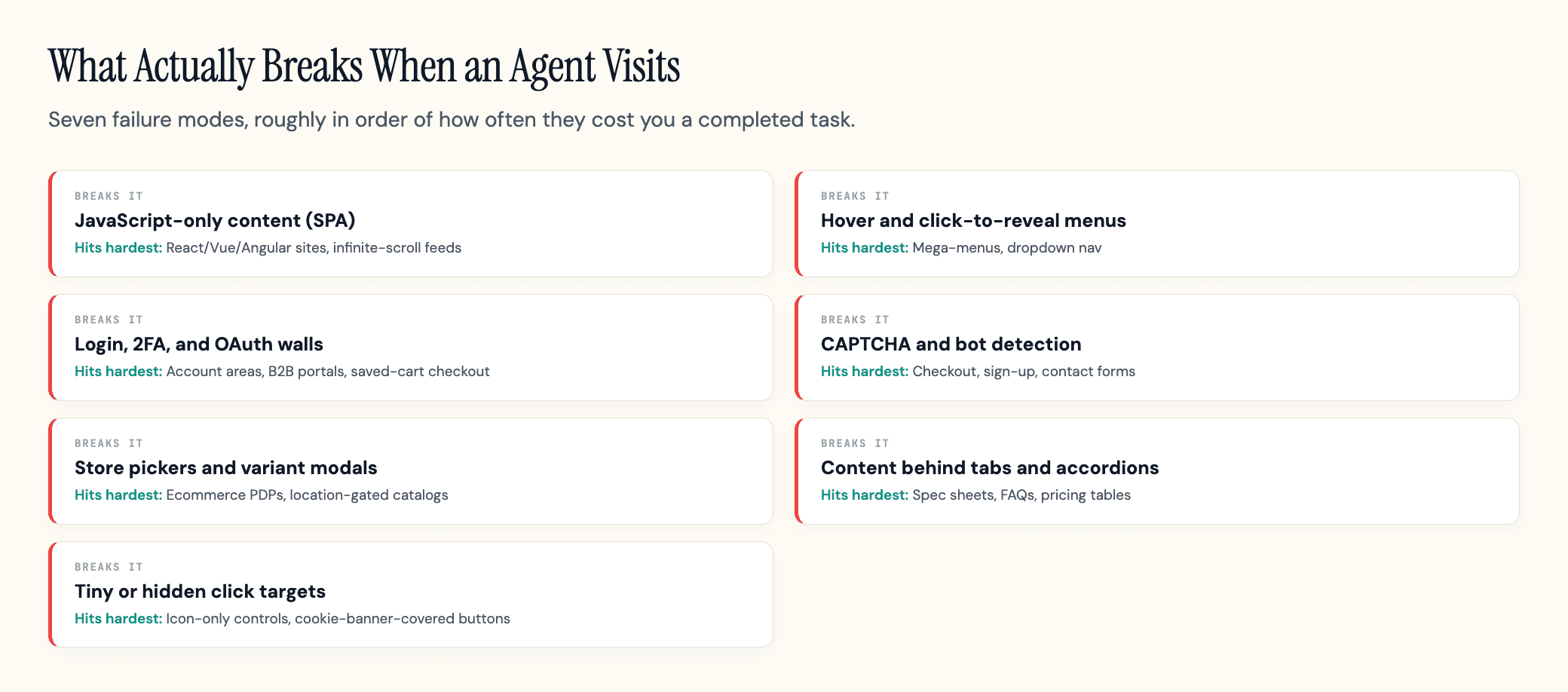
Most agent failures are not exotic. They are the same patterns that have always tripped up automation and accessibility tools, now hitting a much larger audience. Here are the ones that cost you a completed task.
| What breaks | Why it stops the agent | Hits hardest |
|---|---|---|
| JavaScript-only content (SPA) | The answer-fetching bots and many agents do not run JavaScript, so a script-built price, button, or whole page renders as empty; even agents that do render JS miss content that loads too late | React/Vue/Angular sites, infinite-scroll feeds |
| Hover and click-to-reveal menus | An agent does not move a mouse to hover; navigation that only opens on hover never opens | Mega-menus, dropdown nav |
| Login, 2FA, and OAuth walls | An agent cannot read an SMS code or pass a biometric prompt, so the task halts at the gate | Account areas, B2B portals, saved-cart checkout |
| CAPTCHA and bot detection | Controls built to stop automation stop the legitimate agent too, with no way to tell them apart | Checkout, sign-up, contact forms |
| Store pickers and variant modals | A required pop-up selection mid-flow blocks the path the agent needs to follow | Ecommerce PDPs, location-gated catalogs |
| Content behind tabs and accordions | Specs and details not in the initial DOM are easy to miss; the agent answers from what it can see | Spec sheets, FAQs, pricing tables |
| Tiny or hidden click targets | Vision-based agents filter out elements under roughly 8 square pixels or covered by transparent overlays | Icon-only controls, cookie-banner-covered buttons |
In our experience auditing sites for AI visibility, the single most common agent-blocker is not a clever edge case. It is a price, an add-to-cart button, or a key paragraph that only exists after JavaScript runs. The page looks perfect in your browser and arrives nearly empty to most AI crawlers and the answer bots behind AI citations. The quickest free check: load the page with JavaScript disabled and see what survives. For a graded version, Content Analyzer fetches the page the way a crawler would and diffs the JavaScript and no-JavaScript versions.
Reach, Render, Understand: The Three Gates Every Agent Hits
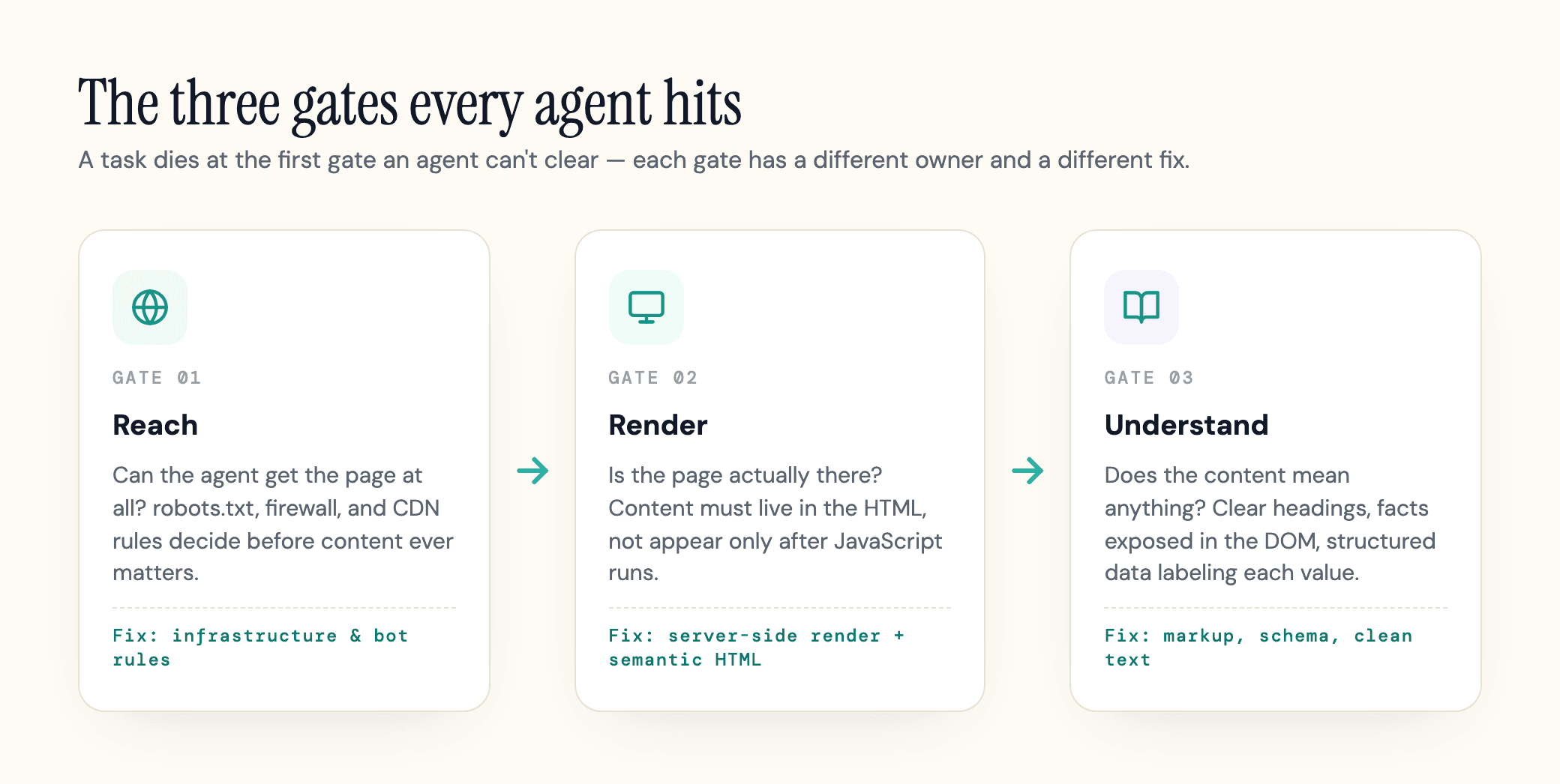
Every one of those failures lives in one of three gates, and it helps to think in those terms because each gate has a different owner and a different fix.
Reach: Can the Agent Get In?
Reach is whether the agent can get the page at all. This is your robots.txt, your firewall, and your CDN rules. Block the wrong bot, or let a security rule challenge non-browser traffic, and the agent never sees a thing. Reach is an infrastructure decision, and it is the one site owners most often get wrong by accident.
Render: Is the Page Actually There?
Render is whether the page is actually there once the agent arrives. A text-based agent needs the content in the HTML, not assembled later by a script. A vision-based agent needs a stable layout it can map, which is where Google's guidance on the accessibility tree comes in, the same machine-readable map screen readers use. Semantic HTML does most of the work here: a real <button> or <a> tells an agent what a thing does, while a clickable <div> tells it nothing.
Understand: Can It Make Sense of the Page?
Understand is whether the content means anything once it is rendered. Clear headings, prices and specs exposed in the DOM rather than buried in a tab, and structured data that labels what each thing is. This is also where a markdown version of the page and an llms.txt file help, by handing the agent clean text instead of making it parse a layout.
Reach and render are mostly Agent Readiness questions, the kind you check at the site level. Understand is where citability and usability meet. Get all three and an agent can find you, see you, and act. Miss any one and the task dies at that gate.
Should You Block or Allow AI Agents?
The honest answer is that "block" and "allow" are too blunt. The useful question is which agents, doing which job.
The training-vs-citation split is covered in our AI crawlers guide: blocking training bots like GPTBot only opts you out of training, while blocking search and citation bots makes you uncitable. Agentic browsers add a third case: an agent fetching your page because a real person asked it to buy something. Block that and you are turning away a customer who showed up with a credit card. Whether those agents will recommend and buy your brand in the first place is the wider commerce question this feeds into.
Most sites have not made these choices on purpose. Cloudflare's scan of 200,000 domains found 78% have a robots.txt, but almost all are written for search engines, and only 4% declare any AI-specific preference at all. The controls exist; hardly anyone has set them for this.
Then there is the paradox: your security stack cannot tell a fraud bot from the legitimate agent acting for your customer. You cannot fix that by turning protection off. The emerging answer is to let good agents prove who they are: standards like Web Bot Auth have agents sign their requests so you can safelist them while still challenging anonymous automation. It is early, but the direction is clear: identity over blanket blocking.
For now, the safe default is the same as it has always been: block training if you want to, keep search and citation bots reachable, and do not let a blanket security rule quietly wall off the agents your own customers are sending.
How to Make Your Site Agent-Ready
None of this requires rebuilding your site. It is a sequence of fixes, roughly in order of impact.
-
Render your critical content server-side. If the price, the buy button, or the core copy only appears after JavaScript, move it into the HTML that ships on first load. This single fix clears the most common agent failure. Test it by viewing the page with JavaScript disabled, or with a render check, and confirm the important parts are still there. Our JavaScript SEO guide shows how to run that test and which bots need it.
-
Use semantic HTML and a stable layout. Real
<button>and<a>elements, labels tied to inputs, headings in order. Keep the layout steady and avoid transparent overlays that cover live controls. This is the same work that helps screen readers, and it makes the accessibility tree an agent can trust. -
Expose the facts in the DOM. Pull prices, specs, availability, and key details out of hover states and tabs and into the rendered page. Add structured data so each value is labeled for what it is.
-
Set your robots.txt on purpose. Decide which crawlers do which job, and use Content Signals to separate training from inference rather than blocking with one broad rule.
-
Offer a clean text version. A markdown rendering of important pages and an llms.txt reading list give agents a plain-text route to the same facts. Cloudflare measured markdown content negotiation cutting token use by up to 80%, with agents reaching a correct answer 66% faster on optimized docs. Treat llms.txt as cheap agent-friendliness plumbing, not a ranking signal, because it is not one.
-
Do not trap agents on public flows. Reserve CAPTCHA and login for what genuinely needs protecting. If a public product or article sits behind a challenge, an agent stops there.
-
Give agents a fallback. When a flow truly needs JavaScript or auth, provide a static or API path to the same information, so an agent that cannot complete the interactive version can still read the result.
Prompt Injection: The Risk Site Owners Miss
There is a security angle most agent-readiness checklists skip, and it cuts both ways.
An agentic browser reads the page content as part of deciding what to do. If an attacker can place text on a page the agent reads, they can try to smuggle in instructions, hidden copy that tells the agent to ignore its task, leak data, or go somewhere else. This is not theoretical: security researchers at Guardio tricked Perplexity's Comet into a phishing scam in under four minutes by feeding it adversarially crafted content, and OpenAI's own security team writes that prompt injection is unlikely to ever be fully "solved." Palo Alto Networks treats these indirect instructions as a core risk of the agentic web.
For a site owner, the realistic exposure is narrow but worth naming. The agent has to actually read attacker-controlled text, so the surfaces to watch are the ones where other people's content lands on your pages: user reviews, comments, forum posts, and any third-party widget you render. The fix is the same hygiene you already owe those fields: sanitize and constrain user-generated content, and do not blindly inject third-party text into pages an agent will act on.
This is an emerging risk, not a five-alarm fire for a normal brochure or store site. But if your pages carry content you do not write, it belongs on your list.
For the fuller picture, including five real disclosed incidents (not lab demos) and how the same mechanism plays out beyond agentic browsers, see AI agent security risks.
How to Know If Your Site Is Actually Agent-Ready
Here is the awkward part. You cannot feel any of this in your own browser, because your browser runs JavaScript, holds your login, and renders every layout perfectly. The agent's experience is invisible from where you sit, and your analytics will not fill the gap. Standard Google Analytics cannot reliably separate an AI agent from a human, so the traffic that is quietly failing on your checkout does not show up as a problem you can name.
So you have to look at the site the way an agent does, on purpose. Two checks cover the first three gates; no scanner yet, ours included, simulates an agent completing your checkout, so test that flow yourself with JavaScript off.
A site-level scan answers reach and render across your whole domain. geotoolbox's Agent Readiness scan does this free from a root URL: it tests live access for the major AI crawlers and captures what a headless agent actually sees, so the gap between your perfect-looking browser and an agent's view stops being invisible.
A page-level check answers the same questions for a specific URL and adds whether the page is citable once an agent gets in. Content Analyzer grades a single page on exactly that, the access path and the content together.
Between the two you get the thing the checklist alone cannot give you: proof. Not "we added llms.txt," but "an agent can now reach, render, and read this page," with a before and after you can hand a developer.
Google now ships a first-party check as well. Lighthouse 13.3 (May 7, 2026) added an Agentic Browsing category to its default audits, and it has since landed where it was headed: Chrome 150 (released June 30, 2026) ships it as an opt-in checkbox in the DevTools Lighthouse panel, and PageSpeed Insights now scores it too. It runs deterministic checks on four signals: the accessibility tree, layout stability, an optional llms.txt fetch, and WebMCP, an early browser API that borrows MCP's tool-exposure model to let a page register actions an agent can call directly. The result is a pass ratio rather than a 0 to 100 score, a category Google itself still labels "under development and subject to change," and it is a floor rather than an agent simulation, but Google grading agent-readiness in its default tooling tells you where this is heading.
Agent-Ready Is the New Table Stakes
The work that makes your site usable by an agent is the same work that makes it readable by a citation bot. The page that renders cleanly for Comet is the page ChatGPT can quote. The robots rules that let an agent through are the rules that keep you in Perplexity's answers. Reach, render, understand: one access path feeds both how AI search cites you and whether an agent can act on your behalf.
Agent traffic is still a small share of most sites' totals, but the curve says it stops being optional for ecommerce first. The work is cheap, it doubles as citation hygiene, and the sites that do it will quietly win the tasks the sites that do not are dropping on the floor.
The cheapest first move is to stop guessing. Run your homepage and a key product or service page through geotoolbox's free Agent Readiness scan (free with an account) and see what an agent actually gets when it arrives. Most owners find one or two fixes that matter far more than the rest, and you cannot prioritize what you have never seen.
Frequently Asked Questions
Can AI agents execute JavaScript, or is my React site invisible to them?
Know which class you are serving: Chromium-based agentic browsers (Comet, Gemini in Chrome) and ChatGPT's own agentic mode (a Chrome extension/sidebar and a ChatGPT app feature since OpenAI discontinued the standalone Atlas browser in August 2026) all run JavaScript and even read screenshots, while the answer-fetching bots behind citations (OAI-SearchBot, PerplexityBot and peers) read raw HTML only. A React site is fine for the first group and invisible to the second unless it renders server-side.
Will Cloudflare or a CAPTCHA block AI shopping agents from buying on my site?
Check your own logs before guessing: filter for agent user-agent strings and look for 403s and challenge pages on product and checkout paths. If you find them, scope the rule by path rather than removing it; challenges on /account and /admin cost you nothing, challenges on public product pages cost you delegated purchases.
Should I block AI agents, or will that make me invisible?
The decision is per bot class, and the one genuinely new call is agentic traffic: unlike training crawlers, an agentic browser session often ends in a transaction, so blocking it has a direct revenue cost rather than a visibility cost. Audit which classes your current rules block before deciding anything.
Does Google Analytics track AI agent traffic?
The workarounds that exist today: server-log analysis by user-agent string, a custom dimension keyed to known agent UAs, and watching for sessions with impossible interaction speed. None are complete, because in-browser agents inherit the user's fingerprint, which is why log-level checks beat analytics dashboards here.
Is llms.txt worth doing if Google says it does not affect ranking?
Yes, but for the right reason. llms.txt is not a ranking or AI-citation signal, and you should not sell it as one. It did just land in Google's own tooling, though: Lighthouse 13.3's Agentic Browsing audits include an llms.txt check (May 2026), and it grades the file rather than merely fetching it. Sites with no llms.txt are marked not applicable, but a file that is served and malformed fails outright: the audit wants a Markdown file with at least one H1 heading, at least one link, and more than fifty characters. That is a fair picture of its current weight: optional to have, but graded once you do. Our breakdown of whether llms.txt is worth it covers the narrow group it genuinely helps and the decision rule for everyone else.
Is agentic checkout real today, or just hype?
Real, and the protocol layer has now arrived: the Agentic Commerce Protocol, an open standard from OpenAI and Stripe, already serves as the connective layer between merchants and ChatGPT users, and the Universal Commerce Protocol, co-developed by Google, Shopify, Amazon, Walmart, and Stripe among others, covers catalog search, cart building, identity linking, checkout, and order management. A separate crypto-native rail, x402, settles agent payments in stablecoins over HTTP. But those rails only work where a merchant has integrated them; everywhere else, an agent buys through your normal human checkout. That is exactly why the boring fixes still matter.
Sources
- Introducing the Agent Readiness score - Cloudflare (robots.txt and AI-preference adoption, markdown token and speed benchmarks) -
blog.cloudflare.com/agent-readiness - Build agent-friendly websites - Google web.dev (accessibility tree, semantic HTML, interactive element sizing) -
web.dev/articles/ai-agent-site-ux - Lighthouse agentic browsing scoring - Chrome for Developers (four deterministic agent-readiness checks, pass-ratio scoring) -
developer.chrome.com/docs/lighthouse/agentic-browsing/scoring - Lighthouse v13.3.0 release notes - GoogleChrome on GitHub (Agentic Browsing added to default config, May 7, 2026) -
github.com/GoogleChrome/lighthouse/releases/tag/v13.3.0 - Lighthouse llms.txt audit source - GoogleChrome on GitHub (the shipped v13.3.0 behavior: grades a served file on H1 heading, links, and length, not just server errors; the Chrome for Developers doc page describing this audit was never updated past its May 5, 2026 draft and undersells what it actually checks) -
github.com/GoogleChrome/lighthouse/blob/v13.3.0/core/audits/agentic/llms-txt.js - What Is an Agentic Browser? - Snowplow (agent traffic growth, product-page intent, reporting HUMAN Security data) -
snowplow.io/blog/what-is-an-agentic-browser - Agentic Browsing Is Here - Snowplow (analytics blind spot, GA4 cannot distinguish agents) -
snowplow.io/blog/agentic-browsing-is-here - What Are Agentic Browsers? - Palo Alto Networks (prompt injection, over-privileged automation) -
paloaltonetworks.com/cyberpedia/what-are-agentic-browsers - Researchers Trick Perplexity's Comet AI Browser Into a Phishing Scam - The Hacker News (real-world prompt injection example) -
thehackernews.com/2026/03/researchers-trick-perplexitys-comet-ai.html - Agentic Commerce Protocol - OpenAI and Stripe (open standard for agent-to-merchant checkout) -
agenticcommerce.dev - Universal Commerce Protocol - UCP co-developers incl. Google, Shopify, Amazon, Walmart, Stripe (catalog, cart, identity, checkout standard) -
ucp.dev - Evolving Atlas into ChatGPT for browser-based agentic work - OpenAI Help Center (Atlas discontinued August 9, 2026, agentic browsing folded into the ChatGPT app and a Chrome extension/sidebar) -
help.openai.com/en/articles/20001371-evolving-atlas-into-chatgpt-for-browser-based-agentic-work