
Microsoft Copilot is the AI assistant Microsoft has put almost everywhere: a free chatbot on the web, a button in Word and Excel, an assistant built into Windows, and a paid layer that reads your work email. If you want the plain version of what Copilot actually is, which versions exist, what they cost, and whether it is just ChatGPT with a Microsoft badge, this is it, current as of August 2026.
First, the hard part. "Copilot" is not one product. Microsoft uses the name for at least seven different things across four price models, and its own pages rarely stop to say which one you are looking at. Worse, GitHub Copilot is a separate product that a lot of people mean when they say "Copilot." This guide is about Microsoft's AI assistant. We will sort the family out, then get to the part most explainers skip: because Copilot now answers questions by quoting web pages, what it says about your company is something you can influence.
What Is Microsoft Copilot?
Microsoft Copilot is an umbrella brand for a family of AI assistants built on large language models, wired into Microsoft's apps, your work data, and live web search. Microsoft's own definition is "a conversational, AI-powered assistant" that helps you write, summarize, analyze, code, and automate tasks. The key word is family. There is no single app called "Copilot" that does everything; there is a consumer chatbot, a version inside Microsoft 365, one built into Windows, a security tool, and a platform for building custom ones.
Under the hood, every Copilot combines three things: a language model that understands your prompt and writes the answer, a source of grounding (the live web, or your own files and email when you are signed in to a work account), and an integration layer that lets it act inside an app, like drafting an email in Outlook or building slides in PowerPoint.
If the product feels new, the engine is not. Copilot started life as Bing Chat, which Microsoft launched on February 7, 2023. Microsoft began rebranding it to "Microsoft Copilot" on September 21, 2023, and folded its various AI features under that one name. Like Google's Gemini, it is a general-purpose assistant that the maker has pushed into its entire ecosystem rather than a single standalone app.
Which Copilot? The Products Hiding Under One Name
The names are where the confusion starts, so here is the whole family in one place. When someone says "Copilot," they could mean any of these:
| Product | Who it's for | What it does | Price (2026) |
|---|---|---|---|
| Free Copilot | Anyone | Web and app chatbot: questions, writing, image generation, voice | Free |
| Microsoft 365 Premium (replaced consumer Copilot Pro) | Individuals and families | Office apps plus Copilot inside Word, Excel, PowerPoint, Outlook | $19.99/month |
| Microsoft 365 Copilot | Businesses | Copilot grounded in your work email, files, chats, and meetings | $30/user/month (Enterprise); $21 list for Business, up to 300 users |
| Copilot Chat | Work and school | Secure, web-grounded chat using your work identity (no automatic access to your org's data) | Free with eligible Microsoft 365 plans |
| Copilot Studio | Builders and IT | Low-code tool to build and govern custom Copilot agents | ~$200/pack (25,000 credits) or $0.01/credit pay-as-you-go |
| Windows Copilot | Windows 11 users | System assistant: change settings, open apps, search, chat | Free in eligible Windows editions |
| Security Copilot | Security teams | AI assistant for threat hunting and incident response | Metered by Security Compute Units |
| GitHub Copilot | Software developers | Separate product: AI coding assistant inside code editors | Free tier, then Pro and Business plans |
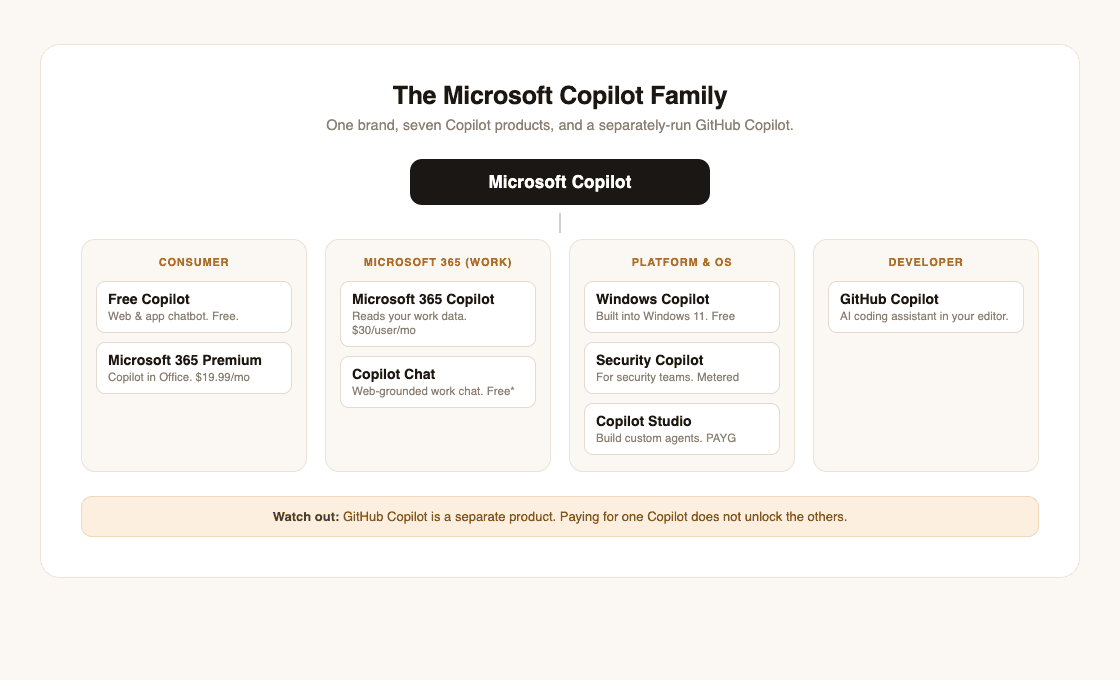
Two distinctions cause most of the confusion. The first is GitHub Copilot versus Microsoft Copilot. They share a name and an owner and nothing else. GitHub Copilot writes code inside a developer's editor; Microsoft Copilot drafts your emails. Paying for one does not give you the other.
The second is free Copilot versus Copilot Chat versus paid Microsoft 365 Copilot. Free Copilot and Copilot Chat can both search the web, and you can upload a file for either to read. What they cannot do is reach into your organization's data on their own. Only the paid Microsoft 365 Copilot grounds itself in your whole work corpus, summarizing your Teams meetings and drafting replies from your real inbox without you pasting anything in. That gap, between an assistant that knows the public web and one that knows your work, is the whole reason the business version costs money.
One more naming note worth keeping straight: Microsoft retired the standalone consumer Copilot Pro subscription and folded its features into Microsoft 365 Premium, which it introduced on October 1, 2025 at $19.99 a month. If a guide still talks about Copilot Pro as the main consumer plan, it is out of date.
How Microsoft Copilot Works
Copilot answers in one of two modes, and knowing which one you are in explains almost everything about what it can and cannot do.
In web mode, which is what the free Copilot and Copilot Chat use, it works like any AI search engine: it runs a search, reads the top web pages, and writes an answer that quotes them with clickable, numbered citations. It knows the public internet and whatever you upload to it, but it does not reach into your organization's files on its own.
In work mode, which only the paid Microsoft 365 Copilot has, it adds a second source: the Microsoft Graph. That is Microsoft's index of your organization's content, your emails, documents, chats, calendar, and meetings, scoped to what you already have permission to see. This is what lets it say "summarize the thread with the client" or "find the deck from last quarter." It is also why the business version raises real privacy questions, which we will get to.
The models behind it shift often. As of July 2026, Copilot's default reasoning runs on OpenAI's GPT-5.6. Microsoft made it the preferred model for Microsoft 365 Copilot across Word, Excel, PowerPoint, Chat, and Cowork when GPT-5.6 became generally available on July 9, 2026. It runs as a fast everyday mode and a slower "Think Deeper" reasoning mode, the same family that powers ChatGPT. But Microsoft has been adding choice: since September 2025 it offers Anthropic's Claude models (Sonnet 4 and Opus 4.1) as options inside Copilot Studio and its Researcher agent, and its autonomous features can still route to Anthropic models. Copilot is also becoming more of a multi-model router than a pure-GPT one: Office Watch, reporting Bloomberg, July 2026 reports that Microsoft has quietly begun routing some high-volume Excel and Outlook prompts to its own in-house "MAI" models to cut costs, even with GPT-5.6 as the headline model. So "what model is Copilot" no longer has one answer; it depends on the surface and the task.
Copilot is less a single AI than a router that sits between you, a choice of frontier models, and either the web or your work data, with Microsoft's apps as the place it does the work.
Is Microsoft Copilot Free? What It Actually Costs
Yes, there is a genuinely free Copilot, and for most personal use it is enough. The free version at copilot.microsoft.com and in the mobile apps gives you chat, web answers with citations, image generation, and voice, with usage limits during busy periods.
For everyday use, you start paying when you want one of two things. If you want Copilot inside your personal Office apps, that comes with Microsoft 365 Premium at $19.99 a month. If you want Copilot to read your company's work, that is Microsoft 365 Copilot at $30 per user per month for enterprises. Smaller businesses can get the Business version (up to 300 users) at a $21 list price, though Microsoft has been running a 15% promotion that brings it to $18 per user per month through December 31, 2026 (month-to-month, with no annual commitment, is $25.20). For every tier broken down, including the base-license math and the Studio and Cowork credit pricing, see our Microsoft Copilot pricing guide.
Don't confuse the free Copilot Chat that shows up at work with the paid version. It looks identical but cannot reach your emails and files on its own. If a colleague says "Copilot summarized my inbox" and yours will not, the difference is a $30 license, not a setting.
Microsoft Copilot vs ChatGPT
The most common question about Copilot is whether it is just ChatGPT wearing a Microsoft badge. It is a fair question, because the consumer Copilot does run on the same OpenAI models, and it grew out of the same partnership.
The real differences are not the model; they are the wiring around it.
| Dimension | Microsoft 365 Copilot | ChatGPT |
|---|---|---|
| Underlying models | OpenAI GPT-5.6 (plus Claude options and in-house MAI models) | OpenAI GPT-5.6 |
| Reads your work files | Yes, via Microsoft Graph (permission-scoped) | Only files you share or connect |
| Acts inside Office apps | Yes, in Word, Excel, Outlook, Teams | No |
| Your data trains public models | No, under Enterprise Data Protection | Depends on your plan and settings |
| Best for | Work grounded in your company's data | Standalone chat, brainstorming, coding |
Microsoft 365 Copilot is grounded in the Microsoft Graph, so it can answer using your own emails, files, and meetings, which ChatGPT cannot reach unless you paste them in. For businesses, Copilot also runs under Enterprise Data Protection: Microsoft keeps your work prompts and company data inside the Microsoft 365 service boundary and does not use them to train the public models. And Copilot can act inside Word, Excel, and Outlook, while ChatGPT mostly hands you text to copy out.
For a standalone chatbot to brainstorm or write, ChatGPT and free Copilot are close, and many people find ChatGPT a little sharper. For an assistant that already lives inside the Microsoft tools your company pays for and can safely read your work, Copilot is doing something ChatGPT is not built to do. We go deeper on this in Microsoft Copilot vs ChatGPT, and the same split shows up across the field in Gemini vs ChatGPT.
What's New in 2026: Agents and Copilot Cowork
Through 2026, Microsoft's whole pitch for Copilot shifted from "AI that answers questions" to AI that does multi-step work on its own. The clearest example is Copilot Cowork, which became generally available on June 16, 2026. Cowork can take a long, multi-step job, run it in the background, and let you check progress from your phone while it works. Notably, it launched on Anthropic models (Opus 4.8 and Sonnet 4.6, with Claude Sonnet 5 rolling into Cowork on July 2, 2026) and can still use them, though Cowork is multi-model: GPT-5.6 became its preferred model on July 9, 2026, alongside the rest of Microsoft 365 Copilot. On top of a Microsoft 365 Copilot license, Microsoft bills it through pay-as-you-go "Copilot Credits" at about $0.01 per credit rather than a flat fee.
This is part of a broader move into agentic AI: assistants that take actions, not just give answers. Copilot Studio lets companies build their own agents that reach into CRM and database systems, and Microsoft has added prebuilt ones like Researcher and Analyst. If you tried Copilot a year ago and found it was a glorified chatbot, the 2026 version is a different kind of tool, for better and worse.
Where Copilot Falls Short
Microsoft's own pages skip this part. Across user forums and reviews, the same complaints come up, and they are worth knowing before you rely on it.
Quality is uneven. Copilot is strong at summarizing meetings and drafting routine email, and weaker at complex reasoning and spreadsheet work, where users still reach for ChatGPT or Claude. Like any large language model, it can state wrong things confidently, so its output needs checking.
Privacy is the real catch for business. Copilot inherits your existing file permissions; it does not expand them. But that cuts both ways: as security analysts have flagged, if a sensitive SharePoint folder was accidentally shared too widely, Copilot makes it trivially easy to find. Copilot did not create the oversharing, but it removes the obscurity that was hiding it.
It feels forced. Microsoft has pushed Copilot into Microsoft 365 subscriptions and onto the Windows taskbar, and a vocal share of users actively look for how to turn it off. Headlines about a Copilot "code red" or "retreat" describe a strategy revamp, not a shutdown; Copilot is not going away, but the rollout has been contentious.
Copilot Is Also an Answer Engine: How to Show Up When It Answers
If you run a website, this is the part that matters most. When someone asks the free Copilot or Copilot Chat a question, it does not invent the answer alone. It searches the web, reads pages, and cites them with clickable footnotes. Those citations are real traffic and real authority, and they go to specific pages. The question for any brand is whether one of them is yours.
This makes Copilot an answer engine, not just a chatbot, and it is a visibility channel you can influence the same way you influence Google. Copilot SEO is the full playbook; in short, three things decide whether Copilot can cite you:
- Reachability. Copilot's web answers are grounded in Bing's search index, so being indexable by Bing is the entry ticket. If Bing and the other AI crawlers cannot fetch your pages, you are invisible before the contest even starts.
- Liftable answers. Copilot quotes self-contained passages that directly answer a question. Pages that bury the answer in fluff get skipped in favor of ones that state it plainly.
- Corroboration. Like most AI engines, Copilot favors claims that show up consistently across several trusted sources, not a single unverified page.
In our experience auditing brands across AI engines, most companies have no idea whether Copilot can even see them, let alone whether it cites them. That blind spot is the whole reason we built geotoolbox: to show you where the AI assistants people now ask are sourcing their answers, and whether your pages are in the running.
Frequently Asked Questions
Is Microsoft Copilot the same as ChatGPT?
No, though they overlap. Consumer Copilot runs on the same OpenAI models as ChatGPT, but Microsoft 365 Copilot adds grounding in your work email and files via the Microsoft Graph, enterprise data protection, and the ability to act inside Office apps. For plain chat they are similar; for work that touches your own data they are not.
Is Microsoft Copilot free?
Yes. The free Copilot on the web and in the mobile apps covers chat, web answers, image generation, and voice. You pay only for Copilot inside your Office apps (Microsoft 365 Premium, $19.99/month) or for Copilot that reads your company's work (Microsoft 365 Copilot, $30/user/month).
Is GitHub Copilot the same as Microsoft Copilot?
No. GitHub Copilot is a separate product, an AI coding assistant for software developers that works inside code editors. Microsoft Copilot is the general assistant for writing, search, and Office work. A subscription to one does not include the other. If it is the coding assistant you want to size up against Anthropic's, see our Claude vs Copilot comparison.
Why don't some people like Copilot?
The common complaints are uneven quality compared to ChatGPT, privacy concerns about it surfacing overshared company files, and frustration that Microsoft pushed it into subscriptions and onto the Windows taskbar by default.
Is Copilot shutting down?
No. Reports of a Copilot "code red" or "retreat" describe Microsoft reworking its AI strategy, not ending the product. Copilot is being expanded, including the 2026 move into autonomous agents.
Does Copilot cite its sources?
Yes. In its web-grounded mode, Copilot returns answers with inline, clickable citations to the pages it used, which is why being one of those cited pages is worth optimizing for.
Which Copilot Is Right for You?
If you just want a free AI assistant, use the free Copilot or compare it with ChatGPT and Gemini; our Copilot vs Gemini breakdown shows which fits your work. If you live in Office and want AI in your documents, Microsoft 365 Premium is the consumer path. If you run a business and want AI that safely works across your email, files, and meetings, Microsoft 365 Copilot is the one that earns its price.
And if your audience is starting to ask AI assistants instead of typing into a search box, the more pressing question is not which Copilot to buy, but whether Copilot can find and cite you when it answers. You can check your AI readiness and see exactly where you stand.
Sources
- Microsoft Copilot, Wikipedia - launch and rebrand timeline, underlying models -
en.wikipedia.org/wiki/Microsoft_Copilot - Microsoft 365 Copilot plans and pricing - enterprise and business pricing, Copilot Chat -
microsoft.com/en-us/microsoft-365-copilot/pricing - Meet Microsoft 365 Premium - consumer plan replacing Copilot Pro, $19.99/month -
microsoft.com/en-us/microsoft-365/blog/2025/10/01/meet-microsoft-365-premium-your-ai-and-productivity-powerhouse - Expanding model choice in Microsoft 365 Copilot - Anthropic Claude models in Copilot -
microsoft.com/en-us/microsoft-365/blog/2025/09/24/expanding-model-choice-in-microsoft-365-copilot - Copilot Cowork is now generally available - 2026 agent capabilities, Copilot Credits (GA on Opus 4.8 and Sonnet 4.6) -
microsoft.com/en-us/microsoft-365/blog/2026/06/16/copilot-cowork-is-now-generally-available - Anthropic's Claude Sonnet 5 in Microsoft 365 Copilot - Sonnet 5 rolled into Copilot/Cowork after the June 16 GA -
techcommunity.microsoft.com/blog/microsoft365copilotblog/available-today-anthropics-claude-sonnet-5-in-microsoft-365-copilot/4532188 - Top Microsoft Copilot security risks, Forcepoint - data oversharing risk -
forcepoint.com/blog/insights/top-microsoft-copilot-security-risks