
Microsoft Copilot starts free, and for most personal use that is the end of the story. If you want more, the consumer paid plans run from $9.99 a month, with Microsoft 365 Premium at $19.99 putting Copilot inside your Office apps. For work, the business plans run from $18 to $30 per user per month. As of November 2026, those are the headline numbers.
The catch is the one almost every guide skips: the business plans are, for now, an add-on. Until November 30, 2026, you cannot buy Microsoft 365 Copilot on its own: you must already hold a qualifying Microsoft 365 license first. Microsoft has announced that new Copilot offers can be bought without one from December 1, 2026, but Microsoft says Copilot experiences still depend on the Microsoft 365 apps and services you are licensed for, so the real cost is often two to three times the sticker. Below is every current Microsoft Copilot price, reconciled from each vendor's own pricing page, plus the only question the numbers exist to answer: which plan, if any, you should actually pay for.
One disambiguation first, because the search results mix them: this is about Microsoft Copilot, the AI assistant. It is not GitHub Copilot, the separate coding tool for developers, which is sold on its own plans and not covered here. Microsoft also prices Security Copilot, Sales and Service Copilot, and Copilot in Dynamics 365 separately; this guide covers the everyday assistant most people mean.
How Much Does Microsoft Copilot Cost? Every Plan at a Glance
Here is the whole family in one place, at US prices rechecked on Microsoft's pricing pages on November 8, 2026.
| Plan | Who it's for | Price (US, 2026) | Base license needed |
|---|---|---|---|
| Free Copilot | Anyone | $0 | None |
| Microsoft 365 Personal | One person | $9.99/mo or $99.99/yr | None (it is the subscription) |
| Microsoft 365 Family | 1 to 6 people | $12.99/mo or $129.99/yr | None |
| Microsoft 365 Premium | Individuals who want extensive Copilot usage | $19.99/mo or $199.99/yr | None (replaced Copilot Pro) |
| Microsoft 365 Pro | Individuals who need the highest Copilot usage | $99.99/mo (monthly billing only) | None |
| Microsoft 365 Copilot Chat | Work and school | Free | An eligible Microsoft 365 plan |
| Microsoft 365 Copilot Business | Teams up to 300 users | $18 to $21/user/mo (+ base) | A qualifying Microsoft 365 Business plan (to buy, until Nov 30, 2026) |
| Microsoft 365 Copilot (Enterprise) | Larger organizations | $30/user/mo (+ base) | An eligible plan, such as Microsoft 365 E3 or E5 (to buy, until Nov 30, 2026) |
| Copilot Studio | Building custom agents | $200/pack/mo or $0.01/credit | Varies |
| Copilot Cowork | Running autonomous agents | Usage-based credits at work; a preview with usage limits in Premium and Pro | A Microsoft 365 Copilot license (work); Premium or Pro (consumer preview) |
Two things drive the confusion. First, "Copilot" is not one product but a family: a free consumer chatbot, paid consumer plans, a free work chat tier, paid business licenses, and a platform for building agents (our guide to what Microsoft Copilot is sorts them out). Second, the business tiers are add-ons (to buy, until a December 1, 2026 change), which is where the budget surprises start.
Is Microsoft Copilot Free? What the Free Tier Actually Gives You
Yes, and there are two different free tiers, which trips people up.
The first is consumer free Copilot at copilot.microsoft.com and in the mobile apps. It gives you chat, web answers with clickable citations, image generation, and voice, with usage limits during busy periods. No subscription required.
The second is Microsoft 365 Copilot Chat, the free tier for work. If your organization has an eligible Microsoft 365 subscription, anyone signed in with a work account gets secure, web-grounded AI chat at no additional cost, with commercial data protection.
The catch is in what they cannot do. Both free tiers answer from the public web and from files you upload in the moment. Neither one reaches into your own emails, documents, or meetings on its own. The thing most people want from Copilot at work, summarizing a client thread or drafting a reply from your real inbox, only comes with a paid Microsoft 365 Copilot license. If a colleague says Copilot summarized their inbox and yours will not, the difference is a paid license, not a setting.
There is also a trap for admins: the free Copilot Chat lets anyone build agents grounded in work data, but running them against your organization's data is metered in Copilot Credits, not included, so a free agent can quietly generate a bill once it answers from your SharePoint and Teams content.
For light personal use, the free Copilot is genuinely enough. You start paying for one of two very different things: Copilot inside your Office apps, or Copilot that reads your company's work.
Microsoft Copilot for Individuals: Personal, Family, Premium, and Pro
If you want Copilot working inside Word, Excel, PowerPoint, and Outlook for personal use, it comes bundled into a consumer Microsoft 365 subscription. There is no separate consumer "Copilot" line item anymore.
| Plan | Price (mo / yr) | People | Cloud storage | Copilot usage |
|---|---|---|---|---|
| Microsoft 365 Personal | $9.99 / $99.99 | 1 | 1 TB | Higher than free |
| Microsoft 365 Family | $12.99 / $129.99 | 1 to 6 | 2 TB pooled (new subscriptions from Oct 8, 2026) | Higher than free |
| Microsoft 365 Premium | $19.99 / $199.99 | 1 to 6 | 2 TB pooled (new subscriptions from Oct 8, 2026) | Extensive |
| Microsoft 365 Pro | $99.99 / not offered | 1 to 6 | 5 TB pooled | Highest |
Yearly billing saves up to 17 percent over monthly on Personal, Family, and Premium, and those three offer a one-month free trial. One quirk worth knowing: the Copilot AI features are tied to the subscription owner and cannot be shared across the household, even on Family and Premium.
The storage figures follow Microsoft's dated note: starting October 8, 2026, all new (including expired and repurchased) Family and Premium subscribers get 2 TB of pooled cloud storage, and existing Family and Premium subscribers get it when their subscription renews from May 2, 2027. Until then they keep their current allowance. Pooled means the allowance is shared across the subscription's members, while each person's mailbox and files stay private.
Microsoft 365 Pro sits above Premium at $99.99 a month, with monthly billing only: Microsoft's page shows no annual price and no free trial for it. It is Premium plus 5 TB of pooled cloud storage and what Microsoft calls the highest usage limits for advanced Copilot chat, agentic AI, visual assistance from your screen or camera, and AI-generated audio. These are US prices, and Microsoft's page marks some plans "not available in your market" depending on where you load it, so confirm Pro is sold where you live.
Cowork, the agent that carries out multi-step tasks for you, has also reached the consumer plans, in preview. Microsoft's AI usage page for individuals (last updated October 2026) lists it with limited usage on Premium and the highest usage on Pro, not on Personal or Family, and currently only in the US and Canada.
If You're Looking for Copilot Pro
You cannot buy it anymore. Microsoft stopped selling the standalone Copilot Pro subscription (the old $20 a month consumer plan) to new customers on October 1, 2025, and folded its features into Microsoft 365 Premium at $19.99 a month. Existing Copilot Pro subscriptions ran until support ended on August 1, 2026, and Microsoft's consumer pricing page now lists Personal, Family, Premium, and Pro. Do not confuse the retired Copilot Pro with Microsoft 365 Pro: Premium took over the old plan's role at $19.99, while Microsoft 365 Pro is the $99.99 plan described above.
This matters because "Copilot Pro at $20 a month" is the single most common out-of-date Copilot price still floating around. Wikipedia, older pricing guides, and even Google's AI Overview keep repeating it. And to answer the question this retirement tends to raise: no, Microsoft Copilot is not shutting down. Microsoft is renaming and expanding the lineup, not ending it.
When Microsoft added Copilot to the standard Personal and Family plans, it raised those subscription prices, and not every customer wanted to pay for AI. For those who do not, a no-Copilot "Classic" version of Personal and Family still renews at the older, lower price, though as of 2026 it is not openly listed and usually surfaces only as a downgrade option during cancellation.
Microsoft 365 Copilot for Business: The $18, $21, and $30 Plans
This is where the per-user pricing lives, and where most of the confusion starts. There are three things to know.
Microsoft 365 Copilot Chat is the free work tier described above: secure web-grounded chat included with an eligible Microsoft 365 subscription, plus agents billed on a metered basis. No per-user fee.
Microsoft 365 Copilot Business is the paid tier for smaller organizations, up to 300 users. Microsoft currently lists it at $18 per user per month on an annual commitment, a promotional rate reduced from the $21 list price, or $25.20 per user per month month-to-month (the $18 rate needs the annual commitment). It adds Copilot inside Teams, Outlook, Word, PowerPoint, and Excel, grounded in your work data, plus the ability to build agents in Copilot Studio.
Microsoft 365 Copilot, the enterprise tier, is $30 per user per month, paid yearly. It is the full assistant for larger organizations, layered on an enterprise base license.
Until November 30, 2026, which tier you can buy comes down to your base license, not a headcount Copilot checks. Copilot Business attaches to a Microsoft 365 Business plan, itself capped at 300 seats; the $30 Microsoft 365 Copilot attaches to a longer list of eligible plans, from Microsoft 365 E3 and E5 to F1, F3, and the Office 365 suites, with no cap. So a small company on E5 can buy the $30 tier, while one over 300 users cannot use Copilot Business, in both cases because of the base plan. Either way, the cheap headline assumes an annual commitment, so you cannot quietly trial a month at the advertised rate.
The Real Cost: Copilot Is an Add-On You Buy on Top of a License
This is where the sticker shock comes from. Until November 30, 2026, Microsoft 365 Copilot is sold only as an add-on: the $18, $21, or $30 buys you the Copilot layer, and every user must already hold a qualifying Microsoft 365 base license, which often costs more than the add-on itself. Microsoft has announced that from December 1, 2026, new Copilot and Copilot Business offers can be bought without that base subscription, at the same price, but Microsoft says Copilot experiences still depend on the Microsoft 365 apps and services you are licensed for, so using it in Word, Excel, Outlook, and Teams still takes licenses for those apps. So your true monthly cost is the base plan plus Copilot.
Until then, if you do not have a base license, the add-on will not even appear as purchasable in your admin center, which is why the real per-seat cost lands well above the advertised number.
| Base plan | Base price | + Copilot | True all-in (per user/mo) |
|---|---|---|---|
| Business Standard | $14 | $18 | $32 (or a $23.50 bundle) |
| Business Premium | $22 | $18 | $40 (or a $32 bundle) |
| Enterprise E3 | $39 | $30 | $69 |
| Enterprise E5 | $60 | $30 | $90 |
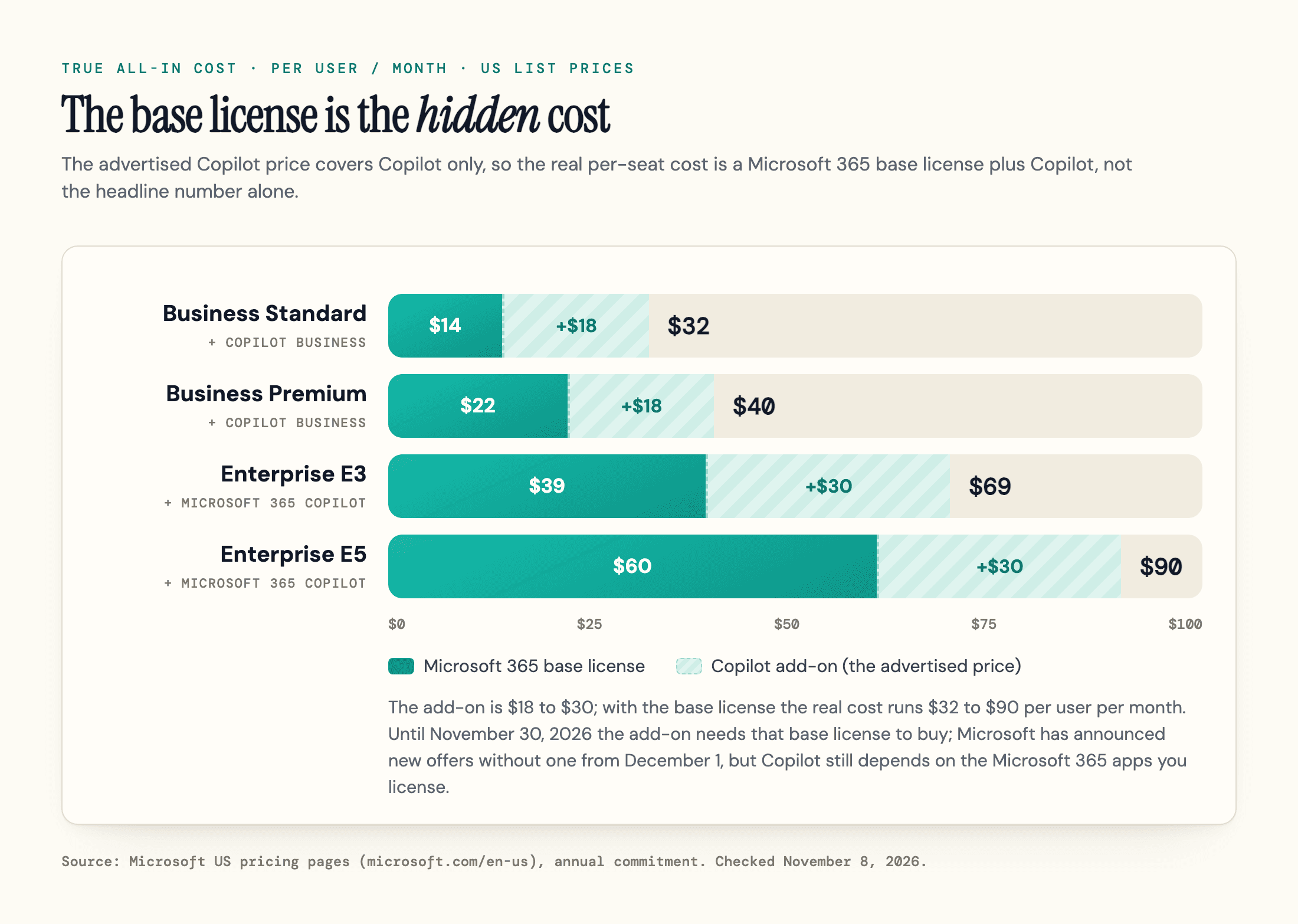
Microsoft also sells bundled "with Copilot" plans for small businesses that fold the base and the add-on into one number, like Business Standard with Copilot at $23.50 and Business Premium with Copilot at $32, which usually beats buying the pieces separately because Microsoft prices the bundle below the sum of the parts. At the top of the enterprise stack, the Microsoft 365 E7 plan at $99 per user per month is the one enterprise tier that bundles Copilot in rather than charging for it as an add-on.
Now multiply by your team. Ten seats of Copilot Business on Business Standard is not $180 a month, it is $320 a month all-in, or roughly $3,840 a year. At E3, ten enterprise seats run $690 a month. It scales fast, so blanket-licensing everyone on day one is the most expensive way to start.
The cheaper path is the one Microsoft's own ROI numbers depend on. Velosio's read of Microsoft's Forrester study cites a 4.5x three-year return and about 1.5 hours a week freed per person, but only when adoption happens. In practice that means licensing a small pilot cohort, proving the value, then scaling, rather than paying for seats that go cold by month three.
Copilot Studio and Cowork: The Pay-as-You-Go Credit Model
There is a third billing model, and it is the newest source of bill shock: consumption credits, where one Copilot Credit costs about a cent.
Copilot Studio, the low-code tool for building custom agents, is sold as a $200 per month capacity pack that includes 25,000 Copilot Credits, or pay-as-you-go at $0.01 per credit through an Azure subscription; a one-year pre-purchase plan of Copilot Credit Commit Units saves up to 20 percent. The trap is that different actions burn wildly different amounts: a scripted answer might cost a single credit, while a token-heavy reasoning response can cost a hundred or more. The same agent can run $8 a month or several hundred depending on how it is built and how often it runs, and capacity-pack credits expire monthly if unused. We break the credit math down in our Copilot Studio guide.
Then there is Copilot Cowork, which became generally available on June 16, 2026 and caused the loudest pricing reaction of the year. Cowork is the agentic layer that takes a long, multi-step job and runs it in the background. Two things about its pricing surprised people. It is not a flat seat fee, and it is not included in the Microsoft 365 Copilot license you already pay for. At work, every Cowork run is billed on usage-based Copilot Credits, on top of a Copilot license, with the per-task cost depending on the model it uses (it launched on Anthropic's Claude Opus 4.8 and Sonnet 4.6; as of November 2026 the default is Auto, and Microsoft's model page lists OpenAI's GPT 6.1 Sol, GPT 6 Astra, GPT 5.6 Terra, and GPT 5.5, Anthropic's Claude Opus 5.5, Sonnet 5.5, and Fable 5.1, and xAI's Grok 4.7, with GPT 5.5 and Fable 5.1 labeled Frontier), the context it pulls in, and how long it runs.
Because Cowork meters by the task rather than the seat, the same automation can cost pennies or several dollars per run, and you only see the bill after it finishes. If you turn it on, use the admin spending caps and budget alerts, and pilot with a real workload before assuming a fixed monthly figure. Variable AI billing is genuinely hard to forecast, which is why early users on Reddit dubbed it a new microtransaction era for productivity software.
What the License Covers, and What Runs on Credits
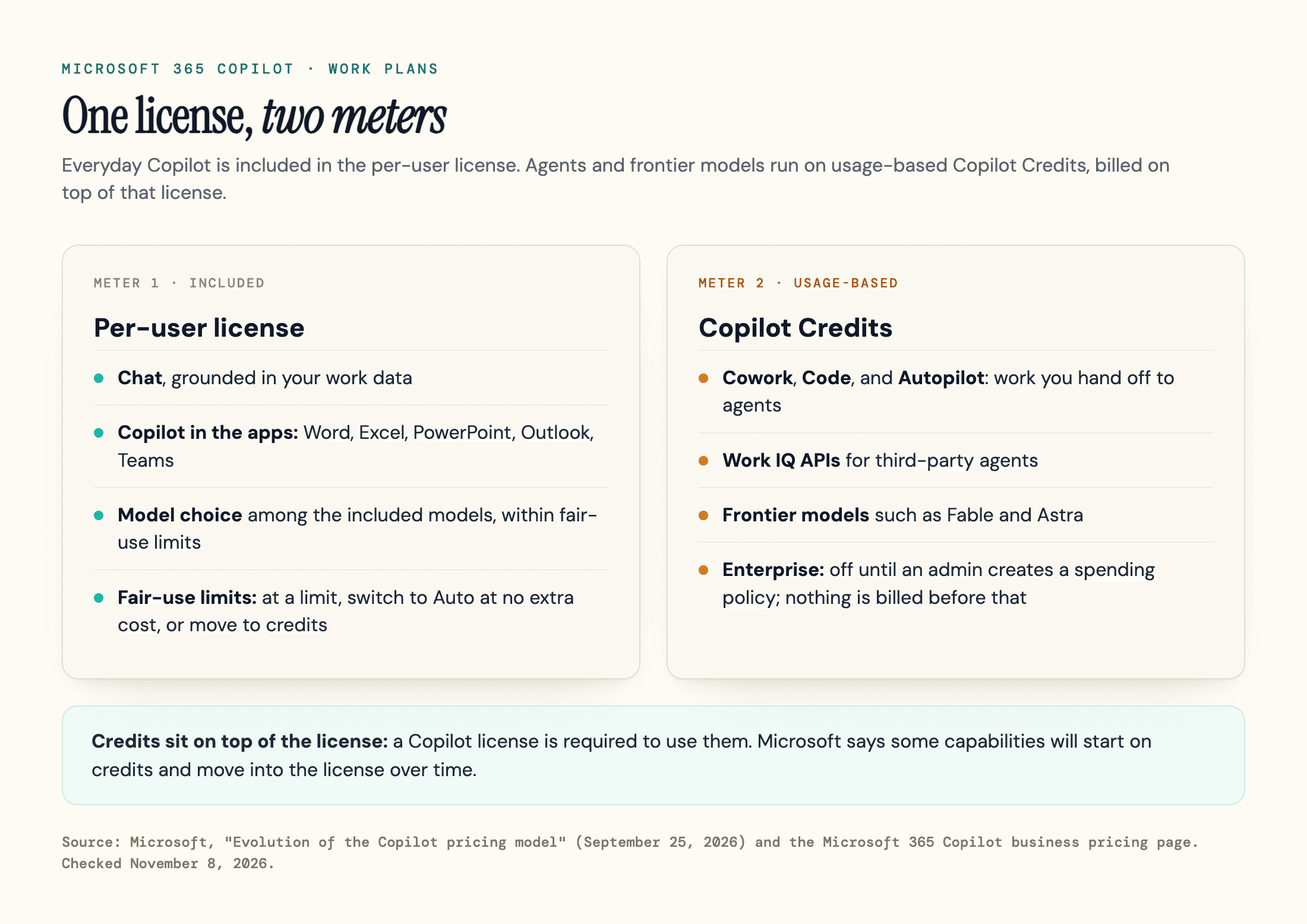
On September 25, 2026, Microsoft spelled out the split between the two meters on its work plans. Everyday AI, meaning Chat and Copilot inside Word, Excel, PowerPoint, Outlook, and Teams, stays inside the per-user license with fair-use limits, and so does choosing among the included models in the picker. A heavy user who reaches a limit gets a warning, then a choice: switch to Auto at no extra cost, or move to credits.
Advanced AI runs on usage-based Copilot Credits on top of that license: Cowork, Code, Autopilot, and advanced experiences in apps like SharePoint, plus frontier models such as Fable and Astra. Microsoft's pricing page also lists the Work IQ APIs as usage-based. For enterprise customers these stay off until an admin creates a spending policy in the Microsoft 365 admin center, and nothing is billed before that. Copilot Business bought through a Microsoft partner in the CSP program is the exception: Microsoft has announced that usage-based billing will be switched on by default for new Copilot Business subscriptions bought through CSP, with rollout planned for January to March 2027, in all markets, and a default spending limit of 4,000 Copilot Credits per user per month that admins can change; a new purchase also switches it on for the tenant's existing Copilot Business licenses. Microsoft also says some capabilities will start on credits and move into the license as the economics allow.
For most buyers, Studio and Cowork are not part of the decision at all. They matter only if you are building or running agents, and if you are, the rule is the same: set caps, estimate against a real task, and never assume a credit pack is a fixed cost.
What Changed on July 1, 2026, and Other Moving Targets
Copilot pricing has a few dates worth knowing, because the number you see today is not necessarily the number you paid last month.
The most important nuance: the July 1, 2026 price increase hit the base Microsoft 365 commercial licenses, not the Copilot add-on. Business Basic moved from $6 to $7, Business Standard from $12.50 to $14, E3 from $36 to $39, and E5 from $57 to $60. Business Premium held at $22, and the Copilot add-on price itself did not rise. Because your all-in cost is base plus Copilot, a higher base still raises what you pay overall, so the base went up, not Copilot.
The promotional rates have their own clocks. Enterprise volume discounts on the $30 add-on ran as a ladder of CSP promotions that Microsoft set out in a Partner Center announcement dated April 14, 2026: 15 percent off at 10 or more seats, 20 percent at 100, 30 percent at 300 and 40 percent at 1,000, available through June 30, 2026. They were partner-channel promotions, not list pricing, so budget the full $30 unless your reseller quotes otherwise. Microsoft also documented a separate channel offer, 15 percent off for a three-year agreement at 300-plus licenses, which ran June 1 through September 30, 2026, alongside one-year offers of 15 percent at 300-plus and 30 percent at 1,000-plus seats that ran July 1 through September 30; all of them ended with the October 1 transition to CSP growth margins. The $18 Copilot Business add-on rate is promotional: Microsoft's pricing page lists the discount as "available between July 1, 2026, and December 31, 2026," applying to the first year only. Treat $18 as a limited-time rate, not a permanent price, since it can step toward the $21 list once that window closes. The bundled "with Copilot" plans are a different story and are no longer a promotion at all, as of July 1, 2026 Microsoft 365 Business Standard with Copilot and Business Premium with Copilot became permanent SKUs, a change Microsoft framed as removing "the friction of selling Copilot as an add-on or as a short-term promotional offer." So $23.50 and $32 are standing prices, not a countdown.
Finally, every figure here is US list pricing. The 2026 changes apply globally with local market adjustments, so the actual cost in your currency, agreement type, and purchasing channel can differ, and nonprofit, education, and government (GCC) tenants have their own Copilot pricing. International and sector buyers should confirm against their own Microsoft pricing rather than converting the US number.
Is Microsoft Copilot Worth It? Copilot vs ChatGPT, Claude, and Gemini on Price
On the consumer side, Copilot is priced in line with its rivals. Microsoft 365 Premium at $19.99 sits next to ChatGPT Plus, Claude Pro, and Gemini AI Pro, which all cluster around $20, except Premium also bundles the Office apps and 2 TB of pooled storage (for subscriptions started from October 8, 2026). You are not paying $20 for a chatbot alone.
| Plan | Price (US/mo) | What you're really paying for |
|---|---|---|
| Free Copilot | $0 | Web-grounded chat, image generation, voice |
| Microsoft 365 Premium | $19.99 | Copilot in your Office apps, plus Office and 2 TB pooled storage (new subscriptions) |
| ChatGPT Plus | ~$20 | A faster standalone chatbot many find sharper |
| Claude Pro | ~$20 | A standalone chatbot strong at writing and reasoning |
| Google AI Pro (Gemini) | $19.99 | Gemini across Google apps and the web |
| Microsoft 365 Copilot | $30 + base | An assistant grounded in your company's email, files, and meetings |
| Microsoft 365 Pro | $99.99 | Highest Copilot usage limits, plus Office and 5 TB pooled storage |
You do not pay the Copilot premium for a better general chatbot. For pure standalone chat, many people find ChatGPT a little sharper, and at $20 with no prerequisite license it is the simpler buy. What the $30 Microsoft 365 Copilot does that a $20 chatbot cannot is work grounded in your own tenant, summarizing your real meetings and drafting from your real inbox, and acting inside Word, Excel, and Outlook. That is a different category, not a more expensive version of the same thing. We go deeper in Microsoft Copilot vs ChatGPT, and our Gemini pricing breakdown runs the same exercise for Google.
So whether Copilot is worth it depends on the buyer: for someone who lives in Office, Premium at $19.99 is an easy yes; for a business, the real question is the all-in cost and whether the seats get used.
Which Microsoft Copilot Plan Should You Actually Pay For?
Most people overbuy. Here is how to decide, from the bottom up.
Stay free if you mostly ask Copilot general questions and want web answers. The free Copilot covers it, and you will know you have outgrown it the day you keep wishing it could read your own files.
Pay $19.99 for Microsoft 365 Premium if you want Copilot working inside your personal Word, Excel, Outlook, and PowerPoint, and you would value the Office apps and storage anyway. It is the cleanest consumer choice and it replaced Copilot Pro. Step up to Microsoft 365 Pro ($99.99 a month, monthly billing only) only if you regularly hit Premium's usage limits or need 5 TB of pooled storage; it costs five times as much.
Pay for Microsoft 365 Copilot Business ($18 to $21 per user, plus a Microsoft 365 Business plan for the apps) if a small team needs Copilot grounded in your shared work. Microsoft's pricing page offers a one-month free trial of Copilot Business (a credit card is required, it converts to a paid subscription unless you cancel, and the $18 promotional rate does not apply to trial subscriptions), so trial a handful of seats alongside the free Copilot Chat tier, then switch to the annual rate once it proves out.
Pay for Microsoft 365 Copilot Enterprise ($30 per user, plus an enterprise base plan such as E3 or E5) when a larger organization needs the full assistant with enterprise compliance. Budget the all-in cost and pilot before you scale.
Add Copilot Studio or Cowork only if you are building or running agents. Treat the credits as a metered utility, set spending caps, and estimate against a real workload before you commit.
It comes down to three habits: match the plan to the job, never blanket-license, and budget the base license alongside the add-on.
Why Copilot's Price Matters for Your Brand
One point outlasts any specific price. Copilot is not just a tool people work inside. When someone asks the free Copilot or Copilot Chat a question, it searches the web through Bing's index, reads pages, and answers by citing them with clickable footnotes. Those citations are real traffic and real authority, and they point to specific pages.
So the more useful question than which plan to buy is whether Copilot names your brand and cites your page when a customer asks it what to buy. That visibility does not come on a pricing tier. In our experience auditing brands across AI engines, most companies have no idea whether Copilot can even see them, let alone whether it cites them. The full method is in our guide to showing up in Microsoft Copilot.
Copilot's prices will move again, so confirm the current figure on Microsoft's pricing page before you pay. And once you know what Copilot costs, the next question is what it tells people about you. Our Citation Interceptor maps where Copilot and the other AI engines cite sources your brand is missing from, so you can see which conversations to join, and our guide to tracking AI visibility covers the broader approach.
Frequently Asked Questions
How much does Microsoft Copilot cost per month?
Microsoft Copilot is free to start. Paid consumer plans run from $9.99 a month, with Microsoft 365 Premium at $19.99 putting Copilot in your Office apps. For work, Microsoft 365 Copilot Business is $18 to $21 per user per month and Microsoft 365 Copilot Enterprise is $30 per user per month, both sold on top of a Microsoft 365 base license, which is a purchase requirement until November 30, 2026.
Is Microsoft Copilot free?
Yes. There is a free consumer Copilot for web chat, image generation, and voice, and a free Microsoft 365 Copilot Chat for work that comes with an eligible Microsoft 365 subscription. Both answer from the public web and files you upload, but neither reads your own emails, files, or meetings on its own. That grounding only comes with the paid Microsoft 365 Copilot license.
What's the difference between the $18 and the $30 Copilot?
The $18 to $21 plan is Microsoft 365 Copilot Business, for organizations up to 300 users. The $30 plan is Microsoft 365 Copilot, the enterprise tier with no seat cap, layered on an eligible base license such as E3 or E5. Until November 30, 2026, both are sold as add-ons to a qualifying Microsoft 365 base plan; Microsoft has announced that new offers from December 1 can be bought without one, but Microsoft says Copilot experiences still depend on the Microsoft 365 apps and services you license.
Do I need a Microsoft 365 subscription to use Copilot?
For the free consumer Copilot, no, just a Microsoft account. For the paid business plans, yes until November 30, 2026: Microsoft 365 Copilot is an add-on that requires a qualifying Microsoft 365 base license. Microsoft has announced new offers from December 1 that can be bought without one, but using Copilot in Word, Excel, Outlook, and Teams still takes licenses for those apps, so the real cost is the base plan plus the Copilot add-on, from about $24 to $90 per user per month all-in (a bundled small-business plan is the cheapest path).
Sources
- Microsoft 365 Copilot plans and pricing (business) - Microsoft -
microsoft.com/en-us/copilot/pricing/business - Microsoft 365 Copilot plans and pricing (enterprise) - Microsoft -
microsoft.com/en-us/copilot/pricing/enterprise - Copilot pricing plans for individuals - Microsoft -
microsoft.com/en-us/microsoft-365-copilot/pricing/individuals - Copilot in Microsoft 365 plans for individuals (Premium and Pro), accessed November 1, 2026 - Microsoft -
microsoft.com/en-us/copilot/solutions/individuals - Introducing Microsoft 365 (storage change note), accessed November 1, 2026 - Microsoft Support -
support.microsoft.com/en-us/office/introducing-microsoft-365 - Meet Microsoft 365 Premium (Copilot Pro retirement) - Microsoft -
microsoft.com/en-us/microsoft-365/blog/2025/10/01/meet-microsoft-365-premium-your-ai-and-productivity-powerhouse - About Microsoft Copilot Pro (existing-subscriber wind-down) - Microsoft Support -
support.microsoft.com/en-us/microsoft-365-copilot/about-microsoft-copilot-pro - Copilot Cowork is now generally available - Microsoft -
microsoft.com/en-us/microsoft-365/blog/2026/06/16/copilot-cowork-is-now-generally-available - Evolution of the Copilot pricing model, September 25, 2026 - Microsoft Tech Community -
techcommunity.microsoft.com/blog/microsoft-copilot-blog/evolution-of-the-copilot-pricing-model/4559416 - How AI usage works across Microsoft 365 subscriptions for individuals (Cowork preview), updated October 2026 - Microsoft Support -
support.microsoft.com/en-us/microsoft-365-copilot/ai-credits-and-limits-for-microsoft-365-subscriptions - Microsoft 365 Copilot pricing (Copilot Studio) - Microsoft -
microsoft.com/en-us/microsoft-365-copilot/pricing/copilot-studio - Microsoft 365 enterprise plans and pricing (E3, E5, E7) - Microsoft -
microsoft.com/en-us/microsoft-365/enterprise/microsoft365-plans-and-pricing - Microsoft Copilot license options (eligible prerequisite plans), updated November 3, 2026 - Microsoft Learn -
learn.microsoft.com/en-us/copilot/plan/copilot-license-options - Advancing Microsoft 365: new capabilities and pricing update (July 1, 2026) - Microsoft -
microsoft.com/en-us/microsoft-365/blog/2025/12/04/advancing-microsoft-365-new-capabilities-and-pricing-update - Partner Center announcements, April 2026 (Copilot for All promo updates, April 14, 2026) and June 2026 (three-year Copilot promotion, June 8, 2026) - Microsoft Learn -
learn.microsoft.com/en-us/partner-center/announcements/2026-april - Partner Center announcements, October 2026 (Copilot offers without a base-subscription prerequisite from December 1, 2026; item dated October 14, 2026) - Microsoft Learn -
learn.microsoft.com/en-us/partner-center/announcements/2026-october - Partner Center announcements, November 2026 (usage-based billing on by default for new Copilot Business in CSP, rollout from January-March 2027; item dated November 3, 2026) - Microsoft Learn -
learn.microsoft.com/en-us/partner-center/announcements/2026-november - Cowork models (model lineup), accessed November 8, 2026 - Microsoft Learn -
learn.microsoft.com/en-us/copilot/cowork/cowork-models - Microsoft 365 Copilot Pricing Calculator 2026 - Velosio -
velosio.com/blog/m365-copilot-pricing-calculator - Claude plans and pricing - Anthropic -
claude.com/pricing - Copilot Cowork pricing and usage details - IT Pro -
itpro.com/technology/artificial-intelligence/copilot-cowork-is-now-generally-available-everything-you-need-to-know-including-pricing-usage-limits-and-new-features - Google AI Pro and Ultra subscriptions - Gemini -
gemini.google/subscriptions