
Ecommerce SEO is how an online store gets its category and product pages ranked in Google's search results and picked in AI shopping answers, so it earns organic traffic without paying for every click. The fundamentals haven't changed, but where product data travels has.
Most stores still lose ground in the same places: filters that flood the index with duplicates, manufacturer copy that gives Google little reason to pick you, out-of-stock pages that get deleted, and a blog that drives traffic but few orders. Most have a documented fix.
What Is Ecommerce SEO?
SEO for ecommerce targets queries where people are ready to buy, which puts the work on category and product pages more than on blog posts.
Most of it is ordinary SEO, but ecommerce sites differ in a few ways:
- Scale. One template produces thousands of product URLs, so a single mistake repeats across the whole catalog.
- Change. Prices, stock and variants move every day, and stale data costs you rich results and listings.
- Filters. Every filter and sort option can create a new URL, which floods crawlers with near-duplicates.
There is also a newer layer. Your product data no longer reaches buyers only through your pages. Google pulls it from structured data and Merchant Center, and ChatGPT pulls it from merchant and third-party product feeds. So ecommerce SEO is half page optimization and half data hygiene.
Is SEO still worth doing for an ecommerce store in 2026? Yes. Google's guide to AI features and your website says the same SEO best practices apply to AI Overviews and AI Mode. Its newer generative AI guide adds one condition: your site must be included in Search generative AI features in Search Console. The crawl, render and index basics that search engines rely on are covered in our guide to technical SEO.
Ecommerce Keyword Research: Match Intent to Page Type
Ecommerce keyword research is less about finding keywords and more about matching each one's search intent to the right page type. As a starting point, keywords that name a type of product want a category page. Keywords that name a model want a product page. Questions want a guide. Check the live results for each one before you choose.
| Query type | Example | Page that should be ranking | What that page needs |
|---|---|---|---|
| Product type | running shoes for flat feet | Category page | A filtered set of products, a short buying intro, links to the best sellers |
| Product type plus attribute | waterproof trail running shoes women | Category or filter landing page | Its own URL and copy, only if people search the combination |
| Brand or model | brooks ghost 17 wide | Product page | Specs, sizing, price, stock, reviews |
| Comparison or question | how to choose a standing desk | Guide | A direct answer, then links into the categories it recommends |
Start your keyword research from your own data. Search Console shows the keywords your store already gets impressions and organic clicks for, and your internal site search shows the words customers type when your navigation fails them. Then widen the list with keyword tools and marketplace autocomplete, which show how buyers phrase product keywords.
Keep long-tail keywords in your target list. An ecommerce store rarely wins the head term early, while specific attribute queries ("standing desk for small home office") state a clear buying need and usually face weaker competition.
Blog Posts vs Category Pages
A recurring complaint in the 33 Reddit, Shopify Community and Hacker News threads we read was a store blog that gets traffic but no orders. A post titled "why use natural face wash" attracts people who want free advice. A category page for "natural face wash" attracts people choosing what to buy.
So the category and product pages are your money pages, and they should target your commercial keywords first in any ecommerce SEO strategy. Guides still earn their place when they answer the questions buyers ask before choosing and link into the category pages they recommend.
Site Architecture for Category and Product Pages
On ecommerce websites, the site structure tells search engines which pages matter most. Google's guide to ecommerce site structure says it can use the number of links needed to reach a page, and the number of links pointing to it, to infer that page's relative importance.
That means a simple hierarchy: menu links to top categories, category pages link to subcategories, and subcategories link to every product. A product that can only be reached through site search or deep pagination sends Google the opposite signal.
These internal linking habits help crawlers and shoppers:
- Breadcrumbs on every category and product page, marked up with BreadcrumbList so the path can show in results
- Category intros that link to the subcategories and best sellers you most want to rank
- Related products and "shop the category" links on product pages, so authority flows back up the tree
Google suggests linking a best-selling product from the homepage or from other content, because more internal links to a page tell it that page matters more than the rest.
Category Pages
On ecommerce sites, category pages carry the head keywords, so treat each one as a landing page, not just a product grid. Give it an H1 and title tag built on the keywords people search, such as "Robot Vacuums for Pet Hair", and a short intro that says what the range covers and how to choose.
Keep that intro above the grid and longer buying advice below it. Then check for keyword cannibalization: two categories, or a category and a blog post, chasing one query. Pick one page to target that query and point the other page's links at it.
Flat or Nested Product URLs
Should a product live at /product-name or /category/subcategory/product-name? SEO guides disagree, but Google says it generally doesn't look at URL structure to work out a site's structure; it reads the links. The bigger risk is a product that appears under two categories and gets two URLs.
Pick one canonical URL per product and make every internal link use it. Google's documentation on duplicate URLs ranks the ways to signal your preference: redirects and rel="canonical" are strong signals, while sitemap inclusion is a weak one. Our guide to canonical tags covers the edge cases.
Shopify makes part of this choice for you: product URLs use the /products/ prefix, and the bare /products path is one of the fixed Shopify paths its help center says you can't redirect. Some themes also link to collection-scoped product URLs (/collections/shoes/products/x), so check which URL your templates link to and which one the canonical tag names.
Selling in Several Countries
If you run country or language versions of your store, tell Google which page serves which market with hreflang. Google's guide to localized versions says each language version must list itself as well as all other language versions.
That includes same-language versions such as en-US and en-GB, which Google can treat as duplicates because their main content is untranslated. Give each version its own prices, currency and local details in the page, markup and feed.
Faceted Navigation and Pagination Without Crawl Waste
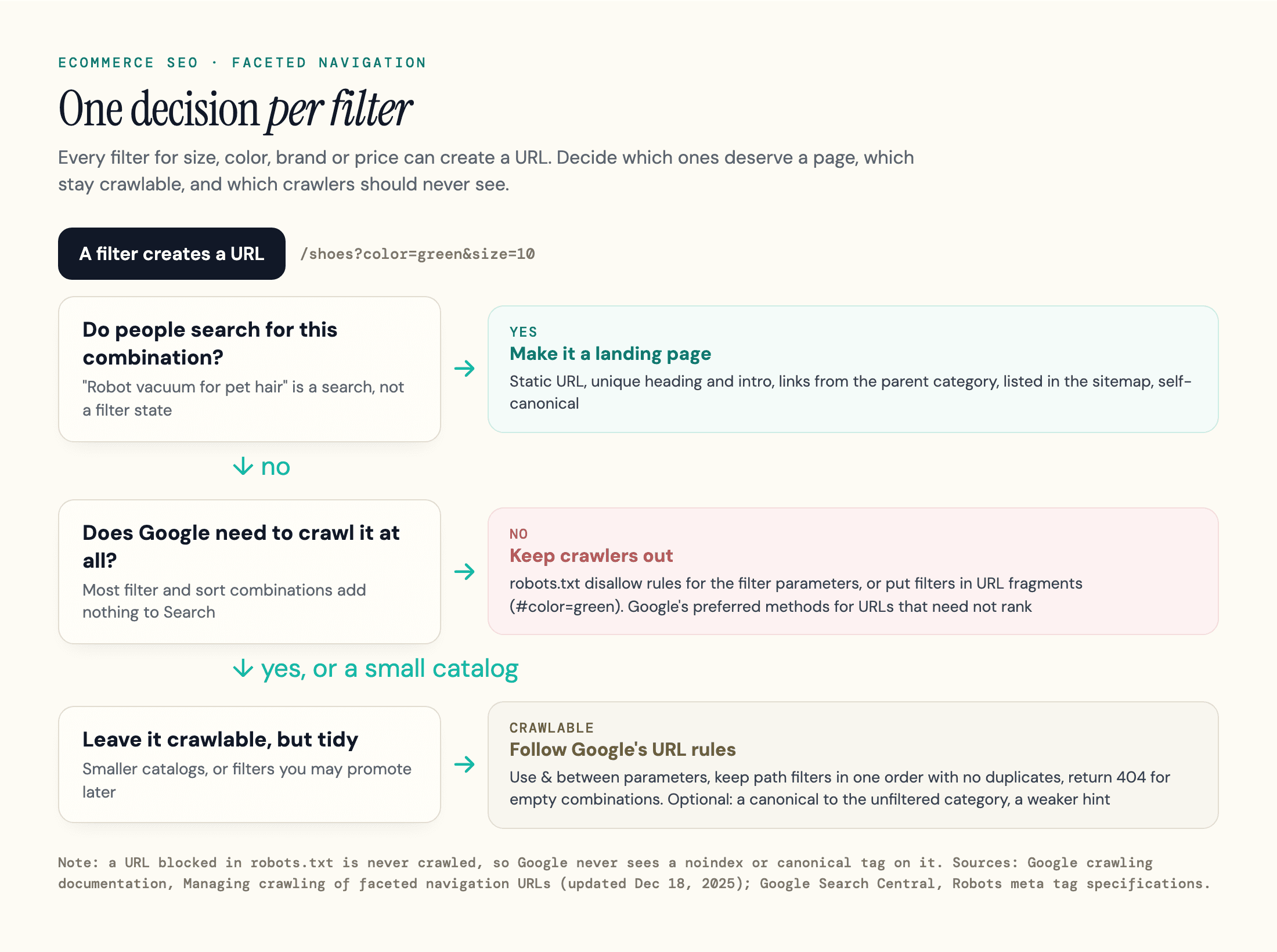
On a large catalog, faceted navigation is often the biggest technical risk. Every filter for size, color, brand and price creates a URL, and the combinations multiply into far more URLs than you have products.
Google's faceted navigation guidance says that when you don't need filtered URLs in Search, there's often no good reason to allow crawling of filtered items. In that case it recommends either method below:
- Block them in robots.txt, for example with
disallow: /*?*color=anddisallow: /*?*size=rules, while allowing the individual product pages and one unfiltered listing page - Put filters in URL fragments (
/shoes#color=green), which Google generally doesn't crawl or index
Canonical tags and nofollow links are weaker. Google says they are "generally less effective in the long term" for controlling crawl, though pointing a filtered URL's canonical at the unfiltered category can reduce crawling of the filtered versions over time.
Order matters if filter URLs are already indexed. Google's robots meta tag documentation says indexing rules on a page blocked by robots.txt are never found. So add noindex first, let the URLs drop out of the index, then block them in robots.txt.
If your filter URLs do need to be crawled, Google lists the rules: use & as the parameter separator, keep path-based filters in the same order with no duplicates, and return a 404 for a combination with no results instead of redirecting to a generic page.
For most small catalogs this is housekeeping, not an emergency. Crawl budget is mainly a large-site problem, and what counts is how many filter combinations become URLs. A store with two or three filters of a few values each rarely needs aggressive blocking.
When a Filter Deserves Its Own Page
Some filter combinations are keywords with search demand of their own. "Robot vacuum for pet hair" is a search, not a filter state.
Give those combinations a static URL, a unique heading and intro, internal links from the parent category and a place in your sitemap. In other words, turn the filter into a category page with that search as its target, and keep the long tail of other combinations out of the index.
Pagination
Every large category uses pagination, and Google's pagination best practices are short:
- Give each page a unique URL, such as
?page=2 - Give each page its own canonical URL; don't point page 2 and beyond at page 1
- Don't use
#fragments for page numbers, since Google ignores them - Link pages sequentially so Googlebot can reach the products on page 10
- Avoid indexing sort orders like
?order=price: use noindex to keep them out of the index, or robots.txt to keep crawlers off them
"Load more" buttons and infinite scroll need the same care. Google's guide says its crawlers generally follow URLs in the href of <a> elements and don't click buttons, so the products behind a button also need paginated URLs.
Product Pages That Rank and Get Cited
An ecommerce product page earns rankings in search engines when it answers the questions visitors have before paying: what exactly this is, whether it fits their need, what it costs to own and what happens if it doesn't work out.
Replacing manufacturer copy is a big fix. If you sell the same item as 200 other retailers and paste the same description, your page gives Google and other search engines little reason to show it instead of theirs.
Two of the threads we read asked whether Google would penalize copied supplier or manufacturer descriptions.
Google's spam policies describe abusive scraping as "Republishing content from other sites without adding any original content or value". A product page with your own price, stock, photos and reviews isn't that. It just has little to set it apart, so add specs, original photos and buying advice to your best sellers first.
How long should a product description be? Length isn't the point. Write what a buyer needs for that product: sizing and fit for shoes, dimensions and weight limits for desks, suction, battery and mapping for robot vacuums, then compatibility, warranty and returns.
A cheap accessory may need a few sentences. A premium robot vacuum needs a spec table and the trade-offs.
Title tags follow the same logic. Product name plus the keywords people search, such as "Brooks Ghost 17 Wide Running Shoe", is more useful than a template that leads with your store name.
Write meta descriptions by hand for categories and best sellers, around their main keywords, and let templates fill the long tail with the product name, a key attribute and the price.
Reviews
Reviews do two jobs. On your own product pages, customer reviews are user-generated content that adds the details buyers trust most, in the words buyers use. Collect them after delivery, show them as HTML text and mark up their aggregate rating.
Editorial reviews on other sites are the second job. Google's reviews system rewards reviews with "insightful analysis and original research", written by people who know the topic. In our test below, review sites were the sources AI shopping answers cited most.
Product Images
Images feed Google Images, Shopping and AI Mode's product tiles. Google Merchant Center has announced a minimum image size of 500 x 500 pixels for all products starting January 31, 2027, and recommends 1500 x 1500 or larger.
Older products uploaded at 400 pixels will fall below that line. Give each image a descriptive file name and alt text that names the product and the variant shown.
Variants, Out-of-Stock and Discontinued Products
Catalogs change daily, so decide by rule whether to keep, merge or retire each URL.
Product Variants
Sizes and colors are the classic duplicate content trap: one shoe in eight sizes and five colors can become 40 near-identical URLs. Google's product variant documentation solves the markup side. Wrap the variants in a ProductGroup, list the properties that change with variesBy, link each variant with hasVariant and give the parent a productGroupID.
The URL side depends on how your store works:
- Single-page setup: one page, variants switch without a reload. Google says there must be one canonical URL for the whole group, usually the base product URL with no variant selected. Each variant still needs its own preselect URL, such as
?color=green, that shows the right image, price and availability. - Multi-page setup: each variant has its own page. Each page needs full, self-contained markup, and there is no single group canonical.
Give a variant its own indexable page only when people search for it, such as a color with its own demand. Otherwise keep one page per product.
Out-of-Stock and Discontinued Pages
| Situation | What the URL returns | Markup and feed | On the page |
|---|---|---|---|
| Out of stock, coming back | 200, keep it live | availability set to OutOfStock, BackOrder or PreOrder | Restock date, back-in-stock signup, links to close alternatives |
| Discontinued, still searched | 200, keep it live | Discontinued in the markup; removed from the feed | Say it's discontinued and link to the successor |
| Discontinued, clear replacement | 301 to the replacement | Remove the old item from the feed | Nothing: the redirect does the work |
| Discontinued, no replacement | 404 or 410 | Remove it from the feed and the sitemap | Update internal links that pointed to it |
| Seasonal, returns every year | 200 all year | Accurate availability between seasons | Keep the URL so it keeps its links and history |
The out-of-stock row matters most. Deleting a temporarily unavailable product throws away its rankings and links for a problem that lasts a few weeks. Google's merchant listing markup has availability values for exactly this, including OutOfStock, BackOrder, PreOrder and Discontinued.
Avoid redirecting a retired product to the homepage.
When more than one row fits a discontinued product, use this order: keep the page live while people still search for it, otherwise redirect it to a genuine replacement, and only then return 404 or 410. On Shopify, a redirect works only from a broken URL, so unpublish or delete the product before you add one.
Product Structured Data and Merchant Center Feeds
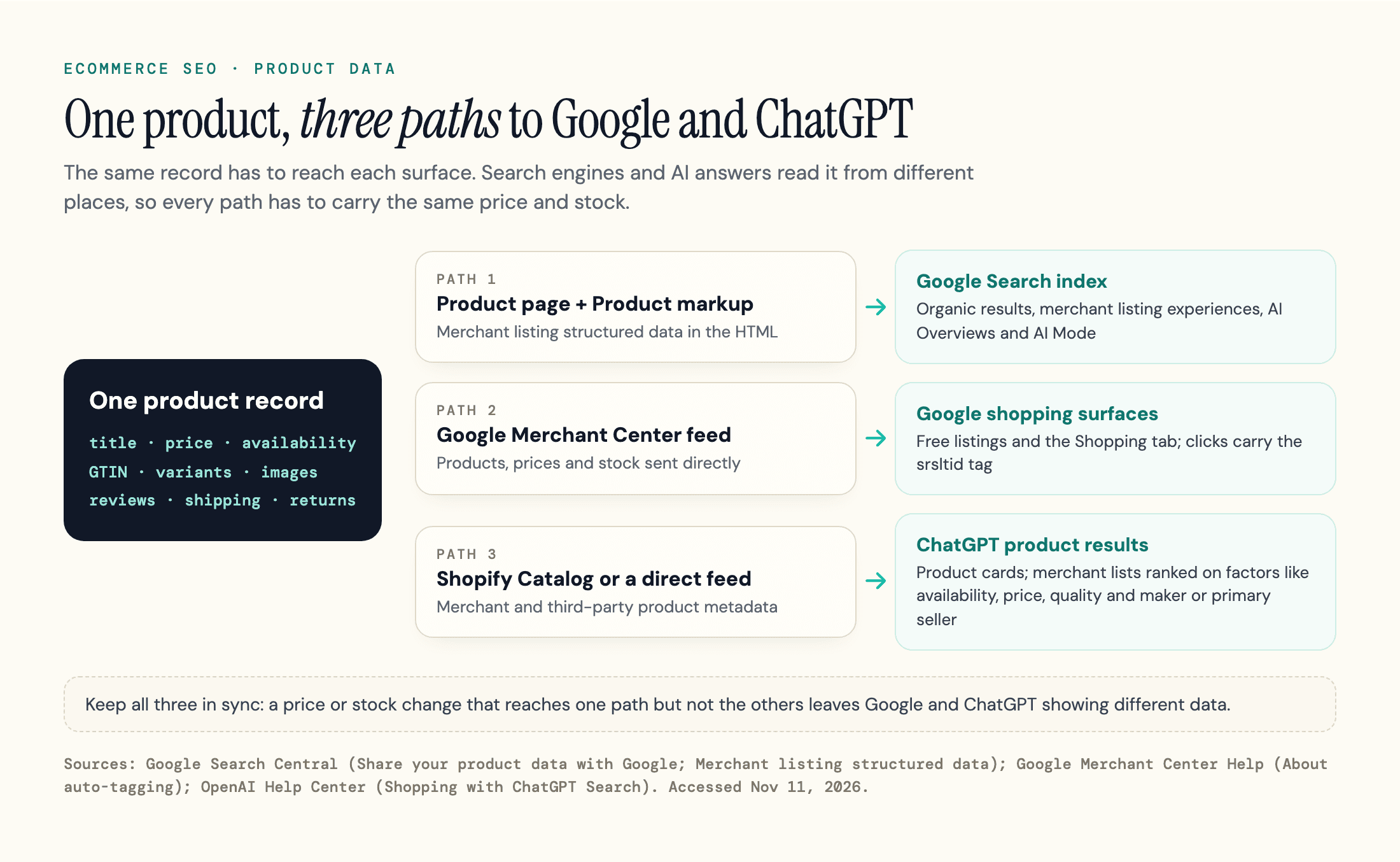
Google gets your product data from your pages and from Merchant Center, and its guide to sharing product data with Google recommends doing both: add Product structured data (what most guides call product schema) to your product pages, and upload a feed to Google Merchant Center.
The markup describes the page Google crawls. The feed tells Google directly which products you sell, at what price, in stock or not.
Structured data isn't required to rank, but Google says it increases eligibility for product rich results and improves its understanding of price, discount and shipping costs.
A Merchant Center feed isn't required for regular results either, but Google says Merchant Center participation is mandatory for some surfaces, such as listings in the Shopping tab, so stores with only markup miss them.
Product Snippets vs Merchant Listings
Google splits Product markup by use case. Product snippets can appear for any page about a product, including review pages. Merchant listings are for pages where shoppers can buy, and they can show price, availability, shipping and return information in experiences like the shopping knowledge panel, Google Images and popular product results.
If you sell the product, mark up for merchant listings. Include offers with price and currency, availability, and where you can, shipping details, a return policy and a GTIN. Merchant listings require an Offer, not an AggregateOffer price range, which only qualifies for product snippets.
Keep Page, Markup and Feed in Sync
The feed problem that costs listings is data that disagrees: a sale price on the page, the old price in the feed, a stock status updated in one place only. Google's help page on mismatched product prices says a product whose landing-page price differs from the feed "may be disapproved".
Prices added with JavaScript after the page loads trigger the same error.
Generate the markup and the feed from the same product database and update both on every price or stock change. Google's product data guide also suggests letting Merchant Center automatically update its copy from your website when the two disagree.
Do AI Answers Need Special Markup?
No. Google's AI features guide says there is no special schema.org structured data to add for AI Overviews or AI Mode. Our article on schema markup for AI search covers what markup does and doesn't change across engines.
One free tracking win: Merchant Center auto-tagging adds an srsltid parameter when someone clicks one of your products on Google Search, so Merchant Center can show how those clicks lead to purchases once key event tracking is set up.
Google notes that sites which don't allow arbitrary URL parameters show an error page, so test a tagged link on your store.
How Products Get Into AI Shopping Answers
For product answers, AI engines lean on product data that someone hands them: your feed, a platform's catalog or third-party data providers. Then they add what review sites and retailers say.
ChatGPT
ChatGPT can show a product carousel, usually with prices and merchant links, when a question has shopping intent. OpenAI's help page on shopping with ChatGPT search describes how it picks products:
- Product results are "selected independently by ChatGPT and are not ads", partnerships don't influence them, and ads are shown separately
- Its inputs include "structured metadata from first-party and third-party providers (e.g., price, product description) and other third-party content", plus what the model already knows before it searches
- When several stores sell a product, merchants are ranked on factors like "availability, price, quality, and whether they are the maker or primary seller"
- Review summaries are generated from public websites, and OpenAI doesn't verify them
For merchants on Shopify, OpenAI says product data "is already integrated into ChatGPT through Shopify Catalog" with no extra work. Other stores can read OpenAI's product feed documentation and apply for direct feed access.
OpenAI names no app a store needs to appear in ChatGPT, a question raised in one thread we read. It names product data, so a complete feed is the part you control.
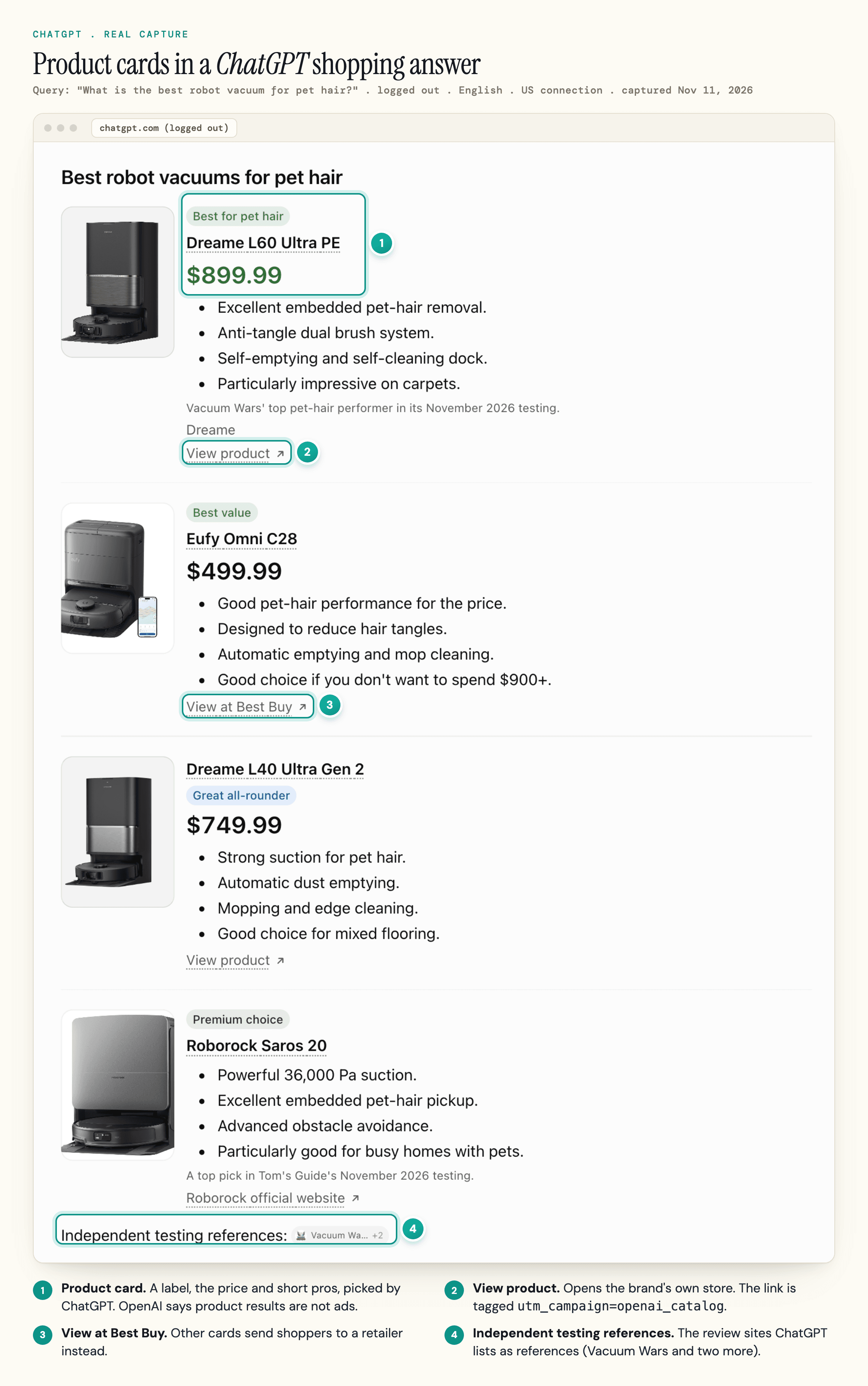
OpenAI lists being the maker or primary seller among the factors it uses to rank stores selling the same product, so brands selling direct should make that obvious in their data. OpenAI also notes that price updates can reach ChatGPT with a delay, which makes feed freshness part of SEO.
The pages ChatGPT cites need its search crawler. OpenAI's crawler documentation says sites opted out of OAI-SearchBot "will not be shown in ChatGPT search answers", apart from navigational links, so check that robots.txt and your bot protection don't block it.
Our explainer on how ChatGPT search works covers the citation side.
Google AI Mode and AI Overviews
To appear as a supporting link in AI Overviews or AI Mode, a page must be indexed and eligible to show in Google Search with a snippet, and the site must be included in generative AI features in Search Console. The same guide describes query fan-out: AI Mode can run several related searches to answer one question.
So a store needs category, product and comparison pages that each answer a narrower question well. The same generative AI guide adds that Merchant Center feeds "can help your products" be visible in AI responses. For tracking and citation tactics specific to AI Mode, see our AI Mode SEO guide.
Perplexity
Perplexity launched a new shopping experience for US users on Nov 25, 2025, with checkout through PayPal and the retailer kept as merchant of record. Its launch post doesn't explain how it picks products, so the safe assumption is the same as for the others: accurate product data plus coverage on the sites it cites.
How agents complete purchases is a separate topic, covered in our guide to agentic commerce.
What We Found: Who AI Shopping Answers Cite
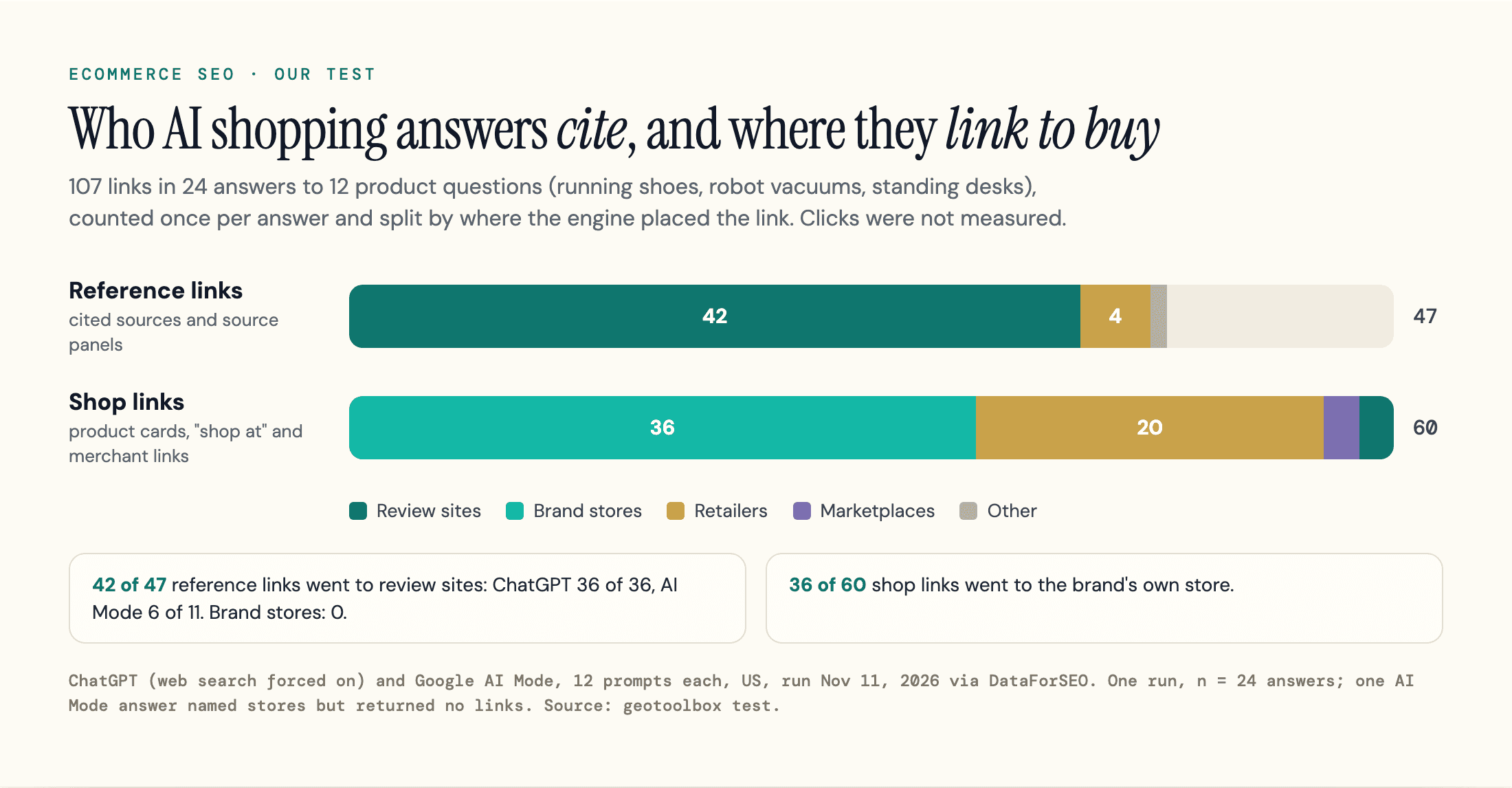
Review sites supplied 42 of the 47 sources AI shopping answers cited (all 36 in ChatGPT, 6 of 11 in AI Mode), while brand stores showed up as places to buy.
To check, we ran 12 product questions through ChatGPT and Google AI Mode on November 11, 2026, from the US, using DataForSEO's scrapers. They were "best", budget, use-case and "where to buy" questions for running shoes, robot vacuums and standing desks. ChatGPT ran with web search forced on, which a normal session may skip.
That gave 24 answers and 107 links, each counted once per answer.
We sorted them by where the engine placed them: reference links (ChatGPT's cited sources and AI Mode's source panel) and shop links (product cards, "shop" buttons and store links in the answer text). We left out links to Google's own pages, including 23 Google product cards in AI Mode's source panels.
| Link type | Review sites | Brand stores | Retailers | Marketplaces | Other | Total |
|---|---|---|---|---|---|---|
| Reference links, ChatGPT | 36 | 0 | 0 | 0 | 0 | 36 |
| Reference links, AI Mode | 6 | 0 | 4 | 0 | 1 | 11 |
| Shop links, ChatGPT | 2 | 18 | 17 | 2 | 0 | 39 |
| Shop links, AI Mode | 0 | 18 | 3 | 0 | 0 | 21 |
In ChatGPT, all 36 reference links went to review sites such as rtings.com, tomsguide.com, runnersworld.com and runrepeat.com. AI Mode showed far fewer: 11 references in 5 of its 12 answers, 6 of them review sites. Across both engines, 42 of 47 references were review sites and none was a brand store.
Brand stores led the shop links instead, with 36 of 60, 18 in each engine. The line between reference and shop links isn't perfectly sharp: AI Mode's robot-vacuum "where to buy" answer put retailer pages in its source panel, and a couple of brand pages were linked for specs in the answer text.
In Google AI Mode, 8 of 12 answers showed product tiles. All 36 tiles showed a price, a star rating and a seller, with the brand's own store as the featured seller on 28. The tiles open Google's own product viewer, not the store.
In ChatGPT, 31 of 46 product cards had a link: 14 carried a utm_campaign=openai_catalog tag and 13 more a utm_medium=feed tag.
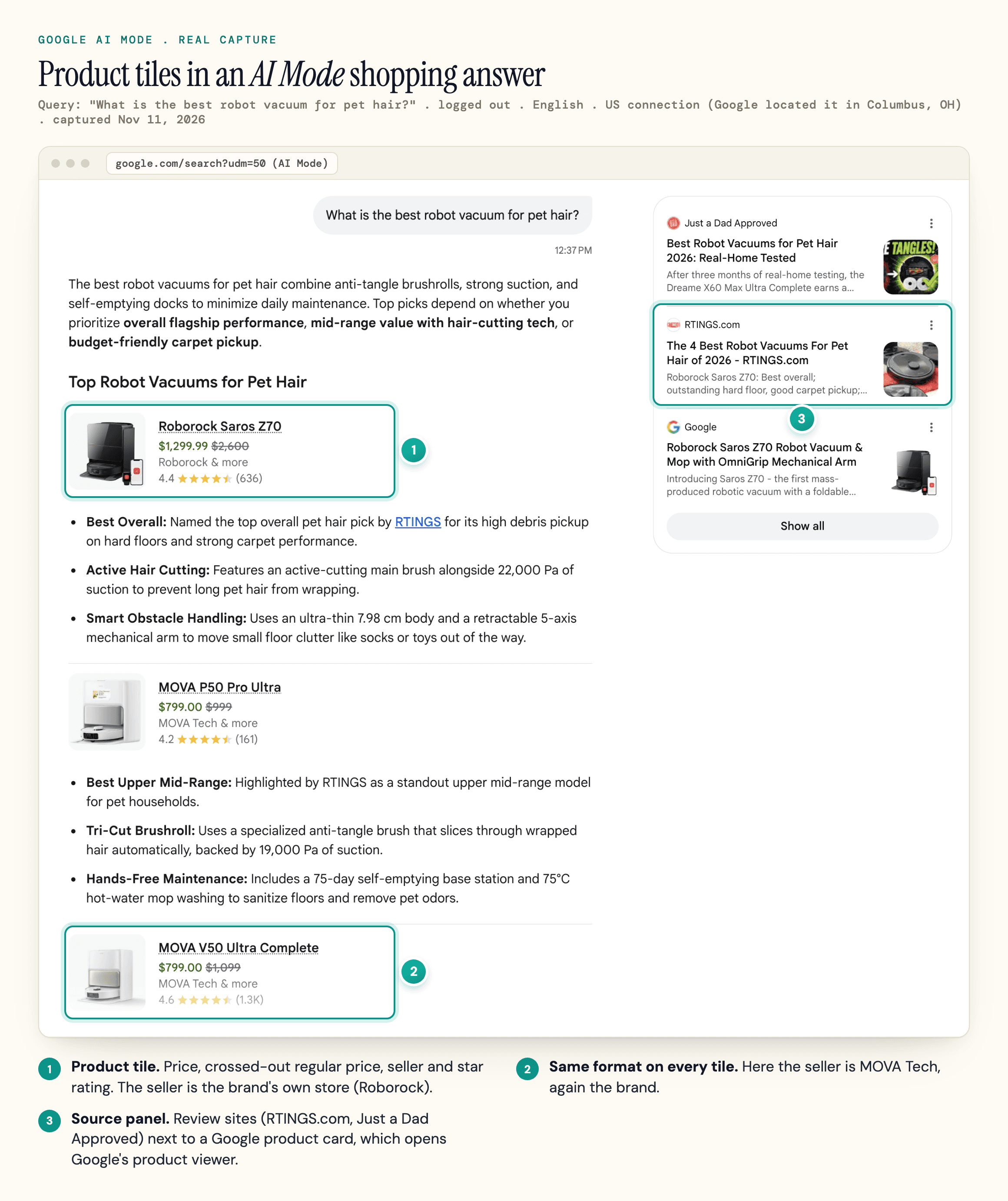
Treat this as a snapshot, not a law. It is one run of 24 answers, and 10 of them had no reference links at all.
One answer can swing a share: all 5 non-review references in AI Mode came from its robot-vacuum "where to buy" answer. Most prompts were "best" questions in review-heavy categories, and every category has big brands that sell direct.
One AI Mode answer named stores but returned no links in our data. The test still points to separate jobs: be the shop link, and be in the reviews that get cited.
Earn the Review Sites AI Answers Cite
Being the shop link is the feed work above. Being cited is classic link building and digital PR, and the same coverage that earns backlinks gives AI answers more sources that can name your products. Our test shows which sources get cited, not what caused a product to be picked, and coverage doesn't guarantee a citation.
Get your products tested by the review sites that already rank in organic results for your category, and give them what they need, such as samples, specs and access to the people who designed the product.
Keep it within the rules. Google's spam policies list "sending someone a product in exchange for them writing about it and including a link" as link spam. Send products for honest review with no link condition, and let the coverage earn its own links.
Platform Notes: Shopify, WooCommerce and BigCommerce
Does Shopify provide SEO? Yes, the basics. Its help center on adding keywords for SEO covers editing page titles, meta descriptions and image alt text.
The differences that matter for ecommerce SEO are in URL control, variant markup and how product data reaches AI engines. Shopify stores reach ChatGPT through Shopify Catalog; WooCommerce and BigCommerce stores can apply for OpenAI's direct feed.
| Platform | URL control | Product markup out of the box | Watch for |
|---|---|---|---|
| Shopify | Fixed /products and /collections paths | Check your theme's output in the Rich Results Test | Collection-scoped product URLs in theme links |
| WooCommerce | WordPress permalinks, fully editable | Generated by WooCommerce core | Variable products: the base URL usually outputs a price range; since 11.0.0 a variation URL gets its own Offer |
| BigCommerce | Preset or custom URL formats, with optional 301s on change | Check your theme's output in the Rich Results Test | Changing URL formats store-wide can hurt ranking positions if redirects are skipped |
On WooCommerce, the 2021 Google Product Feed documentation notes that core outputs one aggregated block for variable products, without variation GTINs or prices. Since release 11.0.0, WooCommerce core's structured data code gives a URL that fully specifies one variation its own Offer and price, plus its own GTIN when it has one.
The base product URL usually still shows a price range, so check your output in Google's Rich Results Test.
On BigCommerce, product, category and page URL formats live under Settings, URL Structure, and its SEO fields help offers to create 301 redirects when you change them. Tick that box.
Which SEO tool is best for Shopify or any other platform? The free ones cover most of it: Search Console for queries and indexing, Merchant Center for feed health and the Rich Results Test for markup.
Ecommerce SEO Checklist
Use this list as the order of work for an ecommerce SEO audit or strategy. The early steps fix problems that make the later ones pointless.
- Map every target keyword to one page type: category, product, filter landing page or guide
- Check that robots.txt and bot protection let Googlebot and OAI-SearchBot crawl your store
- Check that every important category and product is linked from the navigation, not only reachable through site search
- Pick one canonical URL per product page (per variant page in a multi-page setup) and make internal links, canonical tags and the sitemap agree
- Decide per filter: a landing page, crawlable, or kept out with robots.txt or URL fragments
- Give paginated pages unique, self-canonical URLs and keep sort orders out of the index
- Replace manufacturer descriptions on your top sellers first, then work down the catalog
- Add merchant listing markup with price, availability, shipping, returns and GTINs, plus ProductGroup for variants
- Submit a Merchant Center feed generated from the same data as the markup, and fix diagnostics weekly
- Keep out-of-stock pages live with the right availability; keep, 301 or remove discontinued ones in the table's order
- Get your best products reviewed by the sites that rank and get cited for your category
Page speed and Core Web Vitals, HTTPS, mobile-first indexing and XML sitemaps belong on the list too, and our SEO audit checklist covers them step by step.
How to Measure Ecommerce SEO and AI Traffic
Search Console shows the organic traffic and ranking position each query and page earns in Google's search results, plus reports on your product markup. Merchant Center shows clicks from free listings and, through srsltid plus key event tracking, how they lead to purchases.
Most ChatGPT visits should be measurable: in our test, 58 of the 75 ChatGPT links carried a utm_source=chatgpt.com tag: all 36 cited sources and 22 of the 39 shop links, including every linked product card.
The 17 plain links to stores in answer text had no tag, so also check chatgpt.com as a referrer. What analytics can't show is the answers your store wasn't in. For your top questions, check those answers and their cited sources by hand.
At scale, geotoolbox's Citation Interceptor (Plus plan and up) checks the prompts you track each week and lists the offsite sources AI answers cite where your brand is missing. It covers citations, not product cards or feeds.
Frequently Asked Questions
How long does ecommerce SEO take?
Technical fixes such as canonicals, redirects and markup start to take effect once Google recrawls the affected pages, which is quick for frequently crawled pages and slower for deep catalog pages.
Ranking gains for new category pages depend on competition and backlinks, so there is no fixed timeline. If you hire help, ask what results to expect, and in what timeframe, before you sign, as Google's guide to hiring an SEO suggests.
Can ChatGPT do SEO for an ecommerce store?
It can draft product descriptions, title tags, FAQs and Product markup, and it is useful for keyword research and for finding the questions buyers ask.
It doesn't see your Search Console data or crawl problems unless you give it exports, and its drafts need fact-checking against your real specs. Mass-producing pages with AI and no added value falls under Google's scaled content abuse policy, so use it to write better pages, not more of them.
How much should I pay for ecommerce SEO?
Cost follows catalog size and the work needed. A small store with simple templates can do most of the checklist above in-house. A large catalog with faceted navigation, migrations or feed problems usually needs a developer as well as an SEO.
If you compare agencies, ask for examples of category-page wins in your vertical, and be wary of guarantees: Google's hiring guide says no one can guarantee a #1 ranking. Our roundup of AI SEO agencies covers what to look for in a team that also handles AI search.
Sources
- Google Search Central - AI features and your website (updated December 10, 2025) -
developers.google.com/search/docs/appearance/ai-features - Google Search Central - Help Google understand your ecommerce site structure (updated December 10, 2025) -
developers.google.com/search/docs/specialty/ecommerce/help-google-understand-your-ecommerce-site-structure - Google Search Central - How to specify a canonical URL (updated July 10, 2026) -
developers.google.com/search/docs/crawling-indexing/consolidate-duplicate-urls - Google Crawling Infrastructure - Managing crawling of faceted navigation URLs (updated December 18, 2025) -
developers.google.com/crawling/docs/faceted-navigation - Google Search Central - Localized versions of your pages (updated September 21, 2026) -
developers.google.com/search/docs/specialty/international/localized-versions - Google Search Central - Pagination best practices for Google (updated December 10, 2025) -
developers.google.com/search/docs/specialty/ecommerce/pagination-and-incremental-page-loading - Google Search Central - Google Search's reviews system (updated December 10, 2025) -
developers.google.com/search/docs/appearance/reviews-system - Google Search Central - Product variant structured data (updated September 8, 2026) -
developers.google.com/search/docs/appearance/structured-data/product-variants - Google Search Central - Merchant listing structured data (updated September 8, 2026) -
developers.google.com/search/docs/appearance/structured-data/merchant-listing - Google Search Central - Share your product data with Google (updated December 10, 2025) -
developers.google.com/search/docs/specialty/ecommerce/share-your-product-data-with-google - Google Search Central - Spam policies for Google web search (updated August 28, 2026) -
developers.google.com/search/docs/essentials/spam-policies - Google Search Central - Do you need an SEO? (updated June 5, 2026) -
developers.google.com/search/docs/fundamentals/do-i-need-seo - Google Search Central - Robots meta tag, data-nosnippet, and X-Robots-Tag specifications (accessed November 11, 2026) -
developers.google.com/search/docs/crawling-indexing/robots-meta-tag - Google Search Central - Optimizing for generative AI features on Google Search (updated July 10, 2026) -
developers.google.com/search/docs/fundamentals/ai-optimization-guide - Google Merchant Center Help - Image link [image_link] (accessed November 11, 2026) -
support.google.com/merchants/answer/6324350 - Google Merchant Center Help - About auto-tagging (accessed November 11, 2026) -
support.google.com/merchants/answer/15191080 - Google Merchant Center Help - How to fix: Mismatched product price (accessed November 11, 2026) -
support.google.com/merchants/answer/12159029 - OpenAI Help Center - Shopping with ChatGPT Search (accessed November 11, 2026) -
help.openai.com/en/articles/11128490-shopping-with-chatgpt-search - OpenAI Developers - Overview of OpenAI crawlers (accessed November 11, 2026) -
developers.openai.com/api/docs/bots - OpenAI Developers - Agentic Commerce: Products (accessed November 11, 2026) -
developers.openai.com/commerce/specs/file-upload/products - Perplexity - Shopping that puts you first (November 25, 2025) -
perplexity.ai/hub/blog/shopping-that-puts-you-first - Shopify Help Center - Creating and managing URL redirects (accessed November 11, 2026) -
help.shopify.com/en/manual/online-store/menus-and-links/url-redirect - Shopify Help Center - Adding keywords for SEO to your Shopify store (accessed November 11, 2026) -
help.shopify.com/en/manual/promoting-marketing/seo/adding-keywords - WooCommerce - Google Product Feed: expanded structured data markup (2021) -
woocommerce.com/document/google-product-feed-expanded-structured-data - WooCommerce - class-wc-structured-data.php, release 11.0.0 (August 4, 2026) -
github.com/woocommerce/woocommerce/blob/11.0.0/plugins/woocommerce/includes/class-wc-structured-data.php - BigCommerce Support - SEO fields (accessed November 11, 2026) -
support.bigcommerce.com/s/article/SEO-Fields - geotoolbox - Review of 33 Reddit, Shopify Community and Hacker News threads on ecommerce SEO (read November 11, 2026)
- geotoolbox - AI shopping citation test, 12 prompts x ChatGPT and Google AI Mode, US (run November 11, 2026, via DataForSEO)