
Technical SEO decides whether search engines can reach, render and index your pages, the step that content and links build on. In 2026 it serves Googlebot, which renders JavaScript and feeds both classic results and AI Overviews, and also AI crawlers from OpenAI, Anthropic and Perplexity, which often read only the HTML your server sends.
The rules that differ, such as which robots.txt token controls training versus AI search, whether a bot runs JavaScript, and which setting removes you from AI Overviews, are where sites lose visibility by accident.
What Is Technical SEO?
Technical SEO is the work that lets search engines and AI crawlers reach your pages, render them, index them and serve them.
Google's own floor is short. A page has to be reachable by Googlebot, return HTTP 200 and carry indexable content. Google calls these the Search technical requirements, and meeting them only makes a page eligible.
The three classic layers split like this:
| Layer | What it covers | Typical tasks | Who usually does it |
|---|---|---|---|
| Technical SEO | Access, rendering, indexing, site structure, speed | robots.txt rules, status codes, canonicals, sitemaps, Core Web Vitals, structured data | SEO plus a developer |
| On-page SEO | What each page says and how it is labeled | Topic coverage, title tags, headings, internal anchor text | SEO plus a writer |
| Off-page SEO | Signals from other sites | Backlinks, brand mentions, reviews | SEO, PR, partnerships |
AI crawlers add a second set of rules on top of Google's.
How Google and AI Crawlers Process a Page
Google runs one pipeline. It processes JavaScript pages in three phases: crawling, rendering and indexing, with rendering queued after the first fetch in a headless Chromium. AI Overviews and AI Mode draw their supporting links from that same Search index, which is why Google says the normal Search requirements apply to them.
How AI Crawlers Split by Purpose
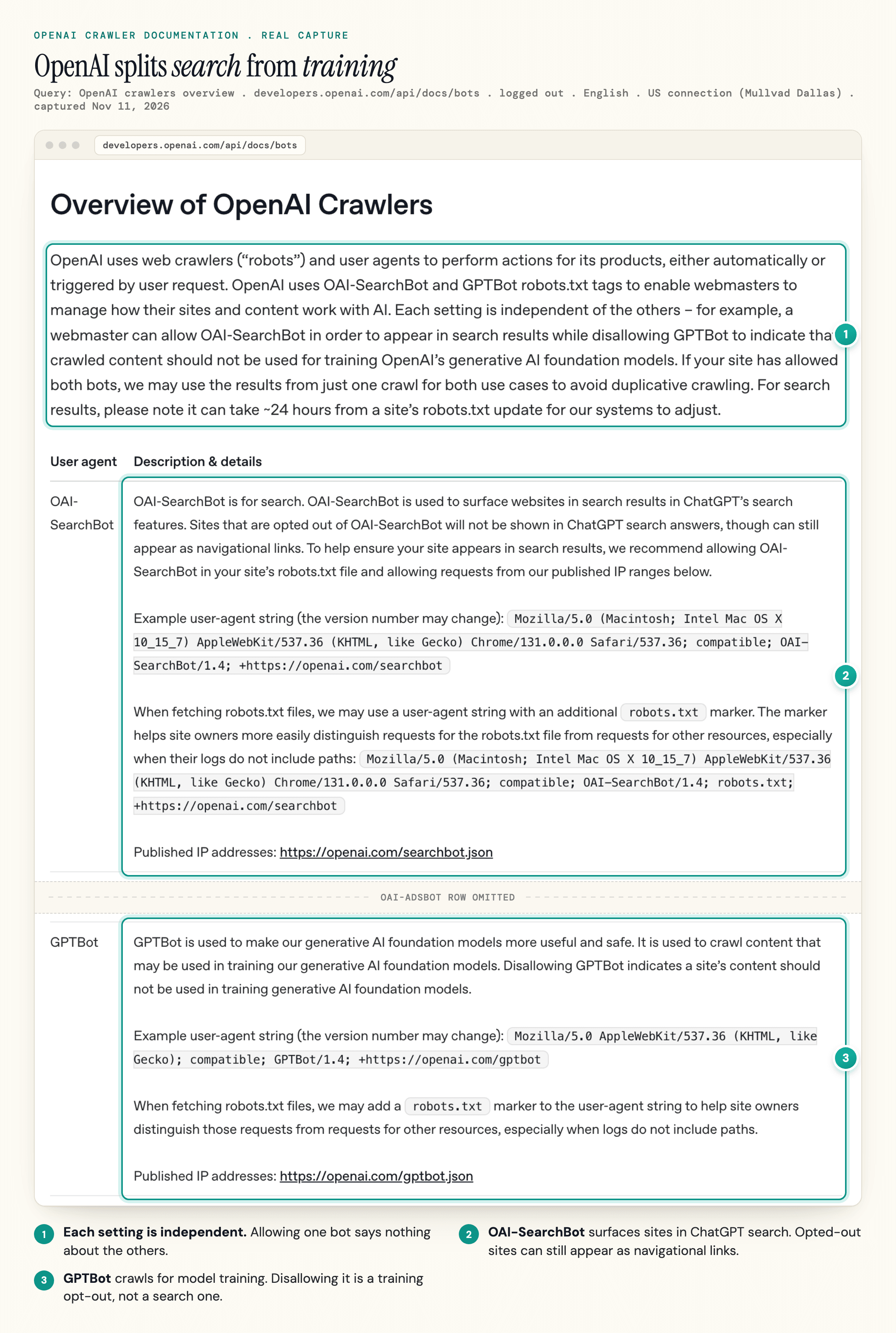
AI companies split their crawling by purpose, and each purpose has its own user agent:
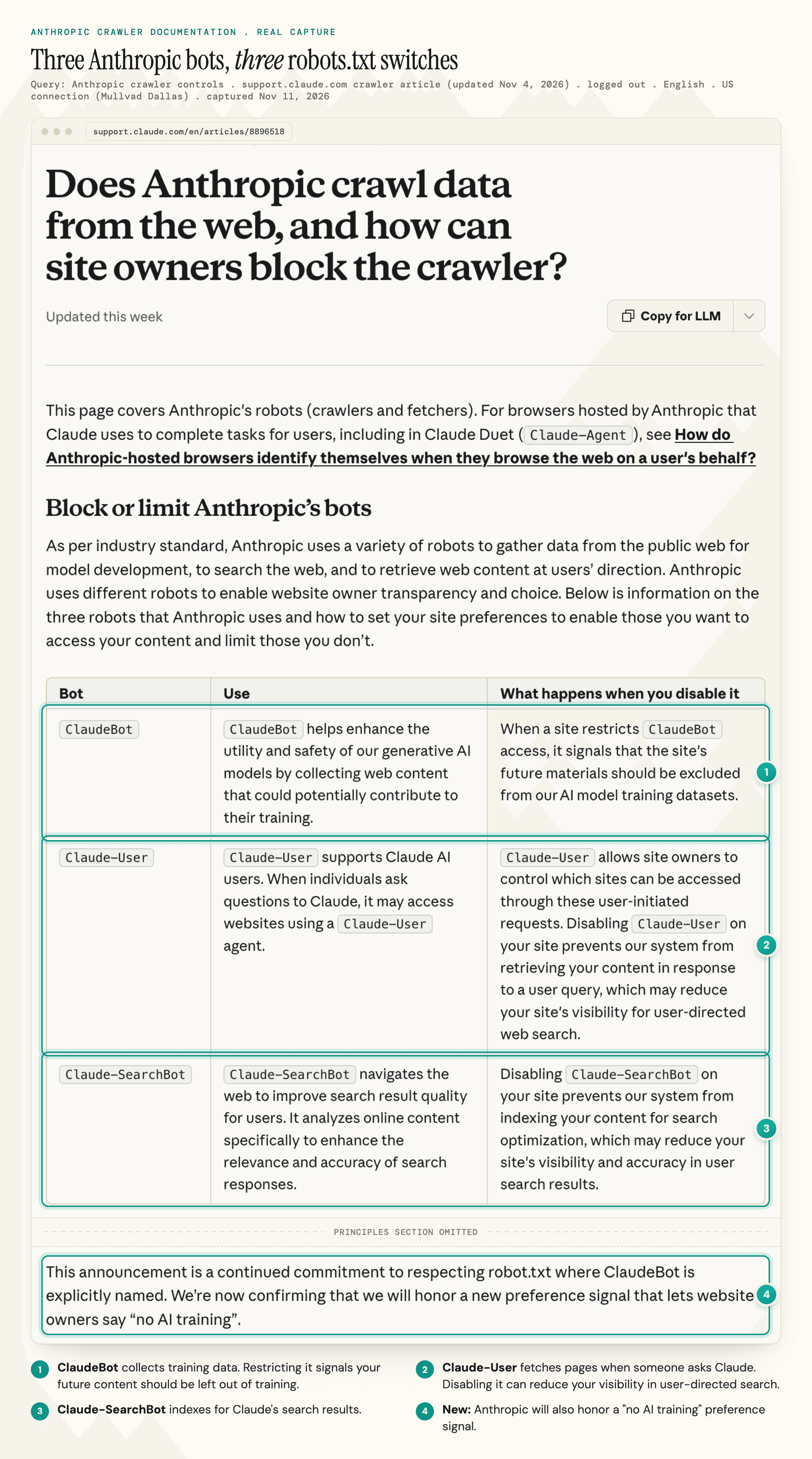
- Training crawlers collect pages for model training: GPTBot, ClaudeBot
- Search crawlers build the index behind an AI search product: OAI-SearchBot, Claude-SearchBot, PerplexityBot
- User-triggered fetchers load a page because someone asked about it right now: ChatGPT-User, Claude-User, Perplexity-User
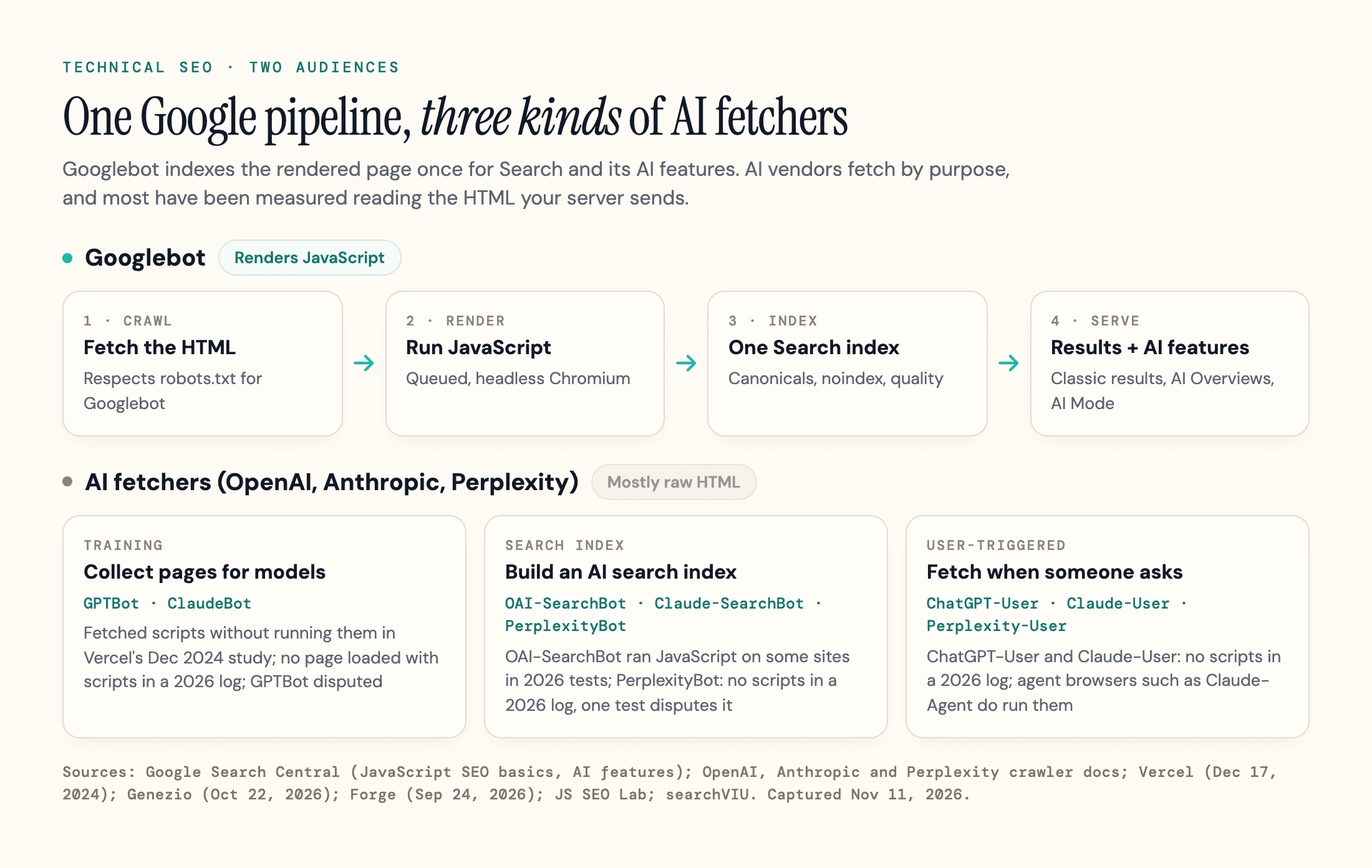
The practical difference is what each one reads: Googlebot indexes the rendered page, while the AI fetchers from OpenAI, Anthropic and Perplexity have mostly been measured reading only the HTML your server sends (OpenAI's search crawler is an exception on some sites). For every user agent, see our list of AI crawlers.
Google vs AI Crawlers: The Requirement Matrix
Google's AI features need an indexed page that is eligible for a snippet, plus one setting. AI vendors have their own rules, and they differ on the two questions that matter most: which token controls which use, and whether the crawler runs JavaScript.
We built the matrix below from each vendor's documentation, captured on November 11, 2026, plus the independent rendering tests cited in the Rendering section.
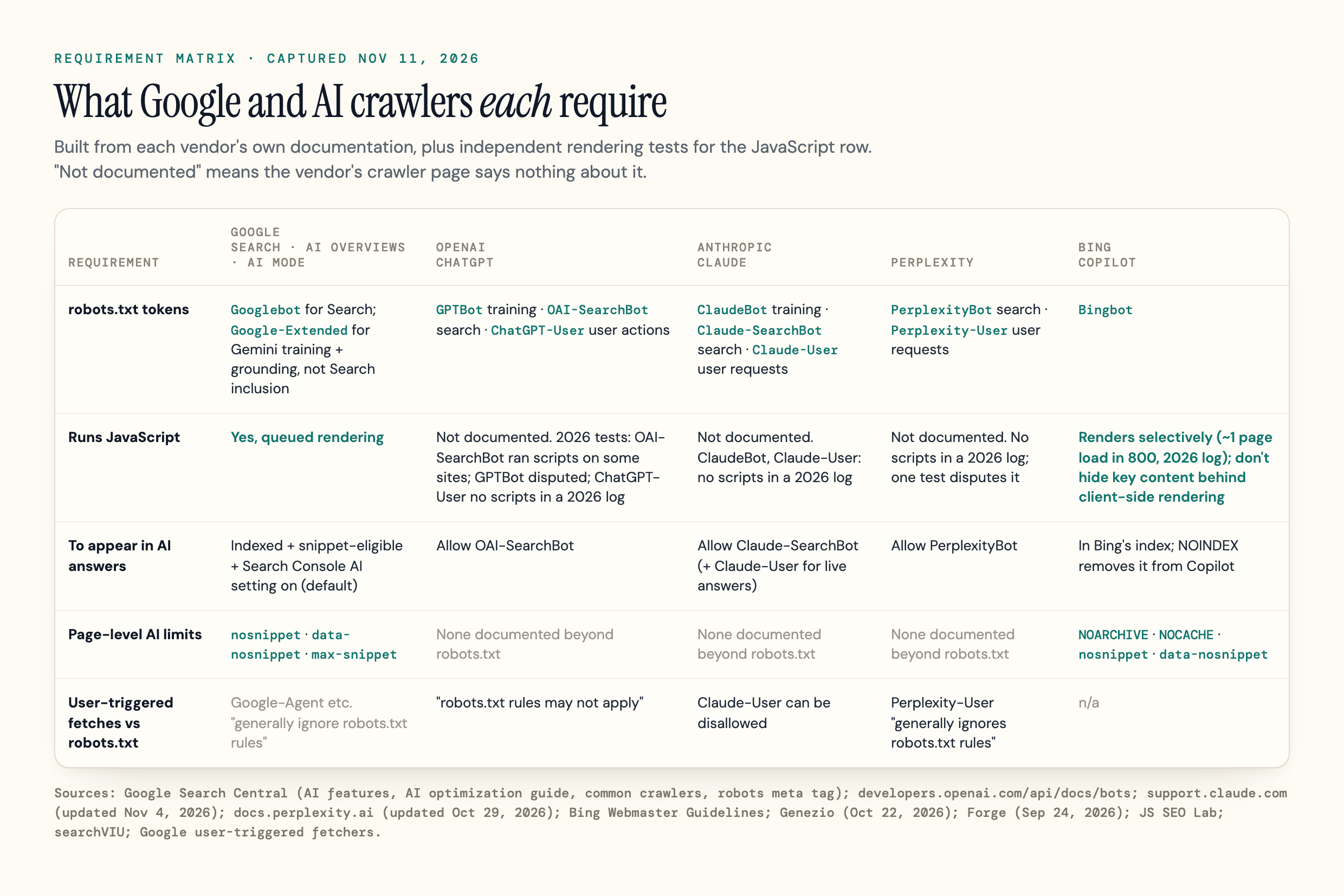
| Requirement | Google (Search, AI Overviews, AI Mode) | OpenAI (ChatGPT) | Anthropic (Claude) | Perplexity | Bing (Copilot) |
|---|---|---|---|---|---|
| robots.txt tokens | Googlebot for Search; Google-Extended for Gemini training and grounding, not Search inclusion | GPTBot (training), OAI-SearchBot (search), ChatGPT-User (user actions) | ClaudeBot (training), Claude-SearchBot (search), Claude-User (user requests) | PerplexityBot (search), Perplexity-User (user requests) | Bingbot |
| Runs JavaScript | Yes, in a queued rendering step | Not documented. OAI-SearchBot ran scripts on some sites in 2026 tests; GPTBot is disputed; ChatGPT-User fetched no scripts in a 2026 log | Not documented. ClaudeBot and Claude-User fetched no scripts while loading a page in a 2026 log | Not documented. PerplexityBot fetched no scripts in a 2026 log; one 2025 test disputes it | Renders selectively (about 1 page load in 800 in a 2026 log); Bing says not to hide critical content behind client-side rendering |
| To appear in AI answers | Indexed, eligible for a snippet, and the Search Console "Search generative AI" setting left on (the default) | Allow OAI-SearchBot | Allow Claude-SearchBot (and Claude-User for live answers) | Allow PerplexityBot | Indexed in Bing; NOINDEX removes the URL from Copilot too |
| Page-level limits on AI use | nosnippet, data-nosnippet, max-snippet | None documented beyond robots.txt | None documented beyond robots.txt | None documented beyond robots.txt | NOARCHIVE, NOCACHE, nosnippet, data-nosnippet |
| User-triggered fetches and robots.txt | Google-Agent and other user-triggered fetchers "generally ignore robots.txt rules" | ChatGPT-User: "robots.txt rules may not apply" | Claude-User can be disallowed in robots.txt | Perplexity-User "generally ignores robots.txt rules" | n/a |
What the Matrix Shows
Three patterns stand out.
First, OpenAI and Anthropic separate training from search, and Perplexity says its crawler is not used for model training.
Second, raw HTML is the shared safe default. Google renders, but ChatGPT-User and Claude-User fetched no scripts in the 2026 log cited below. Agent browsers, such as the Claude-Agent browser Claude uses to complete tasks for users, are the exception: browsers run scripts.
Third, only Google and Bing document page-level controls for AI use.
Google's AI optimization guide adds one requirement: a site "must be included in Search generative AI features in Search Console".
Every site is included by default, and a property inherits the setting from its closest parent property that changed it, so check your domain property too. Google's older AI features page (December 2025) still says there are "no additional technical requirements".
Crawlability: robots.txt, Status Codes and Crawl Budget
Crawlability means a bot can request a URL and get a usable answer, and many technical SEO issues start here.
Why robots.txt Controls Crawling, Not Indexing
robots.txt asks crawlers to stay away from paths; it does not keep a URL out of Google. Google says a page that's disallowed in robots.txt can still be indexed if other sites link to it. The standard itself, RFC 9309, says: "These rules are not a form of access authorization."
Password-protect a staging site or private page: robots.txt and noindex are not security. For a public page that should only stay out of Search, Google recommends noindex. Don't also disallow that URL in robots.txt, because Google has to crawl the page to see the tag.
Googlebot ignores crawl-delay, which its robots.txt spec lists as unsupported, while Anthropic says its bots respect it "where appropriate".
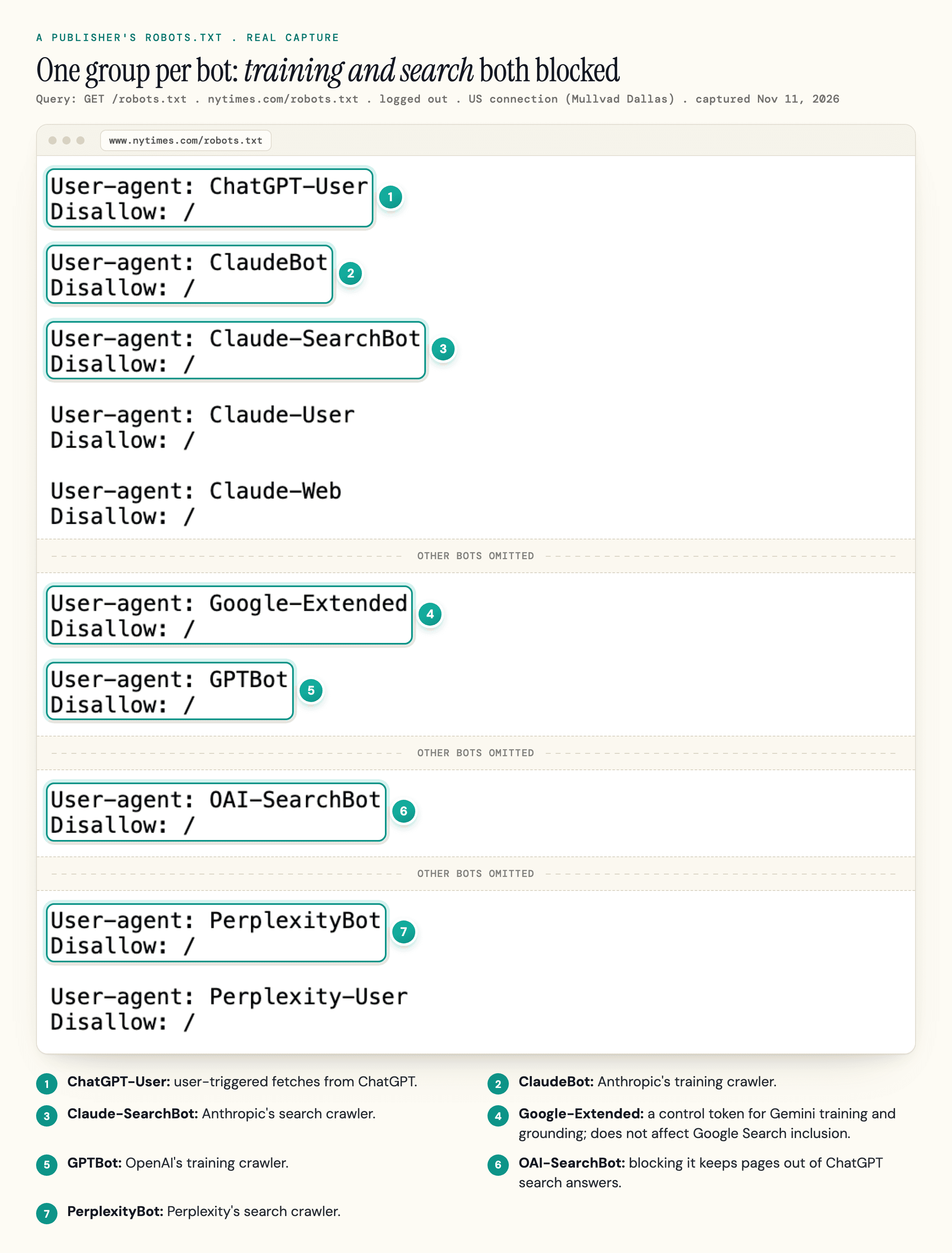
Each crawler follows the group that names its user agent and falls back to * otherwise, so you only name the bots you want to treat differently. Adding these groups asks OpenAI, Anthropic and Google not to train on your pages (Google-Extended is a control token, not a crawler) and leaves every search crawler on its current rules.
Review any existing groups for these bots too: robots.txt combines them, and a more specific Allow line still beats Disallow: /. The Google-Extended group also removes your pages from grounding in Gemini Apps, so leave it out if you want Gemini answers to use them.
User-agent: GPTBot
Disallow: /

User-agent: ClaudeBot
Disallow: /

User-agent: Google-Extended
Disallow: /
To see which bots a live file blocks on your homepage path, paste a domain into our AI Crawler Checker. It tests the robots.txt against 34 crawler user agents, most of them AI bots, and shows the line doing the blocking when one is blocked.
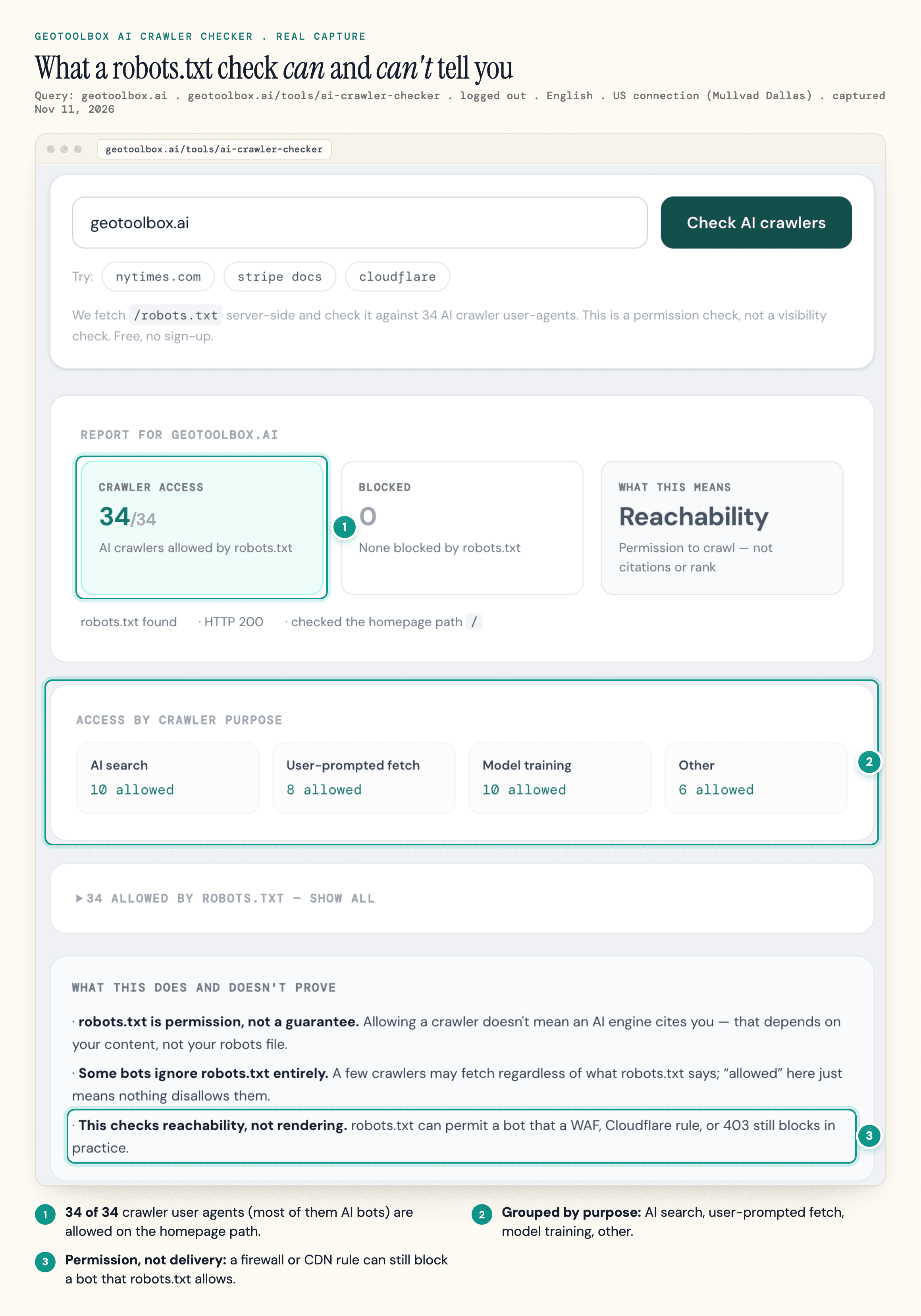
The file's own status code matters too. Under RFC 9309, a 4xx means a crawler may fetch anything, while an unreachable file (a server error) means it must assume everything is disallowed.
Your CDN Can Overrule robots.txt
CDN and firewall bot rules run before robots.txt is read, so a file that allows OAI-SearchBot does nothing if the edge returns a 403. Cloudflare, for one, began asking every new domain whether to allow AI crawlers on July 1, 2025, with blocking as the default.
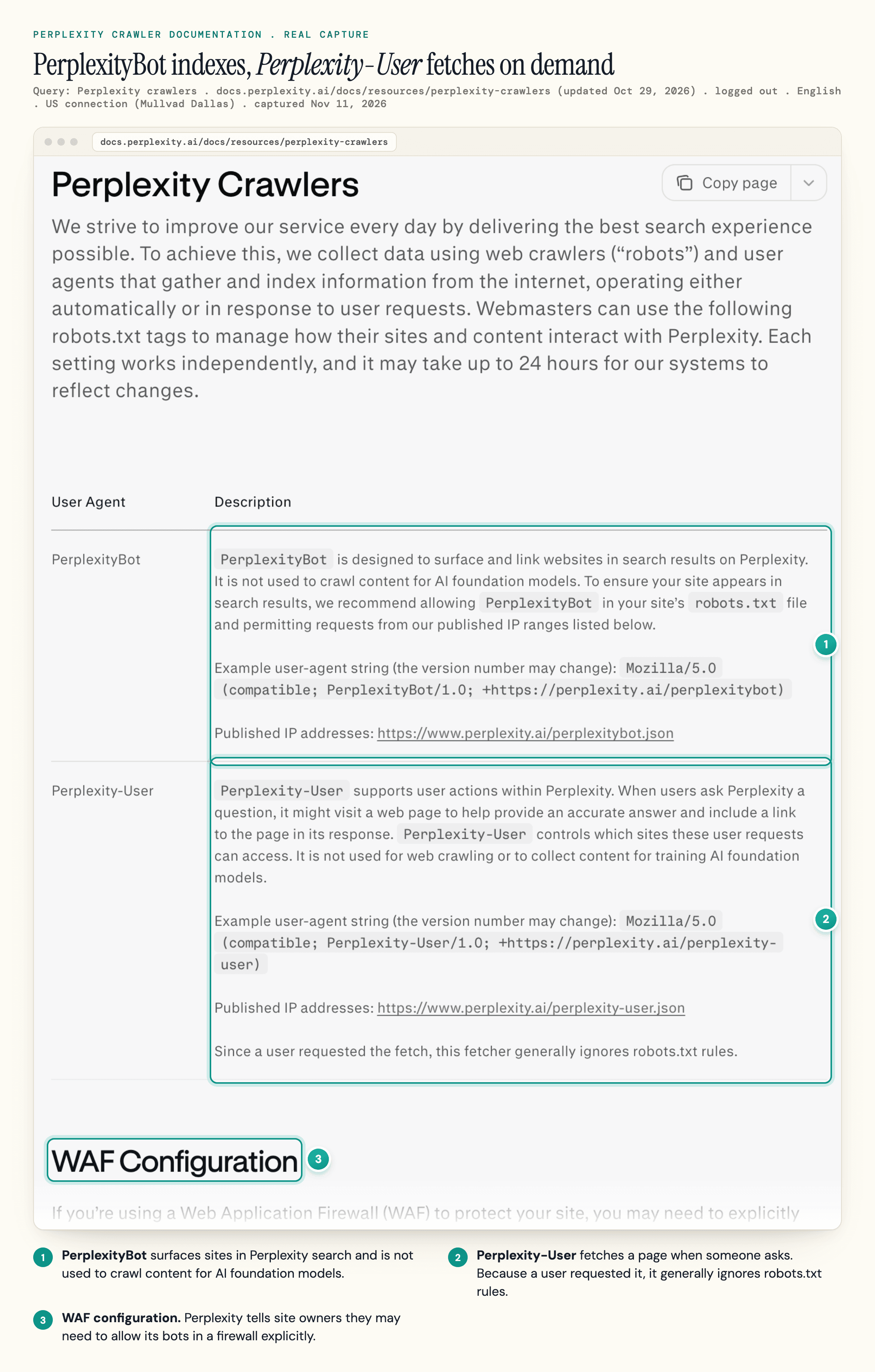
Perplexity's crawler documentation tells site owners they may need to allow its bots explicitly in a web application firewall.
So test what each bot receives as well as what the rules say. The geotoolbox Agent Readiness scan requests your site with six crawler user agents from our server and reports 403s and firewall blocks. A firewall that verifies bots by IP address can still treat the real crawler differently, so confirm in your CDN's bot settings or logs.
Crawl Budget Is a Large-Site Problem
Google's crawl budget guide is written for sites with more than 1 million unique pages that change weekly, more than 10,000 that change daily, or a large share of URLs stuck in "Discovered - currently not indexed", and Google calls those numbers rough estimates. Below that, an unindexed page usually has another cause, such as duplicate content or thin content.
What wastes crawling at any size: redirect chains, soft 404s ("soft 404 pages will continue to be crawled, and waste your budget"), and slow or failing servers. Google lowers its crawl rate when responses slow down or return 5xx or 429 codes.
Rendering: What Each Crawler Actually Sees
If your main text only appears after JavaScript runs, Google will usually see it and the AI fetchers from OpenAI, Anthropic and Perplexity mostly will not.
Google renders in that queued second step, which can lag the crawl. Bing's guidelines ask you not to hide critical content behind client-side rendering, because "content that cannot be reliably rendered may not be indexed or selected for grounding results."
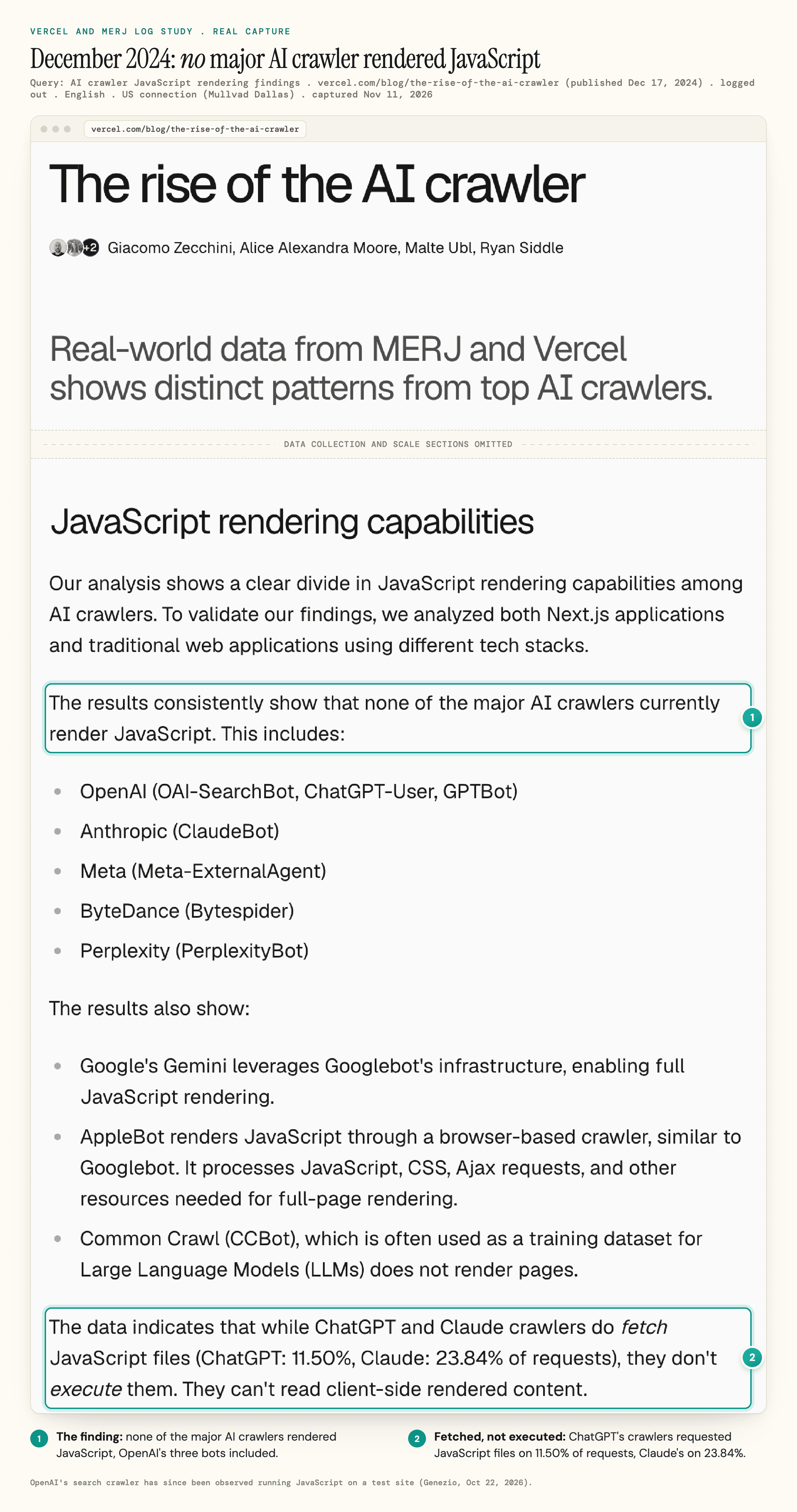
In December 2024, Vercel and MERJ's log analysis of Vercel's network found that "none of the major AI crawlers currently render JavaScript". On nextjs.org, ChatGPT's crawler spent 11.50% of its requests on JavaScript files and Claude's 23.84%, without executing them.
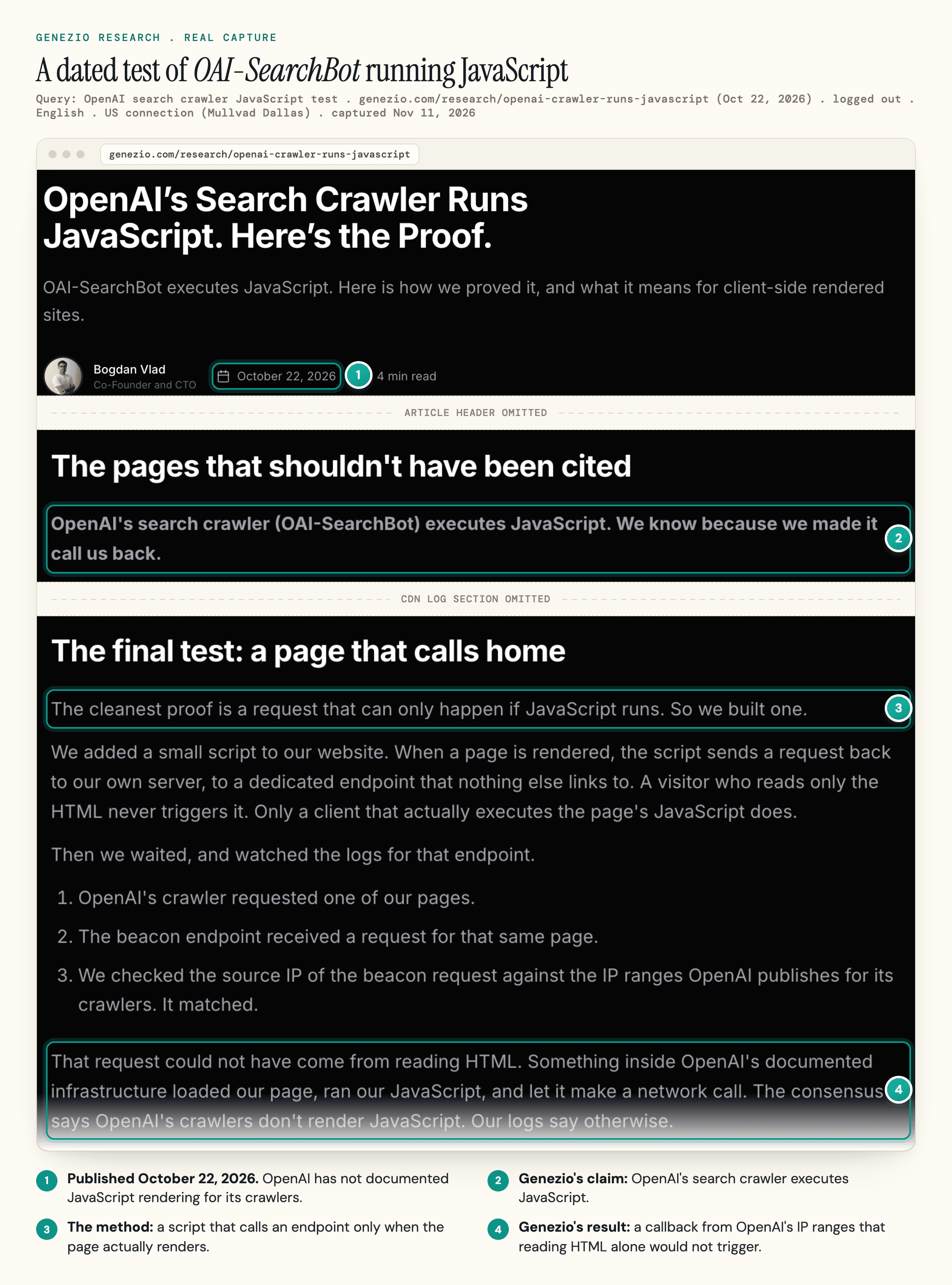
That has changed for OpenAI's search crawler. On October 22, 2026, Genezio, which sells AI-visibility software, published a test on its own site in which a crawler from OpenAI's IP ranges called back an endpoint that only running JavaScript could reach.
Forge's 30-day log of one news site, to September 24, 2026, caught OAI-SearchBot loading a single page the way a browser does, once in 1,738 requests carrying that bot name (Forge did not check them against OpenAI's IP list), and Forge says a log cannot show whether the scripts ran.
OpenAI has not documented any of it. In the same log, ChatGPT-User, Claude-User and PerplexityBot fetched no scripts.
Two other tests muddy the picture. A JS SEO Lab beacon test logged GPTBot running inline scripts, and a searchVIU test run on October 30, 2025 suggests script-written content can reach Perplexity's index.
The View-Source Test
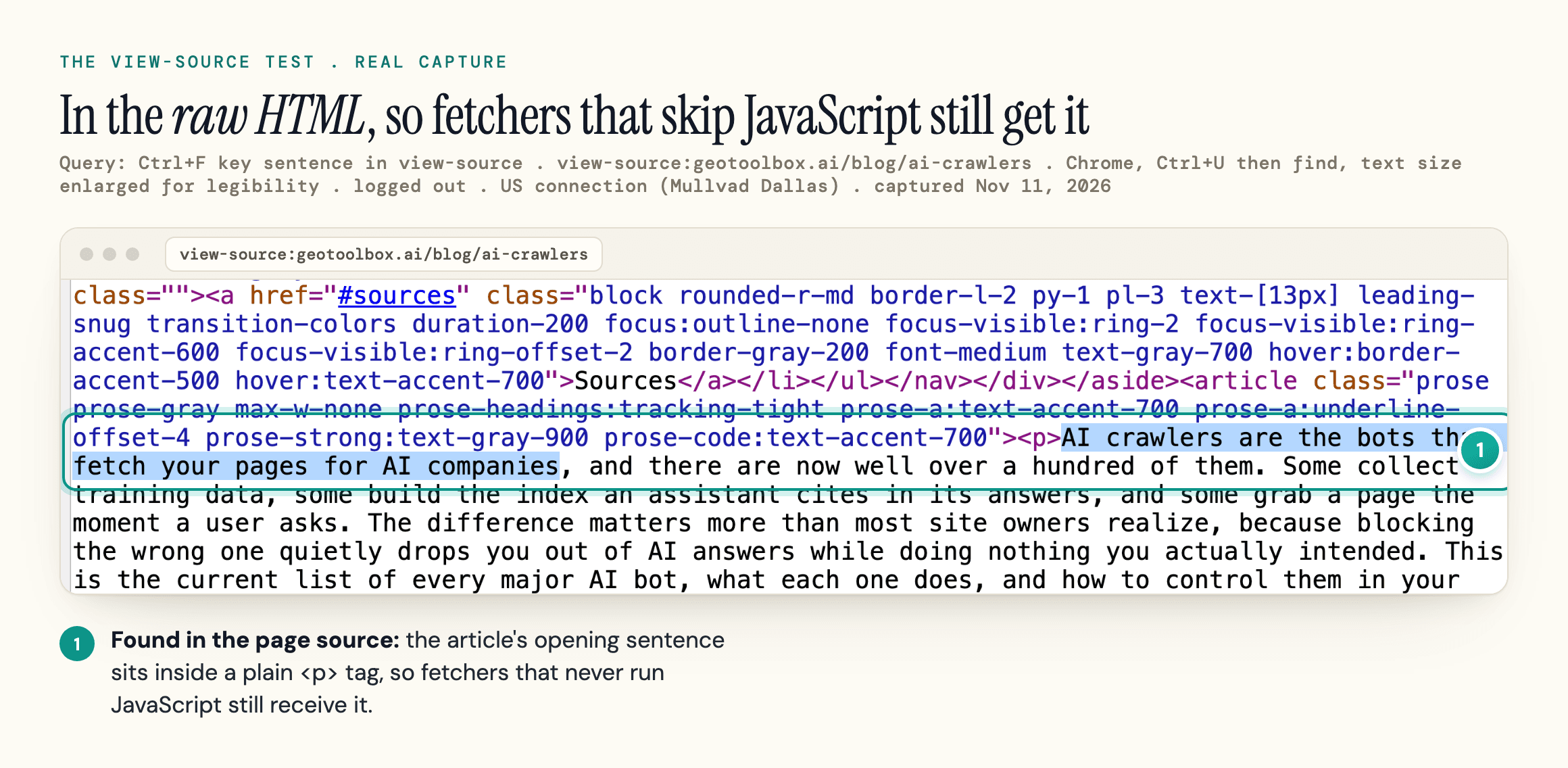
Open view-source (Ctrl+U or Cmd+Option+U), search for a sentence from your main content, and see whether it is there. If it is not in the source, the fetchers that read raw HTML cannot quote it.
The fix is server-side rendering, static generation or prerendering for content pages. Our JavaScript SEO guide covers the bot-by-bot test results and framework options.
Indexing, Canonicals and Sitemaps
Indexing is Google's decision, and you influence it with consistent signals: one canonical URL per piece of content, no accidental noindex, and a sitemap that lists only pages you want indexed.
Google Search Console for technical SEO work starts with the Page indexing report, which groups the URLs Google left out by the reason it gives.
Use a noindex meta robots tag to keep a page out of results, and canonical tags or redirects to consolidate duplicates.
Google treats a canonical tag as a strong signal, not an order, so it works best when internal links, sitemaps and redirects point the same way. Our guide to canonical tags covers how Google and AI engines pick one URL.
Sitemaps and IndexNow
Google says a site of about 500 pages or fewer that is fully linked internally may not need a sitemap. Bing adds IndexNow, a ping that tells Bing when a URL is added, updated or removed, and its guidelines tie that freshness to Copilot answers. See our XML sitemap guide for setup.
"Crawled - Currently Not Indexed"
In Google Search Console, this status means Google fetched the page and chose not to index it, for now. It is not an error code, and Google does not index every URL it crawls.
Work through it in this order:
- Check whether the page duplicates another URL, and whether Google picked a different canonical
- Check how many internal links point to it, and from where
- Check whether it adds anything the indexed pages on the same topic do not
The Request Indexing button only asks Google to crawl the URL again, so it rarely changes the outcome while the cause is still there.
Faceted Navigation
Faceted navigation creates duplicate URLs at scale. Filters and sort orders can create thousands of near-identical URLs. To keep crawlers off the combinations nobody searches for, Google's faceted navigation guidance prefers blocking them in robots.txt or putting filters in URL fragments; it calls canonical tags generally less effective for that. If those URLs are already indexed, noindex them first and block them only once they drop out. Our ecommerce SEO guide walks through that decision per filter.
Site Architecture and Internal Links
Search engines and AI crawlers find most pages by following links, so your internal links decide what gets discovered first and what looks important.
Use plain <a href> links. Bing's guidelines ask for exactly that, with relevant anchor text, and links that only exist after a click handler runs are invisible to fetchers that skip JavaScript.
Keep important pages close to the homepage through category pages and breadcrumbs. What matters is that every page you want indexed has a crawlable path to it. Keep the URL structure short, readable and stable, because every change needs redirects.
Orphan Pages and Broken Links
Orphan pages, with no internal links pointing at them, are the usual casualty of redesigns and CMS migrations.
Broken internal links waste crawling for every bot, AI fetchers included. A full site audit, as in our SEO audit checklist, finds orphan pages and broken links at scale.
Retiring URLs: Redirect or 404
When you retire a URL, redirect it to a page that genuinely replaces it. If nothing does, return 404 or 410, which Google recommends for permanently removed pages, and update the links that pointed to it.
Page Experience: Core Web Vitals, Mobile and HTTPS
Core Web Vitals are the technical SEO factors measured on real visitors: loading, responsiveness and layout stability. Google says good scores align with what its core ranking systems seek to reward, but they are one signal among many, and relevance comes first.
| Metric | What it measures | Good |
|---|---|---|
| Largest Contentful Paint (LCP) | Loading: when the main content appears | 2.5 seconds or less |
| Interaction to Next Paint (INP) | Responsiveness to clicks, taps and key presses | 200 milliseconds or less |
| Cumulative Layout Shift (CLS) | Visual stability (unexpected layout shifts) | 0.1 or less |
web.dev's Core Web Vitals guide sets these targets at the 75th percentile of page loads, measured separately for mobile and desktop. INP replaced First Input Delay as the responsiveness metric, and anything above 500 milliseconds counts as poor.
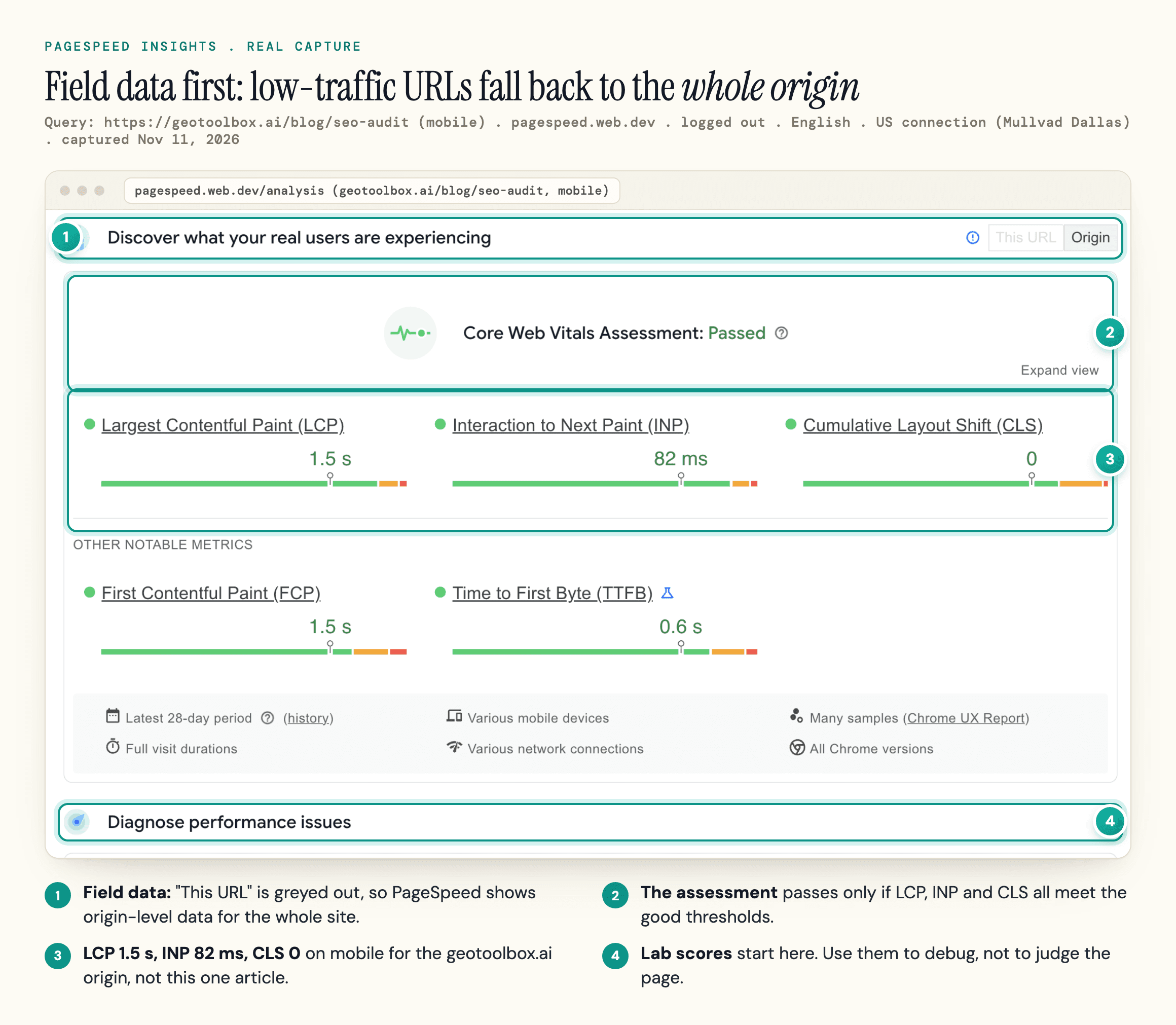
Judge the field data, not the lab score: the lab number moves from run to run, while the field data comes from real Chrome users. When a URL has too little traffic, PageSpeed Insights shows field data for the whole origin instead, if the origin has enough, as in the capture below.
Mobile-First Indexing and HTTPS
Google indexes the mobile version of your pages, crawled with the smartphone agent, so content or links missing on mobile are missing for Google. And pages should be served over HTTPS on one host, with HTTP URLs and the other host version (www or non-www) redirecting to it.
Does Speed Help AI Citations?
We have not seen published evidence that it does, and none of the OpenAI, Anthropic or Perplexity crawler pages we captured mention page speed.
Structured Data and hreflang
Structured data labels what a page is about in a format machines parse without guessing. Write it as JSON-LD and keep it identical to what the page shows.
Google's AI optimization guide says: "Structured data isn't required for generative AI search, and there's no special schema.org markup you need to add." It still recommends markup for rich result eligibility. Bing's guidelines say structured data "may support clearer grounding but does not guarantee visibility or grounding traffic."
Whether markup raises AI citations is a separate question. In the one intervention study we know of, Ahrefs tracked 1,885 pages that added schema and found AI citations barely moved. Our schema markup for AI search breakdown covers the studies.
Validating Structured Data
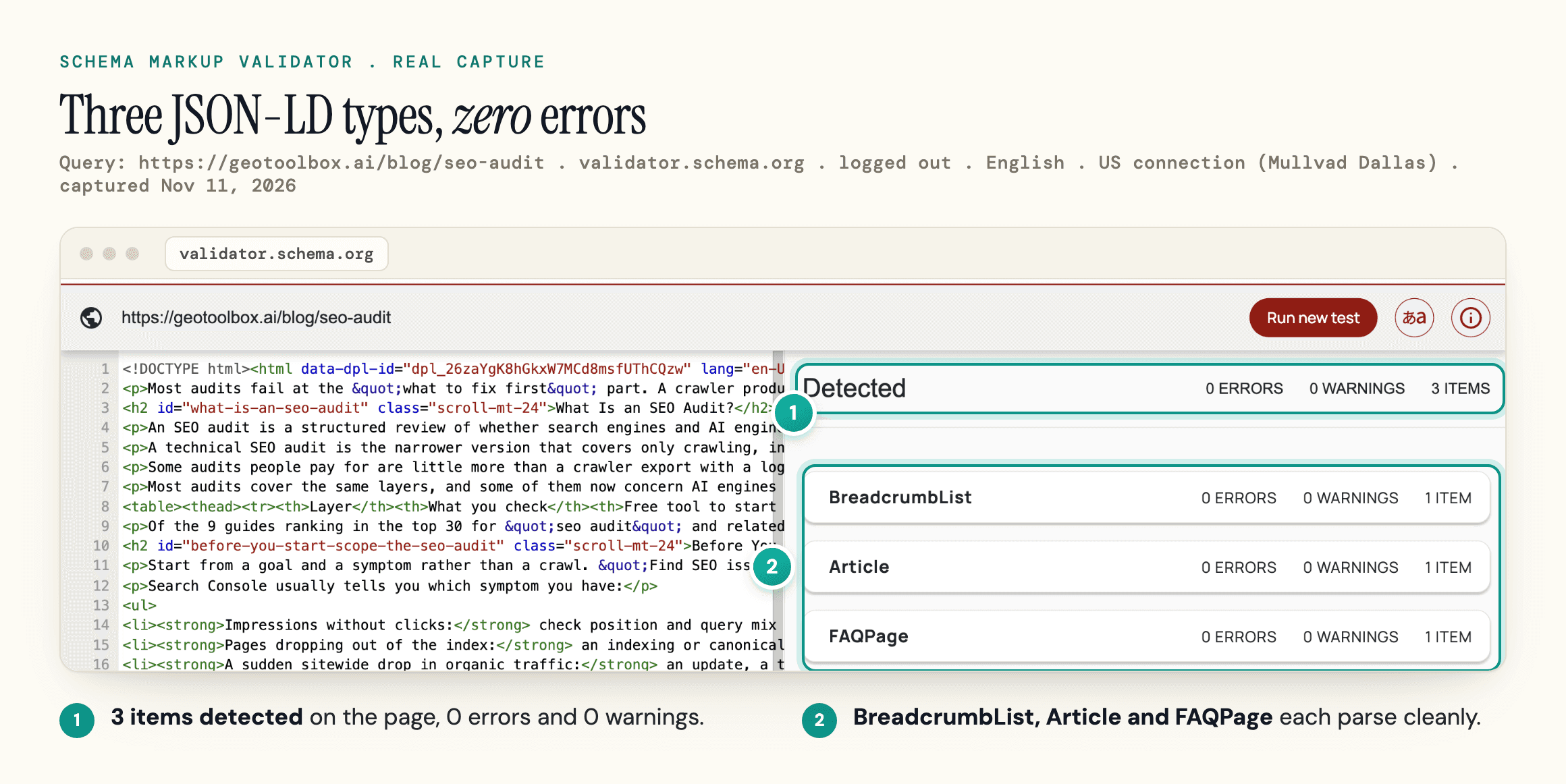
Validate before you ship. A JSON-LD block with a syntax error can't be read at all, and Bing warns that misleading markup "may be ignored."
Using hreflang on Multilingual Sites
hreflang tells Google which language or regional version of a page to show. Each value is a language code in ISO 639-1 format, optionally followed by a region code (en-US, fr-CA).
The common failures are one-way annotations (the French page names the English one, not the reverse) and annotations pointing at redirected or noindexed URLs. Link every language version to itself and every other, point only at canonical URLs, and add an x-default value for the fallback page.
None of the AI vendors' crawler pages we captured mention hreflang. What they can use is a separate, crawlable URL per language that works in plain HTML.
AI Search Controls: What Each Switch Changes
Most AI opt-out mistakes come from using a training control to fix a search problem, or the reverse.
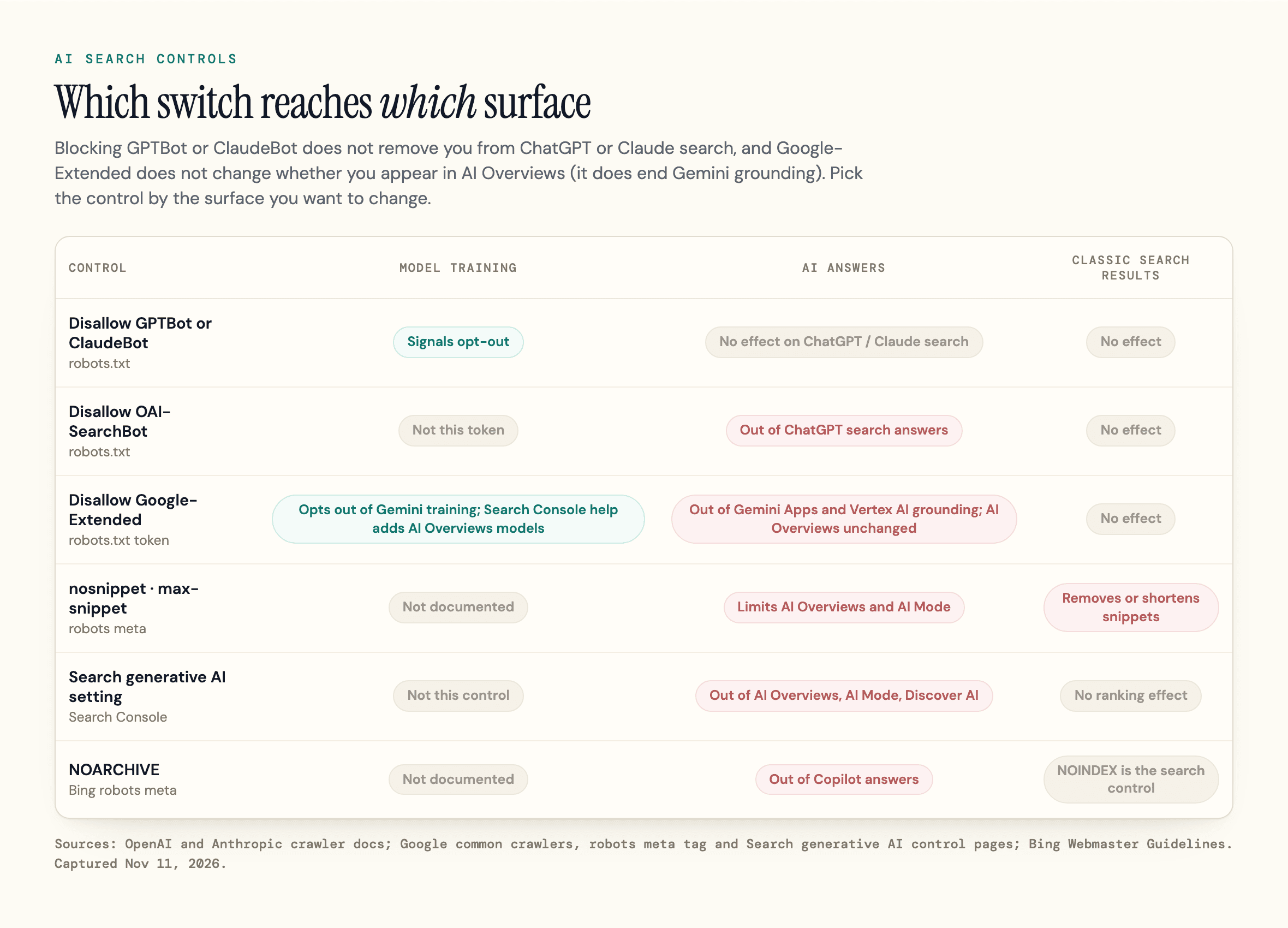
| Control | What it does | What it does not do |
|---|---|---|
| Disallow GPTBot or ClaudeBot | Signals that your content should stay out of model training | Remove you from ChatGPT or Claude search |
| Disallow OAI-SearchBot | Keeps your pages out of ChatGPT search answers | Stop navigational links to your site |
| Disallow Google-Extended | Opts out of Gemini model training and grounding in Gemini Apps and Vertex AI; Search Console help adds training of the models behind AI Overviews and AI Mode | Change whether you appear in Google Search, AI Overviews or AI Mode |
| Add nosnippet or max-snippet | Blocks or limits the text Google can use as direct input to AI Overviews and AI Mode, and can shrink or remove classic snippets too | Limit content you license to Google or supply as in-page structured data (max-snippet) |
| Turn off "Search generative AI" in Search Console | Excludes the property, and child properties that inherit its setting, from AI Overviews, AI Mode and generative AI in Discover | Change rankings elsewhere in Search |
| Add Bing NOARCHIVE | Keeps content out of Copilot answers and grounding | Remove the URL from Bing search (NOINDEX does that) |
Sites opted out of OAI-SearchBot "will not be shown in ChatGPT search answers, though can still appear as navigational links." Google's common crawlers page says "Google-Extended does not impact a site's inclusion in Google Search".
For AI Overviews, the levers are the nosnippet family and the Search generative AI control, which Google had rolled out to all websites by August 31, 2026. Google says exclusion generally takes a few days: content goes within 1-2 days after the control goes live, some later because of caching.
One file you can skip for Google: its AI optimization guide says llms.txt files neither help nor harm visibility in Google Search. See our llms.txt breakdown for other engines, and how to turn off AI Overviews for the opt-out steps.
A Shared No-Training Signal
A shared no-training signal is arriving too. Anthropic's crawler page says that as of October 30, 2026 it "has begun recognizing" a "no AI training" preference that follows a draft from the IETF's aipref work. Google's common crawlers page says it intends to support the same signal, set with user-agent: __usage_ai-training, in early 2027.
A Short Technical SEO Checklist
These technical SEO best practices build on each other. A page that cannot be fetched gains nothing from schema, so the first items matter most:
- Access: important URLs return 200, robots.txt allows the bots you want, and your CDN does not block them
- Rendering: main text and links are in the raw HTML (the view-source test)
- Indexing: no stray noindex, one canonical per page, a sitemap of canonical URLs only
- Architecture: every important page has a crawlable internal link path; retired URLs redirect to a real replacement or return 404 or 410
- Page experience: Core Web Vitals pass on field data, on mobile, over HTTPS
- Structured data: valid JSON-LD that matches the visible page; hreflang links every language version to itself and every other
- AI controls: each robots.txt group, snippet setting and Search Console setting chosen on purpose
- Measurement: the Generative AI performance report in Google Search Console, Bing's AI Performance report, and server logs filtered by user agent
Start with item 1. Paste your domain into the free geotoolbox AI Crawler Checker to see which AI bots your robots.txt blocks on the homepage path, then run the Agent Readiness scan to see what your firewall returns to them.
Measuring AI Crawlers and Citations
Anyone can fake a user agent string, so in logs check claimed AI bots against the IP lists OpenAI, Anthropic and Perplexity publish for their crawlers. On Google's side, the AI optimization guide points to a Generative AI performance report in Google Search Console.
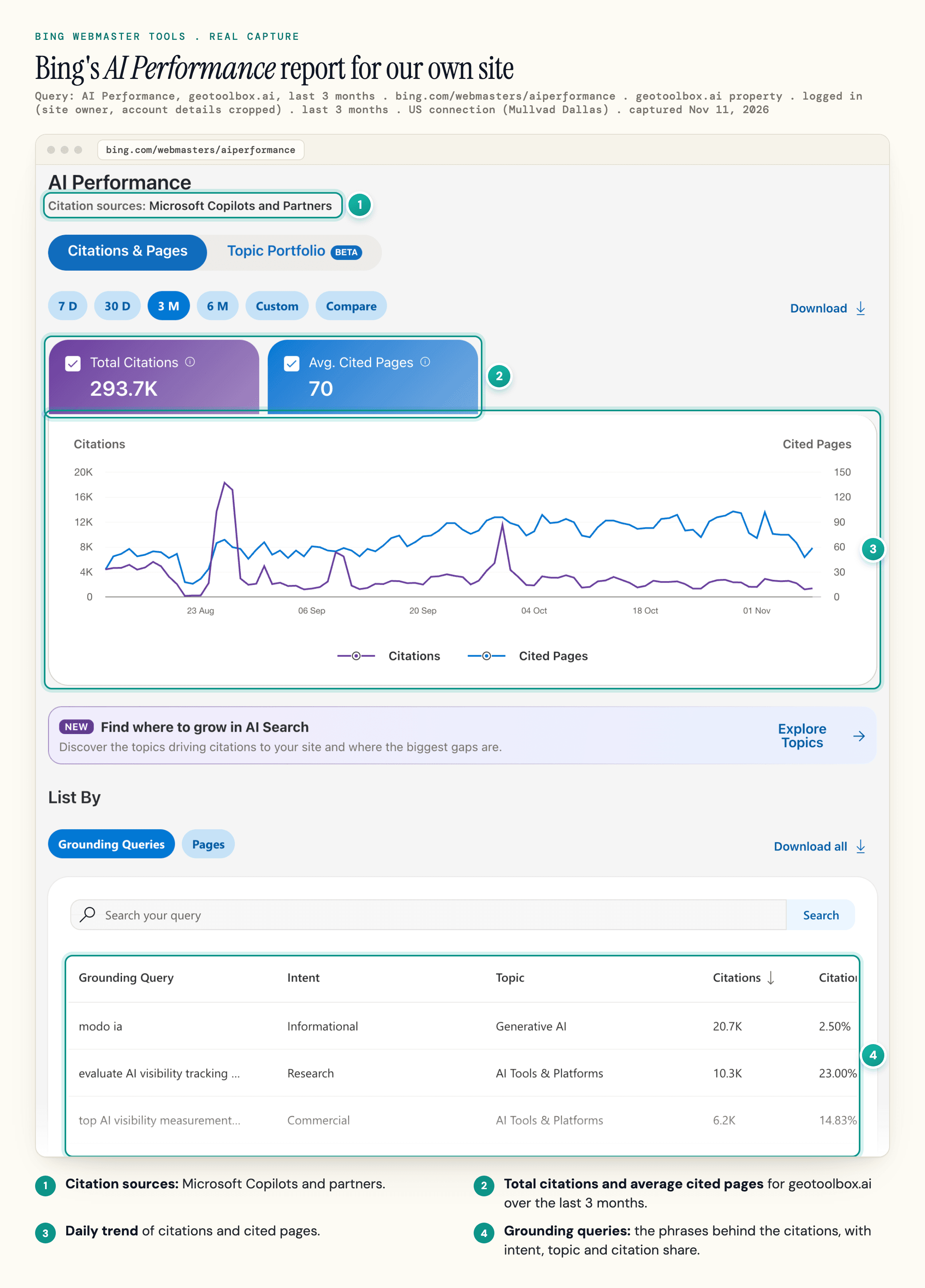
Bing's AI Performance report shows which of your pages Copilot and Bing's AI summaries cite, and the grounding queries behind them. It counts citations; it does not report clicks.
Frequently Asked Questions
Do you need to know how to code to do technical SEO?
No, but you need to read code. Most of the work is diagnosis: reading robots.txt, status codes, page source and Search Console reports. Fixes like server-side rendering or redirect rules usually go to a developer.
Does technical SEO still matter with AI search?
Yes, and arguably more. Copilot runs on Bing's index, and AI fetchers that read raw HTML are less forgiving than Googlebot. A page they cannot fetch or read cannot be cited.
What is the 80/20 rule in technical SEO?
Most of the impact comes from a few checks: whether important pages can be crawled, rendered and indexed. Fix access, raw-HTML content and indexing signals before spending time on scores like Lighthouse performance or minor validator warnings.
Can ChatGPT do technical SEO?
It can explain an error, draft robots.txt rules, redirects or JSON-LD, and summarize a crawl export you paste in. It cannot see your server logs, your Search Console data or what each bot actually received, so check its suggestions against those before you ship a change.
Sources
- Google Search Central - Google Search technical requirements (updated December 18, 2025) -
developers.google.com/search/docs/essentials/technical - Google Search Central - AI features and your website (updated December 10, 2025) -
developers.google.com/search/docs/appearance/ai-features - Google Search Central - Google's guide to optimizing for generative AI features on Google Search (updated July 10, 2026) -
developers.google.com/search/docs/fundamentals/ai-optimization-guide - Search Console Help - Search generative AI control (read November 11, 2026) -
support.google.com/webmasters/answer/16908024 - Google Crawling Infrastructure - Google's common crawlers, Google-Extended (updated October 30, 2026) -
developers.google.com/crawling/docs/crawlers-fetchers/google-common-crawlers - Google Search Central - Robots meta tag, data-nosnippet, and X-Robots-Tag specifications (updated March 24, 2026) -
developers.google.com/search/docs/crawling-indexing/robots-meta-tag - Google Search Central - Understand JavaScript SEO basics (updated March 4, 2026) -
developers.google.com/search/docs/crawling-indexing/javascript/javascript-seo-basics - Google Search Central - Introduction to robots.txt (updated December 10, 2025) -
developers.google.com/search/docs/crawling-indexing/robots/intro - Google Crawling Infrastructure - Crawl budget management (updated July 22, 2026) -
developers.google.com/crawling/docs/crawl-budget - Google Crawling Infrastructure - Managing crawling of faceted navigation URLs (updated December 18, 2025) -
developers.google.com/crawling/docs/faceted-navigation - Google Search Central - What is a sitemap (updated December 10, 2025) -
developers.google.com/search/docs/crawling-indexing/sitemaps/overview - Google Search Central - Localized versions of your pages (updated September 21, 2026) -
developers.google.com/search/docs/specialty/international/localized-versions - Google Search Central - Mobile-first indexing best practices (updated December 10, 2025) -
developers.google.com/search/docs/crawling-indexing/mobile/mobile-sites-mobile-first-indexing - Google Search Central - Understanding Core Web Vitals and Google search results (updated December 10, 2025) -
developers.google.com/search/docs/appearance/core-web-vitals - Search Console Help - URL Inspection tool (read November 11, 2026) -
support.google.com/webmasters/answer/9012289 - web.dev - Web Vitals (updated October 31, 2024) -
web.dev/articles/vitals - web.dev - Interaction to Next Paint (INP) (updated September 2, 2025) -
web.dev/articles/inp - IETF - RFC 9309, Robots Exclusion Protocol (September 2022) -
www.rfc-editor.org/rfc/rfc9309.html - OpenAI - Overview of OpenAI Crawlers (read November 11, 2026) -
developers.openai.com/api/docs/bots - Anthropic - Does Anthropic crawl data from the web, and how can site owners block the crawler? (updated November 4, 2026) -
support.claude.com/en/articles/8896518 - Perplexity - Perplexity Crawlers (updated October 29, 2026) -
docs.perplexity.ai/docs/resources/perplexity-crawlers - Microsoft Bing - Bing Webmaster Guidelines (read November 11, 2026) -
www.bing.com/webmasters/help/webmaster-guidelines-30fba23a - Microsoft Bing - AI Performance in Bing Webmaster Tools (read November 11, 2026) -
www.bing.com/webmasters/help/ai-performance-9f8e7d6c - Vercel - The rise of the AI crawler (December 17, 2024) -
vercel.com/blog/the-rise-of-the-ai-crawler - Genezio - OpenAI's Search Crawler Runs JavaScript (October 22, 2026) -
genezio.com/research/openai-crawler-runs-javascript - JS SEO Lab - JavaScript execution has two depths, and bots split cleanly between them (updated October 25, 2026) -
jsseo.dev/findings/javascript-execution-has-two-depths - searchVIU - Schema markup and AI put to the test (updated October 15, 2026; test run October 30, 2025) -
www.searchviu.com/en/guides/schema-markup-ai - Ahrefs - We Tracked 1,885 Pages Adding Schema. AI Citations Barely Moved. (May 11, 2026) -
ahrefs.com/blog/schema-ai-citations - Forge - Can AI crawlers run JavaScript? What ChatGPT-User really sees on your page (September 24, 2026) -
www.forgeaibotlog.com/articles/can-ai-crawlers-execute-javascript - Google Crawling Infrastructure - Google user-triggered fetchers (updated August 19, 2026) -
developers.google.com/crawling/docs/crawlers-fetchers/google-user-triggered-fetchers - Google Crawling Infrastructure - How Google interprets the robots.txt specification (updated October 23, 2026) -
developers.google.com/crawling/docs/robots-txt/robots-txt-spec - Cloudflare - Cloudflare just changed how AI crawlers scrape the Internet-at-large (press release, July 1, 2025) -
www.cloudflare.com/press/press-releases/2025/cloudflare-just-changed-how-ai-crawlers-scrape-the-internet-at-large