
Gemini API pricing starts at about $0.10 per million tokens with no subscription, which makes it look like one of the cheapest ways to build on a frontier model. It often is. But the per-token rate is not the bill. The same model sells at four different service-tier prices, the free tier comes with a real catch, and a handful of meters (thinking tokens, a context cliff, and grounding) decide what you actually pay.
This is the developer's cost reference for the Gemini API: every model's token price, the service tiers, the free-tier limits, Vertex AI versus the Developer API, and the hidden costs that inflate the number. If you want a monthly consumer plan instead of per-token billing, see the consumer Gemini pricing breakdown instead.
How Much Does the Gemini API Cost? Every Model's Token Price
The Gemini API charges you per token, the chunks of text a model reads and writes, billed separately for input tokens and output tokens. There is no subscription. You pay for what your software sends and receives, and the rate depends entirely on which model you call.
Here are the current pay-as-you-go rates for the models worth using, at Standard-tier prices as of July 2026.
| Model | Input (per 1M tokens) | Output (per 1M tokens) | Best for |
|---|---|---|---|
| Gemini 2.5 Flash-Lite | $0.10 | $0.40 | Cheapest option, high-volume classification |
| Gemini 3.1 Flash-Lite | $0.25 | $1.50 | Prior-generation budget tier |
| Gemini 2.5 Flash | $0.30 | $2.50 | Multimodal workhorse |
| Gemini 3.5 Flash-Lite | $0.30 | $2.50 | New budget tier, fastest in the 3.5 line (July 2026) |
| Gemini 3.6 Flash | $1.50 | $7.50 | New default workhorse, successor to 3.5 Flash (July 2026) |
| Gemini 3.5 Flash | $1.50 | $9.00 | Superseded by 3.6 Flash |
| Gemini 2.5 Pro | $1.25 / $2.50 | $10.00 / $15.00 | Higher rate over 200K-token prompts |
| Gemini 3.1 Pro (Preview) | $2.00 / $4.00 | $12.00 / $18.00 | Top Pro model, paid only, over-200K premium |
Three patterns run through that table. Flash-Lite is the floor and Pro is the ceiling, and the gap is wide: Gemini 3.1 Pro costs eight times more per input token than 3.1 Flash-Lite. For classification, extraction, and routine summarizing, the cheap models are usually enough, and routing simple work to Flash-Lite is where most teams find their savings.
Output costs more than input, four to more than eight times on the Flash models, so long responses are where bills grow fastest. The Pro models also carry a context cliff: once a single prompt crosses 200,000 tokens, the input rate roughly doubles. More on that below.
One naming note, since older guides get it wrong. As of July 21, 2026, the current default workhorse is Gemini 3.6 Flash at $1.50 input and $7.50 output, the successor to 3.5 Flash (which stays live at the higher $9.00 output but is now superseded). Google also shipped Gemini 3.5 Flash-Lite at $0.30 / $2.50 as a newer budget tier. The rates come straight from Google's Gemini API pricing page, the source of record, which changes often enough to check before you commit a budget. For how the two new models compare head to head, see our Gemini 3.6 Flash vs 3.5 Flash-Lite guide.
Standard, Batch, Flex, and Priority: The Four Service Tiers
The headline rate is only one of four prices for the same model. Since April 2026, every Gemini model is billed on a service tier, and the tier you pick swings the bill from half price to nearly double. Most pricing guides still show only Standard and Batch, which is why a number you read somewhere may not match what you are charged.
Here is Gemini 3.6 Flash across all four tiers.
| Tier | Input (per 1M) | Output (per 1M) | What you trade |
|---|---|---|---|
| Standard | $1.50 | $7.50 | Baseline price, normal latency |
| Batch | $0.75 | $3.75 | 50% off, up to 24 hours to return |
| Flex | $0.75 | $3.75 | About 50% off, latency-tolerant, can be queued |
| Priority | $2.70 | $13.50 | Roughly 1.8x Standard, non-sheddable traffic |
Standard is the default. Batch runs any model at half price if you submit work as a job and can wait up to a day for it, which suits overnight enrichment and bulk generation. Flex is the middle ground: close to Batch pricing for on-demand calls you are willing to let the system queue during busy periods. Priority is the premium lane, about 1.8 times Standard, for production traffic that needs predictable latency: Google doesn't guarantee a specific response time, but Priority requests are non-sheddable and won't get queued behind Standard traffic during busy periods, the way Flex can.
The practical trap is reading a number without knowing its tier. If an AI Overview tells you Gemini 3.6 Flash costs $2.70 per million input tokens, it is quoting the Priority rate, not the $1.50 headline. Always confirm which tier a quoted price belongs to before you budget against it.
The Gemini API Free Tier: What's Free, and the Catch
Yes, the Gemini API has a free tier, and no, it is not a trial that expires. Through Google AI Studio you can call the Flash and Flash-Lite models with no credit card. Google no longer publishes a fixed public table of the limits; the Flash-tier allowance runs into the low thousands of requests a day, but the number that matters is the live quota AI Studio shows for your project. Either way it is plenty for prototyping and light production.
Two limits decide whether the free tier fits your project.
The first is scope. Since April 2026 the Pro models have effectively left the free tier, and 3.1 Pro in particular is paid from the first call. If your workload runs on Flash and Flash-Lite, the free tier stretches a long way. If it needs Pro-grade reasoning, budget for paid from day one.
The second is the data trade, and it is the one that surprises teams doing client work. On the free tier, Google's API terms allow it to use your inputs and outputs to improve its models, and human reviewers may read them. That is fine for a weekend prototype and wrong for anything confidential. Paid usage, on either the Developer API or Vertex AI, is not used for training. If you are sending customer data, treat the free tier as off-limits.
One more thing that surprises people: extra API keys do not add quota. Rate limits are enforced per project, not per key, so spinning up a second key in the same project buys you nothing. To raise limits you move up a usage tier, which is the next section.
Rate Limits and Usage Tiers: Free to Tier 1, 2, and 3
Your rate limits are not fixed. They rise as your project climbs a usage-tier ladder tied to how much you have spent, and each tier also carries a billing cap that pauses service if you hit it.
| Tier | How you reach it | Billing cap |
|---|---|---|
| Free | Active project or free trial | N/A |
| Tier 1 | Link a billing account | $250 |
| Tier 2 | $100 spent, plus 3 days since first payment | $2,000 |
| Tier 3 | $1,000 spent, plus 30 days | $20,000 to $100,000+ |
Higher tiers raise your requests-per-minute, tokens-per-minute, and requests-per-day limits. Google does not publish those numbers as a single public table; you view your active limits inside AI Studio, and they lift automatically as you cross each spending threshold. The billing documentation spells out the caps: when your cumulative spend hits a tier limit, service pauses for every project on that billing account until the next cycle.
This is also where the dreaded 429 lives. A RESOURCE_EXHAUSTED error means you have hit a rate limit, and it can strike even on a paid key when a project has not finished provisioning its higher quota, or when an image model is still pinned to free-tier limits. The fix is usually to confirm billing is fully linked, give the project time to provision, and add backoff-and-retry rather than hammering the endpoint.
The Costs That Surprise You: Thinking Tokens, the Context Cliff, and Grounding
The sticker rate tells you what a token costs. It does not tell you how many tokens you will be billed for, and that is where real bills diverge from estimates. Four things drive the gap.
First, thinking tokens are billed as output. Gemini's reasoning models generate internal thinking before they answer, and those tokens bill at the full output rate even though the user never sees them. A model can return a two-sentence answer and charge you for thousands of tokens of hidden reasoning. It is why a low-headline-rate model can cost more in practice than a pricier one that reasons less: the effective cost depends on how verbose the thinking is on your workload. Setting a thinking budget caps how many tokens the model spends reasoning before it must answer.
Second, the 200K context cliff doubles Pro input. On the Pro models, once a single prompt crosses 200,000 tokens of context, the input rate roughly doubles and output climbs with it: Gemini 3.1 Pro input goes from $2.00 to $4.00 per million, output from $12.00 to $18.00. Retrieval pipelines that stuff large documents into every call cross that line on every request without anyone noticing, because dashboards show averages and the cliff hides in the few oversized prompts.
Third, grounding with Google Search is a separate line. Letting a model check live Search is not free tokens; it is a per-query charge. The Gemini 3 family gets 5,000 grounded prompts a month free, shared across the family, then $14 per thousand. The 2.5 models get 1,500 a day free, then $35 per thousand. Grounding with Google Maps runs $25 per thousand on the 2.5 models and shares the Gemini 3 family's $14 rate. A single request can also fire more than one billable search, so the line item grows faster than the request count.
Fourth, audio input costs more than text. On the same model, audio input is priced above text input, often three times higher. A voice feature is not billed like a text feature, even before you add the separate audio-output meters.
Multimodal Pricing: Images, Video, and Audio
Generating media is metered on its own scales, not in text tokens, and the media rates look nothing like the token table.
Feeding media in is metered too, as tokens. An input image costs a fixed count by size, roughly 560 tokens for a small one and over 1,100 for a large, and a PDF is billed per page as an image plus its extracted text. So a vision or document-processing app has a bigger input line than its character count suggests, and it is worth counting image and page tokens before you ship.
Images out run through Google's Flash Image models. The original, nicknamed Nano Banana, is Gemini 2.5 Flash Image at about $0.039 per image. Its successor, Nano Banana 2 (Gemini 3.1 Flash Image), bills as image-output tokens at $60 per million, which works out to roughly $0.045 for a 0.5K image up to $0.151 for 4K. If you generate at volume, resolution is a real cost lever, not a detail.
Video is the most expensive meter. Veo 3.1 costs $0.40 per second at 720p or 1080p and $0.60 per second at 4K on the Standard model, with cheaper Fast and Lite variants. A single ten-second 4K clip is $6 before you iterate, so video generation belongs behind a hard budget.
Audio has its own meters again. The Live API and the text-to-speech models bill separately, with audio output priced well above text. Live Translate, for example, runs about $3.50 per million tokens of input and $21 per million tokens out.
Embeddings are the cheap corner of the catalog. Gemini Embedding 001 is $0.15 per million tokens, and the newer Embedding 2 is $0.20, with batch pricing halving both. For a retrieval system, embedding cost is usually a rounding error next to the generation calls it feeds.
If your product touches images, video, or voice, model those meters separately. They will not show up in a token estimate, and video in particular can dwarf everything else on the bill.
Context Caching and Batch: How to Actually Cut the Bill
Two levers cut a Gemini bill more than any model swap, and teams routinely miss both.
Batch is the easy 50%. Any job that does not need an instant answer (overnight enrichment, bulk classification, offline generation) can go through the Batch tier for half price in exchange for up to 24 hours of latency. It is one of the easiest large savings to skip, and it needs no code beyond submitting the work as a batch job instead of a live call.
Caching comes in two forms, and the difference decides whether it costs you anything. Implicit caching is automatic on Gemini 2.5 and newer models: when a request reuses a prefix you have sent before, Google passes on the discount, roughly 10% of the input rate, with no storage fee and nothing to manage. Explicit caching is the version you create and hold on purpose, which guarantees the discount for a system prompt or codebase you know you will reuse but adds a storage meter, about $1.00 per million tokens an hour on Flash and $4.50 on Pro, running whether or not you use the cache.
That storage meter gives explicit caching a break-even. A cached 200K-token context on Pro costs around $0.90 an hour to hold and saves about $0.36 on each cache hit, so it pays for itself at roughly two or three reuses an hour and loses only when a large context sits nearly idle. Lean on implicit caching by default; reach for explicit caching on the big, hot contexts where you want the discount guaranteed, and let cold ones expire.
Stacking the levers is where the big numbers come from. On Vertex AI, cached input is priced at 10% of the standard input rate, a 90% reduction, alongside an advertised 50% batch discount, and a high-reuse batch job can combine both. Two more habits help: route classification and extraction to Flash-Lite instead of Pro, and set thinking budgets so reasoning tokens cannot balloon a simple task.
A Worked Example: What a Real Gemini App Actually Costs
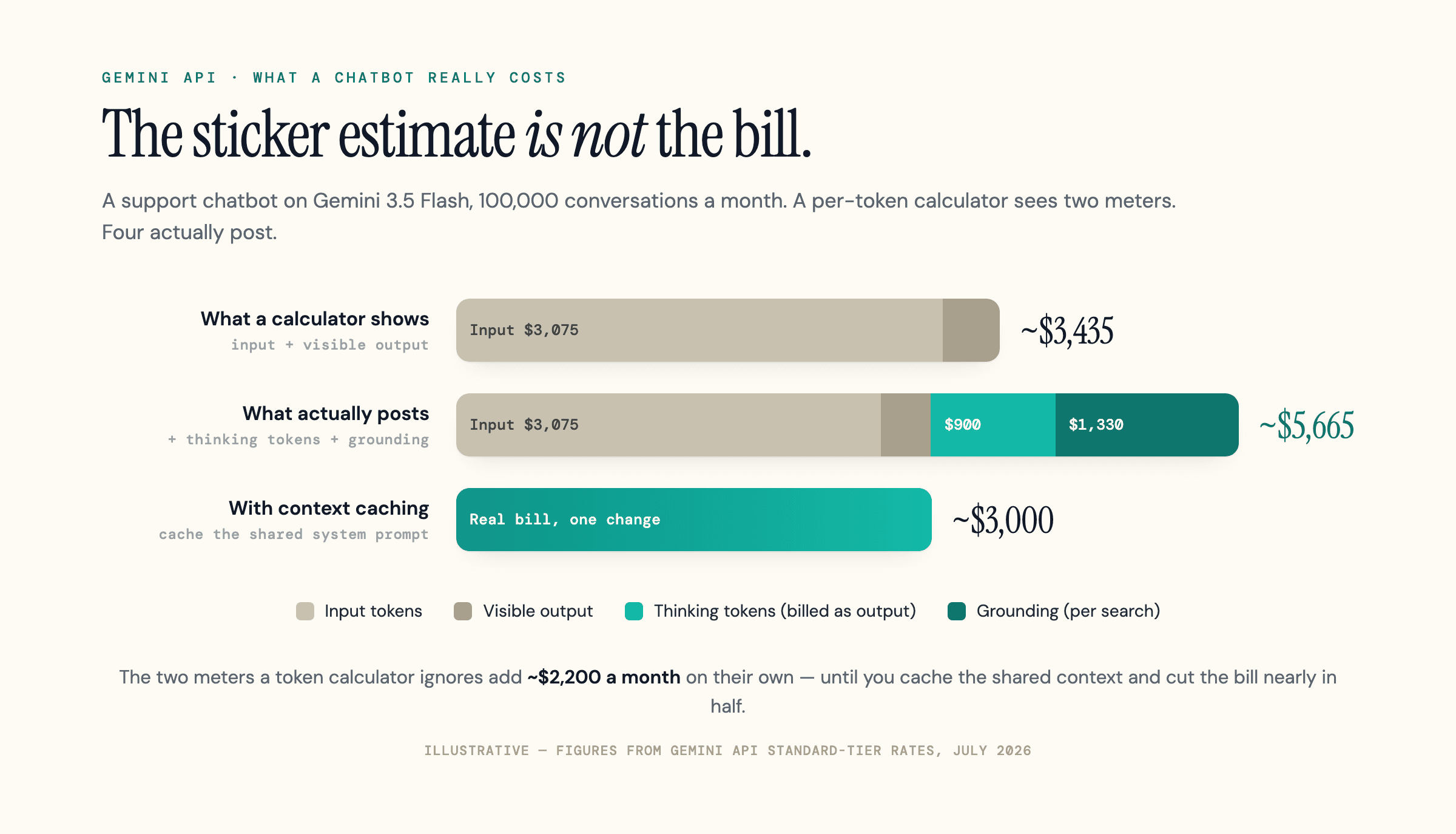
Numbers in a table are abstract until you stack every meter into one bill. Take a support chatbot on Gemini 3.5 Flash handling 100,000 conversations a month. (The same workload on its successor, 3.6 Flash, runs the output-driven lines about 17% cheaper on the output-rate change alone, $7.50 instead of $9.00; the shape of the bill is identical.) Each conversation ships a 20,000-token system prompt and knowledge base, a short user turn, returns a 400-token answer, spends about 1,000 tokens thinking, and runs one grounded Search. Here is how the estimate and the real bill diverge.
| Line item | How it is billed | Monthly cost |
|---|---|---|
| Input tokens | ~20,500 x 100K at $1.50/1M | ~$3,075 |
| Visible output | 400 x 100K at $9.00/1M | ~$360 |
| Thinking tokens | 1,000 x 100K at the $9.00 output rate | ~$900 |
| Grounding | ~95K searches at $14/1,000 (after 5K free) | ~$1,330 |
| Sticker estimate (input + visible output) | what a naive calculator shows | ~$3,435 |
| Real bill (all meters) | the number that actually posts | ~$5,665 |
The sticker estimate misses by about 65%. Thinking tokens and grounding, neither of which appears in a per-token calculator, add more than $2,000 a month on their own. This bot grounds on every turn, which is the high end; one answering mostly from its own knowledge base would ground less and see a smaller gap. The shape holds either way: the meters a calculator ignores are the ones that move the bill.
Now apply the levers. That 20,000-token system prompt is identical on every call, so cache it. Cached input drops to roughly 10% of the rate, cutting the input line from about $3,075 to about $375, while the storage meter for a context this heavily reused costs only around $15 a month. The real bill falls from about $5,665 to about $3,000, nearly a 50% cut, from one change. If any part of the workload were offline rather than live chat, moving it to the Batch tier would halve it again.
Model every meter before you ship, then attack the two or three lines that dominate, which are rarely the ones the token table points at.
Gemini Developer API vs Vertex AI: Same Tokens, Different Bill
You can reach the same Gemini models two ways, and the per-token rates are close to identical. What differs is everything wrapped around the tokens.
The Gemini Developer API, through Google AI Studio, is the simple path. You get an API key, the free tier lives here, and you can be live in minutes. It is the right choice for most projects, prototypes, and anything that does not need enterprise controls.
Vertex AI, which Google renamed the Gemini Enterprise Agent Platform in April 2026 and which most people still call Vertex, serves the identical models through Google Cloud. Its base rates match the Developer API on global endpoints, though data-residency and other non-global endpoints can carry a small regional uplift. What it adds is the machinery large deployments need: SLAs, VPC Service Controls, compliance certifications, and IAM and billing folded into the rest of your Google Cloud account. It is also where new models tend to land first, though the unreleased Gemini 3.5 Pro is not on its published pricing page either.
Vertex's headline advantage for high-volume production is Provisioned Throughput, which reserves guaranteed capacity at a flat hourly rate. A committed reservation earns a double-digit percentage discount, larger on a one-year term than a one-month one, and beats pay-as-you-go once your traffic is high and steady.
The trade-off is that Vertex moves you into Google Cloud's billing surface, and that surface has its own costs: regional endpoint uplift, provisioned-throughput commitments, logging and storage, and network egress add up in ways the token rate never hints at. Teams that expected "same price as the API" are the ones surprised by a Vertex bill, and it is usually the cloud plumbing, not the model, doing the damage.
The rule of thumb: build on the Developer API until you need provisioned capacity, data-residency guarantees, or compliance sign-off. At that point Vertex earns its complexity. Below it, the extra surface is cost and effort you do not need.
How Gemini API Pricing Compares to OpenAI and Anthropic
On raw token price, Gemini's Flash models are among the cheapest credible options for high-volume work. Here is each provider's cheap tier against its frontier model, at Standard rates.
| Provider | Cheap tier (in / out per 1M) | Frontier (in / out per 1M) |
|---|---|---|
| Google Gemini | 2.5 Flash, $0.30 / $2.50 | 3.1 Pro, $2.00 / $12.00 |
| OpenAI | GPT-6 Luna, $0.10 / $0.50 (Work/Codex/API; GPT-5.6 Luna, which standard ChatGPT still runs, is $0.20 / $1.20) | GPT-6 Astra, $10.00 / $50.00 (GPT-6 Sol below it at $2.00 / $10.00 in Work/Codex/API; GPT-5.6 Sol, which standard ChatGPT still runs on paid plans, is $4.00 / $20.00, promotional to Nov 21, 2026) |
| Anthropic Claude | Haiku 4.5, $1.00 / $5.00 | Fable 5.1, $10.00 / $50.00 (Opus 5.5 below it at $4.00 / $20.00) |
Gemini 2.5 Flash at $0.30 input and $2.50 output is a fraction of what the frontier models charge, and the fair fight is Flash against each rival's own cheap tier: GPT-6 Luna, which OpenAI added to Work, Codex and the API on September 22, 2026, at OpenAI's published rates, and Claude Haiku 4.5. That fight Gemini now loses on the headline rate, because GPT-6 Luna is $0.10 input against Flash's $0.30, an even wider gap than GPT-5.6 Luna's $0.20 (the cheap model standard ChatGPT still runs), though Flash still undercuts Haiku 4.5 at $1.00. You can read the full breakdowns in our ChatGPT API pricing and Claude API pricing guides.
There is a subtler wrinkle no table row captures: the 200K cliff erodes Gemini's long-context edge. Gemini 3.1 Pro at $2.00 input undercuts GPT-5.6 Sol by half, ties GPT-6 Sol's own $2.00 input rate, and undercuts GPT-6 Astra by 80%, on prompts up to 200,000 tokens. Cross that line and Gemini's input doubles to $4.00 while Anthropic holds its rates flat and OpenAI holds flat up to 272,000 tokens, so the gap narrows sharply, though even at $4.00 Gemini 3.1 Pro still sits under GPT-5.5's $5.00. Past 272,000 input tokens OpenAI applies its own surcharge, doubling input and adding half again on output for the whole request, so GPT-6 Sol moves to $4.00 and $15.00 and ties Gemini 3.1 Pro's post-cliff input rate again. Where it can actually flip is against a cheaper-tier rival: Claude Sonnet 5 undercuts Gemini's post-cliff $4.00 at its $2.00 input rate (which Anthropic made permanent in August 2026, cancelling the planned $3.00 rise). A workload that lives in very long context can erase Gemini's short-context price win, so price the cliff into your own token distribution before you commit.
And remember the reasoning-token tax applies to all three. Every provider charges for internal thinking on its reasoning tiers, so a base-rate comparison can flip once you measure how verbose each model is on your actual prompts. Benchmark two or three models on your real workload before you commit. The lowest number in a table is a starting point, not the bill.
The Deprecation Treadmill: What's Changing in 2026
Gemini's lineup turns over fast, and pricing a project against a model that is about to disappear is a common, expensive mistake. Here is the current state of play from Google's deprecation schedule.
Gemini 2.0 Flash and 2.0 Flash-Lite shut down on June 1, 2026, so any guide still listing them as budget options is out of date. The bigger event is ahead: the entire 2.5 series (Pro, Flash, and Flash-Lite) retires on October 16, 2026, with 2.5 Pro pointing to 3.1 Pro, 2.5 Flash to 3.5 Flash (now itself superseded by 3.6 Flash), and 2.5 Flash-Lite to 3.1 Flash-Lite. On the media side, Imagen 4 shuts down on August 17, 2026, replaced by the Gemini image models.
The risk is the migration path, because the wrong replacement can multiply your cost. Moving a cheap 2.5 Flash-Lite workload to 3.5 Flash instead of 3.1 Flash-Lite jumps you from $0.10 to $1.50 input, fifteen times the price, for work that never needed a frontier model. Same-class upgrades follow the tier, cheap to cheap and mid to mid, which keeps the jump small. Map every model you depend on to its named successor before its shutdown date, and confirm the replacement is the same class, not the next one up.
Set a Hard Spend Cap Before You Get a Surprise Bill
The bill-shock stories are real: a retry loop left running overnight, a leaked key mining tokens for hours, a batch job that overshoots. A Google Cloud budget alert will not save you from them, because an alert only notifies; it does not stop spend. By the time the email arrives, the money is gone.
The controls that actually cap spend are more specific. The usage-tier billing caps pause service once your cumulative spend hits the tier limit, so a Tier 1 billing account cannot run past $250 in a cycle. Since March 23, 2026, Google has also rolled out prepay billing: linking a billing account requires prepaying a minimum $10 credit balance, and requests only serve while that balance stays positive, which acts as a de facto hard cap once you stop topping it up. Inside AI Studio you can also set per-project spend caps, useful when several projects share one billing account, though Google warns that batch jobs and agent sessions can overshoot a project cap slightly because billing lags real usage by about ten minutes.
Beyond the platform controls, the operational habits matter more. Watch cost per call, not just total spend, because two identical-looking requests can bill very differently once thinking tokens and context length vary, and averages hide the expensive few. Put a ceiling on retries so a failing loop cannot run away. And guard your API key like a credential, because a stolen key is a direct line to your billing account.
The teams that stay in control track effective cost per request from day one, rather than reading the sticker rate and hoping.
The Sticker Price Is Where the Bill Starts
The Gemini API is genuinely cheap at the low end and genuinely easy to misjudge everywhere else. The per-token table is the opening number. The service tier, the free-tier data trade, thinking tokens, the 200K cliff, grounding, and the storage meter behind caching are what turn it into an invoice. Price a project against all of them, not just the headline, and the surprises mostly disappear.
One shift worth noticing: these exact prices are increasingly quoted back to developers by AI answers. When someone asks ChatGPT, Gemini, or Google's AI Mode what the Gemini API costs, an engine is choosing which page to cite. In our experience tracking which sources those engines pull from, the pricing pages that win are the clear, current, and machine-readable ones. If you publish anything developers price decisions against, it is worth knowing whether the engines cite you or a competitor, which is what geotoolbox checks.
Frequently Asked Questions
Is the Gemini API free?
There is a free tier through Google AI Studio with no credit card, but it is in practice limited to the Flash and Flash-Lite models at roughly a thousand-plus requests a day, and the current Pro model has not been free since April 2026. Two catches matter: free-tier data can be used to train Google's models, and enabling billing removes the free allowance rather than adding to it.
Which is cheaper, the Gemini API or the ChatGPT API?
For high-volume work OpenAI's cheap tier is now clearly cheaper: Gemini 2.5 Flash is $0.30 input against GPT-6 Luna at $0.10 (the Work/Codex/API tier OpenAI added September 22, 2026) or GPT-5.6 Luna at $0.20 (the cheap model standard ChatGPT still runs). But reasoning tokens and context length can flip a base-rate comparison, so benchmark both on your real prompts. See our ChatGPT API pricing guide for the full numbers.
Why is my Gemini API bill higher than the token price suggests?
Almost always thinking tokens, which bill at the output rate even though you never see them, plus grounding charges and the 200K context cliff on Pro models. None of the three shows up in a simple per-token estimate.
What is the 200K context cliff?
On the Pro models, once a single prompt crosses 200,000 tokens, the input rate roughly doubles and output rises with it. Gemini 3.1 Pro input goes from $2.00 to $4.00 per million. Retrieval pipelines cross it easily.
Developer API or Vertex AI, which is cheaper?
Both charge the same per-token rates. Vertex wins at high sustained volume through Provisioned Throughput discounts, but it adds Google Cloud costs like egress and idle endpoints. For most projects the Developer API is cheaper and simpler.
Does the free tier train on my data?
Yes. On the free tier, Google may use your inputs and outputs to improve its models, and human reviewers may read them. Paid usage on the Developer API and Vertex AI is excluded from training.
Sources
- Gemini Developer API pricing - Google (per-model token rates, service tiers, media meters) -
ai.google.dev/gemini-api/docs/pricing - Gemini API billing and usage tiers - Google (tier caps, spend controls) -
ai.google.dev/gemini-api/docs/billing - Gemini API additional terms - Google (free-tier data-use policy) -
ai.google.dev/gemini-api/terms - Gemini API model deprecations - Google (shutdown and migration dates) -
ai.google.dev/gemini-api/docs/deprecations - Vertex AI generative AI pricing - Google Cloud (rate parity, caching discounts) -
cloud.google.com/gemini-enterprise-agent-platform/generative-ai/pricing - OpenAI API pricing - OpenAI (comparison rates) -
developers.openai.com/api/docs/pricing