
Keyword cannibalization is the SEO problem everyone checks for and few people prove. A tool or a Search Console report shows two of your URLs for one query, and the usual advice is to merge them.
Often that is right. But the same report also lists pages that never ranked side by side, or a page that simply dropped out while the other stayed weak. Your own Search Console data can tell these cases apart, and each one needs a different fix: merge and redirect, a canonical, a sharper split between pages, or work on the weaker page.
What Is Keyword Cannibalization?
Keyword cannibalization (sometimes called SEO cannibalization) is when two or more pages on your site compete for the same query and the same search intent, so they can split the clicks, links and relevance one stronger page would collect. Google then has to pick between your URLs, and it does not always pick the one you want.
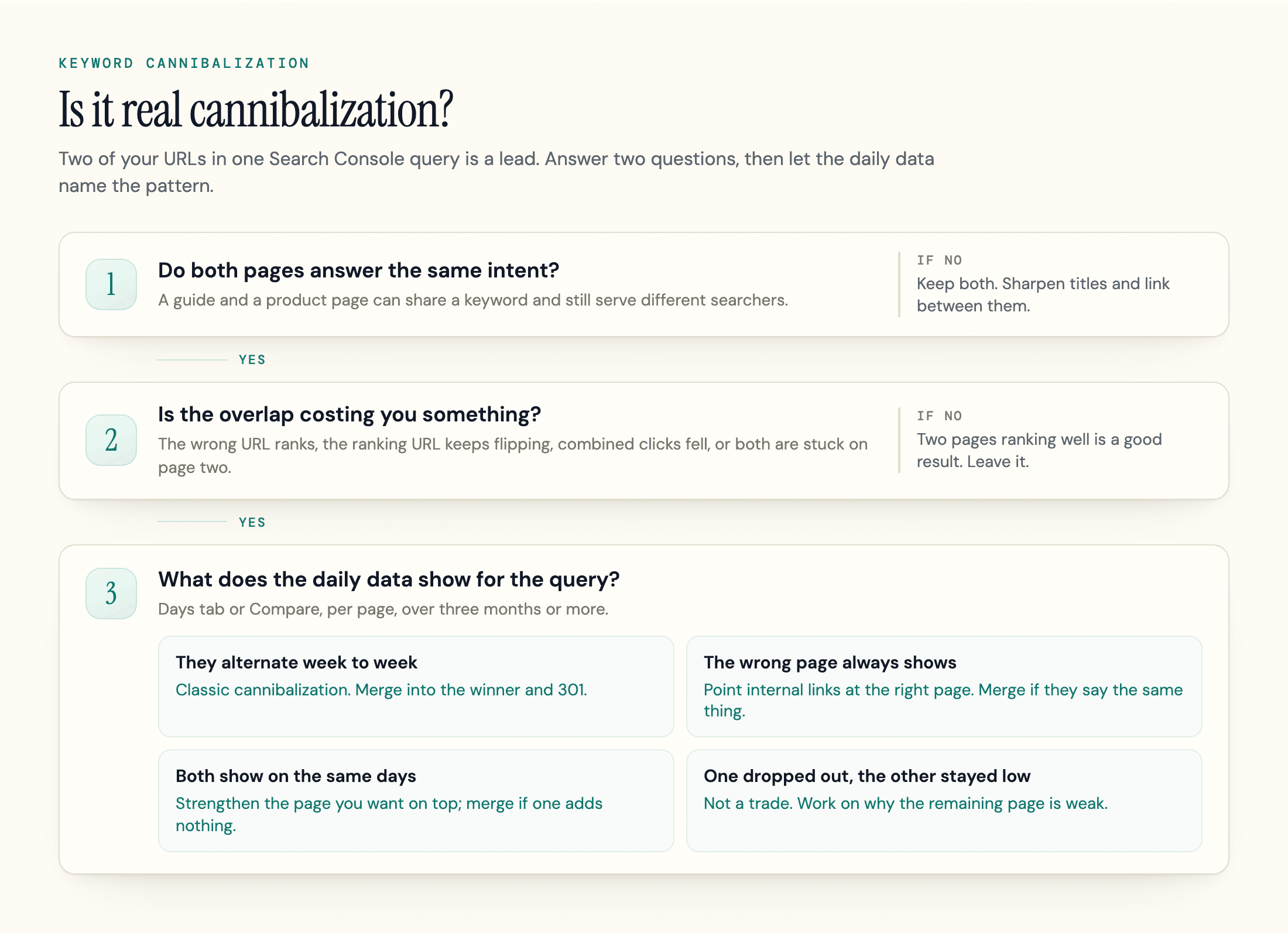
Both conditions matter. A buying guide and a product page can share a keyword and still serve different searchers; each covers its own job. Cannibalization starts when the pages answer the same question for the same person, which is a search intent problem first and a keyword problem second.
Some SEOs draw a line inside the term. Keyword cannibalization is the targeting overlap: titles, H1s and anchors aimed at the same term. Content cannibalization is the substance overlap: articles that say the same thing in different words. In practice you find both the same way and fix them the same way.
Three things look like cannibalization and usually are not:
- Two results from your site on one page. Since Google's 2019 site diversity change, you "usually won't see more than two listings from the same site" in the top results, though Google may show more when it judges that especially relevant. Two listings can be a strong result.
- An indented second result. This is a host group: a second result from the same site, indented under the first. Gary Illyes said it is "a telltale that you have more than one page that can rank well for a certain query" and added that "you might want to consolidate those two pages perhaps, if it's possible at all." Treat it as a prompt to check intent.
- Duplicate content. Near-identical copies of one page (URL parameters, print versions, HTTP and HTTPS) are a canonicalization problem. Cannibalization is about distinct pages with overlapping intent.
Is Keyword Cannibalization Bad?
Not by default. Google has never described a cannibalization penalty, and two of your pages ranking for one query is often a good outcome. It is a problem when the overlap costs you something measurable.
What Google Says
The clearest recent answer came from John Mueller, when an SEO asked how to see which of their pages Google considers for a query. As Search Engine Journal reported on September 22, 2025, Mueller replied that "Search Console shows data for when pages were actually shown, it's not a theoretical measurement," and added: "If you have 3 different pages appearing in the same search result, that doesn't seem problematic to me just because it's 'more than 1'."
He added: "Reduce unnecessary duplication and spend your energy on a fantastic page, sure. But pages aren't duplicates just because they happen to appear in the same search results page."
With the Illyes comment above, Google's position is consistent: overlap is not punished, and consolidating pays off when the pages really are the same thing.
Signs It Is Actually Costing You
Before you fix anything, check whether the overlap is costing you clicks. These symptoms justify action (wasted crawl budget, also often listed, rarely matters below very large sites):
- The ranking URL keeps flipping. Google alternates between your pages week to week in the SERP, and the ranking fluctuation leaves neither with a stable position.
- The wrong page ranks. An old blog post sits where your product or service page should, so searchers land on a page without the form or the checkout.
- Combined clicks fell. Total clicks for the query dropped after you published the second page, even though each page looks fine on its own.
- Both pages are stuck. Two URLs sit on page two for a term where one consolidated page would have the links and content to reach page one.
How to Find Keyword Cannibalization in Search Console
Google Search Console shows which of your URLs Google actually displayed for a query.
- Filter the report to one query. Open Performance, then Search results, add a Query filter set to the exact term, and pick a window of three months or more.
- Open the Pages tab. It lists every URL that earned impressions for that query, with its clicks (tick "Average position" to add positions).
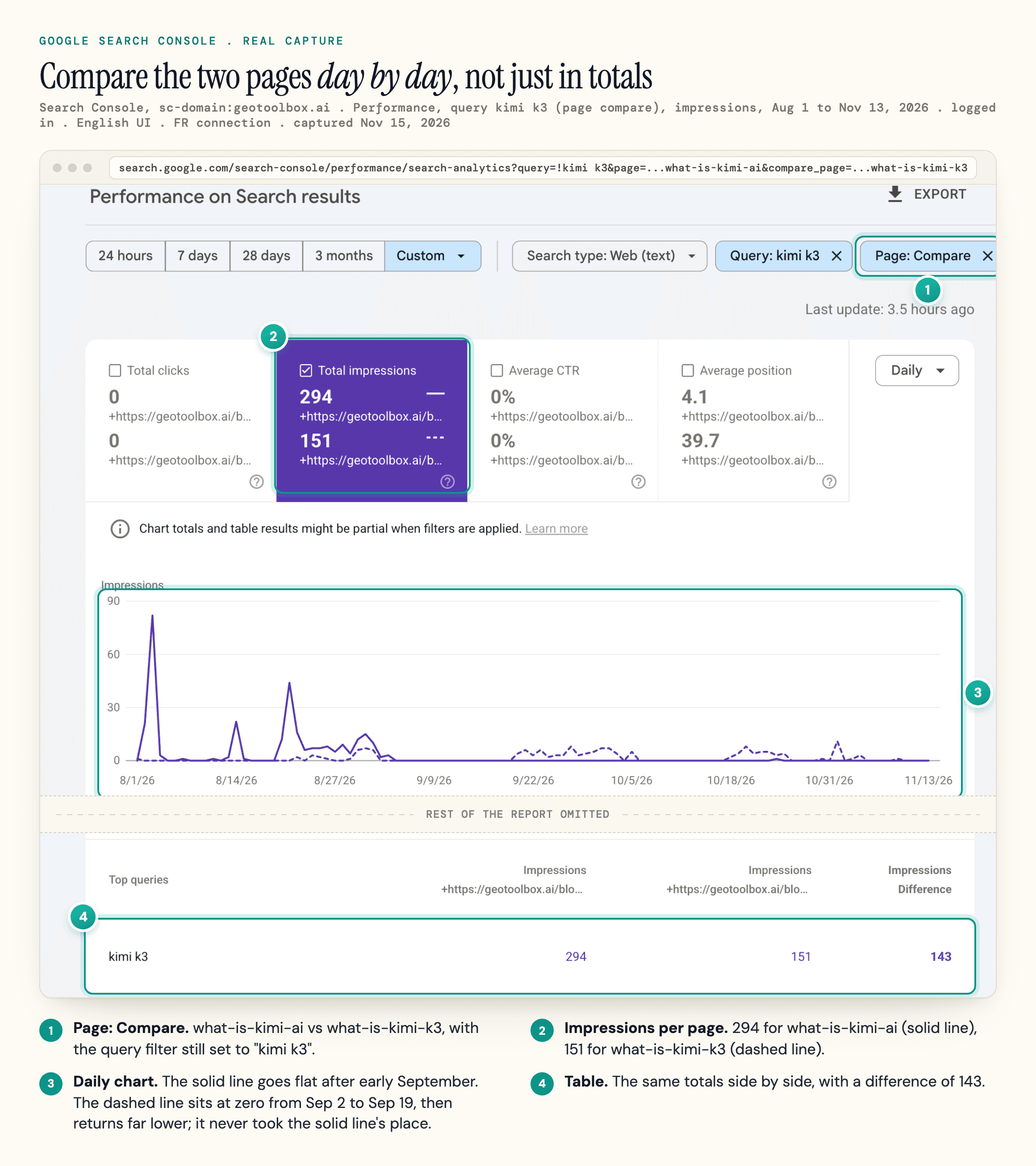
- Read the days. Add a page filter for each URL and open the "Days" tab, or use the page filter's "Compare" option, and match what you see to a pattern in the diagram above.
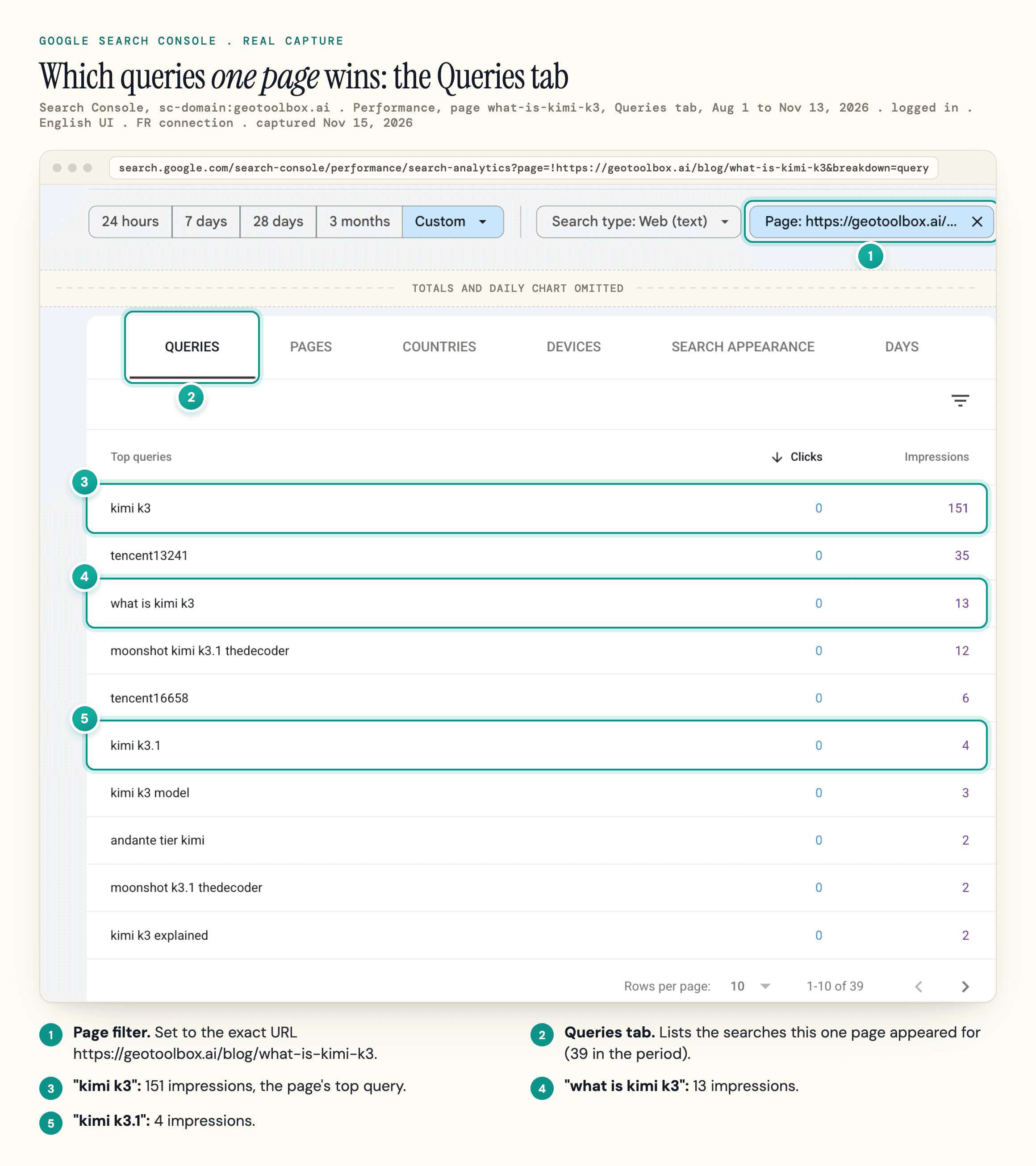
- Check what each page wins. Filter by one page, open the Queries tab, and look at what it ranks for beyond the shared term before you decide the pages compete.
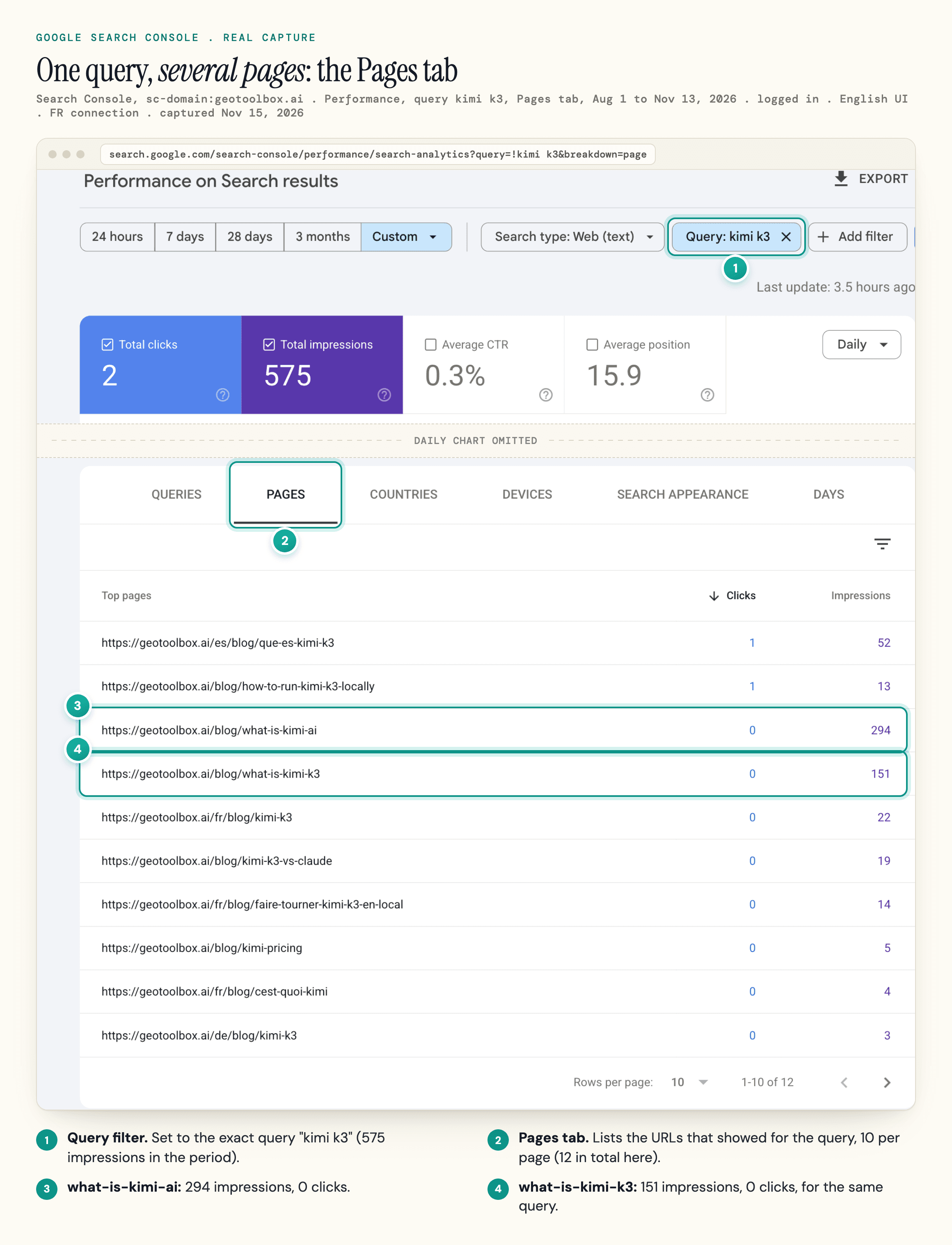
Step 3 is where most of the guides we compared stop short: they read the Pages tab totals or hand the time check to a rank tracker. Those totals sum the whole date range, so one table can hide pages shown in different weeks, pages shown on the same days, or one page replacing another. The counting differs too: Google's Performance report documentation notes that "Data grouped by Pages or Search appearance is aggregated by page," so when several of your URLs appear in one search, each gets its own impression.
A Real Example from Our Own Site
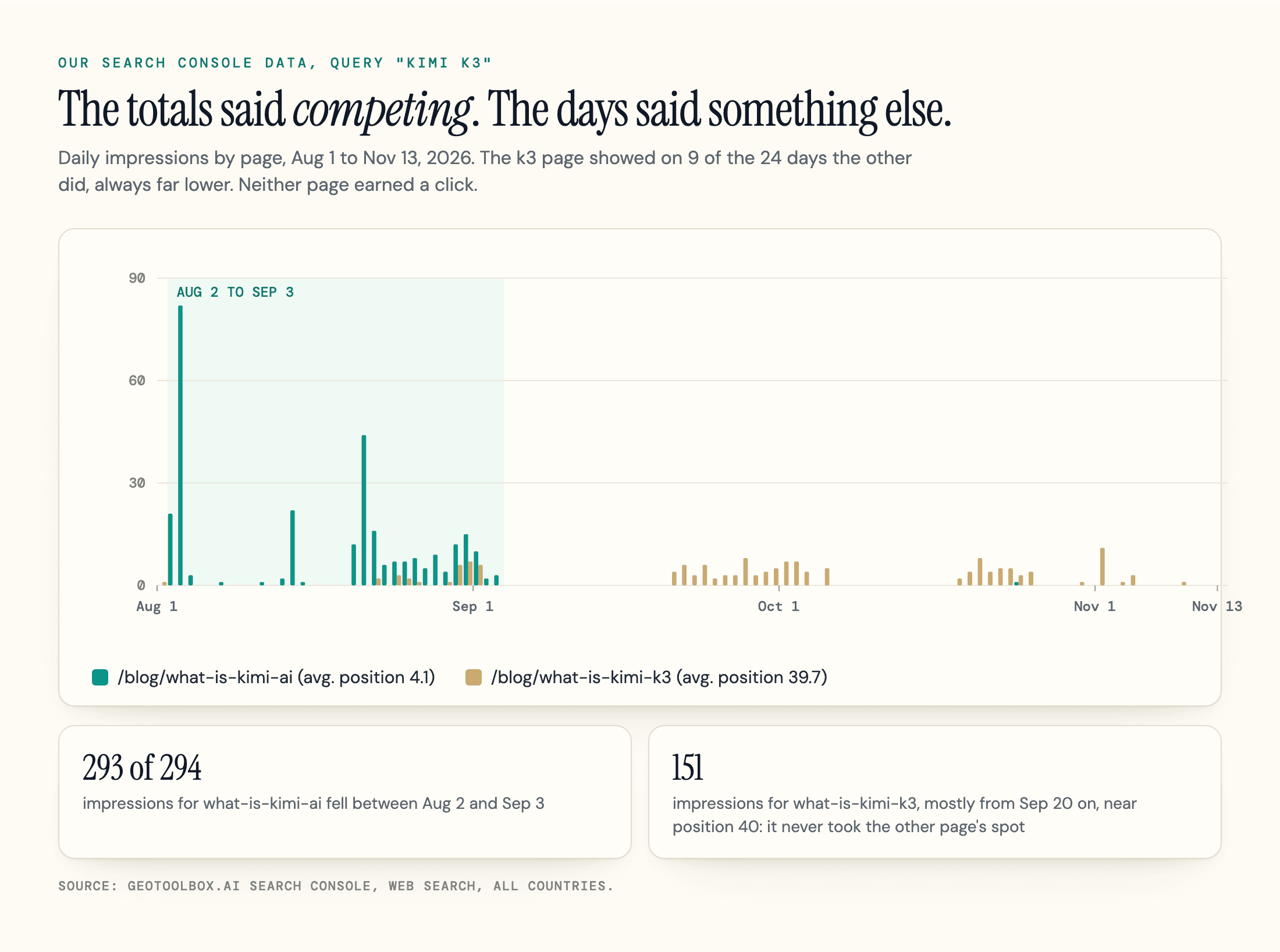
The query "kimi k3" shows why. From August 1 to November 13, 2026, geotoolbox's own Google Search Console listed 12 URLs for it. Two English explainers had the most impressions: /blog/what-is-kimi-ai with 294 impressions at an average position of 4.1, and /blog/what-is-kimi-k3 with 151 impressions at 39.7. Neither page earned a click. A cannibalization tool would flag that pair; one of our own content audits did, in November 2026.
The days added what the totals hid. 293 of the 294 impressions for what-is-kimi-ai fell between August 2 and September 3. The k3 page showed on 9 of the 24 days the other page did, 8 of them between August 22 and September 1, but always at a far lower average position: 22 or worse, against about 4 to 7. Same day is not same search, either: the 12 page rows add up to 579 impressions against 575 for the query, so at most 4 impressions came from a search that showed two of our URLs.
After September 3, Google all but stopped showing what-is-kimi-ai for this query, and the k3 page did not take its place. It came back on September 20 in the 40s, where it already ranked, apart from one week in late October around position 20; for a week in between, our Spanish twin showed for the query around position 12. That is not a pair of pages trading places. One page dropped out and the other stayed weak, so the question worth working on is why the dedicated K3 page ranks so low. We cannot prove a merge would not have helped, but nothing in the daily data showed the pages fighting for one spot.
Filtered to what-is-kimi-k3, the Queries tab shows that page earning most of its impressions from K3 queries, which is the job a model-specific explainer should do.
Other Ways to Spot It
A site:yourdomain.com "keyword" search shows which pages Google associates with a term; rank-tracker history shows URL flips if you already track the keyword.
For a whole site, going query by query is too slow. Export query and page data through the Search Console API or a Looker Studio connector, flag queries where more than one URL earned impressions, then pull those queries by day to see which pattern each follows. Our SEO audit checklist includes this check.
geotoolbox's Analytics dashboard has a Cannibalization tab that lists queries where more than one of your URLs earned impressions in the selected period and labels whether the leading URL stayed stable or switched. It works from period totals and can suggest a fix such as a redirect, so treat what it flags the way you would any tool's output: as a lead to check against the daily data.
How to Fix Keyword Cannibalization
To fix keyword cannibalization, pick the winner first: usually the page with more backlinks, better conversions or the stronger position for the target keyword. Then choose the fix that matches what you found.
| What you found | Fix | Watch out for |
|---|---|---|
| Two pages answer the same question for the same searcher, and the overlap is costing you | Merge into the winner and 301 redirect the other | The second page also ranks for long-tail queries the winner lacks. Move that content over first |
| Both pages must stay live (a campaign landing page, a near-identical variant) | Canonical tag on the weaker page, pointing to the winner | The pages differ in substance. Canonicals are meant for duplicate or very similar pages |
| Same keyword, different intent (guide vs product page, article vs service page) | Differentiate: retitle, refocus, link between them | A merge across page types loses one audience. Keep the guide and the product page separate |
| A thin page has no search value but must exist for users | Noindex | Noindex blocks the page from Search entirely and does not move its link equity to the winner the way a redirect does |
| One page dropped out and the other stayed weak | Improve the remaining page | A merge alone may not lift a page that ranks low on its own |
| The winner already holds #1 and the other page brings extra clicks | Leave it | Combined clicks start to fall or the URLs start flipping |
Merge and 301 Redirect
For two pages with the same intent that alternate or cost you clicks, merging is the default. Fold the useful sections of the weaker page into the winner, then 301 redirect the old URL to it. Point internal links straight at the winner and drop the old URL from your XML sitemap.
Google's canonicalization documentation ranks its methods "in order of how strongly they can influence canonicalization," and redirects come first. That makes a 301 the strongest way to tell Google which URL should collect the signals.
Use a Canonical Tag When Both Pages Stay
A rel="canonical" tag states which version you prefer. Google's canonical documentation calls it "a strong signal", not a command, and Google can pick another URL, so it suits near-duplicates that must stay live and works poorly between two different pages. More in our canonical tags guide.
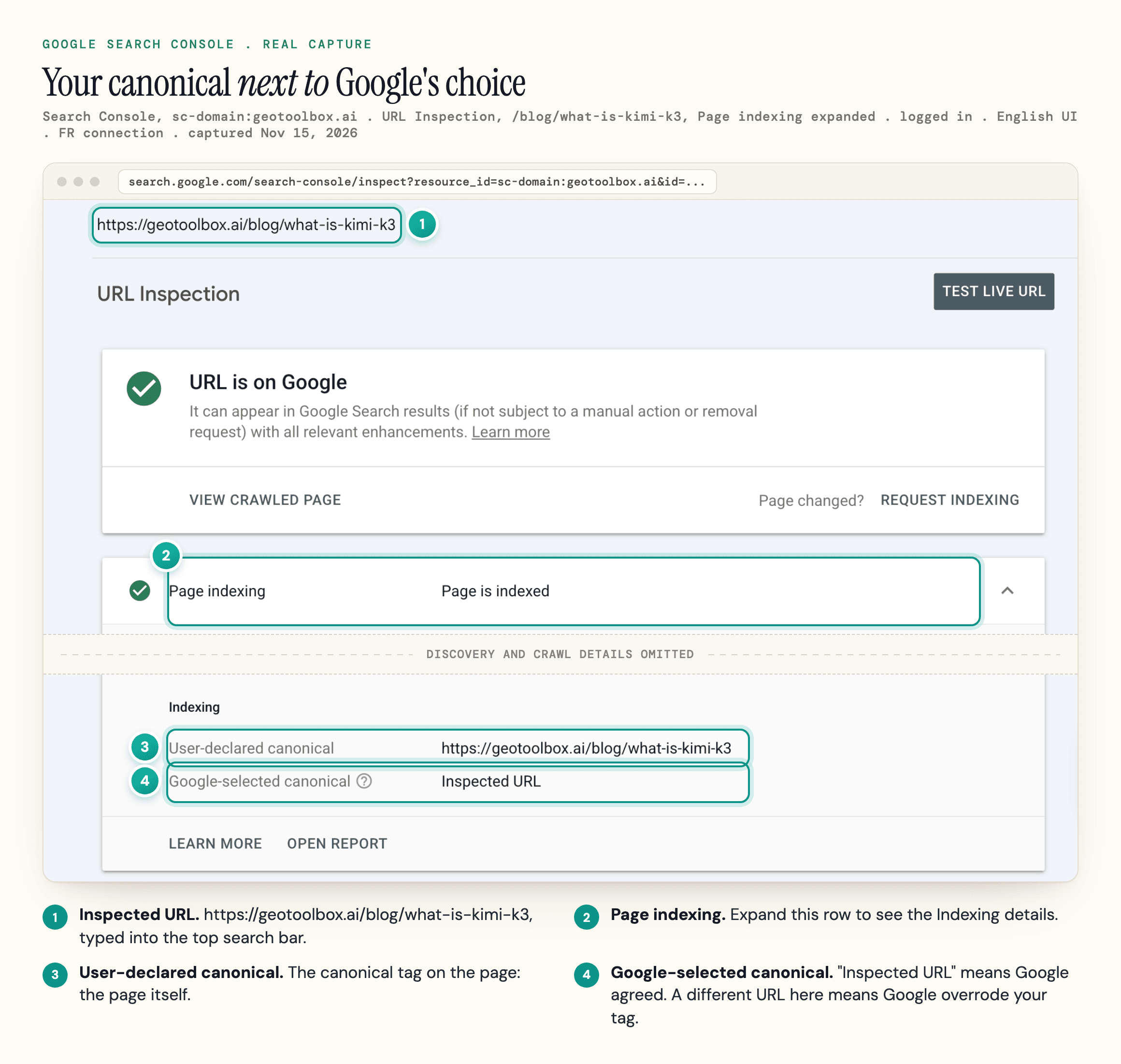
URL Inspection shows the canonical you declared next to the one Google picked. If they differ, Google is not following your tag.
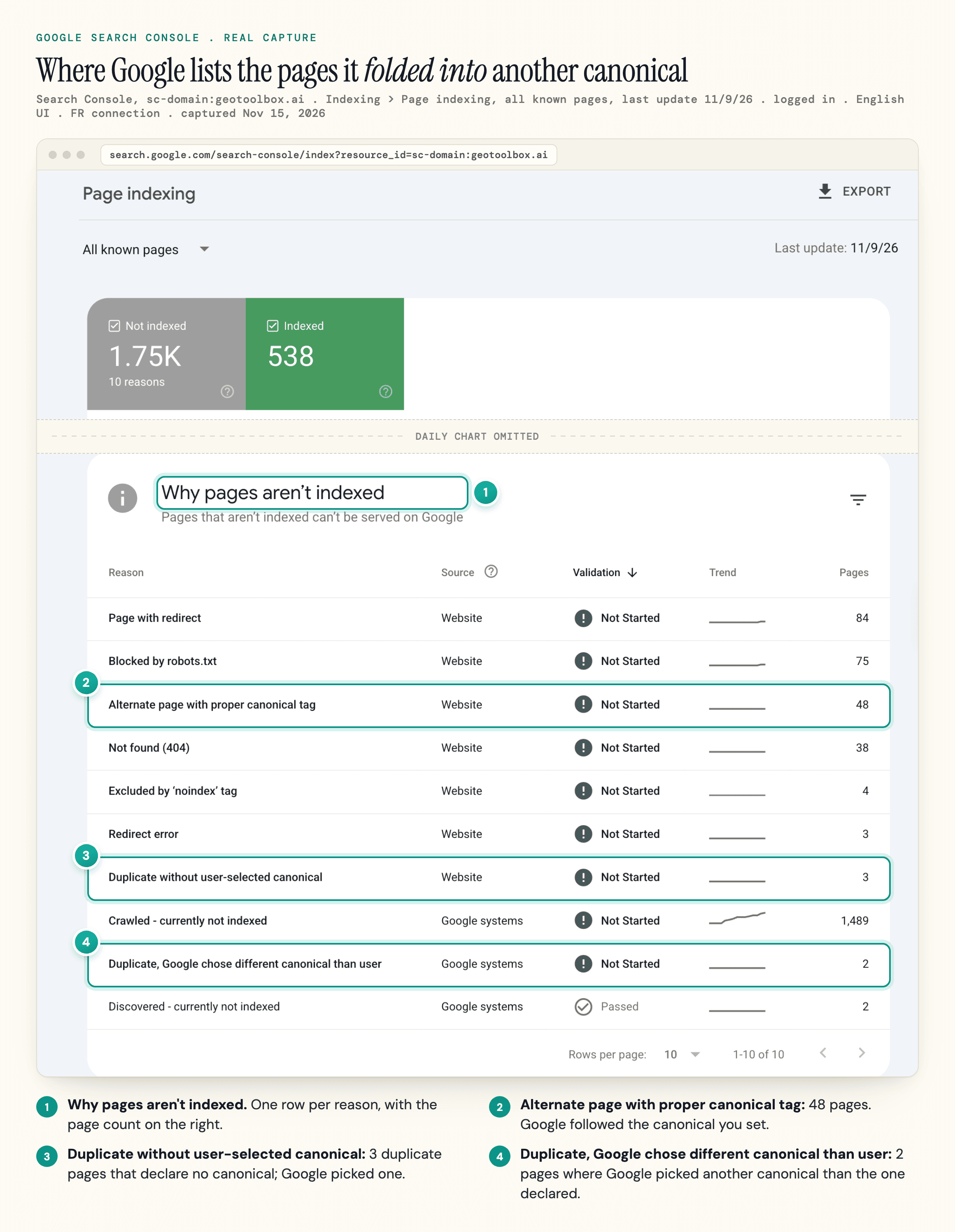
The Page indexing report shows example URLs Google folded into another canonical, under reasons such as "Alternate page with proper canonical tag" and "Duplicate, Google chose different canonical than user".
Differentiate Instead of Merging
A frequent forum complaint is a blog post outranking the money page for a commercial term. Do not redirect a post that ranks and earns links. Retitle it around the question it answers best, then link from it to the product or service page with an anchor that names the commercial term.
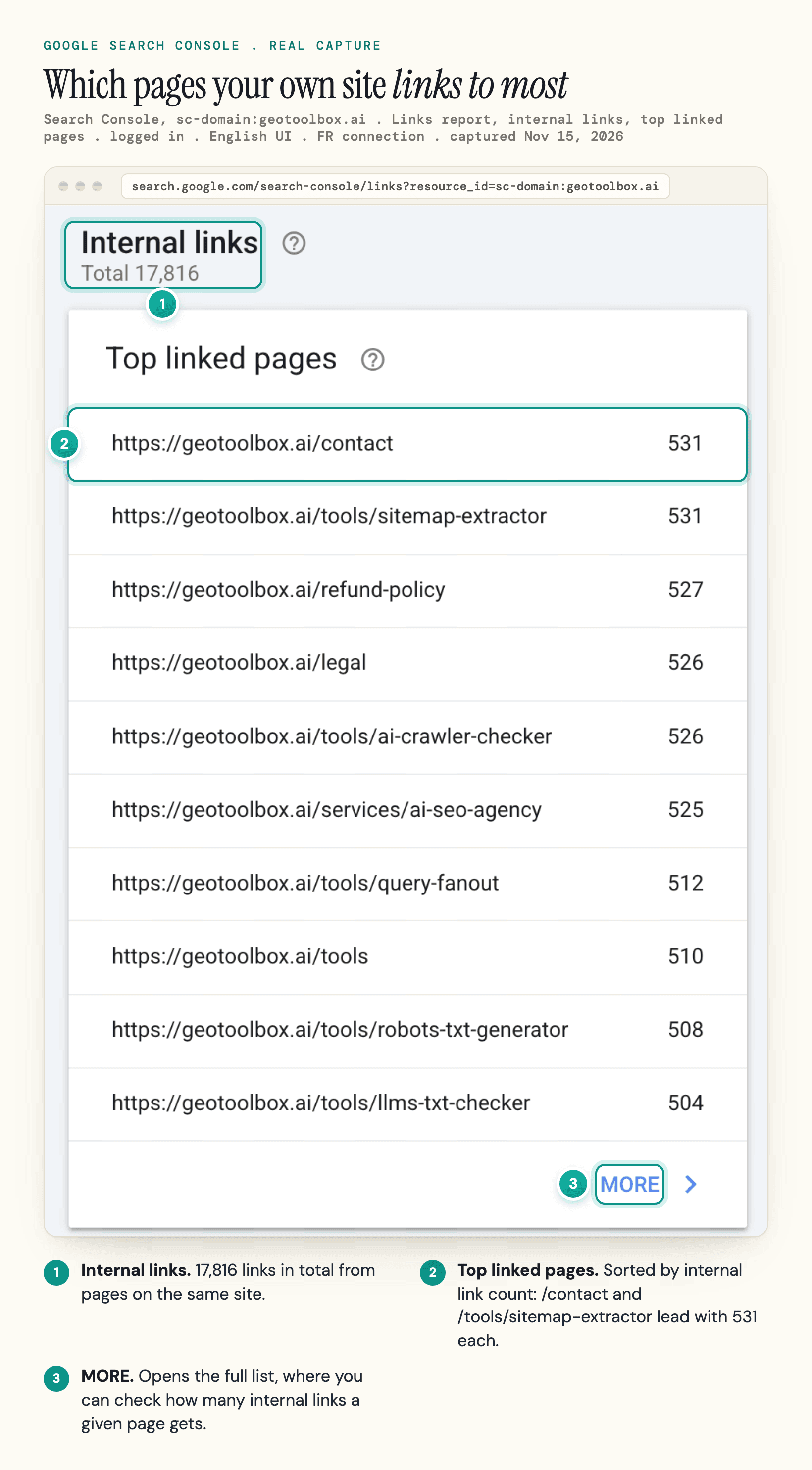
Internal links are the cheapest signal to change. Search Console's Links report shows which pages your own site links to most; if the page you want to rank gets fewer, fix that first.
Noindex, De-Optimizing and Deleting
Noindex ends the overlap, and de-optimizing (stripping the shared keyword from the weaker page) may clarify each page's focus; both leave value behind. Google's canonicalization guide advises against noindex for choosing between pages on one site, "because it will completely block the page from Search", and recommends rel="canonical" instead. De-optimizing keeps two pages on one topic. Use them only when a merge is off the table.
Deleting a page outright is the bluntest fix. An old page can still carry backlinks and some traffic, and Google's redirects documentation lists "You removed a page and you want to send users to a new page" as a reason to redirect. Point it at the winner instead of letting it return a 404. A page with no equivalent can return a 404 or 410.
What to Expect After a Fix
In the first week, confirm the redirect returns a 301 and that internal links and the sitemap point at the winner. Then rerun the daily comparison you used to diagnose the problem. Rankings can move while Google recrawls and processes the redirect, so judge the fix on a month or more of data.
Cannibalization on Ecommerce and Local Sites
Templates multiply pages, so give each page type one clear job.
Category vs Product Pages
Category pages should own the broad terms ("men's running shoes") and product pages the model and attribute terms. Trouble starts when product titles and internal anchors repeat the category keyword, so one product outranks the category for the head term.
Variants and Filters
Variants, sort orders and filters create many URLs for one product or category. Rank one URL per variant group, canonicalize the rest, and index only filter combinations people search for. Our ecommerce SEO guide covers faceted navigation in detail.
Homepage vs Service or Category Page
A homepage built around the main service term often competes with the service page. Let the homepage target the brand and give the specific term to the page built for it.
Location Pages
City pages compete with each other when they are the same template with the city name swapped. Each needs genuinely local content: address, service area, staff, reviews and projects from that place. Our local SEO guide covers how to build them.
Does Keyword Cannibalization Affect AI Search?
Possibly, but we found no published test that isolates it, and no engine documents a cannibalization penalty. The evidence that exists covers duplicate and near-duplicate pages; for distinct pages with the same intent, the effect is untested. Google AI Overviews and AI Mode draw on the same index: Google's guide says a page "must be indexed and eligible to be shown in Google Search with a snippet" to appear in them, among other requirements.
Google's guide to optimizing for generative AI search describes query fan-out: the model issues a set of related queries to fetch more results for one question. That makes it tempting to publish a page for every sub-question. Google warns against exactly that: creating "separate content for every possible variation of how people might search (for example, by focusing on other queries that people have asked, or fan-out queries)" primarily to manipulate rankings or AI responses "violates Google's scaled content abuse spam policy." The same guide lists "Reduce duplicate content" among its technical basics, mainly for crawling and user experience.
Bing went further in a December 19, 2025 post on duplicate content and AI search, which opens on "unintentionally competing against your own content". When several pages cover the same topic with similar wording, structure and metadata, "AI systems cannot easily determine which version aligns best with the user's intent," which lowers the chance your preferred page becomes a grounding source. Bing adds that LLMs cluster near-duplicate URLs and pick one to represent the set, and may "select a version that is outdated or not the one you intended to highlight."
So an AI answer may cite your older, weaker page, with a stale price or stale advice.
We found nothing from ChatGPT or Perplexity on same-site overlap. To check your own pages:
- Run the questions you target in ChatGPT, Perplexity and Google AI Mode.
- Note which of your URLs each answer cites, across several prompts, since answers vary between runs.
- Repeat the same prompts a few weeks after a merge and compare.
Our guide on query fan-out explains why we favor one deep page over several thin ones for those sub-questions.
How to Prevent Keyword Cannibalization
The easiest way to avoid keyword cannibalization is a publishing rule: one target keyword and one intent per URL, checked before anyone writes.
- Keep a keyword map. A sheet with one row per indexable URL: its primary query, its search intent and its page type. Group queries by intent: if the same pages rank for two phrasings, treat them as one target.
- Check before you plan. Before a new page goes into the plan, search the map, run the query filter in Search Console and do a quick
site:search. If a page already covers the topic, update it instead of starting a new one. - Update instead of republishing. A "2026 version" of an old post on a new URL creates two competing pages. Refresh the existing URL and keep its links.
- Give subtopics a home. A subtopic that needs a paragraph belongs in the parent page; it earns its own URL when it has its own intent. A pillar page with linked supporting pages keeps the cluster pulling in one direction.
- Review on a schedule. Once a quarter, rerun the daily comparison for your top terms.
When a report says your pages compete, check the days before you merge anything. To get the list of candidate pairs without building the export, ask us for early access to the Search Console connection in geotoolbox Analytics (Google is still verifying our app), start from its Cannibalization tab, and read each pair's daily data before you redirect.
Frequently Asked Questions
What is the difference between keyword cannibalization, duplicate content and keyword stuffing?
They are three different problems. Keyword cannibalization is two distinct pages on your site competing for the same query and intent. Duplicate content is the same or nearly the same content at more than one URL, which canonicalization handles. Keyword stuffing is cramming a term into one page to manipulate rankings, a spam issue.
Sources
- Google Answers SEO Question About Keyword Cannibalization - Search Engine Journal, Sept 22, 2025 -
searchenginejournal.com/google-answers-seo-question-about-keyword-cannibalization/556472/ - Google Says You May Want To Consolidate Pages That Show Indented In Google Search - Search Engine Roundtable, June 8, 2023 -
seroundtable.com/google-consolidate-host-group-pages-35518.html - Google Change Restricts Two Listings From Same Domain For Most Search Results - Search Engine Roundtable, June 7, 2019 -
seroundtable.com/google-search-domain-diversity-update-27696.html - How to specify a canonical URL with rel="canonical" and other methods - Google Search Central -
developers.google.com/search/docs/crawling-indexing/consolidate-duplicate-urls - Performance report (Search results): Overview and basic setup - Search Console Help -
support.google.com/webmasters/answer/7576553 - Redirects and Google Search - Google Search Central -
developers.google.com/search/docs/crawling-indexing/301-redirects - Optimizing your website for generative AI features on Google Search - Google Search Central -
developers.google.com/search/docs/fundamentals/ai-optimization-guide - Does Duplicate Content Hurt SEO and AI Search Visibility? - Bing Webmaster Blog, Dec 19, 2025 -
blogs.bing.com/webmaster/2025/12/Does-Duplicate-Content-Hurt-SEO-and-AI-Search-Visibility/