
Claude Code is Anthropic's agentic coding tool, and it is not the Claude you chat with. That distinction trips up almost everyone who searches for it, including Google, whose top organic result for "claude code" is currently the sign-in page for the chat assistant.
It also moves faster than the answers about it. The install command Google's own AI summary still hands you is deprecated. The "terminal-only" framing is a version behind. Straighten both out before you decide whether the tool is for you.
What Claude Code Is
Claude Code is Anthropic's agentic coding tool. It reads your codebase, edits files, runs commands and tests, and carries out multi-step development tasks from plain-English instructions, under permissions you control.
The verbs are the part people miss. Claude Code does not suggest code for you to copy. It does the work: opens files, makes changes across them, runs the test suite, reads what broke, and tries again.
Two things it is not, and both confusions are common.
It is not a model. People say "I used Claude Code" the way they say "I used Opus," and ask which is better. The question does not parse. Claude Code is the harness; Opus and Sonnet are the models that run inside it. You pick the model with a /model command, and the same agentic loop runs underneath whichever one you choose.
It is not chat with access to your files. A chat assistant that can read your repo still hands the work back to you. Claude Code executes. It has a shell, it can commit to git, and it can run a build and read the error output. That is the difference between a tool that describes a fix and one that applies it, and it is what the word agentic AI is doing in the definition.
The practical shape of it: you open a terminal in a project, type claude, and describe what you want in a sentence. It explores the codebase itself rather than waiting for you to paste the relevant files in. For a working definition of the broader category, our AI agent guide covers the general pattern; Claude Code is one of the more literal implementations of it.
Claude Code vs Claude: Not the Same Thing
Claude is the assistant you talk to. Claude Code is the tool that does the work on your machine. Same models underneath, different products.
Google is not helping. When we pulled the US results for "claude code" on 15 July 2026, the number one organic result was the sign-in page for Claude AI, the chat assistant. Not the coding tool. The top related query on Google Trends was "claude vs claude code," and Google's own People Also Ask box drifted to "Is Claude better than ChatGPT?" That is a search engine trying to answer a question about a developer tool with information about a chatbot.
The split is clean once you see it. Claude answers you, in a browser, a desktop app, or on your phone. Claude Code runs where your code lives, and it changes things.
What differs is the harness, not the intelligence inside it, which is why how Claude works under the hood is the same story in both products, and why the answer to "which is better" is neither. They are not competing.
How Claude Code Works: the Agentic Loop
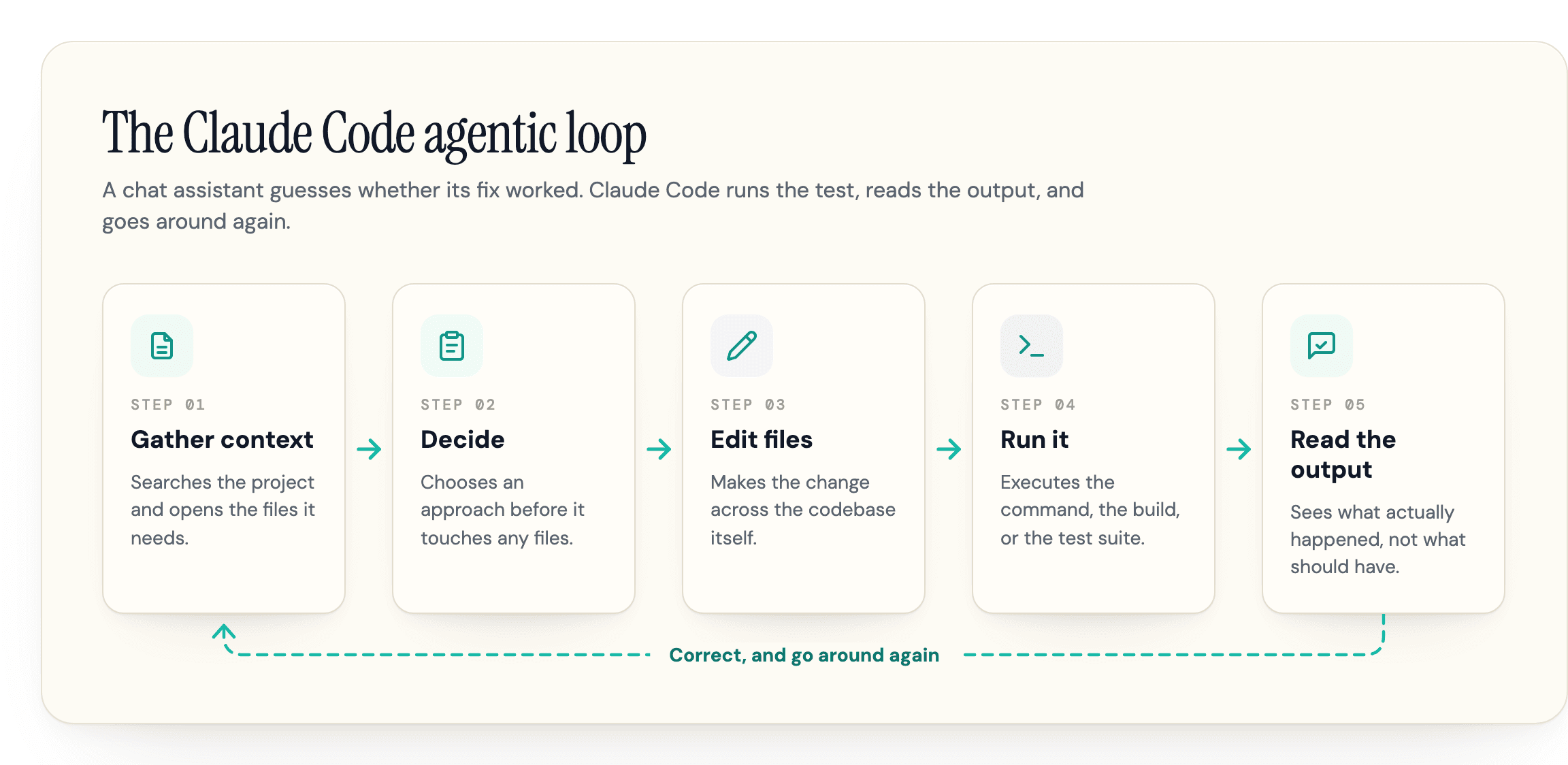
Everything Claude Code does reduces to one loop: look at the project, decide on an approach, make a change, run something, read the result, correct. Three parts make it work, and one mode decides when it starts.
It Gathers Its Own Context
You do not assemble the context. Claude Code searches the project, opens the files it decides are relevant, and reads them. That is why it behaves differently from a chat window, where the quality of the answer is capped by how well you chose what to paste.
The cost is that everything it reads occupies the same budget. Your instructions, the files it opened, every command's output, and the entire conversation share one context window, and it fills faster than most people expect. We covered the mechanics of that in detail in our guide to the Claude Code context window, including how to read the meter before output quality starts degrading.
It Runs Things and Reads What Happens
The loop closes because Claude Code can execute. It runs the test, reads the failure, edits the file, runs the test again. A chat assistant guesses whether its fix worked. Claude Code checks.
It Uses Your Tools
Shell commands, git, your test runner, and any MCP servers you have connected are available to it, within the permissions you grant. Connecting a tool is what turns a general coding assistant into something that can open a pull request or query your database, and the open-source tooling around Claude Code has grown up around exactly that seam.
Plan Mode
Most guides skip this, and it is the feature that changes how the tool feels. In plan mode, Claude Code investigates and proposes an approach without touching anything. You read the plan, correct the parts it got wrong, and only then let it execute.
Use it by default on anything non-trivial. The failure mode of an agentic tool is not usually a bad line of code. It is confidently doing the wrong task well, and a plan you can reject costs a few seconds to prevent exactly that.
Where You Can Actually Use It
Claude Code is not terminal-only. That framing was true once, it still shows up in guides that rank for this topic, and it is out of date.
Anthropic's own overview puts it plainly: Claude Code "runs on several surfaces: the terminal, IDE extensions, a desktop app, and the web." The how-it-works page goes further, listing access through the terminal, the desktop app, IDE extensions, claude.ai/code, Remote Control, Slack, and CI/CD pipelines. Notably, the docs never commit to a number, and different pages enumerate different lists, so a guide that hands you a firm count is inventing precision the docs never claim.
Three details are easy to get wrong, and all three are current as of July 2026:
The desktop app is a real Claude Code surface, which several AI assistants will tell you it is not. Anthropic's product FAQ answers the question directly: "Yes. Max, Pro, Team, and Enterprise users can access Claude Code on the Claude desktop app."
The JetBrains plugin is still labeled Claude Code [Beta] on the JetBrains Marketplace, by Anthropic itself. The VS Code extension carries no such label. If you work in an IDE, that distinction is worth knowing rather than discovering.
Remote Control is the one people do not expect: your code and the execution stay on your machine while you drive the session from a browser somewhere else.
The important part is that the loop does not change. Anthropic is explicit that the interface determines how you see and interact with Claude, while the underlying agentic loop stays identical. Choosing a surface is a preference, not a capability decision.
How to Install Claude Code
Use the native installer. Anthropic labels it "Native Install (Recommended)" in the setup docs. Pick the line for your platform.
macOS, Linux, or WSL:
curl -fsSL https://claude.ai/install.sh | bashWindows, in PowerShell:
irm https://claude.ai/install.ps1 | iexOr through a package manager, if you already use one. On macOS with Homebrew:
brew install --cask claude-codeOn Windows with winget, in PowerShell:
winget install Anthropic.ClaudeCodeThen point it at a project and start:
cd your-project
claude
You may have read that you install Claude Code with npm install -g @anthropic-ai/claude-code. That command still exists and the setup docs still document it, so it is not wrong exactly. It is just no longer the path Anthropic points you at. The project's own README is direct about it: "Installation via npm is deprecated. Use one of the recommended methods below."
The practical reason to care is Node. The npm package requires Node.js 22 or later as of v2.1.198, though the docs note that on an older version npm only prints a warning and the install still works. The native installer skips the question entirely. It wants 4 GB of RAM and a reasonably current OS, and Anthropic's setup docs list the supported versions in full. If you have been putting off installing Claude Code because you did not want to manage a Node toolchain for it, that reason expired.
Anthropic marks one path recommended and the other deprecated, and Google's AI summary still hands you the deprecated one. That gap is not an install problem.
What Claude Code Costs
No, Claude Code is not free. It needs either a paid Claude subscription or an Anthropic Console account, and neither has a free tier.
There are two ways to pay, and mixing them up is a genuine source of confusion. A subscription buys you a bounded allowance across Claude. A Console account bills you per token, and Anthropic charges no separate Claude Code fee on top: it "consumes API tokens at standard API pricing."
| Plan | Price | Claude Code access |
|---|---|---|
| Pro | $20/month, or $17/month billed annually ($200 up front) | Included |
| Max 5x | $100/month | Included, for larger codebases |
| Max 20x | $200/month | Included, most access to Claude models |
| Console (API) | Standard API pricing, per token | No separate Claude Code fee |
| Fast mode | $10 / $50 per million tokens (in, out) | Research preview, consumption plans |
Figures verified against Anthropic's Claude Code product page on 16 July 2026. Pricing on this product has moved more than once in the past year, so check before you budget on it. Our Claude pricing guide tracks the full plan lineup, including Team and Enterprise seats.
The sticker price is the easy part. What almost nobody publishes is what a working day costs, and Anthropic does: across enterprise deployments the average is around $13 per developer per active day, and $150 to $250 per developer per month, with costs staying under $30 per active day for 90% of users.
Those numbers are the useful anchor. If you are on Max 20x at $200 a month and you code most days, you are roughly at the enterprise average and the flat rate is doing its job. If you only code a couple of days a week, that same per-day figure lands nearer $110 a month, which is below Max 20x and close to Max 5x, and the case for paying per token on a Console account rather than buying a subscription tier you will not fill. Treat the number as a rough ceiling rather than a quote: it is an enterprise deployment figure, and individual usage diverges hard in both directions. And if your bill is running well past $30 on an active day, that is not the price of the tool, it is a usage pattern you can change. The swing is mostly context, not the plan you picked, and our guide to reducing Claude Code token costs covers the habits that move it.
The Usage Limits Everyone Argues About
This is the complaint. Not the price, the limits. r/ClaudeAI runs a standing megathread for Claude usage limits that has collected over 5,800 comments, and a subreddit does not maintain a permanent thread for a topic that comes up occasionally.
Read the thread and the grievance sharpens: consumption is unpredictable. You cannot see what a request will cost before you make it, you cannot easily tell which habit burns the allowance, and the limit tends to arrive as a surprise mid-task rather than as something you saw coming.
The striking part is that Anthropic does not really dispute this. Its own cost documentation hedges every number it gives you: the dollar figure in /usage "is an estimate," the figures "are approximate" and exclude usage from other devices, and costs "vary widely" between developers. When the vendor's own docs decline to promise you an accurate number, the community is not imagining the problem.
What is documented is the shape. Usage runs against a five-hour session limit with a weekly limit on top, both documented for Pro and Max. Crucially, subscription capacity is shared with the rest of Claude rather than being a coding-only pool, so a heavy afternoon in the chat window is spending the same allowance your evening coding session needs.
What is not documented is any specific number. You will find confident figures elsewhere, and several AI assistants will quote you exact prompt counts per plan. We could not verify any of them against a primary source, so we are not repeating them.
The mechanism underneath is real, though. A July 2026 logging-proxy test by the consultancy Systima, posted to Hacker News, measured Claude Code sending around 33,000 tokens before it even reads your prompt, against roughly 7,000 for OpenCode. Treat it as one un-peer-reviewed test by a firm with a product in the space rather than a settled fact, but the direction is consistent with the docs: the loop reads a lot before it acts, and reading is what you are paying for.
Is Claude Code Worth It in 2026?
For most working developers, yes, with the caveat that it rewards a particular way of working.
The adoption is not marketing. A 2026 AI tooling survey published on Gergely Orosz's The Pragmatic Engineer in March 2026, with research by Elin Nilsson, found Claude Code went from nothing to the most-used AI coding tool among the developers they surveyed in about eight months, and the most-loved one. That is a real signal from 906 working engineers, most of whom use several of these tools side by side.
Now the part the enthusiastic guides leave out. Search interest in Claude Code peaked around February and March 2026 and has come down since. Our own pull of Google search volume on 15 July 2026 puts it at roughly 55% of its March peak, down about a third quarter on quarter.
That looks like a tool cooling off, and it is not. The other agentic AI tools we tracked fell harder: OpenClaw is down to 25% of its search peak and Antigravity to 37%, against Claude Code's 55%. Claude Code held more of its peak than any competing tool we measured, and is still up around 124% year on year. This is a category coming down off a hype spike together, not one product losing to another.
The read we would give a colleague: the tool works, the market has stopped being amazed that it works, and what is left is the ordinary question of whether it fits your workflow. If you work in a codebase most days and you are willing to use plan mode and watch your context, it earns its subscription quickly. If you want a chat window that writes functions on request, you will pay for a loop you are not using.
If you do install it, start with plan mode on anything larger than a one-file change, and keep an eye on the context window, because that is what governs both output quality and cost.
What the AI Engines Say about Claude Code
Plenty of people never read an article like this one. They ask an assistant "what is Claude Code" and take the answer. So what is that answer made of?
We measured it. "Claude code" carries roughly 49,300 monthly AI searches in the US, and when we pulled the sources that ChatGPT draws on for that topic in July 2026, the ranking was not what you would expect:
| Source domain | Times cited |
|---|---|
| reddit.com | 220 |
| anthropic.com | 155 |
| github.com | 102 |
| cursor.com | 64 |
| businessinsider.com | 59 |
Reddit outranks Anthropic's own site as a source about Anthropic's own product. The vendor is not the primary voice describing the vendor.
Which brings back the install command. Google's AI Overview for "what is claude code" currently walks readers through getting started with the npm command, the one Anthropic's repo marks deprecated. Its definition says the tool runs "directly inside your terminal or IDE," which the docs outgrew.
Here is the part that should worry you. Look at what that Overview actually cites. Anthropic's own overview page, cited three times, says "Native Install (Recommended)" and never mentions npm. Its most-cited independent source, builder.io, cited three times as well, tells readers outright that the native installer replaced npm. The npm command the Overview leads with traces to a different citation: a Zapier tutorial from August 2025, cited twice, that still presents npm install -g @anthropic-ai/claude-code as the way to install Claude Code, with no note that it has since been deprecated. And the one Anthropic page that does still document npm, the setup docs, is not in the citation set at all. So the engine did not lack for better sources. It cited them, and it led with the stale one anyway.
We watched a sharper version of the same thing. We loaded twelve sources into a research model, three of them Anthropic's own pages: the Claude Code overview, the how-it-works page, and the product page. We asked it to check the install method. It reported that the docs teach npm install and attributed that to the official documentation. None of those three official pages contains the string npm install at all. The command was real, but it came from the third-party tutorials in the set, two of which flag it as outdated in the same breath. The model lifted it from those, pinned it on Anthropic's docs, and dropped the deprecation caveat on the way. It was not summarizing a stale source. It was blending the set and crediting the wrong one.
To be clear about credit: independent guides had already spotted the npm drift before we did, and several are among the sources the engines cite. Publishing the correction was not enough, because the engine had the corrected sources in hand and still surfaced the stale one. Engines lag hardest on facts that changed recently, which is exactly when you cannot afford to wait for them to catch up. The weighting is not yours to fix by writing a better page.
That is the whole problem geotoolbox exists to measure, and Claude Code is just the worked example. If an engine can do this to Anthropic, on a page Anthropic controls, it can do it to you, and your analytics will not show it. Our guide on how to get cited in Claude covers the mechanics of ending up in that citation set rather than outside it.
Being Right in Your Docs Is Not Enough
Anthropic publishes accurate, current documentation about its own product and labels the recommended path plainly, and the answer Google hands people who ask what Claude Code is still leads with the deprecated npm command. The gap was never in the documentation. It was in what the engine did with it.
Your product has the same exposure, without Anthropic's docs traffic to soften it. If an engine has been describing your pricing, your features, or your setup from a guide someone wrote eighteen months ago, that is invisible from where you are standing.
That gap is what geotoolbox was built to close. Our citation interceptor shows you which sources the engines actually reach for when they describe you, so you can go and fix the wrong ones rather than guessing which they are.
Frequently Asked Questions
Is Claude Code free to use?
No. It requires either a paid Claude subscription, starting with Pro at $20 a month, or an Anthropic Console account billed per token. There is no free tier. On the Console path Anthropic charges no separate Claude Code fee, so you pay standard API rates for what you use.
Is Claude Code better than ChatGPT?
They are different kinds of thing, so the comparison usually means something else. ChatGPT is an assistant you talk to; Claude Code is an agentic tool that edits and runs your code. The fair comparison is Claude Code against other agentic coding tools like Cursor, GitHub Copilot, or OpenAI's Codex, not against a chat product.
Does Claude Code work offline?
No. The models run on Anthropic's servers, not on your machine, so every request needs a network connection. What runs locally is the harness: the file reads, the shell commands, and the edits all happen on your machine, which is why it can work on a private codebase without uploading the whole repository.
Does Anthropic train on my code?
It depends on how you pay. Under commercial terms, which covers the Console API, Team, and Enterprise plans, Anthropic's data usage docs state it does not train its models on the code or prompts you send through Claude Code unless you explicitly opt in. On the consumer plans, Free, Pro, and Max, your data can be used to improve future models when that setting is turned on, and you can turn it off at any time in your privacy settings. If keeping your code out of training is a hard requirement, a Console, Team, or Enterprise plan is the safer default.
Do I need to know how to code to use Claude Code?
It helps considerably, but the tool is not limited to writing software. A substantial part of the community uses it as a general local automation agent for file operations, data wrangling, and research. The limit is review: if you cannot evaluate what it did, you cannot catch it confidently doing the wrong thing.
Is Claude Code the same as the Claude Agent SDK?
No, though they are closely related. The Agent SDK is Claude Code packaged as a library, so you can build your own agent on the same harness rather than using Anthropic's interface. Claude Code is the product; the Agent SDK is the engine offered separately.
Sources
- Claude Code overview (Anthropic, Claude Code Docs) -
code.claude.com/docs/en/overview - Set up Claude Code (Anthropic, Claude Code Docs) -
code.claude.com/docs/en/setup - How Claude Code works (Anthropic, Claude Code Docs) -
code.claude.com/docs/en/how-claude-code-works - Manage costs effectively (Anthropic, Claude Code Docs) -
code.claude.com/docs/en/costs - Data usage (Anthropic, Claude Code Docs) -
code.claude.com/docs/en/data-usage - Usage limit best practices (Anthropic, Claude Support) -
support.claude.com/en/articles/9797557-usage-limit-best-practices - Claude Code product page (Anthropic) -
claude.com/product/claude-code - anthropics/claude-code (Anthropic, GitHub) -
github.com/anthropics/claude-code - Claude Code [Beta] plugin listing (Anthropic, via JetBrains Marketplace) -
plugins.jetbrains.com/plugin/27310-claude-code-beta- - AI tooling in 2026 (Gergely Orosz and Elin Nilsson, The Pragmatic Engineer, March 2026) -
newsletter.pragmaticengineer.com/p/ai-tooling-2026 - Claude Usage Limits Discussion Megathread (r/ClaudeAI) -
reddit.com/r/ClaudeAI/comments/1s7fcjf/claude_usage_limits_discussion_megathread_ongoing - Claude Code sends 33k tokens before reading the prompt; OpenCode sends 7k (Hacker News, July 2026) -
news.ycombinator.com/item?id=48883275