
You open Claude Code on a Monday, ask it to fix what looks like a two-file bug, and by lunch you have hit your weekly usage limit. You are not doing anything wrong, and you are not alone. Cost is one of the most common complaints about agentic coding tools right now, sharpened by Fable 5 coming back online in July 2026 and a lot of people rediscovering how fast a coding agent can spend.
Token cost is not random. It mostly comes down to one mechanism, and once you understand it, a handful of habits cut the bill hard. This guide covers why Claude Code burns tokens so fast, then the levers that actually move the number, ranked by how much they save.
Why Claude Code Burns Tokens So Fast
The model has no memory between steps. Every time Claude Code sends a request, it re-sends the entire context: the system prompt, your project files, every prior message, and every tool result, with your new message appended at the end. Anthropic's own prompt caching documentation states it plainly: "The model doesn't remember anything between requests, so Claude Code re-sends the full context." A human holds a conversation in their head. The model re-reads the whole transcript, out loud, on every single turn.
That is expensive on its own. Agentic coding makes it worse. When you ask for that "simple" fix, Claude does not answer once. It fetches a diff, reads six files to understand them, runs the tests, reads the failures, and edits. Each of those steps injects its full output, entire files, thousands of lines of logs, back into the context. And the whole growing pile is re-sent on the next step, and the next. This is why input tokens, not the code Claude writes, dominate your cost by volume. It is also the same transformer machinery that powers every model, so the pattern is worth understanding once: see how Claude actually works for the longer version, and what tokens are if that word is still fuzzy.
Claude Code softens this with automatic prompt caching: the unchanged part of your context is re-billed at roughly a tenth of the normal input rate, so you are not paying full price to re-read a stable prefix every turn. That shifts the real cost onto what changes each turn, plus anything that throws the cache away. Keeping that cache intact is a lever in itself, one we come back to below.
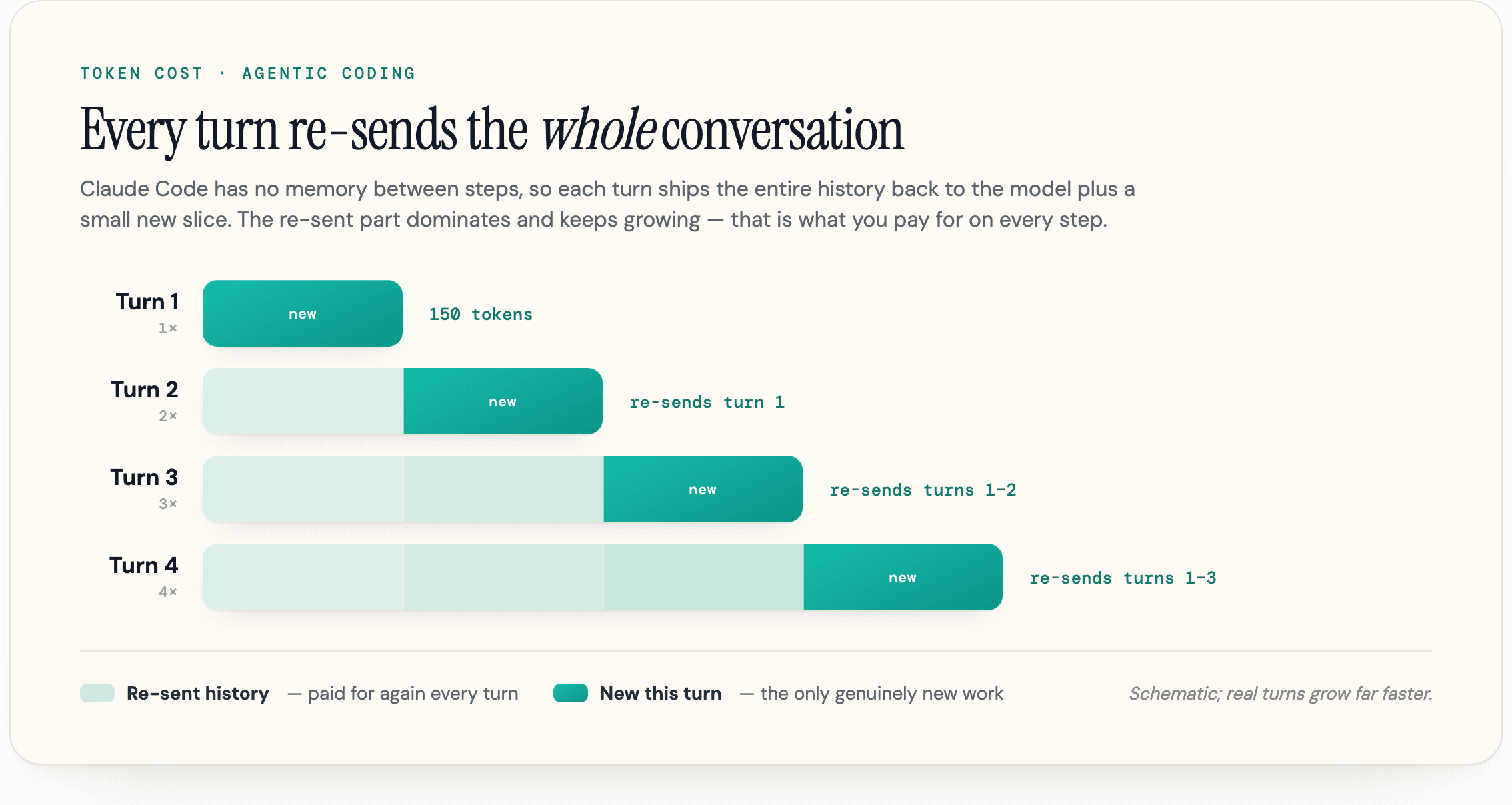
The scale is not subtle. A 2026 study, How Do AI Agents Spend Your Money?, measured agentic coding tasks consuming roughly 1000 times more tokens than ordinary code chat, with input tokens driving the cost. The same study found the exact same task can vary by up to 30 times in token usage from one run to the next. A task that looks trivial to you can quietly turn into fifty thousand tokens of re-read context. That variance is why two developers on the same team can see wildly different bills, and why "it was just a small change" is never a reliable predictor of cost.
Computerphile has a clear walkthrough of why this is so expensive at the hardware level:
The Sonnet 5 Tokenizer Tax
One recent change can raise your bill without you touching anything. Sonnet 5 launched on June 30, 2026 and is now the default model in Claude Code, and it ships with a new tokenizer that emits roughly 30 percent more tokens for the same text on average, per Anthropic's what's new in Sonnet 5 doc. The inflation is uneven: heavier on English prose, on the order of 40 percent, and lighter on code, closer to 27 percent on Python, with languages like Chinese roughly unchanged. Per-token pricing did not change, so an equivalent request or session simply costs about a third more tokens than the same work did on Sonnet 4.6. The coverage calls it a "tokenizer tax," and the name fits.
You cannot opt out of the ratio, but it raises the stakes on every lever below. If the same task now costs roughly 30 percent more tokens, the context you keep lean and the output you keep short are each worth proportionally more, and the 1M-token window holds meaningfully less, roughly a quarter less, of your actual text than it used to, so context discipline starts biting sooner.
Your Bill or Your Limit? What "Cheaper" Actually Means
Before the tactics, get clear on what you are optimizing, because it changes what "saving tokens" means for you.
If you use Claude Code through a Pro or Max subscription, you do not pay per token. You pay a flat monthly fee and hit a usage limit. Saving tokens means not running out mid-week, not a smaller invoice. If you use an API key, every token is real money, and the numbers add up: Anthropic's cost documentation reports an average of around 13 US dollars per developer per active day and 150 to 250 dollars per developer per month across enterprise deployments, with 90 percent of users staying under 30 dollars a day. Either way, the same habits help. One protects your limit, the other protects your wallet. If you are still deciding which tool to buy in the first place, our Claude vs Copilot comparison walks through how the two meter heavy use.
You can see where your tokens go with the /usage command. It shows your session token totals, and on a paid plan (Pro, Max, Team, or Enterprise) it also breaks recent usage down by skills, subagents, plugins, and individual MCP servers:
Total cost:            $0.55
Total duration (API):  6m 19.7s
Total duration (wall): 6h 33m 10.2s
The dollar figure is a local estimate, not your actual bill, but the breakdown is what matters: it tells you which parts of your setup are quietly eating context. For the full plan comparison, see our guide to Claude pricing in 2026. Look at that breakdown once before you start cutting, so you are trimming real waste rather than guessing.
The Levers That Actually Move Your Token Bill
Most guides hand you 30 or 50 tips in no particular order. That is not useful when you have five minutes and a limit warning. Almost all of the savings come from two things: keeping your context small and matching the model to the task. Everything else is a smaller, situational win.
Here is the ranking, biggest wins first.
| Lever | What it does | Effort | Typical impact |
|---|---|---|---|
| Manage context (/clear, /compact) | Stops re-sending stale history on every turn | Low | Highest |
| Match the model to the task | Routine work on Sonnet or Haiku, not Opus | Low | High |
| Lower reasoning effort | Cuts thinking tokens on simple tasks | Low | High |
| Disable unused MCP servers | Removes tool definitions from context | Low | Medium |
| Filter verbose command output | Keeps logs and diffs out of context | Medium | Medium |
| Write specific prompts | Avoids broad scanning and re-work | Low | Medium |
| Delegate noisy work to subagents | Isolates verbose output from the main thread | Medium | Situational |
Start at the top. The next sections take the levers in that order.
Keep Your Context Small
This is the lever that matters most, because it attacks the mechanism directly. Every token you keep out of the context window is a token you do not pay to re-read on every future turn. For the mechanics of the window itself, how big it is and how to read the /context meter, see our guide to the Claude Code context window.
Two commands do most of the work, and people confuse them. /clear wipes the conversation history entirely while keeping your files and tools. Use it when you switch to unrelated work, so the React bug you just fixed stops riding along into a Postgres question. /compact replaces a long back-and-forth with a short summary and keeps going, preserving the decisions and current task state while discarding raw tool output. Use it at a natural break, when you finish a phase, not reactively after Claude starts forgetting things. A healthy session compacts into a better summary than a degraded one.
The bigger mistake is letting a session ride all the way to the context ceiling. At that point Claude Code auto-compacts for you, spending tokens to summarize and then carrying a lossy version forward, and a session you keep nursing past that point pays for that again and again while getting fuzzier each time. When you do not actually need the history, a clean /clear or a fresh session is cheaper and sharper than riding repeated auto-compactions.
You can tell compaction what to keep:
/compact Focus on the auth refactor and the failing tests, drop the exploration
Run /context any time to see what is actually occupying the window: open files, tool definitions, conversation turns. It is a memory profiler for your session, and it is the fastest way to spot a file that got pulled in and never left.
Two habits keep the window lean from the start. First, do not let Claude scan the whole repo. Point it at the specific files with @path/to/file instead of asking it to "figure out the codebase," which is one of the biggest single token drains there is. Second, keep your CLAUDE.md small. It loads on every session and sits in context the whole time, so a bloated one is a fixed tax on every turn. Anthropic suggests keeping it under 200 lines and moving specialized workflows into skills, which load only when invoked:
# Compact instructions
When compacting, focus on test output and code changes.If you have gone down a wrong path, /rewind back to an earlier checkpoint instead of arguing Claude out of it. Rewinding truncates to context that is already cached, so it is usually cheaper than compacting a session full of dead ends.
Match the Model to the Task
Most people open Claude Code, leave it on the default model, and never think about it again. Running everything on Opus is where a lot of bills quietly balloon. Opus is the architect: reserve it for planning, hard debugging, and decisions where the reasoning is the point. Sonnet 5 is the contractor that handles day-to-day implementation, refactors, and tests. Haiku is for cheap helper work and exploration. Use /model to switch, or set a default in /config.
| Model | Best for | Relative cost |
|---|---|---|
| Opus | Architecture, planning, hard reasoning | Highest |
| Sonnet | Everyday coding, refactors, tests, reviews | Middle |
| Haiku | Simple edits, questions, subagent helpers | Lowest |
The "opusplan" setting automates the split: it plans on Opus, then drops to Sonnet for execution. Useful, with one caveat worth knowing. Each model and each effort level has its own cache, so switching mid-session recomputes the entire request with no cache hits. That is why picking your model and effort at the top of a session beats flipping between them mid-task.
The other model-shaped lever is reasoning effort. Extended thinking is on by default, and those thinking tokens are billed as output, with a default budget that can run into tens of thousands of tokens. For a job like "rename this variable," that is pure waste. Drop it with /effort for simple tasks, or, on models with a fixed thinking budget, cap it with MAX_THINKING_TOKENS. Heavier reasoning is a real trade-off, not a free upgrade, so dial it down when the task does not need it. One note for the current lineup: on Fable 5 you cannot turn extended thinking off entirely, so that particular switch is off the table, though you can still lower the effort.
Cut the Hidden Context Bloat
Some of the worst offenders never show up in anything you typed. They load quietly in the background.
MCP servers are the classic example. Older advice says every connected server dumps its full tool definitions into context on every message, and for a while that was true. It is now more nuanced: on supported models, tool definitions are deferred by default, so only tool names enter context until Claude actually uses one. That said, disabling servers you are not using still helps, especially on Haiku or through some gateways where deferral is unavailable and the full definitions load. Run /mcp to see what is connected and turn off what you do not need. When a plain command line tool like gh or aws will do, prefer it, since it adds no per-tool listing at all. For the servers that do earn their place, plus the cost trackers that keep this spend visible, see our roundup of open-source Claude Code tools.
Verbose command output is the other silent drain. A test run, a git diff, or a build log gets billed at full token cost, and most of it is noise Claude does not need. Filter it before it lands. That can be as simple as pytest -q, or a preprocessing hook that greps a 10,000-line log down to the errors, turning tens of thousands of tokens into hundreds. The output nobody thought to trim is almost always where the surprise token counts come from, not the prompts people worry about.
For genuinely noisy jobs, hand them to a subagent. A subagent explores logs, runs the tests, or reads the docs in its own separate context, and only a short summary comes back to your main thread. The verbose part stays quarantined, and you can pin the subagent to a cheaper model like Haiku for that grunt work. Finally, use plan mode (Shift+Tab) before a non-trivial task. Claude proposes an approach before touching anything, which heads off the expensive re-work of letting it charge down the wrong path first.
Write Prompts That Don't Waste Tokens
How you phrase a request changes how many tokens come back. Vague prompts like "improve this codebase" trigger broad scanning and long, hedged answers. Specific ones keep the work tight: "add input validation to the login function in auth.ts" lets Claude read one file and move. Negative prompts help too. Adding "do not redesign the architecture, do not add dependencies, do not touch code outside this function" reduces collateral changes and the tokens spent making them.
Answer budgets are the cheapest lever of all, and they target the priciest tokens. Output tokens are billed five times more than input tokens, per token: Anthropic's pricing puts Sonnet 5 at 2 dollars per million input against 10 dollars per million output per million output, a 5-to-1 ratio. So "return only the diff," "answer in under 200 tokens," or "five bullets maximum" saves more than the word count suggests, and it usually improves the answer by forcing Claude to select instead of generating everything plausible.
We lean on this constantly in our own work. On routine tasks we ask for terse output by default and let the model spend its budget on reasoning rather than narration. The point is to constrain the output, not the thinking: a short answer is not a dumber one if the model still reasoned fully before replying. One caveat, since extended thinking is billed as output too: an answer-length limit does not cap the hidden thinking tokens, so on simple tasks pair the terse-output request with a lower /effort. Some developers push this further into a grammar-stripped "caveman" style for quick lookups, which saves input tokens too, with one real failure mode. Strip too much and Claude infers more, which means it sometimes infers wrong. Keep full sentences for anything that touches production code. One developer documented a roughly 60 percent cut from this kind of context and prompt discipline alone, in this dev.to write-up.
For sequences you run constantly, define a /command so a repeated workflow stays one short, consistent instruction instead of a long ad-hoc prompt retyped each time. It still costs tokens when invoked, but a tight command beats a sprawling one.
The One Habit Worth Keeping
The habit that pays back on every turn is context discipline. Clear between tasks, compact at the breaks, keep CLAUDE.md lean, and stop the agent from re-reading things it does not need. Model routing and sharper prompts stack on top, but managing context is the lever that keeps working while you do everything else.
The reason agentic coding is expensive is the same reason serving AI answers is expensive: models re-process large amounts of context to produce each response. We spend our time on the visibility side of that economics at geotoolbox, so if you also run a site and want to see how AI models read and cite it, our free AI readiness checker is a good place to start.
Frequently Asked Questions
Why does Claude Code use so many tokens?
Because the model has no memory between steps, so Claude Code re-sends the entire context, your files, prior messages, and every tool result, on every single turn. Agentic tasks compound this by injecting large file and log outputs that then ride along on all following turns, which is why input tokens dominate the cost by volume.
What is the difference between /clear and /compact?
/clear wipes the conversation history completely while keeping your files and tools, which is what you want when switching to unrelated work. /compact summarizes the conversation so far and continues from that summary, which is what you want at a natural break in the same task. Reach for /clear between tasks and /compact within one.
How big should my CLAUDE.md file be?
Keep it small, ideally under 200 lines. It loads at session start and stays in context the entire session, so every line adds fixed weight to every task, including the ones it has nothing to do with. Move detailed or specialized workflow instructions into skills, which load only when Claude invokes them.
Does switching from Opus to Sonnet actually lower my bill?
Yes, for routine work. Opus costs more per token, so running everyday edits, refactors, and tests on Sonnet (or simple helpers on Haiku) cuts cost with no real quality loss. Reserve Opus for planning and hard reasoning. Set your model at the start of a session, since switching mid-session recomputes the cache.
Do subagents cost more or less?
It depends on the job. A subagent runs verbose work like log analysis in its own separate context and returns only a short summary, which keeps that noise out of your main thread and can save tokens overall. Spawn many long-running teammates at once, though, and each carries its own context window, so cost scales with the team.
Is reducing token usage about my bill or my usage limit?
Both, depending on your plan. On a Pro or Max subscription you pay a flat fee and hit a usage limit, so saving tokens means not running out mid-week. On an API key every token is billed, so it is literal money. The same habits help either way.
Sources
- Manage costs effectively - Claude Code Docs (Anthropic) -
code.claude.com/docs/en/costs - How Claude Code uses prompt caching (Anthropic) -
code.claude.com/docs/en/prompt-caching - How Do AI Agents Spend Your Money? Analyzing and Predicting Token Consumption in Agentic Coding Tasks (arXiv, 2026) -
arxiv.org/abs/2604.22750 - Why AI Tokens are so Expensive (Computerphile) -
youtube.com/watch?v=-0HRzXk8vlk - Claude API and model pricing (Anthropic) -
platform.claude.com/docs/en/about-claude/pricing - What's new in Claude Sonnet 5 (Anthropic) -
platform.claude.com/docs/en/about-claude/models/whats-new-sonnet-5 - How I Cut My Claude Code Token Usage by 60% and Got Better Output (dev.to) -
dev.to/numbpill3d/how-i-cut-my-claude-code-token-usage-by-60-and-got-better-output-48b0