
The Claude Code context window is the single number that decides how much your session can hold, how much it costs, and how sharp it stays. Most people meet it only when Claude Code starts forgetting things or a usage limit lands mid-week. This is what the context window actually is, how big it is on each model, what fills it before you type a word, and how to read and keep it under control.
What the Claude Code Context Window Is
The context window is the session's working memory: everything Claude Code can see at one moment, measured in tokens. That includes the system prompt, your project's CLAUDE.md, the tools and MCP servers you have connected, every file it has read, every tool result, and the full back-and-forth of your conversation. It all shares one fixed budget, and it all competes for the same space.
A token is roughly four characters, or about three-quarters of a word. Code is denser than prose because of punctuation, identifiers, and syntax, so source files eat the window faster than their line count suggests. Reading one large module can cost tens of thousands of tokens on its own.
The mental model that trips people up is treating the window like human memory, something Claude holds in the back of its mind and glances at when needed. It does not work that way. The model has no memory between turns, so Claude Code re-sends the entire window on every single request, then appends your new message. It is not a filing cabinet Claude opens occasionally; it is the whole document it re-reads, start to finish, every time you hit enter. That is what makes everything below matter: the context window is not just a capacity limit, it is a recurring cost you pay on every turn.
How Big Is the Context Window? 200K vs 1M
1 million tokens is now the normal case, not the exception. Every current model except Haiku 4.5 is 1M-capable, and Sonnet 5 runs at 1M unconditionally. The 200,000-token window is still the documented default, but in practice it is the floor you land on in specific situations rather than the standard you start from.
| Model | Context window in Claude Code | Notes |
|---|---|---|
| Claude Sonnet 5 (current Sonnet) | 1M tokens | Always 1M on the Anthropic API. No 200K variant, no [1m] suffix, no usage credits on any paid plan |
| Claude Opus 5.5 (current Opus) | 1M tokens | Automatic on every paid plan, including Pro, with no [1m] suffix and no usage credits. Opus 5, the prior model, is still selectable and keeps the same 1M behavior |
| Fable 5.1 (and Fable 5) | 1M tokens | 1M on every paid plan, including Pro. Fable usage itself can bill to usage credits on some plans and seat tiers |
| Haiku 4.5 | 200K tokens | The one current model that does not reach 1M |
| Legacy (Opus 4.8 / 4.7 / 4.6, Sonnet 4.6) | 1M tokens | Opus 4.8 and 4.7 run 1M on every paid plan, like Opus 5.5. Opus 4.6 and Sonnet 4.6 reach 1M only through their [1m] variant: Opus 4.6 is included on Max, Team, and Enterprise and needs usage credits on Pro, while Sonnet 4.6 requires usage credits on every subscription plan, including Max |
The 1M window is available on Pro, Max, Team, and Enterprise, not the free tier, per Anthropic's context window documentation. The plan split, from Anthropic's model configuration docs (checked September 26, 2026): on the Anthropic API, Fable 5.1, Fable 5, Sonnet 5, and Opus 4.7 and later run with the 1M window on every plan, including Pro, with no configuration and no usage credits. The plan rules only apply to Opus 4.6 and Sonnet 4.6, covered in the legacy row above.
Two details that matter for cost. First, the 1M window uses standard model pricing with no premium for tokens beyond 200K. Where extended context is included with your subscription, it stays covered by your subscription; where it comes through usage credits, those tokens bill to credits. A bigger window costs more because you are sending more tokens, not because the tokens themselves are priced higher. Second, on current models there is nothing to select. The [1m] suffix only matters for the two older models that reach 1M through a separate variant:
/model claude-opus-4-6[1m]
/model claude-sonnet-4-6[1m]
If your account supports those variants, they also appear in the /model picker; restart the session if you do not see them. sonnet[1m] has no effect when sonnet already resolves to Sonnet 5, since that model is 1M natively.
You land back on 200K in three cases: running Haiku 4.5, running behind an LLM gateway (where Claude Code cannot verify 1M support), or setting CLAUDE_CODE_DISABLE_1M_CONTEXT=1.
Two things about that headline number. First, these are the Claude Code sizes; the Claude.ai chat app is different. The same documentation now gives Opus 5.5, Opus 5, Fable 5.1, and Sonnet 5 a 1M window in chat on any paid plan, while Fable 5, Opus 4.6 to 4.8, and Sonnet 4.6 are held to 500K there, so do not carry a chat figure over to your terminal without checking which model it refers to. Second, the number you can actually use is always smaller than the ceiling. By the time a real session is running, a chunk of the window is already spoken for by things you never typed, which is the next section.
What Fills the Window Before You Type a Word
Open a fresh Claude Code session and the window is already partly full. A stack of components loads automatically, before your first message. The figures below are the representative values Anthropic publishes in its own context window simulator; your setup will vary, particularly on CLAUDE.md size and skill count.
| What loads automatically | Representative tokens |
|---|---|
| System prompt (Claude Code's own instructions and tool definitions) | 4,200 |
Project CLAUDE.md | 1,800 |
Auto-memory (MEMORY.md from past sessions) | 680 |
| Skill descriptions | 450 |
Personal ~/.claude/CLAUDE.md | 320 |
| Environment info | 280 |
| MCP tool names (schemas deferred until used) | 120 |
Two notes on that table. Anthropic folds tool definitions into the system prompt rather than counting them separately, so a single 4,200-token figure covers both. And auto-memory is capped at the first 200 lines or 25KB of MEMORY.md, whichever comes first, which in practice lands well under a thousand tokens rather than the several thousand the cap might suggest. Git branch, status, and recent commits load as a separate block at the very end of the system prompt.
None of that is waste, but it is fixed overhead on every turn, and two sources balloon fast if you are not watching.
MCP Servers, the Big One
The first is MCP servers. Each connected server advertises its tools, and a single tool definition, name plus description plus parameter schema, can run several hundred tokens. Back in December 2025, before deferral existed, developer Damian Galarza measured one MCP tool at roughly 663 tokens and the Playwright MCP's 22 tool definitions at about 14,300 tokens, over 7 percent of a 200K window. That is the problem Anthropic solved: MCP tool definitions are now deferred by default and loaded on demand through tool search, so only tool names consume context until Claude actually reaches for a specific tool. Run /mcp to see per-server costs.
One documented exception. When ANTHROPIC_BASE_URL points at a non-first-party host, MCP tool search is disabled by default; set ENABLE_TOOL_SEARCH=true if your proxy forwards tool_reference blocks. Outside that case, deferral is simply on. Names still add up across many servers, though, so servers you never touch remain weight you are not using.
Skills Load Lighter Than MCP
The second is skills. A skill only loads its name and description at startup, a couple hundred tokens, and pulls in the full instructions on demand when invoked. That is the same deferral idea applied more aggressively: the Playwright capability that costs 14,300 tokens as a full MCP definition is about 200 tokens as a skill until you actually use it. If a tool is one you reach for occasionally rather than every session, a skill is far cheaper on context. You can go further and keep even the description out: disable-model-invocation: true in a skill's frontmatter means nothing loads until you call it explicitly with /name, and skillOverrides in settings does the same for skills you did not write. This is why "audit your MCP servers" is the single biggest context cleanup most people have never done. If you are deciding which servers are worth their weight in the first place, our roundup of open-source tools for Claude Code sorts them by the job they do.
How to Read the /context Meter
You do not have to guess at any of this. Run /context in a session and Claude Code prints a live map of the window: a filled grid plus a per-category breakdown of exactly what is taking up space.
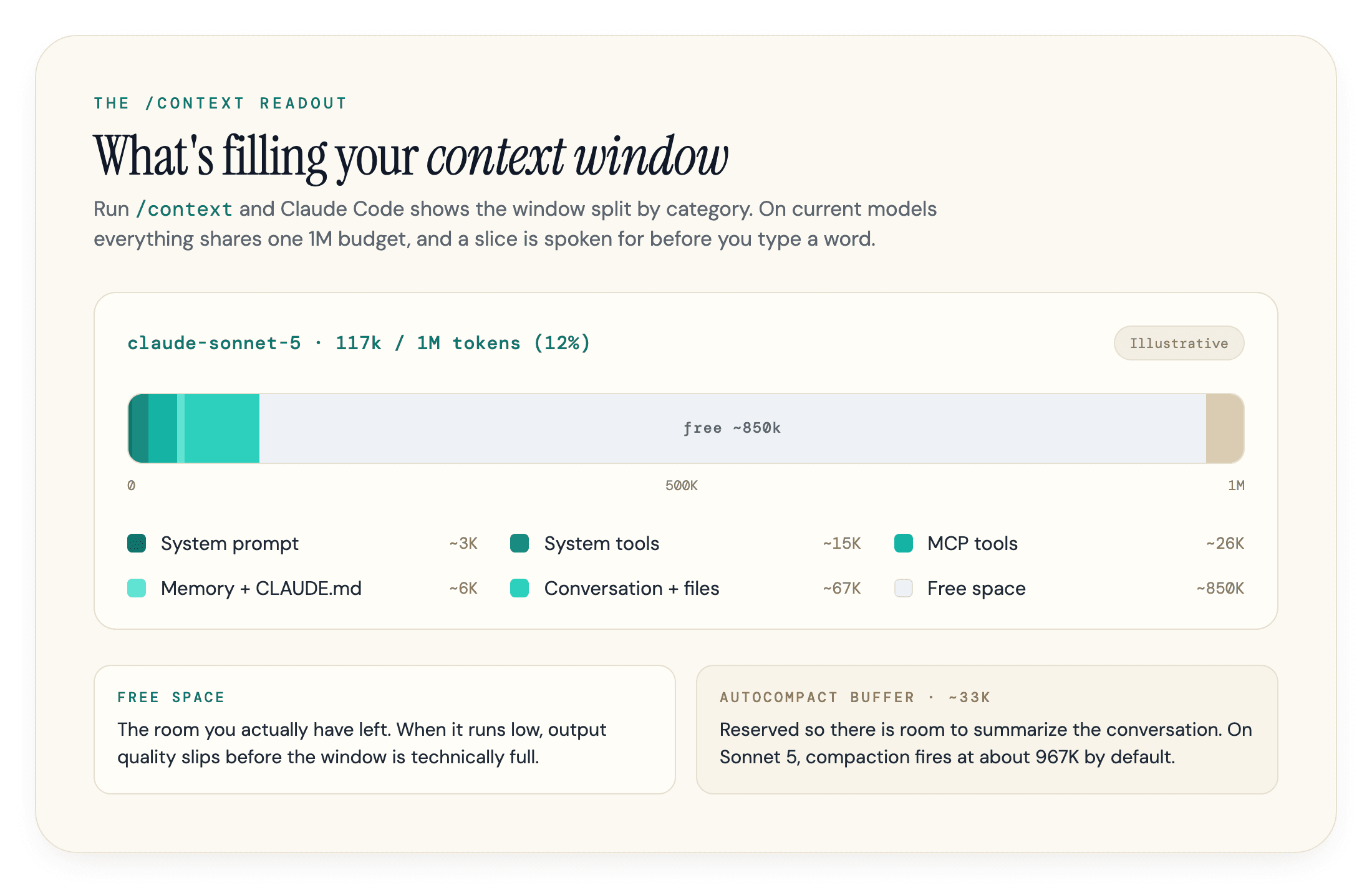
The top line shows your model and usage, something like 117k/1M tokens (12%) on a current model; the denominator reads 200k on Haiku 4.5, on Opus 4.6 or Sonnet 4.6 without their [1m] variant, or in the other cases listed above. Below it, each category reports its own tokens and percentage: system prompt, system tools, MCP tools, custom agents, memory files, messages, then free space and a reserved autocompact buffer at the bottom. The value is that it turns a vague "why is this session sluggish" into a specific answer. If MCP tools are showing 26k tokens, you know where to cut. If your CLAUDE.md is 4k before you have done anything, that is a fixed tax on every turn worth trimming.
The Interactive Simulator
Anthropic recently shipped an interactive simulator that walks through the same thing visually: what loads at startup, what each file read costs, and when rules and hooks fire as a session grows. It is the fastest way to build an intuition for how quickly the window fills before you spend real tokens learning it the hard way.
One myth to put down: older guides claim Claude Code has no native way to see token usage and that you only notice trouble through behavior. That is out of date. Between /context, the /usage command (which on paid plans breaks recent usage down by skills, subagents, plugins, and individual MCP servers), and a configurable status line that shows context usage continuously, the window is fully visible. You just have to look.
Auto-Compaction: What Happens When the Window Fills
Claude Code does not crash when you approach the limit. It compacts, and it does so in two stages: it clears older tool outputs first, then summarizes the conversation if that is not enough. Your requests and key code snippets are preserved; detailed instructions from early in the conversation may not be. That reserved band at the bottom of the /context readout, the autocompact buffer, is the room held back so there is space to run the summarization when it triggers.
Anthropic does not publish a fixed buffer size, but the trigger is now configurable. CLAUDE_CODE_AUTO_COMPACT_WINDOW sets the capacity used for auto-compaction calculations, defaulting to the model's context window, except on Sonnet 5, which auto-compacts at about 967K tokens by default. CLAUDE_AUTOCOMPACT_PCT_OVERRIDE sets the percentage of that window at which compaction fires. On a local Opus session, auto-compaction triggers when the conversation reaches the model's context limit rather than at a percentage.
There is one failure mode worth recognizing. If a single file or tool output is so large that the context refills immediately after each summary, Claude Code stops auto-compacting after a few attempts and shows an error instead of looping. If you see that, the fix is a smaller input, not a bigger window.
What Survives a Compaction
Compaction is not lossless, and it is worth knowing what survives it. Anthropic's documentation on what survives compaction notes that the system prompt stays unchanged and isn't part of the compacted message history in the first place, while your project-root CLAUDE.md, memory, and MCP tools all reload automatically.
The skill listing is the one exception. Everything else reloads; the index of available skill descriptions does not. Only skills you actually invoked are preserved, and those are capped at about 5,000 tokens each and 25,000 total, oldest dropped first. Truncation keeps the start of the file, which is why the most important instructions belong near the top of a SKILL.md. Path-scoped rules and nested CLAUDE.md files are dropped until their directory is touched again. In other words, the standing context you set up mostly holds, but anything that depended on being deep in the conversation can quietly vanish.
/clear, /compact, and /rewind
You have three manual controls, and they are not interchangeable.
| Command | What it does | Reach for it when |
|---|---|---|
| /clear | Wipes the conversation entirely, keeps your files and tools | You are switching to unrelated work |
| /compact | Summarizes the conversation and continues from the summary | You hit a natural break in the same task |
| /rewind | Restores the conversation or code to an earlier checkpoint | A path went wrong and you want to back out of it |
The trick with /compact is to run it before quality drops, not after. Compact at a clean boundary, say once a phase of work is done, and the summary is built from good state. Compact a session that has already gone off the rails and you bake the confusion into the summary. You can also steer it: /compact Focus on the auth refactor and the failing tests tells Claude what to keep. If you find yourself typing the same steer every time, make it permanent with a # Compact instructions section in your project-root CLAUDE.md, and every compaction in that project inherits it. Reach for /clear between tasks and /compact within one.
Why a Full Window Degrades Your Output
A window that is technically not full can still produce worse output. This is where the context window quietly starts costing you quality on top of tokens.
The reason is how attention works. Models weight some positions more heavily than others, and content in the middle of a long window gets less reliable attention than content at the start or end, the well-documented "lost in the middle" effect. So the coding conventions you set an hour ago drift toward the middle as the session grows and start getting ignored. The symptoms are recognizable: Claude repeats work it already did, renames a function it just settled on, reintroduces a pattern you told it to avoid, or asks a question you already answered. None of that is a bug. It is a noisy window crowding out the signal.
The trap is assuming this only kicks in when the meter is near full. It does not. Degradation is gradual, and on a busy session it can show up while you still have plenty of free space, because what matters is not the percentage used but how much noise sits between the model and the thing it needs to focus on. Treat the /context percentage as a rough gauge, not a green light to keep piling on until it fills.
Why a Bigger Window Isn't the Fix
This is also why a 1M window is not the fix it sounds like. Chroma's Context Rot study tested 18 frontier models, Claude among them, and found every one degrades as input length grows, even on simple retrieval tasks. A bigger window buys you more room before you have to compact. It does not buy immunity from the model getting less reliable the more you cram in. Curating what goes into the window beats maximizing how much fits.
The cost angle compounds here. A bloated session is expensive twice: you pay to re-send that growing window on every turn, and you pay again when auto-compaction spends tokens summarizing it, sometimes summarizing a previous summary. In our experience, the sessions that burn the most tokens are rarely the hardest problems. They are ordinary tasks run in a window nobody cleared, where each turn re-reads a pile of stale context that stopped being useful long ago. Computerphile has a good walkthrough of why re-processing that context is expensive at the hardware level:
Context Window vs Usage Limit
These two get conflated constantly, and the difference matters. The context window is per-session working memory, the 200K or 1M budget for one conversation, and /clear resets it to empty. Your usage limit is a plan-level cap on how much you can consume over time, a weekly or monthly ceiling on Pro or Max. Clearing your context does nothing to your usage limit directly; it just makes each turn cheaper, which means you reach that limit slower.
So "saving tokens" means two different things depending on which one is biting. If you are hitting a usage limit mid-week, the goal is fewer tokens consumed overall. If a single session is degrading, the goal is a leaner window. The habits overlap, but the reason you care is different. For the full set of levers on the spend-and-limit side, model routing, reasoning effort, and prompt discipline, see our companion guide on reducing Claude Code token costs. For how the plans and usage credits themselves work, our Claude pricing breakdown covers the tiers.
Keeping the Window Lean
Managing the window well is mostly a handful of habits, not a tool. Clearing and compacting deliberately, covered above, is half of it. The other half is controlling what enters the window in the first place.
Point Claude at specific files with @path or line ranges instead of asking it to "figure out the codebase," one of the fastest ways to drain the window. Hand noisy jobs like log analysis or codebase exploration to a subagent, which works in its own separate window and returns only a summary. Keep CLAUDE.md tight, Anthropic suggests under 200 lines, and move detailed per-workflow instructions into skills so they load on demand instead of on every turn. And run /mcp to switch off servers you are not using. Where a CLI and an MCP server do the same job, the CLI (gh, aws, gcloud) is cheaper on context because it adds no per-tool listing at all.
Agent Teams Multiply the Bill
One feature deserves its own warning if you are watching spend. Agent teams, disabled by default and enabled with CLAUDE_CODE_EXPERIMENTAL_AGENT_TEAMS=1, use roughly 7x more tokens than a standard session when teammates run in plan mode. Each teammate is a separate Claude instance maintaining its own context window, and each one loads CLAUDE.md, MCP servers, and skills automatically. Anthropic's own mitigations: run teammates on Sonnet, keep teams small, keep spawn prompts focused, and shut teammates down when they are done. It is a real capability, but it is the most expensive button in the product.
One model-specific wrinkle: extended thinking is billed as output, so those reasoning tokens count against your budget too. On Fable 5 you cannot turn extended thinking off, only lower the effort, so it takes a bigger bite of the window on simple tasks.
The Window Is the Lever
The context window is not a background detail. It is the resource that decides both what a session costs and how good its output stays. Watch it with /context, keep it lean, and compact deliberately, and most of the "why is Claude Code expensive and getting worse" problem takes care of itself.
The reason a coding agent's context is expensive is the same reason serving AI answers is expensive: models re-process large amounts of context to produce each response, and AI search engines do much the same with your pages when they decide whether to cite you. That is the side we work on at geotoolbox. If you run a site and want to see how AI models read and reference it, our free AI readiness checker is a good place to start.
Frequently Asked Questions
What is the Claude Code context window size?
On current models it is 1 million tokens. Sonnet 5 runs at 1M unconditionally, Opus 5.5 and Fable 5.1 reach 1M on paid plans, and Haiku 4.5 is the one current model still capped at the 200,000-token standard window. The usable space is always smaller than the headline number, because the system prompt, tools, memory, and your CLAUDE.md occupy part of the window before you type anything.
Does Claude Code have a 1 million token context window?
Yes. On the Anthropic API, Sonnet 5, Opus 5.5 (and Opus 4.7 or later), and the Fable models run with it on every paid plan, including Pro; the 1M window needs no configuration and no usage credits, although Fable usage itself can bill to credits on some plans. Only Opus 4.6 and Sonnet 4.6 need their [1m] variant, with plan-dependent usage credits. It is not available on the free tier, and the 1M window carries no price premium for tokens beyond 200K.
What is the difference between /compact and /clear?
/clear wipes the conversation history entirely while keeping your files and tools, which is what you want when switching to unrelated work. /compact summarizes the conversation so far and continues from that summary, which is what you want at a natural break in the same task. The short version: between tasks, clear; inside one task, compact.
Why does Claude Code get worse in long sessions?
As the window fills, model attention weights recent content more heavily and instructions from earlier drift toward the middle, where they get less reliable attention. You see repeated work, contradicted decisions, and ignored rules. Research on context rot shows this happens even with a larger window, so a 1M context delays the problem rather than removing it.
Is the context window the same as my usage limit?
No. The context window is the per-session working-memory budget, and /clear resets it. Your usage limit is a plan-level cap on how much you can consume over a week or month. Keeping the window lean makes each turn cheaper, which helps you reach the usage limit slower, but the two are separate things.
How do I check how much context I am using?
Run /context in a session for a live breakdown by category, use /usage for a plan-limit view of recent usage by skills, subagents, plugins, and MCP servers, or configure the status line to display context usage continuously. Claude Code shows all of this natively.
Sources
- Explore the context window (Anthropic, Claude Code Docs) -
code.claude.com/docs/en/context-window - Model configuration (Anthropic, Claude Code Docs) -
code.claude.com/docs/en/model-config - How Claude Code works (Anthropic, Claude Code Docs) -
code.claude.com/docs/en/how-claude-code-works - Environment variables (Anthropic, Claude Code Docs) -
code.claude.com/docs/en/env-vars - Context windows (Anthropic, Claude Platform Docs) -
platform.claude.com/docs/en/build-with-claude/context-windows - Manage costs effectively (Anthropic, Claude Code Docs) -
code.claude.com/docs/en/costs - How large is the context window on paid Claude plans? (Anthropic) -
support.claude.com/en/articles/8606394-how-large-is-the-context-window-on-paid-claude-plans - Understanding the Claude Code context window (Damian Galarza) -
damiangalarza.com/posts/2025-12-08-understanding-claude-code-context-window - Context Rot: How Increasing Input Tokens Impacts LLM Performance (Chroma Research) -
trychroma.com/research/context-rot - Why AI Tokens are so Expensive (Computerphile) -
youtube.com/watch?v=-0HRzXk8vlk