
JavaScript SEO now serves a second audience. Googlebot renders your scripts, within limits worth knowing. In the tests we found, ChatGPT-User, Claude-User and PerplexityBot read only the HTML, so a page whose text only exists after a script runs can rank in Google and still look empty to them.
The evidence is dated, uneven and moving: one report says OpenAI's crawlers began rendering on September 25. The cheapest fix is the same either way: get the text into the first HTML response.
What JavaScript SEO Means in 2026
JavaScript SEO is the technical SEO work of making sure the text, links and tags your scripts build can be crawled, rendered and indexed by search engines. For a decade, JavaScript and SEO meant one question: can Google render it? Now there is a second question, because some of the readers fetching your pages never run a script at all.
Take a product page whose price and specs are drawn by a script after page load. Google can render it and index the price. A ChatGPT answer built from the same URL may see an empty shell, so the answer can describe the page without its price. Our guide to AI visibility covers why that matters.
In the bot table, each row carries a label. Vendor doc means the company says so itself. Independent test means someone else measured it, with a date. Tested marks the one thing we ran ourselves. Where sources disagree, we say so instead of picking a winner.
How Google Crawls, Renders, and Indexes JavaScript
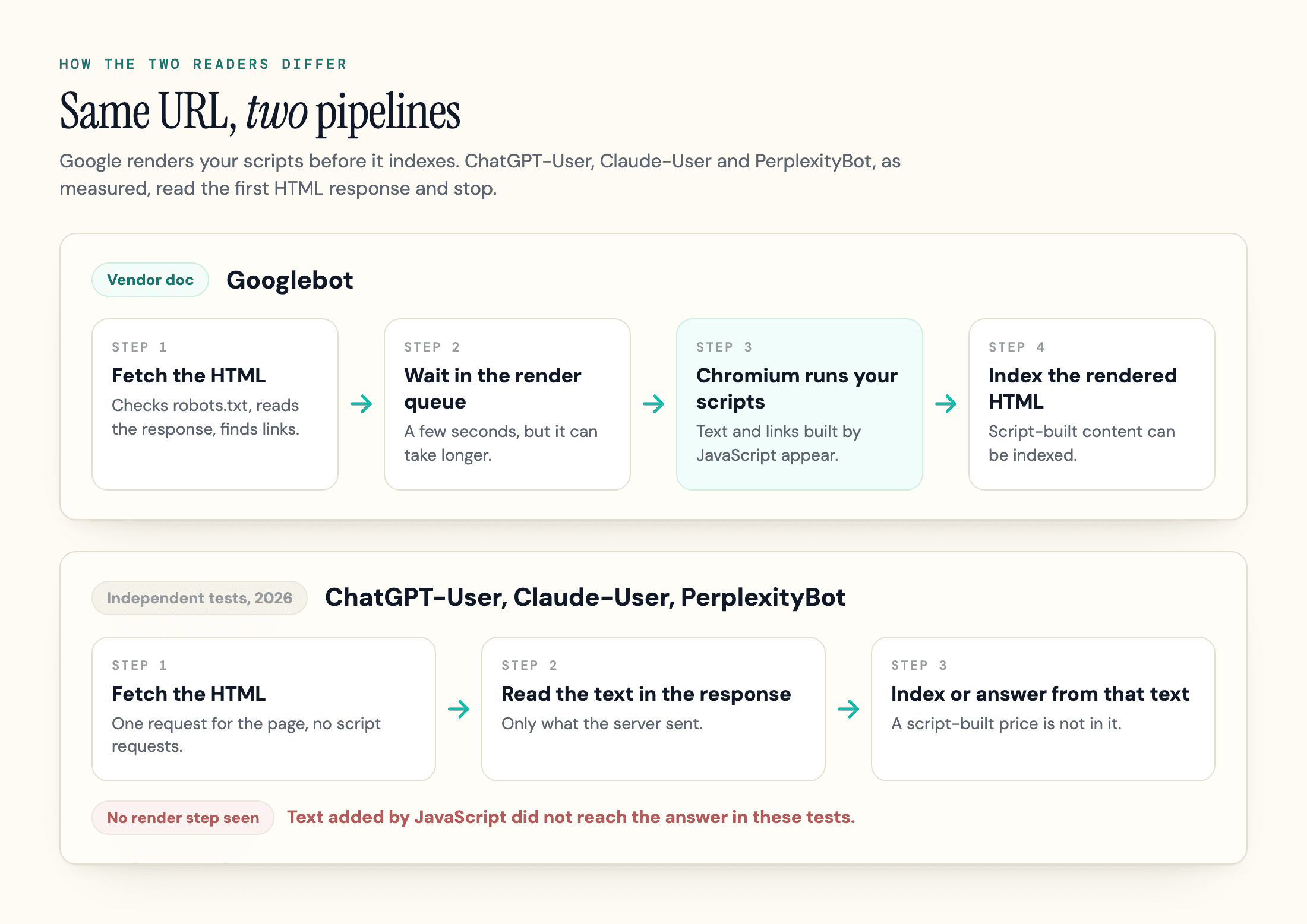
Search engines that render JavaScript work in a fixed order: crawl, render, index. For Google, Googlebot fetches the URL, reads the HTML, and queues the page for rendering. Google's JavaScript SEO guide says Googlebot queues every page with a 200 status code unless a robots meta tag or header says not to index it. A non-200 page, such as a 404, might skip rendering.
Google publishes no upper limit for the wait. The same guide says a page may sit in the queue "for a few seconds, but it can take longer than that." Then a headless Chromium runs the scripts, and Google parses the rendered HTML for new links and for indexing.
Before you read on, open view-source on your most important page and search for one sentence of its body copy. If it is missing, the rest of this article applies to you.
The 2MB Cutoff
Google's March 2026 crawler post says Googlebot fetches up to 2MB of any individual URL except PDFs, headers included, and stops there. Bytes past the cutoff are not fetched, not rendered and not indexed. Each script and stylesheet gets its own separate 2MB counter, so a bundle over 2MB loses its tail even when the HTML is tiny. The 15MB figure you may have seen was Googlebot's documented limit in Google's 2022 post on the 15MB limit; the 2026 post puts Googlebot at 2MB and keeps 15MB as the default for other Google crawlers that set no limit.
No Published Render Timeout
The "few seconds" line describes waiting in the queue, not how long your scripts may run. Neither the JavaScript guide nor the crawler post gives a render timeout, so the "Google gives up after 1 to 5 seconds" rule that circulates among SEOs has no source in either page. Speed still helps users.
Rendering Is Stateless
The crawler post says Google's rendering service clears local storage and session data between requests, so content that depends on a stored value may not appear to Googlebot.
Server Speed and Crawl Rate
Slow servers cost you crawl capacity before rendering even starts. Google's crawler post says that if your server struggles to serve bytes, its crawlers will automatically back off, which drops your crawl frequency. The post's advice is to keep HTML lean and move heavy CSS and JavaScript into external files, which also keeps the HTML under the cutoff.
Dynamic Rendering Is a Workaround
Dynamic rendering means serving search engine crawlers a pre-rendered HTML version while users get the client-side app. Google now calls it a workaround, not a long-term solution and points to server-side rendering, static rendering or hydration instead. Googlebot generally does not treat dynamic rendering as cloaking when the content is similar. Serving crawlers completely different content can be.
Google's own guide adds a line worth keeping: server-side or pre-rendering "is still a great idea because it makes your website faster for users and crawlers, and not all bots can run JavaScript."
Which AI Crawlers Execute JavaScript?
In the tests we found, ChatGPT-User, Claude-User and PerplexityBot read the HTML your server sends and stop, with an open question about OpenAI's crawlers below. The search engine crawlers Googlebot, Applebot and, selectively, Bingbot render pages, and several assistants outside the US did in the one test that measured them.
Separate the kinds of bot first, because they behave differently. Training crawlers collect data for models, search crawlers build the index an assistant draws on, and user fetchers load a URL the moment a person asks. Our AI crawler list names each bot and its job. A user fetcher like ChatGPT-User decides whether a link pasted into a chat gets read properly.
| Bot | Job | Runs your JavaScript? | Evidence |
|---|---|---|---|
| Googlebot | Search indexing | Yes | Vendor doc: Google crawler post, March 2026. To appear as a supporting link in AI Overviews or AI Mode, a page must be indexed and eligible to appear in Google Search with a snippet (Google, December 2025) |
| Applebot | Apple search | Yes | Vendor doc: Apple says Applebot may render content in a browser. Independent test: 3,133 script fetches across 4,838 page reads (Forge, September 2026) |
| Bingbot | Bing index | Selectively | Vendor doc: Bing says Bingbot is generally able to render JavaScript but not at scale, and recommends dynamic rendering (October 2018). Independent test: scripts fetched on roughly 1 in 800 page reads (Forge, September 2026) |
| Gemini (a URL pasted into the app) | User fetch | Disputed | Independent test: raw HTML only in Search Engine World (June 2026) and Forge (September 2026). searchVIU (October 2025) saw it return a script-written price. Vercel (December 2024) said Gemini's crawler uses Googlebot's infrastructure, a different path from a pasted URL |
| OAI-SearchBot | ChatGPT search crawler | Almost never, per logs to September 24 | Independent test: 10 script fetches across 1,738 page requests; one page loaded browser-style (Forge). A September 30 report from the author's own server says rendering began September 25 |
| GPTBot | OpenAI training crawler | No, per logs to September 24 | Independent test: 37 page requests and no script fetches (Forge). The same September 30 report says GPTBot began rendering September 25; the author found no OpenAI announcement |
| ChatGPT-User | User fetch | No | Independent test: 37,045 page reads, 0 script fetches (Forge). The ChatGPT assistant reported the HTML-written value in the Search Engine World and Forge tests, and Forge matched its fetch to ChatGPT-User |
| ClaudeBot and Claude-User | Training crawler and user fetch | No | Independent test: Claude-User 10,028 page reads and ClaudeBot 915 page requests, no script fetches (Forge). Vendor doc, API tool only: Anthropic says its web fetch tool does not support JavaScript-rendered sites |
| PerplexityBot | Perplexity search crawler | No in logs, disputed by one test | Independent test: 3,193 page requests, 0 script fetches (Forge). searchVIU saw Perplexity return a script-written price after indexing; the test does not show how that content reached the index |
| DeepSeek, Qwen, Kimi, ERNIE, Mistral | User fetch | Yes, in one test | Independent test: each reported the number only a script could write, one prompt per assistant (Search Engine World, June 2026). Meta AI and Copilot reported the HTML value in the same test |
| Grok | User fetch | Ran it, then ignored it | Independent test: a script executed on one node, but the answer quoted the HTML value (Search Engine World) |
How Much Weight the Evidence Deserves
Read the "No" rows as observations, not announcements. OpenAI's and Perplexity's crawler pages say nothing about JavaScript either way, and Anthropic's statement covers its API tool rather than ClaudeBot.
The tests have their own limits. Search Engine World is an SEO publication, Forge makes a bot-log plugin, searchVIU sells SEO monitoring, and Vercel is a hosting vendor. We sell a related check ourselves (the Content Analyzer, below), so weigh our reading the same way. Each test is also a snapshot: one site queried once per assistant, one news site's 30-day log, one fresh test page. Forge's bot table counts requests by name without checking them against published IP ranges. We did not test any of these bots ourselves.
The "AI crawlers don't run JavaScript" claim began with a December 2024 Vercel and MERJ analysis. It found that none of the OpenAI, Anthropic, Meta, ByteDance or Perplexity crawlers it measured rendered JavaScript, while Gemini used Googlebot's infrastructure and Applebot rendered through a browser. It is no longer a single study, and the newer ones agree on ChatGPT and Claude, with the Perplexity, Gemini and OpenAI-crawler caveats in the table.
One later report cuts the other way. A September 30 developer post from the author's own server, with requests checked against OpenAI's published IP ranges, says OAI-SearchBot and GPTBot began rendering JavaScript on September 25, just after Forge's log ends. The evidence is Next.js prefetch requests that only appear when a page is rendered, and the detailed counts come from one Next.js site. Those prefetches also inflate raw request counts. The author found no OpenAI announcement, so treat the OpenAI crawler rows as in flux and re-run the test yourself.
You may also see a "69 percent" statistic attached to AI crawlers that cannot execute JavaScript. Forge says that figure counts names on a list of 23 crawlers and measures nothing.
A concrete example is in Forge's log. Over 30 days ChatGPT-User read a page of live fuel prices 157 times and Claude-User read it 80 times. Scripts drew the prices, so none of those 237 reads saw one.
Fetching a script is not proof of running it. Vercel's data showed ChatGPT's crawlers spending 11.50% of their requests, and Claude's 23.84%, on script files they never executed. A month with zero script fetches fits no execution, though caching or a separate render service could hide fetches, which is why the decoy-value tests carry more weight.
Browser-Driving Agents Are a Separate Case
Forge notes that browser-driving agents, such as OpenAI's, Claude in Chrome and Perplexity's Comet, run scripts because they drive a real browser, and that an agent visit looks like a person on Chrome in a server log. Our guide to the agent-ready website covers how to serve them.
Bingbot is the hardest row to pin down. It renders selectively, and Microsoft's last detailed statement we found dates from October 2018 and gives no rule for which pages it renders. If you care about ChatGPT search, our guide to how ChatGPT search works covers which index it draws on.
The practical read: Google and Apple can run your scripts. The big US assistants mostly won't, so text that only a script writes is not reliably there for them.
How to Test What a Bot Sees
Compare the HTML your server returns with the DOM a browser builds. The DOM is the live tree of elements the browser creates from that HTML, and it is what scripts change. The gap between them is what non-rendering bots miss.
-
Fetch the raw HTML. Request the page the way a bot does and save the response without running anything. A spoofed user agent only tests how your own server and firewall respond. It does not prove the real bot gets through, and a fetcher may serve a cached copy, so a clean result is a floor, not proof.
curl -s -A "GPTBot/1.1" https://example.com/page > raw.html -
Capture the rendered DOM. In Chrome DevTools, compare View Source (the HTML source code your server sent) with the Elements panel (the live DOM). For Google's version, Google's guide says to use the Rich Results Test or the URL Inspection tool and look at the rendered HTML. If the content is missing from that rendered HTML, the guide says Google can't index it.
-
Diff what matters. Pull the JSON-LD blocks out of the raw HTML first, then strip scripts and styles before you count body text and links, and compare the title, canonical tag, robots meta tag, H1, links, JSON-LD and the main copy against the rendered version.
-
Rule out the firewall. A 403 or a challenge page looks like a rendering failure in your tools but is a delivery failure. A CDN or firewall rule can turn AI crawlers away even when robots.txt allows them, as our GPTBot guide explains, so check status codes in your CDN logs before you rewrite the app.
-
Read your server logs. A rendering bot usually asks for the page and then for its scripts, stylesheets and Ajax or API calls. A fetcher asks for the page and leaves. That difference is how Forge sorted the bots in the table above, and it needs no special tooling. Treat logs as supporting evidence, since caching or inline scripts can hide a render; a unique marker that only a script can write is the stronger test. Check the requests against any IP ranges the vendor publishes, since a user agent string alone proves nothing.
Tested, October 4, 2026: we ran steps 1 to 3 on one product page built in different ways, as local fixtures served from a local web server. The first is a client-rendered shell, the second is server-rendered HTML, and the third is server-rendered HTML that a script then adds one line to. Each cell shows the raw response, then the rendered DOM in Chromium.
| What we measured | Client-rendered shell | Server-rendered | Server-rendered plus script |
|---|---|---|---|
| Body words | 0, then 60 | 60, then 60 | 60, then 65 |
| Page title | "Loading", then the product title | Product title, then the same | Product title, then the same |
| H1 in the markup | None, then present | Present, then present | Present, then present |
| Canonical tag | None, then present | Present, then present | Present, then present |
| JSON-LD block | None, then present | Present, then present | Present, then present |
Links in <a href> tags | 0, then 1 (a click handler stays a non-link) | 2, then 2 | 2, then 2 |
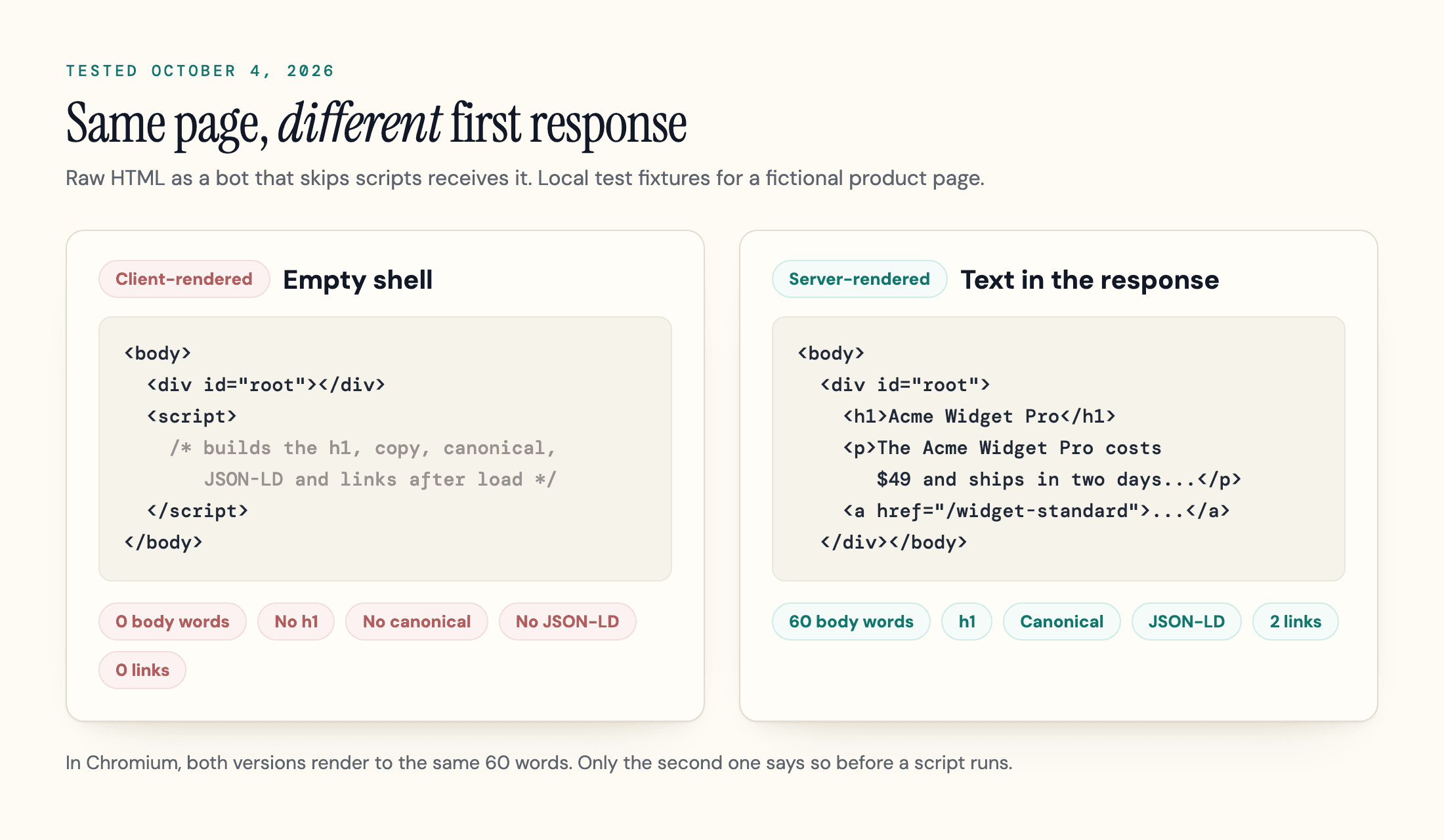
This tests what the HTML contains, which is what a bot that skips scripts reads. It does not test any real crawler. Google could index the rendered version of the shell if it fetches and renders the deployed page, while a fetcher like ChatGPT-User would receive the empty one.
One check misleads. A search for <h1 in the raw source of the client-rendered page finds a match, because the script's own text contains the tag. Strip scripts before you count.
geotoolbox's Content Analyzer, part of our paid plans, runs this comparison on a live URL: it renders the page with and without JavaScript and diffs the word counts, so a shell like the 0-versus-60-word fixture above shows up as a gap, and it probes access with the major AI bots' user agents, which carries the spoofing limit from step 1. The free Agent Readiness Scanner makes live requests with multiple AI crawler user agents, and the free AI Crawler Checker covers the robots.txt layer only.
CSR, SSR, SSG, and Prerendering: Which Strategy Fits?
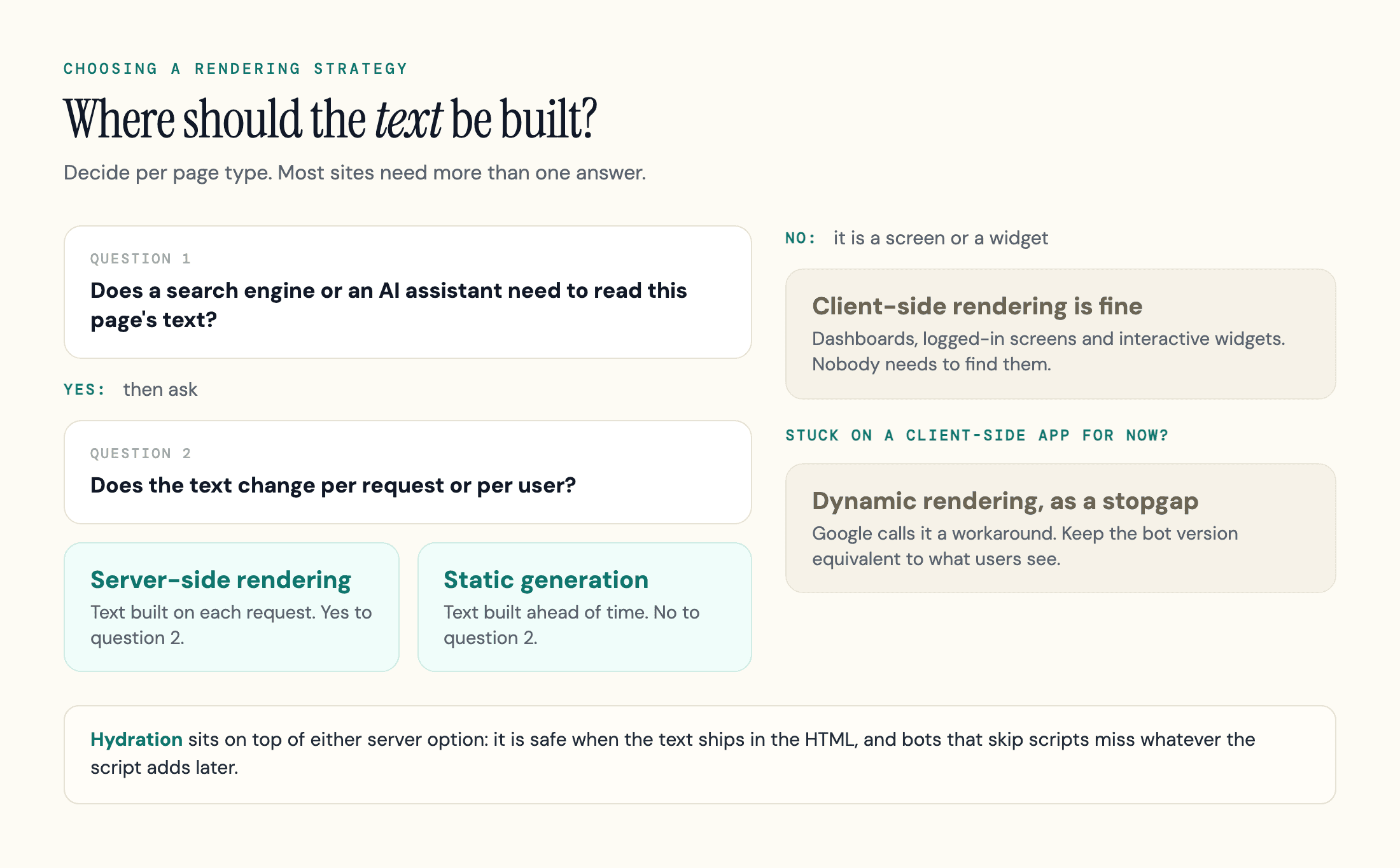
Choose the rendering location by what the page must do. If a page has to be indexed or cited, its text belongs in the first HTML response.
| Strategy | Text in the first HTML? | Fetchers that skip scripts | Use it for | |
|---|---|---|---|---|
| Client-side rendering (CSR) | No, an empty shell | Renders it after the queue | See an empty shell | Logged-in screens, dashboards, widgets |
| Server-side rendering (SSR) | Yes, built per request | Fine | Fine | Pages that change per request and must rank or be cited |
| Static generation (SSG) | Yes, built ahead of time | Fine | Fine | Articles, docs and product pages that change on a schedule |
| SSR with hydration | Yes, then a script adds interactivity | Fine | See the server text, miss what the script adds | Interactive pages whose key text ships in the HTML |
| Dynamic rendering | Only for bots | Works, but Google calls it a workaround | Fine if the service serves them | A stopgap while you migrate |
Hydration is safe when the paragraph that answers the query is already in the server HTML. What non-rendering bots miss is the line a script adds later, such as a stock level or a live price, which is exactly the five words our server-rendered-plus-script fixture gained.
Dynamic rendering carries one extra duty: keep the bot version equivalent to what users see. Google's test is whether the content is similar.
Most JavaScript frameworks let you choose per route. Keep CSR for the dashboard and use SSR or SSG for every page a search engine or an assistant should read.
Common JavaScript SEO Issues and How to Fix Them
These issues trip up Googlebot, the fetchers that skip scripts, or both, and each fix doubles as a JavaScript SEO best practice.
For a bot that skips scripts, a fix counts only when the result shows up in view-source. Status codes, headers and firewall rules need their own checks.
Links That Are Not Links
Googlebot finds new URLs in the href attribute of HTML links. Google's guide says it is fine to inject links with JavaScript, as long as they follow its best practices for crawlable links. A button with an onclick handler, or a router that swaps the view without a real URL, gives crawlers nothing to follow. For client-side routing, the same guide says to use the History API, because fragments can stop Googlebot extracting your URLs. A sitemap that lists every real URL is the backup for links a router hides, and our guide to the XML sitemap covers the format.
Tags That Exist Only After Rendering
Google lets you set titles, the meta description and canonicals with JavaScript, but its guide calls HTML the best place for the canonical link tag. If the HTML already sets one, a script may only repeat the same URL; if the HTML leaves it out, a script can add it, and the page should carry only one rel=canonical tag. Our canonical tags guide covers how conflicting signals change which URL Google picks. A bot that skips scripts sees the raw values. In our shell fixture that meant a title of "Loading" and no canonical.
A noindex tag works the other way. Google says that when it meets a noindex tag it may skip rendering, so a script that removes noindex later may never run. If you want the page indexed, keep noindex out of the original HTML.
Soft 404s in Single-Page Apps
A single-page app that answers every route with a 200 status turns missing pages into soft 404s. Google's guide offers script-based fixes: redirect with JavaScript to a URL that returns a real 404, or add a noindex tag to error views with JavaScript. Both depend on scripts running, so a fetcher that skips them sees the 200 and the empty shell either way. Where you can, have the server return a real 404 status.
Blocked Scripts and Oversized Bundles
Googlebot reads robots.txt first, and per its guide it won't render JavaScript from blocked files or on blocked pages. A rule that blocks your script folder or API path can leave Google looking at an unrendered shell. Size is the second problem. Keep each bundle under the cutoff described earlier, and place the title, canonical and essential structured data near the top of the HTML, as Google's crawler post advises.
Content That Waits for a Click or a Scroll
Google Search does not interact with your page, according to its lazy-loading guide, so content that loads only after a click or a scroll will not reach it. The guide's fix is to load all relevant content whenever it enters the viewport, with the IntersectionObserver API for example, and to give infinite scroll paginated URLs. Tabs and "load more" buttons follow the same logic: if the text needs a click or a scroll to be fetched or inserted, assume bots never see it.
Structured Data Added by Script
Google's guide says you can generate JSON-LD with JavaScript and inject it, and to test the result. Assistants are a different case. In searchVIU's October 2025 test, a price that existed only in JSON-LD, whether static or script-injected, was returned by none of the assistants it tested. That is one test, and the assistants ignored JSON-LD whether or not a script injected it. Put the key facts in visible HTML text, and ship the JSON-LD in the HTML as well, so Google and any parser that skips scripts can read it without rendering.
Our guide to schema markup for AI search covers what it does and does not do.
Firewalls and Challenge Pages
A firewall that makes visitors prove they are human with JavaScript shows a non-rendering bot the challenge, not your page, according to Forge. Forge's own test page was refused to Claude and Perplexity by something in front of its server until it moved a copy, and Forge does not say what.
What to Fix First
Does JavaScript hurt SEO? For Google, usually not, as long as the page renders, returns correct status codes and stays under the size cutoff. For AI search, JavaScript-only text is a retrieval risk, especially with direct fetchers that don't render, as ChatGPT-User and Claude-User didn't in the tests above. How much of it reaches an answer through search indexes varies, and OpenAI's crawlers may be changing.
Fix in this order, since each step makes the next one easier:
- Put the copy that answers your target queries, your links and your JSON-LD in the first HTML response.
- Return correct status codes and make sure your firewall lets in the bots you want.
- Match titles, canonicals and robots tags between the raw HTML and the rendered DOM.
- Trim bundles and move the critical tags to the top of the document.
- Re-run the raw-versus-rendered diff on your ten most valuable pages, and check your logs a month later.
Run your top pages through geotoolbox's Content Analyzer to see what changes between the JavaScript and no-JavaScript versions, and walk through the rest of the pipeline with our AI visibility audit. Bot behavior moved between the tests above within months, so a dated log of what you tested is worth more than any single result here.
Frequently Asked Questions
What is SEO in JavaScript?
SEO for JavaScript sites is the practice of making JavaScript content visible to search engines and AI crawlers. That covers whether pages can be crawled, rendered and indexed, and whether the text, links and tags also exist in the HTML for bots that skip scripts.
Is React still bad for SEO?
Where React renders matters more than React itself. A React app rendered on the server or built ahead of time puts its text in the first HTML and behaves like any other site. One that renders only in the browser can work for Google once it renders the page, but looks empty to fetchers that skip scripts.
Can ChatGPT, Claude, and Perplexity read JavaScript?
In the tests we found, ChatGPT-User, Claude-User and PerplexityBot fetched no scripts in a 30-day log of one news site, and in Search Engine World's test ChatGPT, Claude and Perplexity reported the HTML value (Forge's Perplexity test returned no result). The exception to watch is OpenAI's crawlers, OAI-SearchBot for search and GPTBot for training: a September 30 report from the author's own server says both began rendering on September 25, and the author found no OpenAI announcement. Their vendors' own bot pages do not confirm any of this, so treat it as measured behavior that could change.
Does Google have a render timeout?
The Google documentation we read does not give one. The limits it does publish are the 2MB fetch cutoff for each resource and a stateless renderer, and its JavaScript guide says only that a page may wait in the queue for a few seconds or longer. Aim for fast scripts and small payloads instead of a number Google has not documented.
Is dynamic rendering cloaking?
Keep the bot version equivalent to what users see and it generally is not. Google says Googlebot generally does not treat dynamic rendering as cloaking, though serving crawlers completely different content can be. Google also calls the technique a workaround rather than a long-term solution.
Why does my Next.js page say "Discovered - currently not indexed"?
Rendering is rarely the only suspect. In an r/nextjs thread, the original poster says most such cases were redirect behavior such as 308s, canonicals and missing sitemap or robots files rather than content. That is a community report, not a Google statement. Rule out redirects and canonicals first, then compare the raw and rendered HTML as above.
Sources
- Anthropic - Web fetch tool, API documentation (undated, read October 4, 2026) -
platform.claude.com/docs/en/agents-and-tools/tool-use/web-fetch-tool - Apple - About Applebot (undated, read October 4, 2026) -
support.apple.com/en-us/119829 - Bing Webmaster Blog - bingbot Series: JavaScript, Dynamic Rendering, and Cloaking. Oh My! (October 31, 2018) -
blogs.bing.com/webmaster/2018/10/bingbot-Series-JavaScript,-Dynamic-Rendering,-and-Cloaking-Oh-My - DEV Community, hisashispace - Traffic from ChatGPT jumped! Is it because its crawlers now run JavaScript? (September 30, 2026) -
dev.to/hisashispace/traffic-from-chatgpt-jumped-is-it-because-its-crawlers-now-run-javascript-5961 - Forge AI Bot Log - Can AI crawlers run JavaScript? (published September 24, 2026; 30-day log to September 24; code-word test September 25) -
forgeaibotlog.com/articles/can-ai-crawlers-execute-javascript - Google Search Central Blog - Googlebot and the 15 MB thing (June 28, 2022) -
developers.google.com/search/blog/2022/06/googlebot-15mb - Google Search Central - AI features and your website (last updated December 10, 2025) -
developers.google.com/search/docs/appearance/ai-features - Google Search Central - Fix Lazy-Loaded Website Content (last updated December 10, 2025) -
developers.google.com/search/docs/crawling-indexing/javascript/lazy-loading - Google Search Central - Dynamic rendering as a workaround (last updated December 10, 2025) -
developers.google.com/search/docs/crawling-indexing/javascript/dynamic-rendering - Google Search Central - Understand JavaScript SEO basics (last updated March 4, 2026) -
developers.google.com/search/docs/crawling-indexing/javascript/javascript-seo-basics - Google Search Central Blog - Inside Googlebot: demystifying crawling, fetching, and the bytes we process (March 31, 2026) -
developers.google.com/search/blog/2026/03/crawler-blog-post - Reddit r/nextjs - Why Google refuses to index many Next.js sites (thread 1qs38nw, read October 4, 2026) -
reddit.com/r/nextjs/comments/1qs38nw - Search Engine World, Andre Alpar - Do AI assistants actually render your JavaScript when grounding? (June 9, 2026, updated July 2, 2026) -
searchengineworld.com/do-ai-assistants-actually-render-your-javascript-when-grounding-we-put-it-to-the-test - searchVIU - Schema Markup and AI in 2025 (December 2, 2025; test run October 30, 2025) -
searchviu.com/en/schema-markup-and-ai-in-2025-what-chatgpt-claude-perplexity-gemini-really-see - Vercel with MERJ - The rise of the AI crawler (December 17, 2024) -
vercel.com/blog/the-rise-of-the-ai-crawler