
To get YouTube videos cited in AI search, first decide which engine you mean. Google's AI Overviews and AI Mode cite YouTube often, and AI Mode can reach what you say in a video. ChatGPT and Claude almost never cite it, and Perplexity only occasionally does.
We tested this in 2026 with 100 real search queries on 5 AI engines, a read test on 8 small videos, and the prompts our customers tracked from April to October.
Make the video for Google, with the answer spoken early and chapters it can link to, and publish a page with the transcript for everyone else. Ask YouTube, the new YouTube AI search, plays by a third set of rules.
The Short Answer: Optimize the Video for Google, Publish a Page for Everyone Else
YouTube citations in AI search are mostly a Google story. In our panel of 100 US search queries, Google's AI Overviews cited YouTube in 81 of 97 answers, while ChatGPT did it twice and Perplexity once.
| Engine | Cited YouTube in our panel (Nov 26, 2026) | What it answered in our video test | What to do |
|---|---|---|---|
| Google AI Overviews | 81 of 97 answers (83.5%) | Not tested directly (no prompt box) | Optimize the video: spoken answer early, chapters, accurate captions |
| Google AI Mode | 45 of 96 answers (46.9%) | Spoken words: 8 of 8 facts when given the link | Same as AI Overviews; it often links to moments inside videos |
| Gemini app (logged out) | 0 of 47 answers with a source list | Description facts only, never spoken ones | Put the key facts in the title and description too |
| ChatGPT | 2 of 99 answers | Never reached the video | Publish a companion page with the transcript |
| Perplexity | 1 of 100 answers | Some spoken facts, inconsistently | Companion page, and allow PerplexityBot |
| Ask YouTube | Not measured (it lives inside YouTube) | Not tested; plays clips from the most relevant timestamp | One clear answer per chapter; engagement counts here |
How Often Each AI Engine Cites YouTube (2026 Data)
Google's AI Overviews and AI Mode cite YouTube in a large share of answers. In our panel, every other engine cited it in 2 answers or fewer.
The first data set is a panel of 100 real US search queries drawn from Google keyword data across 10 topics, from home repair and cooking to B2B software, run once on each engine on November 26, 2026.
ChatGPT and Gemini were DataForSEO scrapes of the logged-out apps, ChatGPT with web search forced on, and Perplexity was its Sonar API.
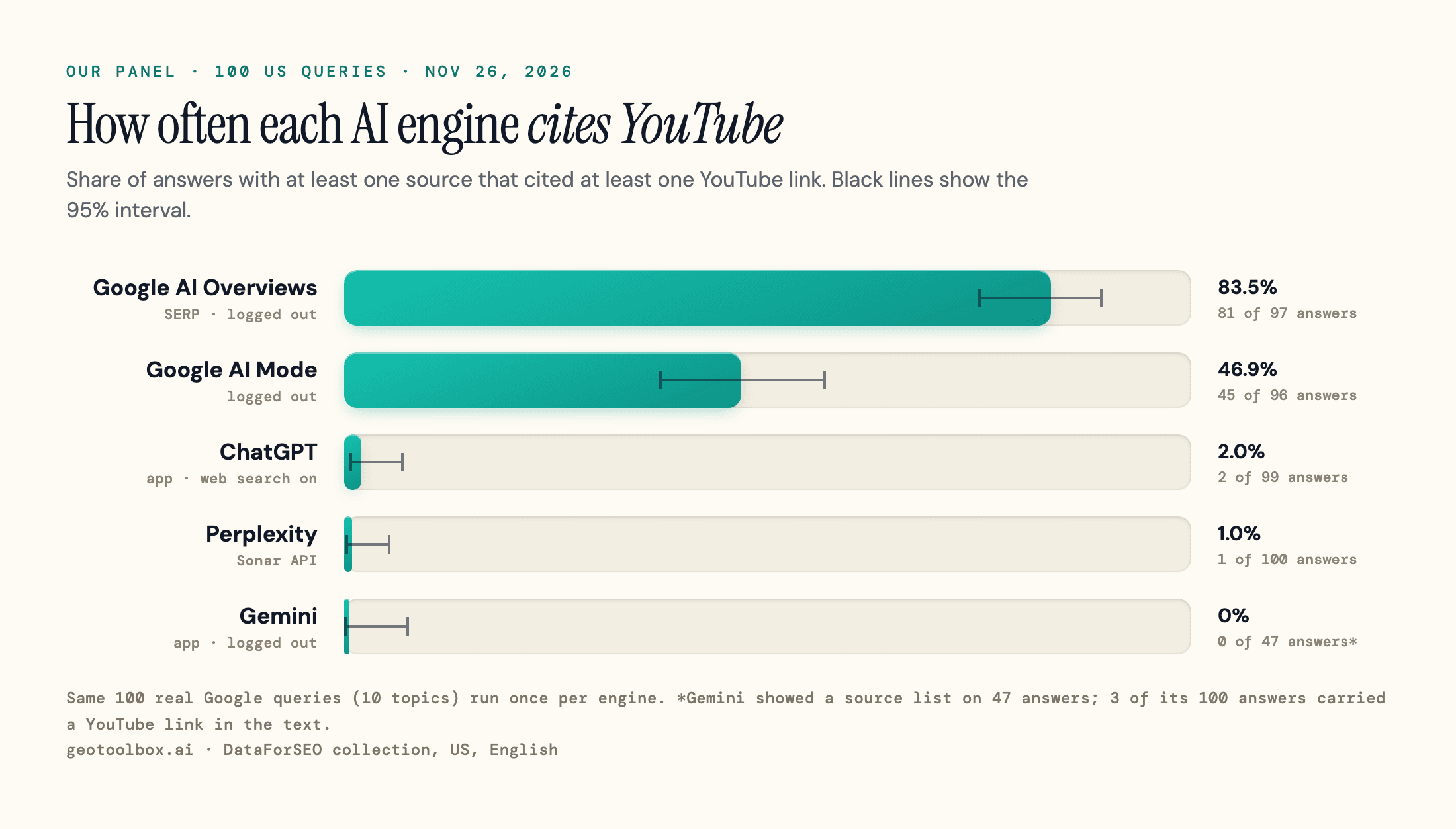
YouTube also made up 27.4% of all AI Overview citations in the panel (264 of 964), and 23.4% in AI Mode. And it depends on the question type: AI Overviews cited YouTube in all 20 how-to answers and in only 2 of 8 pricing answers.
By topic, AI Overviews cited video in at least 60% of answers in all 10 topics, from marketing and SEO (6 of 10) to cooking (10 of 10). AI Mode swung more, from 1 of 10 health and wellness answers to 7 of 10 B2B software answers.
These are small samples of popular question, comparison, review and price searches, with local "near me" and medical-advice searches left out, so test your own niche before you invest.
The second data set is our own tracker. Across the prompts geotoolbox customers tracked between April 15 and October 31, 2026 (AI Mode from June 30), these are the shares of prompts with sources where an engine cited YouTube at least once:
| Engine | Prompts where it cited YouTube at least once |
|---|---|
| Google AI Overviews | 48.0% (369 of 768) |
| Google AI Mode | 21.8% (148 of 678) |
| Perplexity (API) | 11.4% (97 of 850) |
| Gemini | 6.6% (46 of 698) |
| Bing Copilot | 0.9% (7 of 744) |
| ChatGPT | 0.1% (1 of 834) |
| Claude (API) | 0 of 414 |
| Grok (API) | 0 of 354 |
Treat both Google numbers as floors, because of the redirect links explained in the tracking section. The prompts are also whatever our customers chose to track, not a random sample of searches, and a prompt counts once it cites YouTube in any of its runs.
Third-party studies also put Google's surfaces on top, with different numbers:
| Study | What it counts | AI Overviews | AI Mode | Gemini | Perplexity | ChatGPT |
|---|---|---|---|---|---|---|
| Tenpoint Labs, Oct 2026 | All answers (6,684) | 31.0% | 9.5% | 0.2% | 0.1% | 0% |
| RankZero, Aug-Nov 2026 | All answers (78,574) | 23.7% | not reported | 7.4% | 2.0% | 0.2% |
| GEO Compass, Aug 2025-Sep 2026 | Answers with sources, 24 markets | 38.3% | 36.9% | 5.0% | 13.4% | 3.7% |
Why do the rates disagree so much? Each study counts a different thing (all answers, answers with sources, or prompts over several runs), uses a different question mix, and queries either the consumer apps or the APIs.
Beyond AI Overviews and AI Mode, Perplexity's figures vary the most, from 0.1% to 13.4%. The direction never changes: Google's search surfaces cite YouTube, and ChatGPT and Claude almost never do.
What Each AI Engine Can Actually Read from Your Video
Google AI Mode answered from the words spoken in a video. The logged-out Gemini app got only description facts right, Perplexity got spoken details now and then, and ChatGPT got none right.
That is the result of a read test we ran on November 26, 2026:
- We picked 8 small YouTube videos (2 to 967 views, published between August and November 2026) on everyday topics such as a running toilet, sourdough bagels and a laptop keyboard swap.
- For each one we chose two facts: one said only out loud (absent from the title, description and chapters) and one written only in the description.
- Before asking any engine, we searched Google for every fact. One description fact, why tomato seeds carry gel, turned out to be common gardening knowledge, so the description counts below leave it out.
Then we asked each engine about every fact twice: once naming the video and its channel, once pasting the video's URL. That made 128 trials (120 counted below).
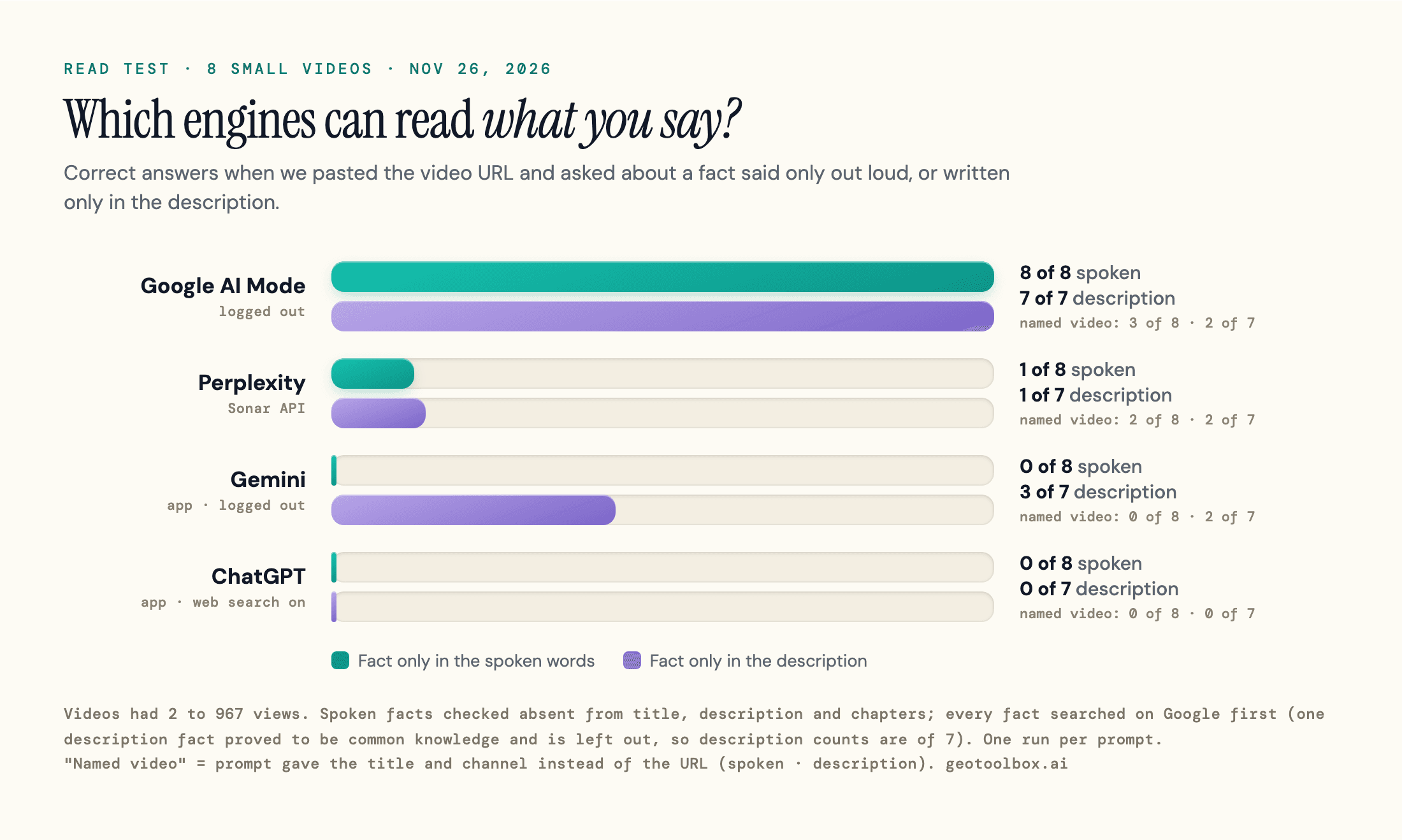
| Engine | Spoken-only fact, video named | Spoken-only fact, URL pasted | Description fact, video named | Description fact, URL pasted |
|---|---|---|---|---|
| Google AI Mode | 3 of 8 | 8 of 8 | 2 of 7 | 7 of 7 |
| Perplexity (API) | 2 of 8 | 1 of 8 | 2 of 7 | 1 of 7 |
| Gemini app (logged out) | 0 of 8 | 0 of 8 | 2 of 7 | 3 of 7 |
| ChatGPT | 0 of 8 | 0 of 8 | 0 of 7 | 0 of 7 |
AI Mode did more than repeat the fact. Eight of its 11 correct spoken-only answers linked to a timestamp, and 6 of those landed within 12 seconds of the moment the line is said.
Google can process what a video says: its Gemini API documentation describes multimodal prompting that reads a public YouTube link's audio along with one frame per second by default, in a developer preview.
The others fell short for different reasons.
- ChatGPT never cited or even retrieved the video's page, so its zero tells you about reach, not about captions.
- The logged-out Gemini app, mostly 3.5 Flash-Lite here, got a description fact right in 5 answers and a spoken fact in none, as if reading only the page text. Signed in, with Activity on, Google says Gemini can help you understand the content of a video, untested here.
- Perplexity's correct spoken answers cited the watch page, and we can't tell how it got the words.
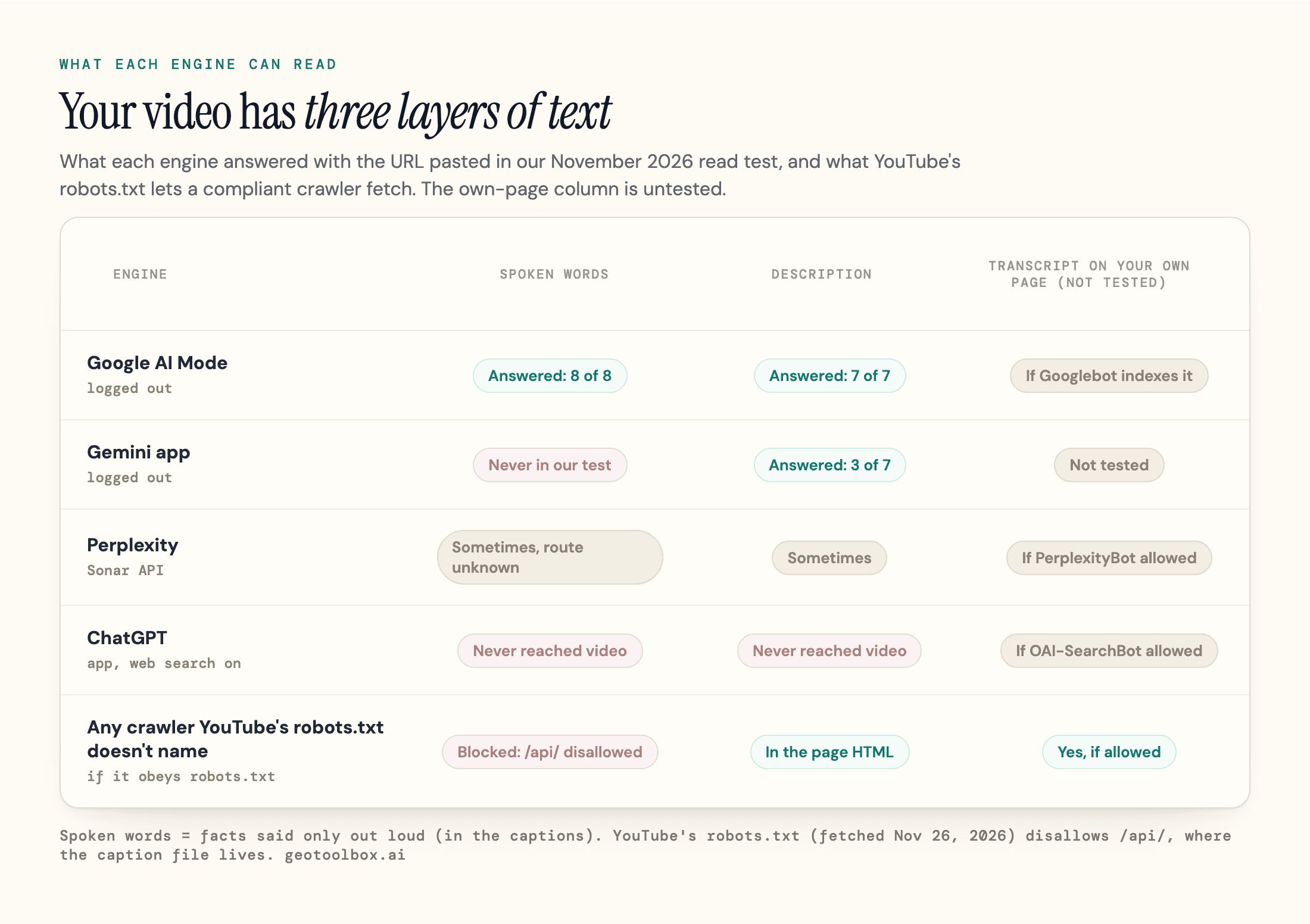
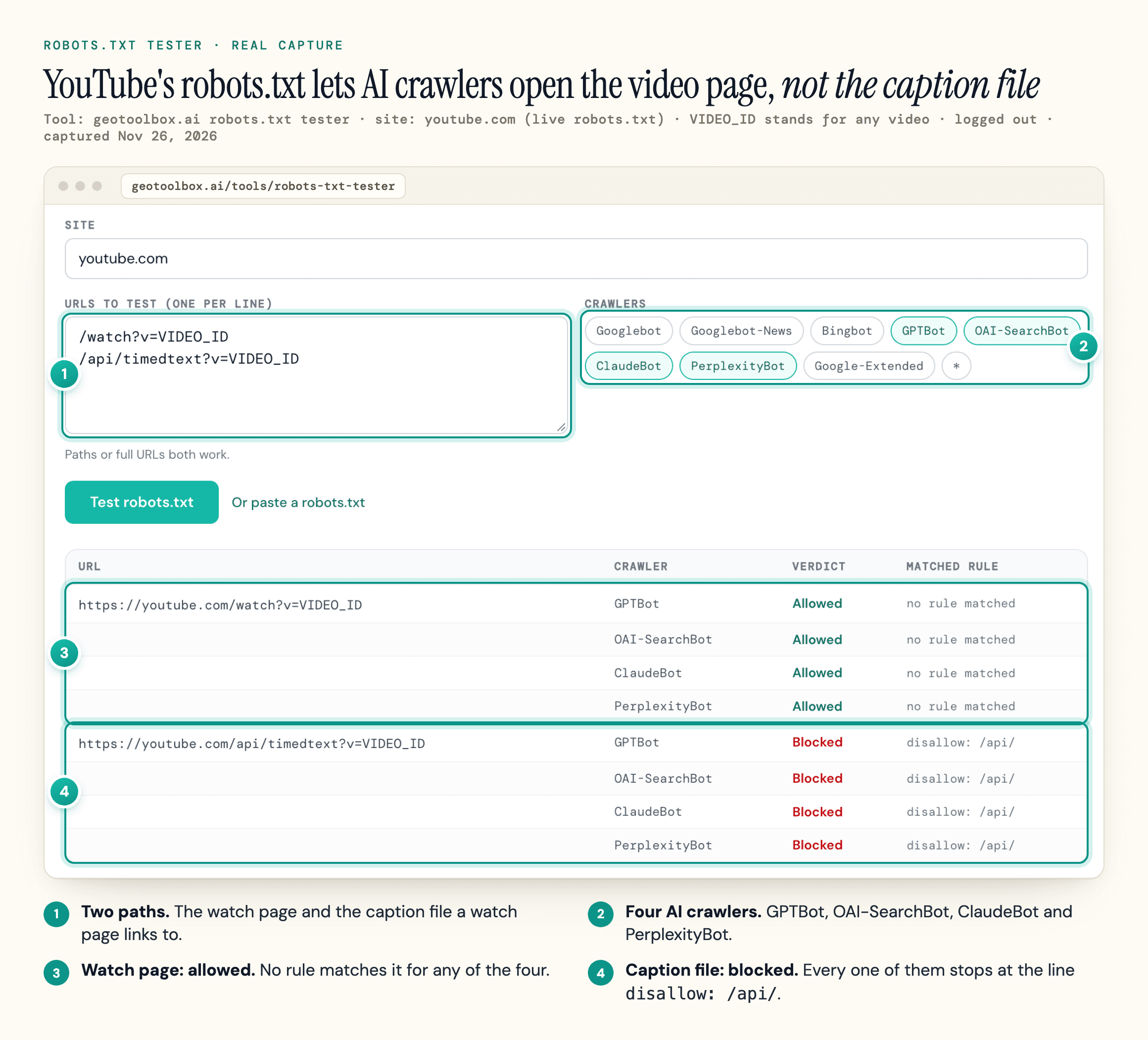
One possible factor is YouTube's robots.txt. It blocks every crawler it doesn't name from /api/, Googlebot and AI crawlers included.
When we fetched a YouTube watch page as OAI-SearchBot and as PerplexityBot, it carried the video's metadata (title, description, chapters) and a link to the caption file under /api/timedtext, but none of the transcript text.
A crawler that obeys robots.txt never gets past that link. Perplexity's user-triggered fetcher, by contrast, generally ignores robots.txt rules, one possible route for its spoken-fact hits. OpenAI's ChatGPT-User has a similar caveat.
So say the facts you want quoted, then also put them in the description and in plain text on a page you control.
How to Get Cited in Google AI Overviews, AI Mode and Gemini
Optimize the video itself for Google. Both AI Overviews and AI Mode link to moments inside videos, so the spoken answer, the chapters and the description all count.
Google's AI optimization guide says that if you already follow its video SEO documentation, you are already optimizing for generative AI search, a point it makes about videos on your own pages. We did not test whether each habit below lifts citations:
- Say the answer early, in one full sentence. In our panel, 74 of 113 timestamped AI Overview links to YouTube pointed into the first minute, but only 27 of 62 in AI Mode, which, given the link in our read test, found a fact spoken nearly 12 minutes in.
- Add chapters. Per YouTube's chapter rules, start at 00:00 and list at least three timestamps in ascending order, each chapter at least 10 seconds long. Google prioritizes those description timestamps for key moments, and they override YouTube's automatic chapters.
- Check your captions for names and numbers. Five of our 8 test videos had only auto-generated captions, and AI Mode got their spoken facts anyway. Auto captions can mangle product names, so add corrected captions under Subtitles in YouTube Studio or upload an SRT file.
- Say your product's name out loud. A brand that only appears on screen is never spoken, so put the name in your script and the title, or an answer can cite the video without naming you, the pattern behind ghost citations.
- Title the video with the question and write a real description. The logged-out Gemini app got some description facts right and none from our transcripts, so put the answer and the key numbers in the first lines of the description.
- Don't wait for views. The smallest video in our test had 2 views. Given its link, AI Mode still answered from its spoken words, linking about 10 seconds before the line. That shows Google can read a small video, not that it will pick one.
Here is what items 1 and 5 look like on a typical how-to upload (an illustrative example, not one of our test videos):
| Before | After | |
|---|---|---|
| Title | Quick Tips for Better Videos | How to Add Chapters to a YouTube Video (Step by Step) |
| First lines of the description | Hey everyone, welcome back! Don't forget to like and subscribe. | To add chapters, list timestamps in your description starting at 00:00, with at least three timestamps and each chapter at least 10 seconds long. |
| Opening line spoken on camera | So today I want to talk about something a lot of you asked about... | You add chapters by typing timestamps into your description, starting at zero. |
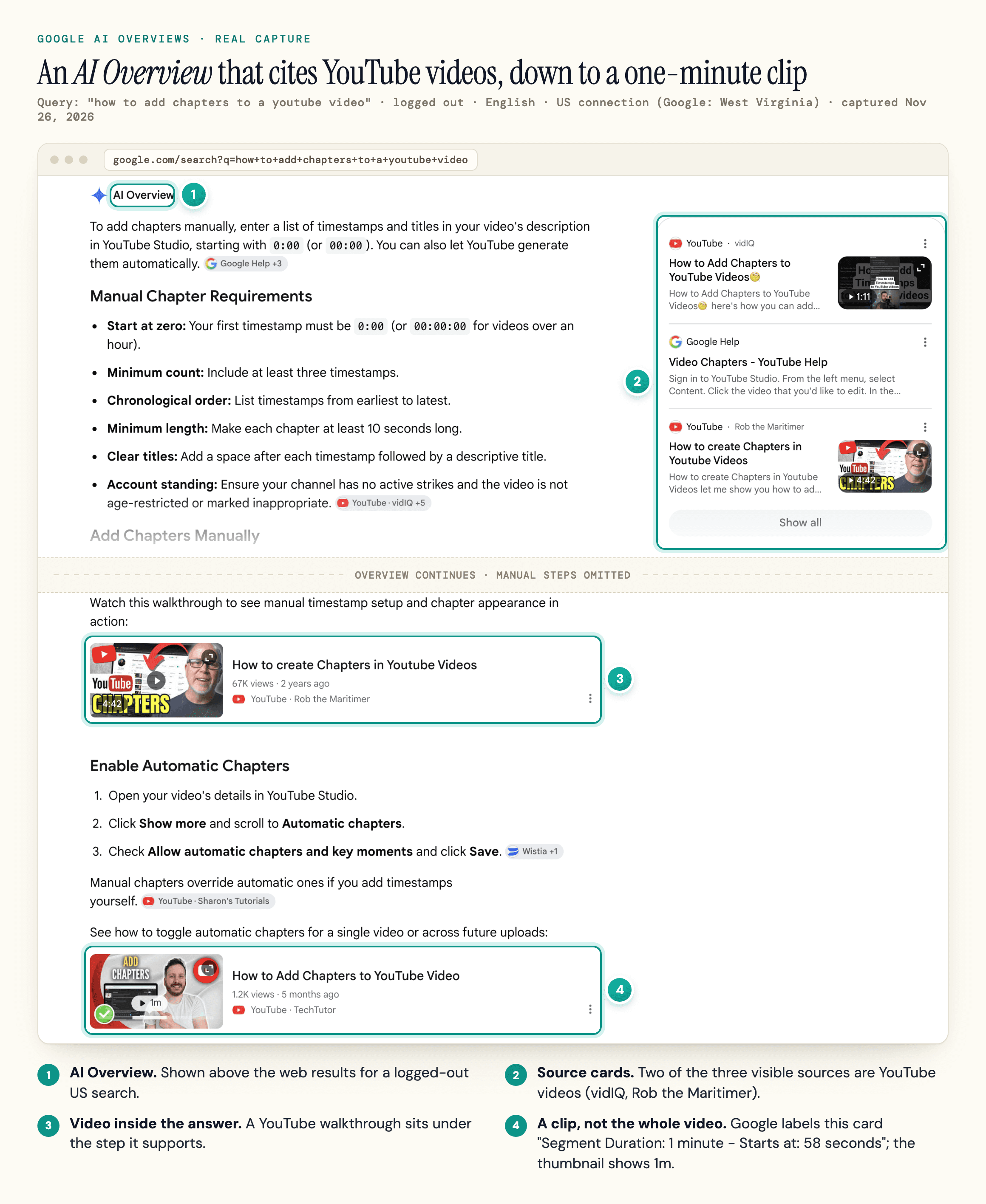
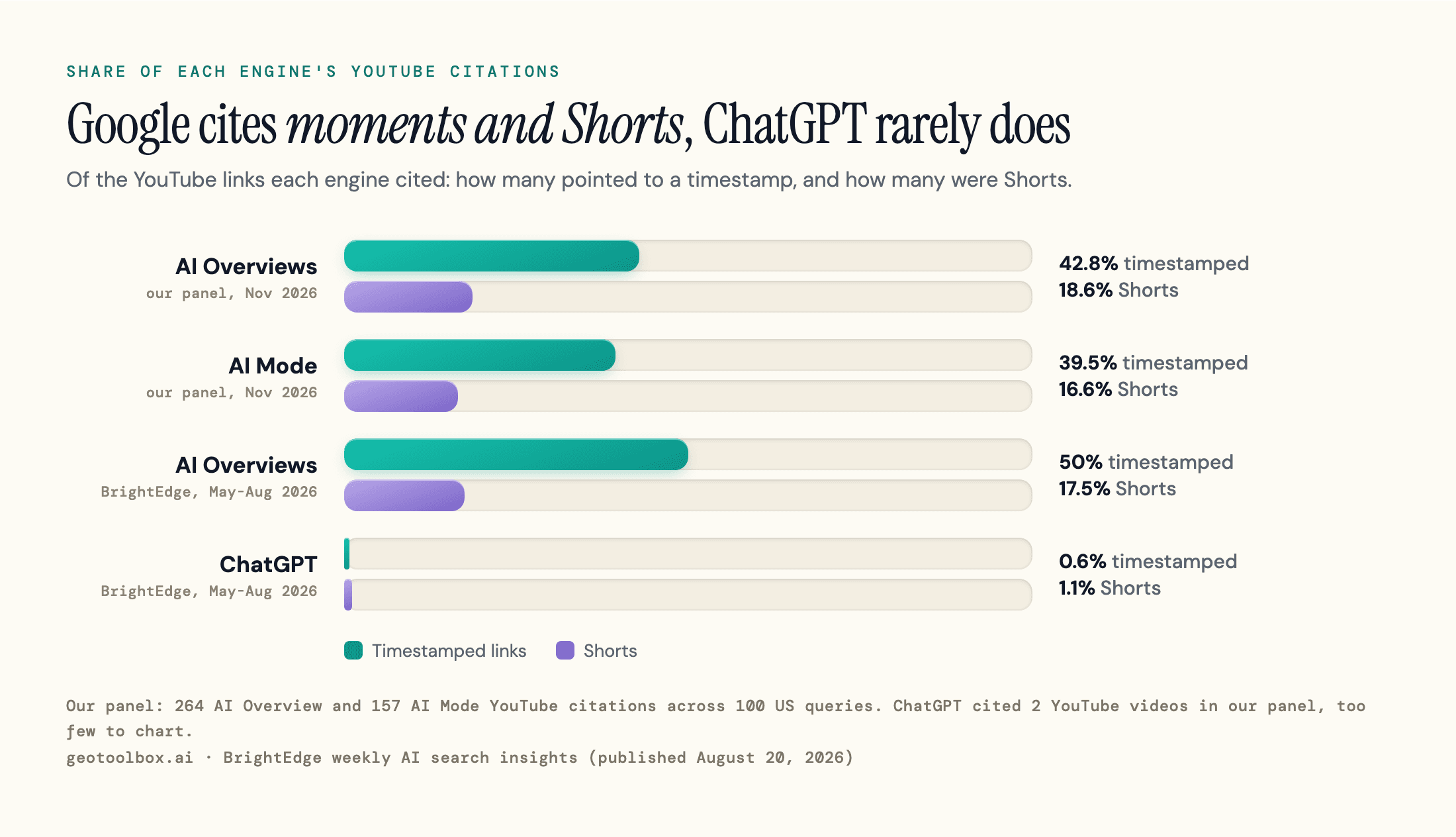
Google's taste for timestamps shows in citation data. In our panel, 42.8% of AI Overview YouTube citations pointed to a timestamp, and 39.5% in AI Mode; BrightEdge found 50% for AI Overviews and 0.6% for ChatGPT from May to August 2026.
Start with the videos you already have: you can add chapters to uploaded videos, as YouTube's chapter page notes, and write a description or companion page in an afternoon, so fix your strongest how-to videos before filming new ones.
Two tips from other guides deserve a check:
- Tags: YouTube's help page on tags calls tags descriptive keywords but says the title, thumbnail and description matter more for discovery, and that tags play a minimal role unless your topic is commonly misspelled.
- Freshness: some guides say videos updated within the last 13 weeks get cited more. We found no primary data for that window.
The logged-out Gemini app cited no YouTube video in the source lists of our 47 answers that had one, though 3 answers carried YouTube links in their text. So for Gemini, lean on the description and your own page as well as the video.
How to Get Cited by ChatGPT, Perplexity and Claude: Publish the Companion Page
For ChatGPT, Perplexity and Claude, the thing that usually gets cited is a page they can read, not the video.
So give those engines a text version of the video on your own site, built from its transcript. We didn't test companion pages; the advice follows from how these engines cite ordinary web pages.
Google doesn't make you choose: its video documentation says it may index an embedded YouTube video both on your page and on YouTube. Both can appear in video features in Google's search results only if your page qualifies as a watch page, built around the video.
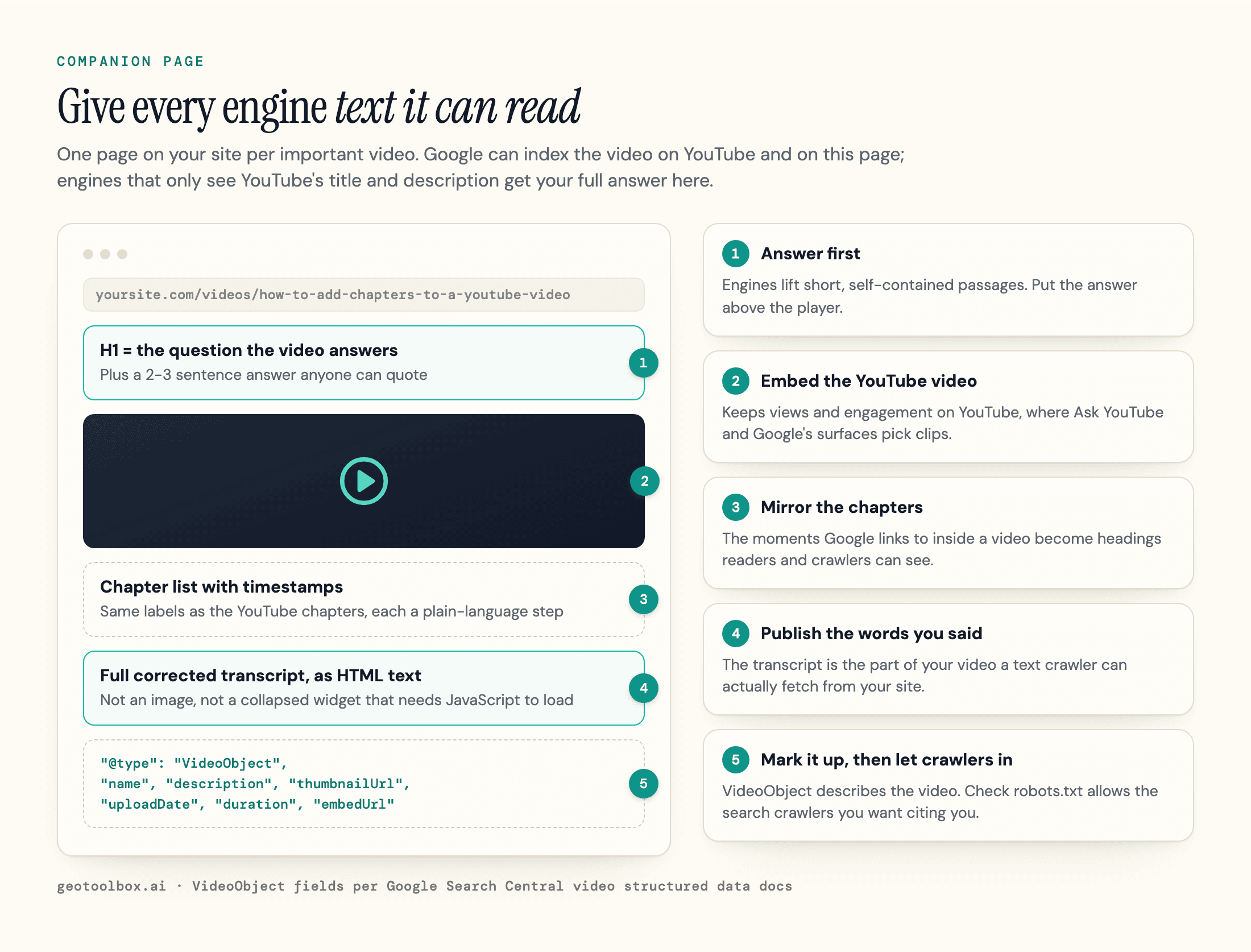
A companion page needs these parts:
- The question as the H1, with a short answer directly under it.
- The embedded YouTube video, visible on the page rather than hidden behind other elements.
- The chapter list, with the same labels and timestamps as on YouTube. Clip markup can mark those moments for Google, as can SeekToAction if Google can fetch the video file.
- The full corrected transcript as HTML text, not an image or a widget that loads it later.
- VideoObject markup. Google's video structured data requires
name,thumbnailUrlanduploadDate, and recommendsdescription,durationandcontentUrlorembedUrl. Google also accepts these pages in a video sitemap.
A minimal version looks like this:
{
  "@context": "https://schema.org",
  "@type": "VideoObject",
  "name": "How to add chapters to a YouTube video",
  "description": "Add timestamps starting at 00:00 to your description to create chapters.",
  "thumbnailUrl": "https://example.com/thumbs/chapters.jpg",
  "uploadDate": "2026-11-20T08:00:00+00:00",
  "duration": "PT6M42S",
  "embedUrl": "https://www.youtube.com/embed/VIDEO_ID"
}
Markup describes the video; it does not get it cited on its own. Our guide to schema markup for AI search covers what it does and doesn't change.
Then make sure each engine can reach the page:
- For ChatGPT search, OpenAI recommends allowing OAI-SearchBot in robots.txt, along with requests from its published IP ranges.
- For Perplexity, PerplexityBot is the crawler that surfaces and links websites in its search results.
- For Claude, Anthropic runs its own crawlers, covered in our Claude SEO guide.
- For Google, the site has to stay included in Search generative AI features, so check the Search Console control hasn't been switched to exclude it.
- For every engine, a transcript that only renders in JavaScript can be missed by crawlers that don't run it.
Our free AI crawler checker tests your robots.txt against 34 AI crawler user agents and shows the exact line blocking any of them, which takes a minute before you publish more of these pages.
Ask YouTube: Getting Into YouTube's Own AI Answers
Ask YouTube is an AI search surface where engagement counts on the record: YouTube's help page says its ranking "prioritizes relevance, engagement, and quality," much like standard YouTube search. Per the same page:
- It is a conversational search that draws on real-time information from the web and YouTube content to answer complex questions, and its responses blend long-form videos, Shorts and text.
- Clips play on hover, starting at the timestamp most relevant to the question, with the video title and channel name attached.
- It is available to users in the United States searching in English on a computer, mobile or TV device, and availability is gradually expanding.
- Playlists and Premium-exclusive content are not eligible to appear in responses.
YouTube also uses the name for a second feature: Ask YouTube on the watch page answers questions about the video you're watching.
We couldn't test Ask YouTube, so these tactics are inferences from those rules:
- One clear answer per segment. The system picks clips that directly answer the question, so a chapter that answers one thing is easier to pick than a long ramble.
- Engagement on the video itself. A video that holds its audience has an edge here.
- Both formats. Answers mix long-form videos and Shorts, so a short cut of your key answer gives you a second way in.
Search interest jumped this year. Estimated US searches for "ask youtube" went from 110 in March 2026 to 2,400 in May and 1,600 in October, according to DataForSEO's keyword data.
The feature's help page mentions no creator reporting, so we know of no way to see how often your videos appear in it, and it describes no way to switch the feature off.
YouTube does give creators a training switch: its third-party training setting is off by default, so YouTube shares your videos with outside companies for AI training only if you turn it on in YouTube Studio's channel settings, and you can turn it off anytime.
Long Videos vs Shorts in AI Answers
Shorts get cited, but almost only by Google. In our panel, Shorts made up 18.6% of AI Overview YouTube citations and 16.6% in AI Mode. Neither of ChatGPT's YouTube citations was a Short, and Perplexity listed only a channel page.
| Source | Engine | Shorts share of YouTube citations |
|---|---|---|
| Our panel, Nov 26, 2026 | Google AI Overviews | 18.6% (49 of 264) |
| Our panel, Nov 26, 2026 | Google AI Mode | 16.6% (26 of 157) |
| BrightEdge, May-Aug 2026 | Google AI Overviews | 17.5% |
| BrightEdge, May-Aug 2026 | ChatGPT | 1.1% |
So which should you make? Make the long-form, chaptered video your main asset, because every chapter is another moment Google can link to and the video gives you a full transcript for your companion page.
Add a Short when a single question has a single quick answer, mostly as a play for Google's surfaces and Ask YouTube, which mixes both formats.
How to Track YouTube Citations in AI Search for Free
We found no AI engine that tells creators when it cites their videos. You can still get a usable picture by combining free reports with a small prompt panel you run yourself.
- Add your channel to Search Console. Google's platform properties, globally available since July 29, 2026, track how your YouTube videos perform on Google Search, Discover and Google News. Google's announcement mentions no AI Overviews or AI Mode breakdown, so treat them as a demand signal.
- Watch the generative AI report for your companion pages. Search Console's generative AI performance report, rolled out to all websites as of August 31, 2026, shows impressions in AI Overviews and AI Mode by page. It covers pages on your own site only.
- Check the External traffic source in YouTube Studio. YouTube defines it as traffic from websites and apps that have your video embedded or linked to. Clicks from AI answers may appear there by referring site; signed-out viewers and unidentified apps land in Direct or unknown.
- Run a fixed prompt panel every month. List 20 to 50 questions your buyers ask (your main keywords, phrased as questions), run them logged out on each engine, and log every YouTube link by video ID, whether it carries a timestamp, and whether it is a Short.
- Use the panel as a partner list. The channels Google cites for your buyers' questions are creators worth vetting as sponsors if you have no channel yet.
Running that panel by hand gets old after a few months. Our AI Visibility Tracker, the source of the tracker table above, runs your prompts on a schedule across up to 8 AI engines, depending on plan, from $99 a month.
On AI Overviews, AI Mode, Gemini and Copilot, the tracker logs that an answer cited YouTube but not which video, so keep the manual panel for per-video detail. Our guide to measuring AI visibility covers the rest of the setup.
Whichever way you run it, the prompt panel is your only direct measure of AI citations, so get these details right:
- Resolve redirects: Google returns many YouTube references as google.com redirect links labeled "YouTube", so a script that counts by domain undercounts YouTube on the engines that cite it most. We hit this trap ourselves.
- Count per engine: a single "AI visibility" number hides the fact that Google and ChatGPT behave like different channels for video.
Myths That Waste Your Video Budget
Most video optimization advice treats all AI search engines as one. These beliefs come up again and again in creator and SEO forums, and our tests or creators' own reports contradict each one.
"Every Engine Reads Your Transcript"
In our read test, only Google AI Mode reliably answered from spoken words, and only when given the video's link; Perplexity did it 3 times in 16. For every other engine, transcripts that live only inside YouTube's caption files are close to invisible.
"YouTube Is How You Get Into ChatGPT"
The panel and tracker figures above say otherwise, and ChatGPT's YouTube citations in our panel both came on how-to questions. If you want ChatGPT to link to you, a readable page is the asset; we measured links, not brand mentions.
"A Citation Means Views"
An AI answer can settle the question before anyone clicks. In a thread on r/PartneredYoutube, creators described Google's summaries telling viewers what's in a video with only a small link to watch it.
Frequently Asked Questions
Can ChatGPT watch YouTube videos?
Not in our test. On November 26, 2026, logged-out ChatGPT with web search on never retrieved any of our 8 test videos, even when we pasted the URL, and answered none of the 32 questions about them correctly. To put a video into ChatGPT, use its transcript:
- Open the video on YouTube and click Show transcript in its description (videos with captions have one).
- Copy the transcript text.
- Paste it into ChatGPT with your question.
ChatGPT connects to other services through apps under Settings > Plugins, with availability that varies by plan and region, but OpenAI's connected apps guide names no YouTube app. For ChatGPT to cite your video content, your best bet is a page it can read.
Does Google read YouTube transcripts for AI Overviews and AI Mode?
Google doesn't say which signal it uses, but AI Mode, the surface we could test, behaved as if it did: given each video's link, it answered spoken-only facts for 8 of 8 videos, usually linking near the moment the line was said.
Do views or subscribers affect whether AI cites a YouTube video?
Not for being read: given its link, AI Mode answered from a 2-view video in our test. Whether small channels get picked for open questions, we didn't test. Ask YouTube is different: engagement counts there, as covered above.
How long does it take for a new video to get cited in AI search?
We didn't measure time to citation. The youngest video in our test was 9 days old when AI Mode answered a question that named it, so Google can read a new video within days. Add the video to your prompt panel and check weekly for the first month.
Sources
- geotoolbox: 100-query AI search panel and YouTube read test, run November 26, 2026 (US, English); tracker data April 15 to October 31, 2026
- Google Search Central: Video SEO Best Practices (updated December 18, 2025) -
developers.google.com/search/docs/appearance/video - Google Search Central: Video (VideoObject, Clip, BroadcastEvent) Schema Markup (updated September 24, 2026) -
developers.google.com/search/docs/appearance/structured-data/video - Google Search Central: Google's Guide to Optimizing for Generative AI Features on Google Search (updated July 10, 2026) -
developers.google.com/search/docs/fundamentals/ai-optimization-guide - Search Console Help: Search generative AI control -
support.google.com/webmasters/answer/16908024 - Search Console Help: Generative AI performance report (Search) -
support.google.com/webmasters/answer/16984139 - Google Search Central Blog: Platform properties roll out globally, plus a new social and video performance guide (July 2026) -
developers.google.com/search/blog/2026/07/platform-properties-social-video-guide - YouTube Help: Search with Ask YouTube -
support.google.com/youtube/answer/16943763 - YouTube Help: Learn more about Ask YouTube on the watch page when viewing videos -
support.google.com/youtube/answer/14110396 - Gemini Apps Help: Find & ask about YouTube content in Gemini Apps -
support.google.com/gemini/answer/16622858 - YouTube Help: Video Chapters -
support.google.com/youtube/answer/9884579 - YouTube Help: Add subtitles & captions -
support.google.com/youtube/answer/2734796 - YouTube Help: Supported subtitle and closed caption files -
support.google.com/youtube/answer/2734698 - YouTube Help: View video transcripts -
support.google.com/youtube/answer/15930243 - YouTube Help: Your content & third-party training -
support.google.com/youtube/answer/15509945 - YouTube Help: Add tags to your YouTube videos -
support.google.com/youtube/answer/146402 - YouTube Help: Understand your YouTube video reach -
support.google.com/youtube/answer/9314355 - YouTube: robots.txt (fetched November 26, 2026) -
youtube.com/robots.txt - Google AI Studio: Video understanding, Gemini API -
aistudio.google.com/docs/video-understanding - OpenAI: Overview of OpenAI Crawlers -
developers.openai.com/api/docs/bots - OpenAI Help Center: Connected apps in ChatGPT -
help.openai.com/en/articles/11487775-connected-apps-in-chatgpt - Perplexity: Perplexity Crawlers -
docs.perplexity.ai/docs/resources/perplexity-crawlers - BrightEdge: The Moment or the Whole Video: How Google AI Overviews and ChatGPT Cite YouTube Differently (August 20, 2026) -
brightedge.com/resources/weekly-ai-search-insights/google-ai-overviews-chatgpt-youtube-citations - Tenpoint Labs: YouTube in AI Answers: 2026 Citation Study (October 2026) -
tenpointlabs.com/research/youtube-in-ai-answers - RankZero: YouTube SEO for AI: Google Cites Video, ChatGPT Does Not (November 6, 2026) -
rankzero.io/guides/youtube-ai-answers - GEO Compass: ChatGPT vs Gemini vs Perplexity: AI citations (October 22, 2026) -
wegeocompass.com/insights/chatgpt-gemini-perplexity-google-ai-overviews-compared - Reddit r/PartneredYoutube: Google Gemini Search Is Going To Kill Channels In 'How To' Niche (July 2026) -
reddit.com/r/PartneredYoutube/comments/1v6wrrz