
Claude or Copilot? For coding, GitHub Copilot is the better default for most developers: it lives in your editor, costs $10 a month on Pro, and lets you pick the model behind it, Claude included. Claude Code, Anthropic's terminal agent ($20 a month with Claude Pro), is the better pick when the job is autonomous work across many files, such as a large refactor or migration. If you mean Microsoft 365 Copilot, the assistant inside Word, Excel, and Teams, go to Which "Copilot" Do You Mean?.
Many comparisons mix up the products or quote benchmark numbers that were never real. Below: how the two differ, what each really costs, and how to decide, without the marketing math.
Claude vs Copilot: The Short Answer
They are not the same kind of tool, which is why most head-to-head takes talk past each other. GitHub Copilot is an IDE-native assistant: inline autocomplete, an editor chat, an agent mode, and native GitHub and pull-request workflow, running across a dozen editors and letting you pick the model behind it. Claude Code is a terminal-first agent: you give it a goal, and it plans, edits multiple files, runs commands, and checks its own work, using Anthropic's models only.
So the useful answer to "which is better" is "for what." Copilot wins on inline speed, editor breadth, and living inside GitHub. Claude Code wins on autonomous, multi-file work like large refactors and migrations. Plenty of developers run both, and a paid Copilot plan can even hand tasks to Claude Code as a third-party agent.
The current picture, with every figure verified against the vendors' own pages in November 2026:
| GitHub Copilot | Claude Code | |
|---|---|---|
| What it is | AI pair programmer built into your editor and GitHub | Anthropic's agentic coding tool |
| Where it runs | VS Code, JetBrains, Visual Studio, Neovim, Xcode, GitHub.com, and a CLI | Terminal, VS Code and JetBrains extensions, a desktop app, and the web |
| How you work | Inline completion, editor chat, and an agent mode | Agentic: plan, edit many files, run tests, iterate |
| Models | Multi-model: Claude (Sonnet, Opus), GPT, Gemini, and more | Claude only (Opus 5.5, Sonnet 5.5, Haiku 5.5, plus Fable 5.2) |
| Context window | Up to 1M for supported models in VS Code and the CLI | 1M in Claude Code on every paid plan and the API for current models (Opus 5.5, Sonnet 5.5, Haiku 5.5, Fable 5.2) |
| Best at | Inline speed, editor breadth, GitHub and PR workflow | Autonomous multi-file work, refactors, migrations |
| Entry price | Free tier; Pro $10/mo | In Claude Pro $20/mo, or API pay-as-you-go |
The rest of this guide works through each row, corrects a few numbers that other comparisons still get wrong, and ends with a plain decision framework.
Which "Copilot" Do You Mean?
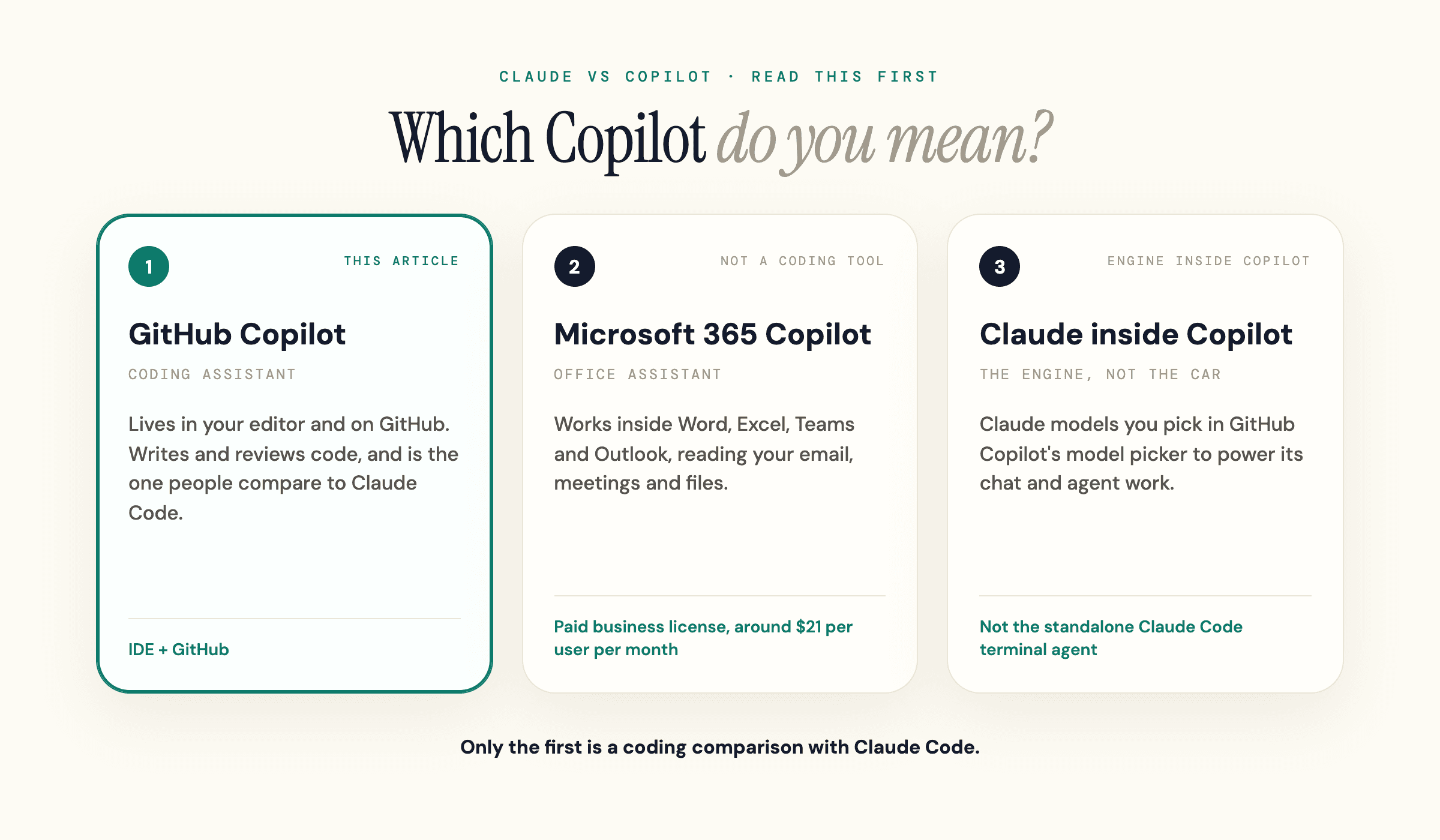
Before going further, sort out which Copilot you are actually comparing, because "Copilot" is three different things and the answer changes depending on which one.
GitHub Copilot is the coding assistant. It lives in your editor and on GitHub, writes and reviews code, and is the one people mean when they compare it to Claude Code. This guide is about GitHub Copilot.
Microsoft 365 Copilot is the office assistant, the paid layer that reads your email, meetings, and files inside Word, Excel, Teams, and Outlook. It competes with Claude for everyday work and enterprise chat, not for writing code. If that is the comparison you want, start with our guide to Microsoft Copilot, then Microsoft Copilot vs ChatGPT. The short version: Microsoft 365 Copilot is a paid business license wired into Office that is listed at around $21 per user per month (a first-year promotional $18 runs through December 31, 2026), and comparing it to Claude is a workplace decision, not a developer one.
Claude inside Copilot is the confusing third case, and it is real. GitHub Copilot lets you pick Claude's models to power its suggestions, so "Claude" and "Copilot" are not always rivals. We cover that next, because it is one of the most common questions on this topic.
For the rest of this article, "Copilot" means GitHub Copilot and "Claude" means Anthropic's Claude, usually through Claude Code.
Does GitHub Copilot Use Claude?
Yes.
GitHub Copilot is multi-model. Inside VS Code or on GitHub, you open a model picker and choose which model powers its chat and agent work, and Claude is on that list. As of November 16, 2026, GitHub's supported-models page lists Claude Fable 5.2 (added November 9, 2026, for Pro+, Max, Business and Enterprise), Fable 5.1, Fable 5, Opus 5.5, Opus 5, Opus 4.8, Sonnet 5.5, Sonnet 5, Haiku 5.5 and Haiku 4.5 alongside GPT, Gemini, Grok and Kimi models (Sonnet 4.6 was retired on September 1, 2026, except on annual plans), and says availability depends on your plan and where you use Copilot: on monthly plans, Opus and Fable models start at Pro+. GitHub's October 15, 2026 changelog scheduled Opus 4.8 and Opus 5 for deprecation on November 16, 2026, in favor of Opus 5.5, though annual individual subscribers keep Opus 4.8; both were still listed on that page on November 16. Its November 13, 2026 changelog schedules Fable 5, Haiku 4.5 and Kimi K3, among other models, for deprecation on December 14, 2026 (suggested alternatives: Fable 5.2 and Haiku 5.5), though annual individual subscribers keep Haiku 4.5. GitHub added Opus 5.5 the same day Anthropic released it, September 22, 2026, on the Pro+, Max, Business and Enterprise plans. Any comparison that flatly claims "Copilot only uses OpenAI models" is out of date.
There is a second, cleaner sense in which Copilot uses Claude. GitHub's docs say all paid Copilot plans can hand tasks to third-party coding agents, Claude Code and OpenAI's Codex among them (its pricing-page table does not list Pro, so check your plan), so you can hand a task to Claude through Copilot's own workflow. This is a preview integration that runs against your Copilot credits, not the full standalone Claude Code terminal tool bundled in for free.
First, picking Claude's model inside Copilot is not the same as running Claude Code. You get Claude's model quality applied to Copilot's inline and agent workflow, not Claude Code's terminal agent loop with its own file handling and configuration.
Second, and this is where the "is Claude cheaper through Copilot" question goes wrong, a Claude subscription does not give you Claude inside Copilot. Copilot bills its own usage no matter which model you select, so paying Anthropic for Claude Pro and paying GitHub for Copilot are separate meters.
Claude Code vs GitHub Copilot: Agentic Terminal vs IDE-Native
Claude Code vs GitHub Copilot is a question of who steers. Copilot keeps you at the wheel and does a little at a time inside your editor; Claude Code takes a goal and does a lot per step while you review.
GitHub Copilot meets you where you already write code. It suggests the next lines as you type, answers questions in an editor chat, and, in agent mode, takes a task and edits across files while you watch in the IDE. The center of gravity is your editor and the GitHub repo, so the workflow is low-friction: nothing new to learn, and a suggestion is one keystroke away. Copilot's agent mode has closed much of the autonomy gap, but the design still assumes you are steering from inside the editor.
Claude Code starts from the other end. It runs in the terminal as an agent: you describe a goal, and it reads the codebase, proposes a plan, edits the files it needs, runs your tests or build, reads the output, and corrects itself. You are supervising an autonomous process rather than accepting suggestions one at a time. That is why it shines on jobs that touch many files at once, and why it has a steeper first hour than clicking "accept" on an autocomplete.
Both tools are configurable, and here the tooling overlaps. Claude Code reads a CLAUDE.md file in your repo for project context, conventions, and commands, and supports hooks that run your own scripts at set points in the loop. Copilot reads repository custom instructions for similar reasons, and its agent can pick up a CLAUDE.md too, so a shared context file can serve both. Both also connect to outside tools and data through the Model Context Protocol (MCP). In practice, a common Reddit complaint about Copilot is that it "loses the thread" on a big change, while the complaint about Claude Code is that its autonomy needs guardrails. These are the same observation from opposite sides: one keeps you in control at the cost of doing less per step, the other does more per step at the cost of control.
IDE Reach, Platform, and Context Window
On editor and platform breadth, Copilot is ahead, and it is not close. It ships in VS Code, Visual Studio, JetBrains IDEs, Neovim, Xcode, and on GitHub.com, plus a command-line interface. If your team already lives in a mainstream editor, Copilot is a plugin away. Claude Code is built around the terminal, with extensions for VS Code and JetBrains plus a desktop app and a web version, so its editor reach is narrower by design.
The context window is where competing articles openly contradict each other, with some claiming 1M tokens and others 200k. The 200k figure is out of date for current Claude models, so here is the verified version.
Claude Code runs Opus 4.7 and later, Sonnet 5 and later, Haiku 5.5, and the Fable models with the full 1M token window by default on every paid plan, Pro included, at no extra cost for the larger window (Fable itself bills to usage credits on Pro), per Anthropic's model configuration docs (checked November 5, 2026). From November 9 through November 16, 2026 (11:59 pm PT) only, the Fable 5.2 launch offer includes Fable models on Pro for up to half the weekly limit; outside that week, Fable bills to usage credits on Pro. The API serves 1M at standard pricing (Haiku 5.5 costs more per token above 100K tokens). In the Claude chat app, Fable 5.2, Fable 5.1, Opus 5.5, Opus 5, Sonnet 5.5, Sonnet 5, and Haiku 5.5 also get 1M on paid plans, while older models such as Fable 5, Opus 4.8, and Sonnet 4.6 are held to 500k and anything outside the listed models to 200k. Copilot, for its part, can use a 1M token window too, but only for supported models, Claude and GPT among them, inside VS Code and the Copilot CLI, and turning it on consumes more of your usage allowance. It is not a flat per-tier cap.
The practical takeaway matters more than the numbers. A larger context window is what lets an assistant hold a big codebase in view long enough to make a coherent multi-file change, which is exactly the workload where Claude Code is strongest and where a smaller default window, unless you turn the larger one on, is why Copilot users say it forgets the wider repo. If your work is mostly local edits in a file you already have open, the difference barely registers. If you are refactoring across dozens of files, it is the whole game.
Pricing and the Real Cost to Expect
Sticker prices are the easy part. What decides your bill is how each tool meters heavy use, and on that point GitHub changed the rules in 2026.
| Plan | Price / mo | What you get |
|---|---|---|
| Copilot Free | $0 | 2,000 completions/mo, limited chat and agent use, entry-level models via Auto model selection only, the Copilot CLI |
| Copilot Pro | $10 | Unlimited completions, $15/mo in GitHub AI credits, access to Claude Code and Codex as third-party agents (per GitHub's docs) |
| Copilot Pro+ | $39 | $70/mo in credits, premium models including Opus, more usage than Pro |
| Copilot Max | $100 | $200/mo in credits, the largest usage allowance |
| Claude Free | $0 | Claude chat only, no Claude Code |
| Claude Pro | $20 ($17 billed annually) | Claude Code included, subject to usage limits |
| Claude Max | $100 | 5x Pro usage every five hours and every week; also runs Claude Code |
| Claude Ultra | $200 | 10x Pro usage every week, no five-hour limit for verified accounts; also runs Claude Code |
| Claude API | pay-as-you-go | Sonnet 5.5 at $2/$10 per million tokens in/out, the same as Sonnet 5; Opus 5.5 at $4/$20 (Opus 5, the prior model, remains at $5/$25) |
Here is the change that breaks the old "Copilot is the predictable one" line. As of 2026, GitHub Copilot's paid plans meter model and agent use in GitHub AI credits, where one credit equals one cent, and each plan includes a monthly credit allowance ($15 on Pro, $70 on Pro+, $200 on Max). Autocomplete stays unlimited, but every agent task and premium-model request draws down that pool, and heavier or frontier models draw faster. Run the agent hard on Pro and the $15 can be gone well before month end, which is exactly the "my limit reset and I hit it again within a week" frustration Copilot users report. The older fixed "premium request" allowance still exists only for annual subscribers who stayed on request-based billing.
Claude's model is different but not automatically cheaper. Claude Code is included in Claude Pro at $20 a month, Max at $100 and Ultra at $200, with usage caps and rolling windows rather than a credit meter, so a heavy day can throttle you until the window resets, unless you turn on usage credits, which keep you working at API rates. Teams that push either tool hard often end up on the API, where the budgeting question that matters is tokens per task, not the headline plan price. If you go that route, our guide to reducing Claude Code token costs covers where the spend actually hides.
So the real answer to "which is cheaper" depends on how hard you push. For light use, both have free tiers to start on and Copilot Pro at $10 is the cheapest paid plan. Under heavy agentic use the picture splits: Claude's subscriptions stay a flat price but throttle you at the cap unless you opt into usage credits billed at API rates, Copilot's credits deplete and then you either stop or pay overage, and the metered API makes your bill rise directly with the tokens a task burns.
Benchmarks: Read Them Skeptically
You will find comparison pages that hand you a clean coding-benchmark scoreboard, usually SWE-bench Verified, with Claude in the high 80s and Copilot trailing. Be careful with those numbers, because a lot of them do not survive a check against the source.
A couple of problems show up repeatedly. First, some figures are simply invented: one widely-copied page cites a precise score on a benchmark that does not exist in any primary source. Second, and more subtly, Anthropic's system cards for Fable 5.2, Fable 5.1, Opus 5.5, Sonnet 5.5 and Haiku 5.5 do not report a SWE-bench Verified number at all. They lead with the harder SWE-bench Pro instead, where Fable 5.2 scores 93.0%, Opus 5.5 89.9% and Sonnet 5.5 81.3%, so a SWE-bench Verified percentage attached to Fable 5.2, Opus 5.5 or Sonnet 5.5 is the one to distrust: it usually means someone carried an older model's score forward or invented it. The previous generation did publish one (Opus 5 at 96.0%, Sonnet 5 at 85.2%), which is exactly why a number that fits an older release keeps getting pasted onto the newest one.
There is also a category error baked into most of these scoreboards: they benchmark the model, then attribute the score to the tool. Copilot and Claude Code can run the same Claude model, so a model benchmark tells you about the engine, not about how well each tool turns that engine into finished work. The quality of the agent harness, how it handles context, and how it recovers from a failed test often matter more than a few benchmark points, which is the same lesson that shows up when you compare Claude against other coding models.
The trustworthy version of "who is better at coding" is narrower and more useful. Claude Code is consistently strong at autonomous, multi-file changes, where its loop of edit, run, read, and correct pays off. Copilot is strong at fast inline completion, staying in your editor, and working natively with GitHub. Where they share a model, what differs is the workflow around it. Treat any exact percentage you cannot trace to a vendor or the SWE-bench leaderboard as marketing.
Where Each One Actually Wins
Strip out the hype and the split is clean.
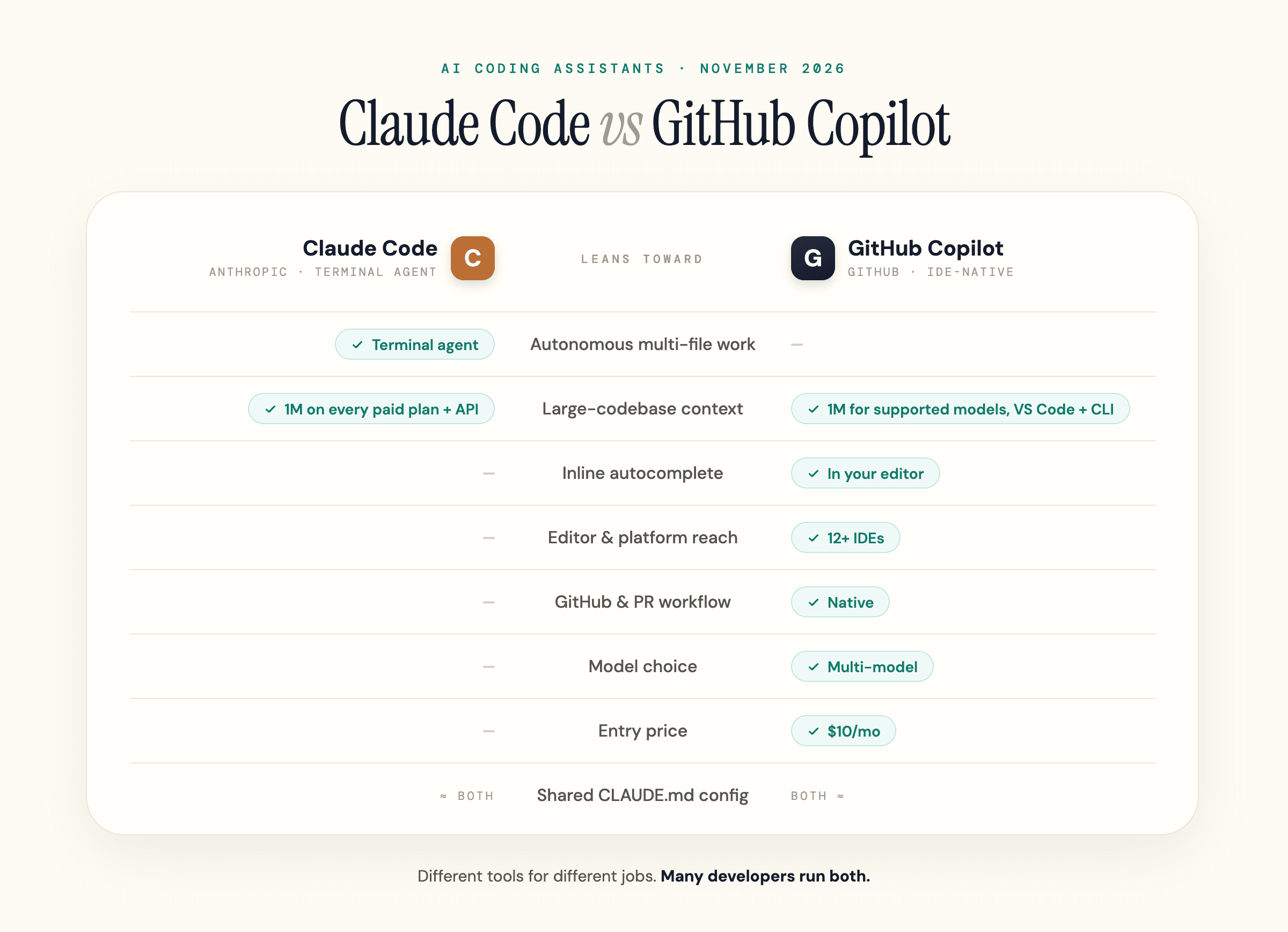
Reach for GitHub Copilot when the work is inside an editor and moves fast: writing new code with inline suggestions, small edits and boilerplate, staying in a mainstream IDE with almost no setup, and anything that touches GitHub directly, like pull-request summaries and code review. If your team is standardized on VS Code or JetBrains and wants one assistant that everyone can turn on today, Copilot is the low-friction default.
Reach for Claude Code when the task is bigger than a single file: a framework migration, a refactor that ripples through a module, wiring up a feature end to end, or a cleanup you would rather delegate and review than type. The terminal agent that plans, edits broadly, and runs your tests is doing a different job than an autocomplete, and it is the job Copilot's inline mode was never built for.
The common answer is both, and the tools now make that easy rather than redundant. Many developers keep Copilot on for inline completion during ordinary editing and switch to Claude Code for the heavy, autonomous jobs. A shared CLAUDE.md gives both the same project context, and a paid Copilot plan can even hand tasks to Claude through its third-party-agent integration, so running the pair is practical rather than duplicative. If you can only justify one bill, decide by where your hours go: mostly typing in an editor points to Copilot, mostly orchestrating large changes points to Claude Code.
Enterprise, Security, and Running Code Locally
Most of this matters most when a company is deciding what to standardize on, but one part below applies to solo developers too.
A pair of governance questions come up first. One is intellectual property: GitHub offers IP indemnification on Copilot's business tiers, so if generated code triggers a copyright claim, GitHub stands behind it, and Anthropic offers comparable commercial protections in its enterprise terms. The other is your code itself: both vendors state that business and enterprise usage is not used to train their models, and both expose organization controls, though the depth of policy, audit logging, and data-retention settings is worth checking against your own compliance needs rather than taking on trust.
One caveat solo developers miss: those no-train guarantees are a business-and-enterprise feature. Since April 24, 2026, GitHub may use prompts, outputs and code snippets from Copilot Free, Pro, Pro+ and Max to train its AI models unless you opt out, so on any individual plan, disable that in Copilot settings rather than assume the business-tier promise covers you. The same applies to Claude: on Free, Pro, Max and Ultra, Anthropic can train on your chats and Claude Code sessions unless you switch off "Help Improve our AI models" in privacy settings.
The more interesting security difference is architectural, and the security firm Wiz frames it well in its own comparison. Both tools can run commands, but the default posture differs: Copilot's center of gravity is the editor and GitHub's managed surface, while Claude Code runs in your terminal by default, executing real shell commands against your files. That local autonomy is the source of Claude Code's power and its sharpest risk, because an agent that can run commands can, in principle, run a destructive one. Anthropic mitigates this with permission modes (by default a separate classifier model blocks actions it judges unsafe; manual mode asks before edits and commands you haven't already allowed), allowlists, sandboxing, and the same hooks that make the tool configurable, but the responsibility to constrain it is yours.
Neither tool checks whether the code is safe once deployed, as Wiz notes. Copilot's cloud agent does run CodeQL, secret scanning and a dependency check on its own pull requests by default, but that is a pre-merge check, not runtime security, so leaked secrets and insecure patterns remain your responsibility whichever you pick. If you are rolling either out across a team, the governance and sandboxing setup deserves as much attention as the feature list.
Which Should You Use? A Decision Framework
Here is the plain verdict, without hedging. For most developers, GitHub Copilot is the better default, because the work is mostly in an editor, the entry price is $10, and it offers a choice of models, Claude included. Reach for Claude Code when the job is autonomous, multi-file work where a terminal agent that plans and self-corrects earns its keep. Neither replaces the other outright, and running both is a legitimate, increasingly common answer.
Match your dominant workload to the tool.
| If you mostly... | Choose |
|---|---|
| Write code inline in VS Code, JetBrains, or Visual Studio and want minimal setup | GitHub Copilot |
| Live in GitHub pull requests and want native code review and summaries | GitHub Copilot |
| Want the lowest entry price and freedom to switch the model behind it | GitHub Copilot |
| Run large refactors, migrations, or multi-file features you would rather delegate | Claude Code |
| Work on a big codebase and need the largest usable context window | Claude Code (any paid plan or the API) |
| Want inline speed and autonomous heavy lifting | Both (Copilot inline, Claude Code for big jobs) |
If you are still unsure, start with Copilot Free or Pro, since it is cheap and you already know your editor, and add Claude Code the first time a task is too big to babysit one suggestion at a time.
What This Means for Your AI Visibility
Step back from the developer question and there is a marketing one hiding inside it. The way most people now research "Claude vs Copilot" is by asking an AI, and the engine answers by citing a handful of pages, then a Google AI Overview does the same at the top of the results. If you sell a developer tool or any software, that is the new shelf: whether an AI recommends you when a buyer asks "what should I use for X" is decided by which pages it can read and trust.
When we pulled the domains that AI engines cite for this comparison, the list was short, mostly a handful of third-party review sites and community threads like Reddit and YouTube, and most companies with a real stake in the answer were nowhere on it. Getting cited is not about gaming a model; it is about being reachable to AI crawlers, structuring answers so they can be lifted cleanly, and covering the specific questions buyers ask, which is the same discipline whether the engine is powering Copilot's answers or a coding assistant.
That is the problem geotoolbox exists to catch. If you want to see whether AI engines can actually read and cite your site before you invest in the content, our free AI readiness checker shows you where the blockers are and what to fix first. The tools you choose to build with matter; being visible when an AI recommends tools like yours matters just as much.
Frequently Asked Questions
Does Copilot use Claude?
Yes. GitHub Copilot is multi-model, and you can select Claude's models (such as Sonnet 5 and Opus 5.5) in its model picker alongside GPT and Gemini. Paid Copilot plans can also delegate tasks to Claude Code through a third-party-agent integration. Choosing Claude inside Copilot is not the same as running the standalone Claude Code tool, and it does not draw on any separate Claude subscription you may have.
Is Claude better than Copilot?
For autonomous, multi-file work like refactors and migrations, Claude Code is usually the stronger tool because it plans, edits broadly, and runs your tests. For fast inline coding inside your editor and GitHub-native workflow, Copilot is better. Since Copilot can run Claude's models, the difference that matters is the workflow around the model rather than the model itself.
Is Claude cheaper than Copilot?
At light use, Copilot is cheaper to start: its Pro plan is $10 a month versus $20 for Claude Pro. At heavy use the meters differ. Copilot draws agent and premium-model use down from a monthly pool of GitHub AI credits, then charges overage or stops, while Claude's subscription price stays flat but throttles you at a usage cap, unless you turn on usage credits, billed at API rates. The metered API rises directly with how much you run the agent.
What are the disadvantages of Copilot?
The most-cited ones are that its AI-credit allowance can run out quickly under heavy agent use, that it can lose track of context on large multi-file changes, and that its agent mode, while improved, is still less autonomous than a dedicated terminal agent. It remains strong at inline completion and editor integration.
Sources
- GitHub Copilot plans and pricing - GitHub, 2026 -
github.com/features/copilot/plans - Usage-based billing for individuals - GitHub Docs, 2026 -
docs.github.com/en/copilot/concepts/billing-and-usage/individuals/billing - Claude Code and plan pricing - Anthropic, 2026 -
claude.com/pricing - Claude API model pricing and context window - Anthropic, 2026 -
platform.claude.com - Model configuration (Claude Code Docs) - Anthropic, checked November 5, 2026 -
code.claude.com/docs/en/model-config - How large is the context window on paid Claude plans? - Anthropic Help Center, updated October 30, 2026 -
support.claude.com/en/articles/8606394-how-large-is-the-context-window-on-paid-claude-plans - Microsoft 365 Copilot pricing - Microsoft, 2026 -
microsoft.com/en-us/copilot/pricing/business - Claude Code vs GitHub Copilot, security perspective - Wiz, 2026 -
wiz.io/academy/ai-security/claude-code-vs-github-copilot - Claude Opus 5.5 is now available in GitHub Copilot - GitHub Changelog, Sept 22 2026 -
github.blog/changelog/2026-09-22-claude-opus-5-5-is-now-available-in-github-copilot - Claude Opus 5.5 - Anthropic, Sept 22 2026 -
anthropic.com/claude-opus-5-5 - Fable 5.1 system card - Anthropic, 2026 -
anthropic.com/claude-fable-5-1-system-card - Claude Fable 5.2 and Claude Mythos 5.2 system card - Anthropic, November 9, 2026 -
anthropic.com/claude-fable-5-2-mythos-5-2-system-card - Haiku 5.5 system card - Anthropic, 2026 -
anthropic.com/claude-haiku-5-5-system-card - Opus 5.5 system card - Anthropic, Sept 22 2026 -
anthropic.com/claude-opus-5-5-system-card - Sonnet 5.5 system card - Anthropic, Sept 28 2026 -
anthropic.com/claude-sonnet-5-5-system-card - Opus 5 system card - Anthropic, July 24 2026 -
anthropic.com/claude-opus-5-system-card - Sonnet 5 system card - Anthropic, June 30 2026 -
anthropic.com/claude-sonnet-5-system-card - Mid-November model deprecations - GitHub Changelog, Oct 15 2026 -
github.blog/changelog/2026-10-15-upcoming-deprecation-of-selected-github-copilot-models-in-mid-november - Upcoming deprecation of selected GitHub Copilot models in December - GitHub Changelog, Nov 13 2026 -
github.blog/changelog/2026-11-13-upcoming-deprecation-of-selected-github-copilot-models-in-december - Claude Fable 5.2 in GitHub Copilot - GitHub Changelog, Nov 9 2026 -
github.blog/changelog/2026-11-09-claude-fable-5-2-in-github-copilot - Manage Copilot policies - GitHub Docs, 2026 -
docs.github.com/en/copilot/how-tos/manage-your-account/manage-policies - Risks and mitigations - GitHub Docs, 2026 -
docs.github.com/en/copilot/concepts/security-governance-and-network-settings/risks-and-mitigations - Manage usage credits - Anthropic Help Center, Oct 30 2026 -
support.claude.com/en/articles/12429409