
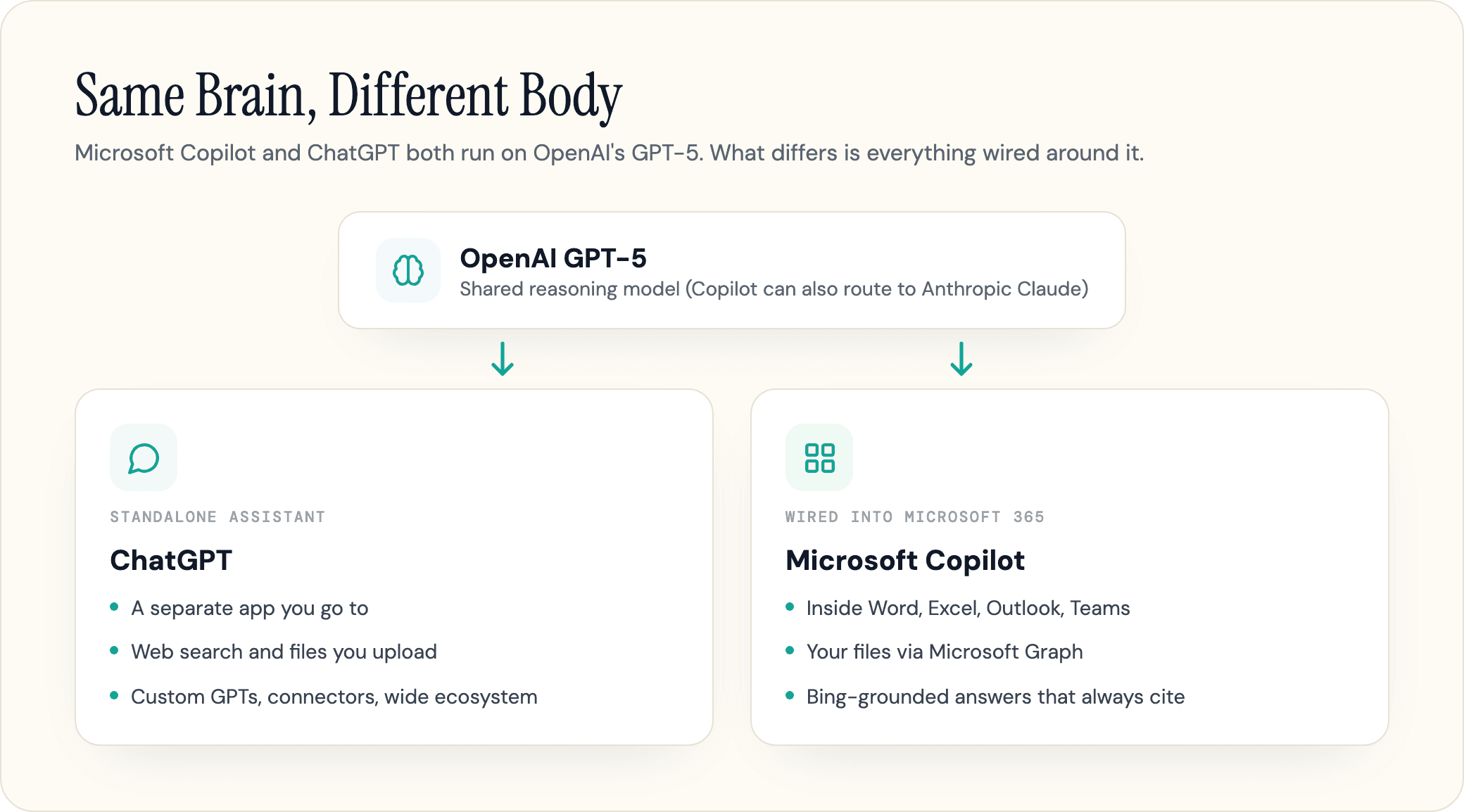
The honest answer to Copilot vs ChatGPT starts with a fact worth stating plainly: they run on the same brain. The consumer Microsoft Copilot and ChatGPT both use OpenAI's GPT models, so on a quick question you would struggle to tell them apart.
The difference is the body around that brain. ChatGPT is a standalone assistant you go to. Microsoft Copilot is wired into Word, Excel, Outlook, and your company's own files. Current as of 2026, this guide covers where that actually matters, the real prices and models, and one comparison most guides skip: which of the two is more likely to cite your brand when it answers.
One note up front: the model names move almost monthly. Everything below is dated, and when a launch lands, the names change before the conclusions do.
Copilot vs ChatGPT at a Glance
Pick ChatGPT for standalone thinking, writing, coding, and the broadest tool ecosystem. Pick Microsoft Copilot for AI that works inside Microsoft 365 and can safely read your own emails, files, and meetings. On a one-off question, they are close enough to be interchangeable.
The reason the choice is not obvious is that the two overlap more than either company admits. Both are multimodal chatbots, both search the web, both read files you upload, and both now run autonomous agents. The split shows up only when the work touches your organization's data or lives inside Office.
| Microsoft Copilot | ChatGPT (OpenAI) | |
|---|---|---|
| Maker | Microsoft | OpenAI |
| Underlying models | OpenAI GPT-5.6 (Sol, Terra, Luna), plus Anthropic Claude and Microsoft's own MAI models | OpenAI GPT-5.6 (Sol, Terra, Luna) |
| Reads your work files | Yes, via Microsoft Graph (permission-scoped) | Only files you upload, share, or connect |
| Acts inside Office apps | Yes, in Word, Excel, Outlook, Teams | No |
| Web answers cite sources | Yes, on web answers, grounded in Bing | Sometimes, when it decides to search |
| Best at | Office work, summaries, work-grounded answers | Writing, reasoning, coding, ecosystem |
| Main paid plan | Microsoft 365 Premium, $19.99/mo | Plus, $20/mo |
The rest of this guide works through where those rows actually bite, starting with the question everyone asks first.
Is Microsoft Copilot Just ChatGPT With Bing?
Partly yes, and that is the honest version. The free Microsoft Copilot runs on OpenAI's GPT models, the same family as ChatGPT, and adds live web search through Bing, so for casual chat it really is close to ChatGPT with a Microsoft front end. That is why the "why pay extra" reaction is fair for the consumer version.
But for the paid Microsoft 365 Copilot, the answer is no. Same brain, different body. The model reasoning is shared; everything wrapped around it is not. Microsoft 365 Copilot grounds itself in the Microsoft Graph, your organization's emails, documents, chats, and meetings, scoped to what you already have permission to see. ChatGPT cannot reach any of that on its own unless you connect or paste it in.
There is also a model twist that breaks the "it's just ChatGPT" line. Copilot is no longer OpenAI-only. Microsoft has added Anthropic's Claude models alongside GPT inside Copilot, and in June 2026 it started routing some work to its own in-house models too. So depending on the task and surface, Copilot may be running a model ChatGPT does not even offer. ChatGPT, by contrast, runs OpenAI models exclusively.
And one naming trap worth clearing: Microsoft Copilot is not GitHub Copilot. They share a name and an owner and nothing else. GitHub Copilot writes code inside a developer's editor; Microsoft Copilot drafts your emails and summarizes your meetings. Paying for one does not give you the other, and most "Copilot vs ChatGPT" confusion online is really three products tangled together.
Pricing: What Each One Actually Costs
Both have a genuinely free tier, and for most personal use either is enough. You start paying for different reasons, which is what makes a straight price comparison misleading.
| Tier | Microsoft Copilot | ChatGPT (OpenAI) |
|---|---|---|
| Free | $0 - chat, web answers with citations, image generation, voice | $0 - GPT-5.6 (Luna), uncapped text chats from mid-August |
| Entry | Microsoft 365 Personal, $9.99/mo (Office apps + Copilot) | Go, $8/mo |
| Main consumer | Microsoft 365 Premium, $19.99/mo | Plus, $20/mo |
| Business | Microsoft 365 Copilot, $30/user/mo enterprise; Business $18-$21 (up to 300 users, needs an M365 license) | Business, about $25/user/mo ($20 annual) |
| Power / Enterprise | Enterprise pricing; Copilot Studio agents billed by credits | Pro, $100-$200/mo; Enterprise custom |
For a fair head-to-head, the closest match is Microsoft 365 Premium at $19.99 against ChatGPT Plus at $20. They are effectively tied on price, but you get different things. Premium puts Copilot inside your personal Word, Excel, and Outlook; Plus gives you OpenAI's full standalone toolset. Microsoft retired the old consumer Copilot Pro plan and folded it into Microsoft 365 Premium, so if a guide still lists "Copilot Pro" as the main consumer plan, it is out of date.
The business comparison is where the sticker price misleads. Microsoft 365 Copilot is $30 per user per month, but it is an add-on that sits on top of a qualifying Microsoft 365 subscription, so the all-in cost is higher than the headline number, often $45 to $90 per seat once you include the underlying license it requires. Our Microsoft Copilot pricing guide breaks down every tier and the base-license math. Smaller businesses can get the Business version at $18 per user per month billed annually (a $21 list price). ChatGPT Business lands around $25 per seat, or about $20 billed annually, as a standalone product with no base license required.
Is either worth paying for over free? For most casual users, no. Pay when you hit message caps often, want Copilot inside your Office apps, or need ChatGPT's heaviest models and tools. In our experience the teams that end up paying twice, Copilot for Office plus ChatGPT for everything else, are usually the ones who never sat down and matched the tool to the actual job.
Which AI Models Each One Runs
Here the shared-model point gets a wrinkle, and the version numbers actually matter.
ChatGPT's frontier model is GPT-6 Astra, released September 3, 2026 and rolling out to Pro, Business and Enterprise in Chat, and to Plus inside ChatGPT Work and Codex rather than regular Chat. Below it sits the GPT-5.6 generation, which became generally available on July 9, 2026 across ChatGPT, Codex, and the OpenAI API, superseding GPT-5.5. It ships in three variants, Sol (flagship), Terra (balanced), and Luna (fast), and which one you get in a standard chat is set by your plan: since August 6, 2026 the free and Go tiers run Luna, while Plus and above run Sol, with Pro, Business, and Enterprise adding the Extra High effort level and Sol Pro. Terra is the odd one out and never appears in a standard conversation on any plan; you reach it in ChatGPT Work, in Codex, or through the API. Every ChatGPT tier runs an OpenAI model and nothing else.
Copilot's default reasoning also runs on OpenAI's GPT models; as of July 9, 2026 Microsoft made GPT-5.6 (Sol, Terra, Luna) the preferred model in Microsoft 365 Copilot, offered as a fast everyday mode and a slower "Think Deeper" reasoning mode, the same GPT-5.6 generation that powers standard ChatGPT chats. The twist is that Microsoft no longer relies on OpenAI alone. Since September 2025 it has offered Anthropic's Claude models (Sonnet 4 and Opus 4.1) inside Copilot Studio and its Researcher agent. Its Copilot Cowork agent launched on Anthropic's Opus 4.8 and Sonnet 4.6 (Sonnet 5 followed in July 2026) and still uses those models, though it is multi-model and GPT-5.6 became its preferred model on July 9, 2026. Microsoft had also launched its own in-house MAI models in June 2026, and these now handle some Copilot tasks. In late July 2026 it went further, adding Anthropic's newest model, Claude Opus 5, to the Copilot model picker across Word, Excel, PowerPoint, Copilot Chat, Cowork, and Copilot Studio, a model aimed at complex multi-step work.
So the model picture splits two ways. On the shared GPT model, the underlying quality is comparable, because it is often the same model. But identical weights do not guarantee identical answers: Copilot's orchestration, system prompts, and tighter context limits can make a given reply feel thinner than raw ChatGPT, which is the kernel of truth behind the common "Copilot feels watered down" complaint. Copilot's real model-level edge is breadth, since it can route to Claude or Microsoft's own models, while ChatGPT stays inside OpenAI's lineup. One lasting frustration is that Copilot often does not tell you which model answered; Microsoft has started exposing model choice, but it remains more of a black box than ChatGPT.
Microsoft 365 and Office Integration
Office is where Copilot earns its price, and for a lot of buyers it settles the question. Copilot lives inside Word, Excel, PowerPoint, Outlook, and Teams, and on the Windows taskbar. It does not just answer in a side panel; it works inside the document you are in. Ask it to turn a draft into an executive summary and it can rewrite the file in place, rather than handing you text to paste back.
The deeper win is grounding. With Microsoft 365 Copilot, you can ask it to "summarize the thread with the client" or "find the deck from last quarter," and it pulls from your real inbox, files, and meetings, scoped to your existing permissions. That is the gap a copy-paste workflow cannot close.
ChatGPT answers this differently. It is not built into a single office suite, but it is far from an island, despite the common critique. Its connectors, Custom GPTs, and app integrations let it reach Google Drive, SharePoint, Slack, and thousands of apps through tools like Zapier, and it builds custom assistants that Copilot's consumer side cannot match. The difference is that ChatGPT mostly hands you output to move yourself, while Copilot does the work where the work already lives.
The verdict here is clean. If your day runs on Microsoft 365, Copilot removes the copy-paste shuffle and that convenience is worth real money. If your stack is spread across many non-Microsoft tools, ChatGPT bends to more shapes. The same trade-off shows up across the field, and we break the wider pattern down in Gemini vs ChatGPT. If Google's assistant is the real alternative you are weighing, see Copilot vs Gemini.
Web Search and Citations
The two engines handle live information differently, and the difference matters more than it looks.
When Copilot answers from the web, it grounds in Bing by default. It runs a search, reads the top pages, and writes an answer with clickable, numbered citations, the way an AI search engine works. You can see where each claim came from and click through. (When it answers from your own files instead, it cites those, not Bing.)
ChatGPT also searches the web, on by default, but it decides per query whether to look something up rather than grounding every answer. That makes it faster and cleaner on questions it already knows, but it is where ChatGPT can hand you a confident, well-written answer about something that changed last month without checking.
Neither is reliable on freshness on its own. Independent hands-on testing has caught both pulling outdated sources for a "what happened this week" prompt, so the safe habit is the same for each: for anything recent or checkable, click the citations rather than trusting the summary. Both engines also hallucinate, so treat either as a fast first draft of the truth, not the truth itself.
That default-to-cite behavior is not just a usability detail. It is what turns this from a question about chat quality into one about whether anyone finds your brand.
Your Data: Privacy and Security
For business use, data handling often settles it, and it favors Copilot, with one real caveat.
Microsoft 365 Copilot runs under Enterprise Data Protection: Microsoft says your work prompts and company data stay inside the Microsoft 365 service boundary and are not used to train the public models. It also inherits your existing file permissions rather than expanding them, so in theory Copilot only ever sees what you could already open.
The caveat is real, though. As security analysts have flagged, if a sensitive folder was accidentally shared too widely, Copilot makes it trivially easy to surface. It did not create the oversharing, but it strips away the obscurity that was hiding it, which is why a Copilot rollout often forces a long-overdue permissions cleanup.
ChatGPT's defaults lean the other way for consumers. On the free and Plus plans it trains on your conversations by default unless you turn that off in settings, while its Business and Enterprise plans do not train on your data. So the practical rule splits by plan: consumer ChatGPT is the one to be careful pasting sensitive work into, and the question "what should I not tell ChatGPT" really means "do not paste anything you would not want retained."
A last myth worth correcting: the free Copilot and Copilot Chat can read files you upload to them. What they cannot do is reach into your organization's data on their own, which only the paid Microsoft 365 Copilot does. If a guide says the free Copilot "can't read files," it is wrong.
Writing, Coding, and Everyday Work
On the actual tasks people run all day, the two trade wins, and the pattern is consistent enough to plan around.
For writing and creative work, ChatGPT is the stronger pick. It varies its rhythm, picks up your tone, and follows complex creative instructions more reliably, which is why so many writers reach for it. Copilot tends to produce clean, structured, reliably on-brand drafts that are excellent for a business memo and a little flat for a creative campaign. Its stricter content filters also make it more likely to refuse or tone down opinion and fiction prompts that ChatGPT will simply write. For a deeper look at how the models differ on voice, see our Claude vs ChatGPT comparison.
For structured work, Copilot earns its keep. In hands-on testing it tends to win on summarizing, pulling clean insights out of a spreadsheet, and generating quick visuals, often faster than ChatGPT. Its output is scannable and to the point, which is exactly what you want for a meeting recap or a data table.
For coding, ChatGPT is better for explaining logic, debugging, and generating snippets in a chat. But if you mean writing code inside an editor, the tool you actually want is the separate GitHub Copilot, not Microsoft Copilot, the disambiguation that trips up half of these comparisons. We weigh GitHub Copilot against Anthropic's models in Claude vs Copilot.
User sentiment lines up with this split. Across G2 user reviews, ChatGPT rates slightly higher overall (around 4.7 versus 4.5), with its top marks for natural language and conversation quality, while Copilot's highest scores are for text summarization and in-app productivity. Both are strong; they are just strong at different things.
Where Each One Falls Short
Most comparisons skip this part. The topic skews negative in real-world use for a reason, so here are the weaknesses on both sides.
Copilot's quality is uneven, and users feel it. It is genuinely good at summarizing meetings and drafting routine email, and weaker on complex reasoning and heavy spreadsheet work, where people still switch back to ChatGPT. A common complaint is that Copilot explains how to do a task in Office instead of just doing it, and reports of it slowing down or stalling on long sessions are frequent. It can also state wrong things confidently, like any large language model. And many users find it unsolicited, pushed onto the Windows taskbar and into apps they did not ask for. Microsoft frames the "code red" and "retreat" headlines as a strategy revamp, not a shutdown, and Copilot is being expanded, not killed. In August 2026 it merged its consumer and business Copilot apps and retired several consumer features by August 18, including Group Chats, AI-generated podcasts, Copilot Labs, Deep Research, and the animated Mico assistant. None of this makes Copilot a bad tool; it makes it a specialized one, strongest inside the Office walls and weaker outside them.
ChatGPT's weakness is the flip side of its strength. For work, it is an island: it does not know your company's files, calendar, or inbox unless you feed them in, which means a lot of copy-paste for anything grounded in your own data. Its per-query approach to web search can also miss something that changed recently, and on consumer plans it trains on your chats by default. None of these are dealbreakers, but they are the reasons a Microsoft-first team rarely makes ChatGPT its primary work assistant.
The Part Nobody Compares: Which One Cites Your Brand
Here is the comparison most "Copilot vs ChatGPT" guides skip, and the one that matters most if customers find you through AI. Both engines now answer questions by quoting web pages, but they do not pull those pages from the same place, so being cited by one is a weak predictor of being cited by the other.
Copilot's web answers are grounded in the Bing index. On those public answers, if Bing cannot crawl and index your pages, Copilot will not cite you, and the playbook for fixing that is its own topic in Copilot SEO. ChatGPT draws on a different mix, its own per-query search plus the sources its training favors, so the pages it surfaces for your category can look nothing like Copilot's list.
In our experience auditing brands across AI engines, a company can be quoted confidently by ChatGPT for a question and be completely absent from Copilot's answer to the same question, simply because each engine trusts a different index. Most companies have no idea this gap exists, let alone which side they are missing from.
The practical consequence is that optimizing for one engine does not carry to the other. You have to know where each one sources your category and earn a place in both, which starts with measuring your AI visibility per engine instead of guessing.
Which Should You Use? (By Task)
Skip the "it depends" and match the tool to the job.
| If your main job is... | Use | Why |
|---|---|---|
| Everyday questions and chat | Either | Same GPT family; pick by free tier or ecosystem |
| Writing and creative work | ChatGPT | Warmer voice, follows complex instructions better |
| Office docs, email, and meetings | Copilot | Edits in place and summarizes from your real files |
| Work grounded in your own data | Copilot | Microsoft Graph access ChatGPT cannot match |
| Coding in a chat | ChatGPT | Better at explaining and debugging (in an editor: GitHub Copilot) |
| Current facts with citations | Either | Copilot cites Bing on web answers; click the sources on both |
| Standalone brainstorming and custom assistants | ChatGPT | Custom GPTs and the wider tool ecosystem |
| Sensitive company data | Copilot | Enterprise Data Protection inside your tenant |
| Image generation | Either | Copilot's Designer is fast; ChatGPT renders text in images better |
| Brand AI visibility | Both | Each cites a different index; you need both |
Most experienced users land in the same place: use both. Think and draft in ChatGPT because it reads more human, then do the work inside Office with Copilot because that is where the documents already live. With both free tiers, that hybrid costs nothing, and it sidesteps the false choice these comparisons usually force.
The Comparison That Outlives the Model Roster
The version numbers in this guide will be stale within months. What will not change as fast is the deeper split: Copilot and ChatGPT reason with the same OpenAI GPT family, but they live in different places and source their answers from different indexes. That decides where each one is useful, and whether your brand shows up when someone asks either one about your category.
If customers increasingly find you through an AI answer instead of a blue link, the question stops being "which chatbot is better" and becomes "which one is recommending me, and which one has never heard of me." Geotoolbox tracks exactly that: which sources Microsoft Copilot's Bing-grounded answers, ChatGPT, and Google's AI Overviews cite for your category, and where your brand is missing from them, so you can earn a place in both engines instead of guessing. See where you stand across engines before the next model launch resets the board.
Frequently Asked Questions
Is Microsoft Copilot the same as ChatGPT?
Not quite, though they overlap. The consumer Microsoft Copilot runs on the same OpenAI GPT family as ChatGPT, so for plain chat they are close. But Microsoft 365 Copilot adds grounding in your work email and files through the Microsoft Graph, enterprise data protection, the ability to act inside Office apps, and the option to run Anthropic's Claude models. For work that touches your own data, they are not the same tool.
Is Copilot better than ChatGPT?
Neither is better overall; it depends on the task. Copilot wins for work inside Microsoft 365 and answers grounded in your own files. ChatGPT wins for writing, standalone reasoning, coding in a chat, and the broader tool ecosystem. On everyday questions, they are close to interchangeable.
Is Microsoft Copilot free, and is it better than free ChatGPT?
Both have a free tier. The free Copilot covers chat, web answers with citations, image generation, and voice, and many reviewers give it a slight edge on free image generation. Free ChatGPT runs GPT-5.6 Luna, the fast variant, which replaced GPT-5.5 as its default on August 6, 2026. From the week of August 10 its text conversations are no longer rate-limited at all, though files, images, and voice keep their own caps, and the flagship Sol stays behind the paid tiers. On features they are close; the bigger difference is that free Copilot ties into the Microsoft apps and ChatGPT into a wider set of standalone tools.
Does Microsoft Copilot use ChatGPT's models?
Yes, in part. Copilot's default reasoning runs on OpenAI's GPT-5.6 series, the same family behind ChatGPT. But Microsoft also routes some Copilot tasks to Anthropic's Claude models, up to the latest Claude Opus 5, which ChatGPT does not offer, so they are no longer running identical model lineups.
Is Microsoft Copilot shutting down?
No. Reports of a Copilot "code red" or "retreat" describe Microsoft reworking its AI strategy, not ending the product. Copilot is being expanded, including the 2026 move into autonomous agents like Copilot Cowork.
More Questions
Why don't some people like Copilot?
The common complaints are uneven quality compared with ChatGPT, a tendency to explain a task instead of doing it, occasional slowness, privacy worries about it surfacing overshared company files, and frustration that Microsoft pushed it into subscriptions and onto the Windows taskbar by default.
Can I use Copilot and ChatGPT together?
Yes, and many people do. A common pattern is to think and draft in ChatGPT, then do the work inside Office with Copilot. With both free tiers, running them side by side costs nothing.
Sources
- Microsoft 365 Copilot plans and pricing - enterprise and business pricing -
microsoft.com/en-us/microsoft-365-copilot/pricing - Meet Microsoft 365 Premium - consumer plan replacing Copilot Pro, $19.99/month -
microsoft.com/en-us/microsoft-365/blog/2025/10/01/meet-microsoft-365-premium-your-ai-and-productivity-powerhouse - Expanding model choice in Microsoft 365 Copilot - Anthropic Claude models in Copilot -
microsoft.com/en-us/microsoft-365/blog/2025/09/24/expanding-model-choice-in-microsoft-365-copilot - Copilot Cowork is now generally available - 2026 agents on Anthropic models -
microsoft.com/en-us/microsoft-365/blog/2026/06/16/copilot-cowork-is-now-generally-available - Top Microsoft Copilot security risks, Forcepoint - data oversharing risk -
forcepoint.com/blog/insights/top-microsoft-copilot-security-risks - ChatGPT plans and pricing - ChatGPT tiers and models -
chatgpt.com/pricing - Microsoft Copilot, Wikipedia - timeline and underlying models -
en.wikipedia.org/wiki/Microsoft_Copilot