
The best free SEO tools in 2026 can carry a real SEO program a long way, if you know which "free" is actually free and which is a signup wall in disguise. Most roundups bury that distinction under a 25-item list and skip the fastest-growing job entirely: checking whether AI search engines can even see you. This list is sorted by the job you are doing, labels exactly how free each tool is, and ends with the free AI-visibility checks the others leave out.
What "Free" Actually Means
Before the list, one filter that decides whether a tool earns a spot here: there are three very different kinds of free, and confusing them is how you end up three clicks deep into a signup wall.
Actually free means no cost, no usage clock, no credit card. Google Search Console and Google Analytics 4 sit here. You can use them forever without paying.
Freemium means a genuinely useful free tier sitting under a paid plan, usually gated by a daily or monthly cap. AnswerThePublic and AlsoAsked give you only a few searches a day before asking for money. The free tier is real, but it is built to run out.
Free trial is not free. It is paid software with the invoice delayed. Useful for a one-time audit, dangerous if you forget to cancel.
We label every tool below with one of these three tags, plus the specific catch. Here is the legend:
| Tag | What it means | Watch out for |
|---|---|---|
| Actually free | No cost, no paywall, no card | Nothing, use it |
| Freemium | Free tier under a paid plan | The daily or monthly limit, and the upsell |
| Free trial | Paid, billing delayed | The renewal date |
The pattern worth remembering: the tools that are actually free are almost all first-party (Google, Microsoft). The freemium ones are third-party tools and capped desktop editions that give you a taste and meter the rest.
Best Free Tools for Keyword Research
Start with the tools that pull data straight from the source.
Google Keyword Planner (actually free, needs a Google Ads account) is the closest thing to first-party demand data. You do not have to run an ad to use it, though without active spend it shows volume in wide ranges instead of exact numbers. It is built for advertisers, so the search-volume buckets lean toward commercial terms.
Google Trends (actually free) does one thing well: relative interest over time. Use it to settle which of two similar keywords is rising and which is fading, and to catch seasonality before you commit a quarter of content to it.
Keyword Surfer (actually free, Chrome extension) overlays rough volume and related terms directly on the Google results page, which saves you the tab-switching that kills momentum during research.
For the questions real people ask, AnswerThePublic and AlsoAsked (both freemium) map out the question space around a seed term. The free tier is only a few searches a day each, so plan your queries instead of burning them on idle curiosity.
Ubersuggest (freemium) rounds out the set with volume, difficulty, and content ideas, though its free allowance has tightened to roughly one search a day, so keep it for checking a single keyword rather than bulk work.
The most underused free keyword tool is one you already have. Google Search Console (actually free) shows the exact queries you already rank for, including the ones sitting on page two with impressions but no clicks. Those are your fastest wins, and no third-party estimate is as accurate as your own performance data. If your goal is visibility in AI answers too, the same query mining feeds directly into how you optimize for AI search.
One honest caveat: free volume data is directional, not precise. Different free tools will hand you different numbers for the same keyword, and the gap widens on low-volume terms. Treat the figures as a rough sort order, not gospel, and you will not get burned.
Best Free Tools for Technical SEO and Site Audits
This is the job where free tools genuinely compete with paid suites.
Screaming Frog SEO Spider (freemium) is the desktop crawler most professionals reach for first. The free edition crawls up to 500 URLs per crawl, which covers most small and mid-size sites outright and lets you audit a single section of a larger one. It surfaces broken links, redirect chains, missing titles, duplicate metadata, and noindex tags you did not mean to ship. The paid license removes the cap and adds structured-data validation.
Google Search Console (actually free) is non-negotiable. It is the only tool that shows how Google actually crawls and indexes your site: coverage errors, which pages are excluded and why, mobile usability, and Core Web Vitals from real users. Set it up for every property you touch.
Bing Webmaster Tools (actually free) is the underrated twin. It runs its own technical audit, accepts a one-click import from your Search Console account, and matters more than its traffic share suggests, because Microsoft's index feeds parts of several AI answer engines. Submitting your XML sitemap here is a five-minute job with outsized upside.
If your site is bigger than Screaming Frog's free 500-URL ceiling, Beam Us Up (actually free, on Windows, Mac, and Linux) crawls with no URL limit, trading polish for raw coverage. It has been free since 2013 and is the rare genuinely uncapped free crawler.
Two files sit underneath all of that and are worth checking directly, because a general crawler will not always tell you when they are wrong. Google retired the interactive robots.txt tester in December 2023 and replaced it with a read-only report, so you can see the file Google fetched but you can no longer test a URL against a rule. That gap is why we built a free robots.txt tester (ours, actually free): it resolves a URL per crawler using Google's real precedence rules and names the line that decided the verdict, which matters because the rule that wins is the longest matching one, not the first.
For the sitemap side, our sitemap extractor and validator walks index files down to their children, where most free extractors stop, then validates the file and flags URLs you are submitting and disallowing at the same time. Neither replaces a crawler. They answer narrower questions more precisely than one.
Between these, you can run a real technical audit, find the issues that quietly suppress rankings, and re-check after fixes, without paying for anything. The one thing to confirm before you trust any audit: that the crawlers you care about, including AI crawlers, are actually allowed to reach your pages in the first place.
Best Free Tools for Page Speed and Core Web Vitals
Site speed is a ranking input and a conversion lever, and the best tools for it are free and first-party.
Google PageSpeed Insights (actually free) grades any URL on mobile and desktop, combines lab data with real-world Chrome data, and reports your Core Web Vitals with a prioritized list of fixes. Start at the top of the Opportunities list and work down.
Lighthouse (actually free) is the same engine built into Chrome's developer tools, so you can audit performance, accessibility, and on-page SEO basics on any page without leaving the browser, including pages behind a login that public tools cannot reach.
GTmetrix (freemium) adds waterfall charts and region testing if you want to see exactly which request is dragging a page down. You can run a basic test anonymously, and a free account adds more test locations and history, which is enough for spot diagnosis.
Best Free Tools for Rank Tracking
Here is where "free" gets thinner.
Google Search Console (actually free) is your free rank tracker, with an asterisk. It shows average position, impressions, clicks, and click-through rate for every query you already appear for. What it does not do is daily, location-specific keyword tracking the way a paid tool does, and it only reports terms Google has already shown you for.
For most small sites that is enough. You care whether a target page is trending up or down, and Search Console answers that for free. Dedicated trackers (SE Ranking, Mangools, and similar) are free-trial only, giving you a week or two and a handful of tracked keywords before asking for a card, so treat them as a trial, not a solution. When you outgrow the free options, our Semrush vs Ahrefs comparison weighs the two big paid suites on real first-party data, our Semrush review tests whether the bigger one earns its price, and our Semrush alternatives guide picks the cheapest tool for each job.
Best Free Tools for Backlink Analysis
Backlinks are the job where the free ecosystem is weakest, so set expectations accordingly.
Google Search Console (actually free) shows who links to you, your top linking sites, and your most-linked pages, straight from Google. For your own backlink profile, it is the most trustworthy free source that costs nothing and needs no third-party signup.
For a quick look at any domain, Moz Link Explorer and Ubersuggest (both freemium) give you a limited free check, with Moz capping monthly queries and Ubersuggest a small daily allowance. Free backlink checkers like these show you a sample rather than the full picture: a capped slice of links, usually somewhere between twenty and a hundred, plus a domain-strength score. That is fine for a quick gut check on a competitor, but the complete competitor backlink data, the kind that actually informs a link-building campaign, is the single thing almost everyone eventually pays for. If free SEO has a hard ceiling, this is it. When you do reach it, our breakdown of link building platforms covers what is worth paying for.
Best Free Tools for Analytics and User Behavior
Google Analytics 4 (actually free) is the default for traffic, engagement, and conversions. The setup has a learning curve, but for understanding which organic landing pages actually convert, nothing free comes close.
Microsoft Clarity (actually free) is underused for SEO, and it has no traffic cap at all. It records heatmaps and session recordings so you can watch where visitors rage-click, where they stall, and where they abandon. A cleaner on-page experience lifts conversions directly, and tends to support the behavioral signals search systems appear to weigh, so fixing the friction Clarity exposes pays off twice.
Pair GA4 with Search Console and Clarity, and you have a complete, genuinely free analytics stack covering what happened, where it came from, and why people did or did not stick around.
Best Free Tools for Local SEO
If you serve a place, Google Business Profile (actually free) is the highest-impact free tool you own. A complete, accurate profile with the right categories, hours, photos, and a steady trickle of reviews is what puts you in the local map pack. Verification can take a few days to a couple of weeks, and the payoff lands every time someone searches with local intent. For most local businesses, this single free tool outperforms any paid local suite you could bolt on before the basics are done.
Best Free Tools for Content and On-Page SEO
You do not need a paid optimization platform to ship clean on-page SEO.
If you run WordPress, Yoast SEO, Rank Math, or All in One SEO Lite (all freemium, with capable free tiers) handle titles, meta descriptions, focus keywords, readability, and sitemaps right inside the editor. One caveat worth respecting: plugins are code, so keep them updated and do not stack five when one will do.
Mangools SERP Simulator (actually free) previews how your title and description will render in results before you publish, so you can fix truncated titles and weak descriptions while it still costs nothing.
Hemingway Editor (actually free in the browser) flags dense sentences and passive voice, which keeps content readable for people and parseable for machines.
For structured data, Google's Rich Results Test and the Schema Markup Validator (both actually free) check whether your markup is valid and eligible for rich results, which is the free answer to the schema validation paid crawlers bundle in.
When you outgrow free and want scoring against what already ranks, our guide to content optimization tools covers the paid options by job.
Best Free Tools for AI-Search Visibility (the Part Other Lists Skip)
Here is the job almost every free-tools roundup ignores, and it is the one growing fastest. Gartner expects traditional search volume to fall 25% by 2026 as people get answers from ChatGPT, Perplexity, and Google's AI Overviews instead of clicking ten blue links. If those engines cannot see or cite you, you can lose AI-search visibility without ever realizing it.
Start with the honest part: a few tools offer limited free tiers for basic AI-mention checks, but no free tool fully tracks your citations, and serious share-of-voice monitoring across ChatGPT and Perplexity is paid. We cover that category in our GEO tools guide. What you can do for free, and what decides whether you are eligible to be cited at all, are the foundational checks below.
Can AI crawlers reach you? This is the silent blocker. AI engines use named crawlers, and you control each one in your robots.txt, but they do different jobs. OpenAI's OAI-SearchBot fetches pages for ChatGPT's search answers, while GPTBot is its training crawler; PerplexityBot retrieves for Perplexity; and Google-Extended governs whether your content feeds Gemini, separate from normal Google Search. Block the wrong one and you can quietly lose citations without touching your Google rankings. In our experience, a common and easily-missed reason a crawlable-looking site gets no AI visibility is not the content. It is a robots.txt rule, often added by a developer or a security plugin, that blocks those bots while the team assumes everything is fine. You can confirm it for free by reading your robots.txt for those user-agents, or running our free AI Crawler Checker, which tests each major AI bot against your site in seconds; the broader list of AI crawlers explains what each one does.
Do you have an llms.txt file? It is an emerging way to point AI models at your most important content. Our free llms.txt Checker tells you whether yours exists and validates it, and our llms.txt explainer covers whether it is worth adding for your site.
How ready are you overall? The free AI Readiness check rolls crawler access, structure, and machine-readability into one score with specific fixes.
Two more free moves round it out: search your server access logs for those crawler user-agents to confirm AI bots are actually visiting, and spot-check by asking ChatGPT and Perplexity about your brand to see what they say. None of this costs anything, and together these checks answer the question the rest of your free stack cannot.
The Free SEO Stack by Job (Quick Reference)
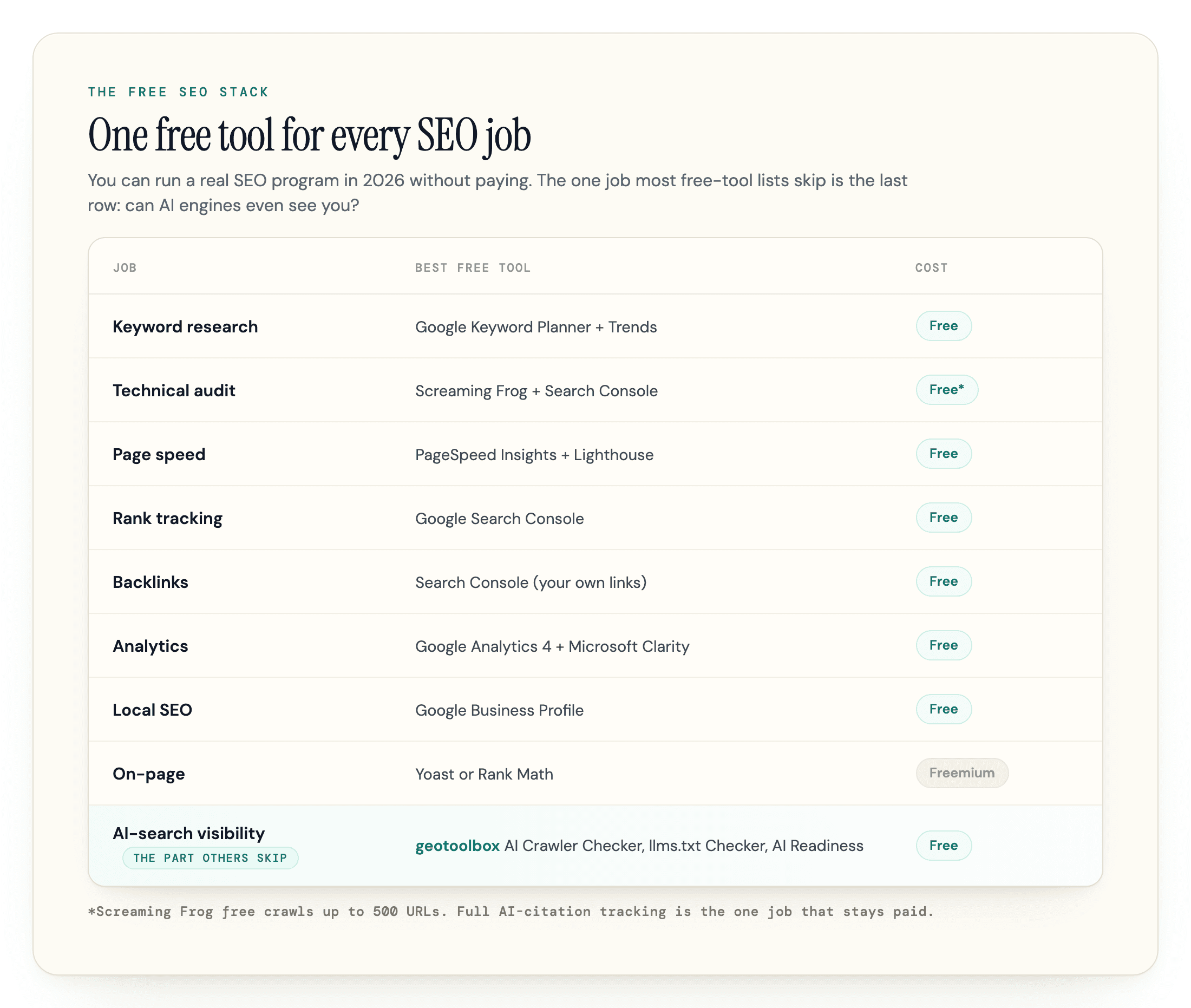
If you want the whole free stack at a glance, here is the best free tool for each job and the catch to keep in mind.
| Job | Best free tool(s) | Truly free? | The catch |
|---|---|---|---|
| Keyword research | Google Keyword Planner + Google Trends | Actually free | Planner needs an Ads account; volume shown in ranges |
| Technical audit | Screaming Frog + Search Console | Freemium / free | Screaming Frog free caps at 500 URLs |
| Page speed | PageSpeed Insights + Lighthouse | Actually free | None |
| Rank tracking | Google Search Console | Actually free | Average position, not daily keyword tracking |
| Backlinks | Search Console (your own links) | Actually free | Competitor link data needs paid |
| Analytics | Google Analytics 4 + Microsoft Clarity | Actually free | GA4 has a setup curve |
| Local SEO | Google Business Profile | Actually free | Verification required |
| On-page / content | Yoast or Rank Math (WordPress) | Freemium | Advanced features are paid |
| AI-search visibility | geotoolbox AI Crawler Checker, llms.txt Checker, AI Readiness | Actually free | Full citation tracking is paid |
Build from the top down. Search Console, Analytics 4, and the AI-crawler checks take an afternoon to set up and immediately tell you whether anything is fundamentally broken.
Are Free SEO Tools Enough?
For most sites, free tools handle the large majority of day-to-day SEO: keyword research, technical audits, speed, on-page work, your own rank and backlink data, analytics, and the AI-visibility checks above. If you are a small business, a solo founder, or a blogger, you can run a real SEO program for a long time without paying for a single tool.
Three things eventually push people to pay. The first is competitor backlink and keyword data at full depth, which is the hardest thing to get for free. The second is scale, when daily caps and 500-URL crawls stop fitting the work. The third is managing many sites at once, where free tools turn into a tab-juggling nightmare.
The smart move is to run the free stack until you hit a specific wall, then pay only for the one tool that breaks it, rather than buying a 200-dollar-a-month suite on day one to use 15 percent of it. If that wall is AI search, our honest, job-based AEO tools guide covers what is actually worth it.
Start Free, Then Check the Part Everyone Misses
You can build a serious SEO program in 2026 without spending a dollar. Stand up Search Console, Analytics 4, and a crawler, then do the thing most of your competitors have not: confirm that AI search engines can actually reach and read you.
Run our free AI Readiness check and AI Crawler Checker to see where you stand in a couple of minutes. geotoolbox builds free tools for exactly this gap: the AI-visibility half of SEO that the old free stack still leaves out. When you outgrow the free layer and want the citations tracked over time, the paid side of geotoolbox does that across up to eight AI engines, from $99 a month with a 7-day trial.
Frequently Asked Questions
What is the best free SEO tool?
Google Search Console, for almost everyone. It is actually free, shows real first-party data on how Google sees your site, and doubles as a keyword source and a rank tracker. If you set up only one tool, make it this one.
Are free SEO tools actually free, or freemium?
Both, and the difference matters. Google's tools, Bing Webmaster Tools, Microsoft Clarity, PageSpeed Insights, and Lighthouse are genuinely free, with no paywall for normal SEO use. Tools like AnswerThePublic, AlsoAsked, and Ubersuggest are freemium, with daily-search limits before a paywall. Check which one you are dealing with before you build a workflow around it.
Can you do SEO for free?
Yes, for the large majority of it. Keyword research, technical audits, on-page work, speed, your own rank and link data, analytics, and AI-visibility checks all have capable free tools. The main thing you cannot get well for free is deep competitor backlink and keyword data.
What is the best free tool for site audits?
Screaming Frog's free edition, which crawls up to 500 URLs, plus Google Search Console for how Google actually indexes your pages. Together they catch most technical issues at no cost.
Is there a free way to check my AI-search visibility?
Partly. No free tool fully tracks your citations in ChatGPT or Perplexity, but you can check the foundations for free: whether AI search crawlers like OAI-SearchBot and PerplexityBot are allowed in your robots.txt, whether you have an llms.txt file, and your overall AI readiness. geotoolbox's free AI Crawler Checker, llms.txt Checker, and AI Readiness cover exactly those checks.
Are free AI SEO tools any good?
The ones that check crawler access, llms.txt, and technical readiness are genuinely useful, and enough to make you technically eligible to be cited, though not enough to guarantee it. The tools that promise full AI citation tracking or share-of-voice monitoring are mostly paid, and their free tiers are usually capped at a handful of prompts.