
Most "best AI search engine" lists rank on vibes and ship prices that were stale by the time they published. This one sorts the picks by what you actually use each tool for, and every price was checked against the vendor's current pricing in July 2026. It is also honest about the flaw every AI-powered search engine still shares: citations you cannot fully trust. Here are the ones worth your time, what each is genuinely best at, and where to stay skeptical.
The Best AI Search Engines at a Glance
For most people who want answers with sources they can check, Perplexity is the one to start with. That is not a unanimous verdict, and it should not be. PCMag's testers rank Google's AI Mode first; Zapier and others put Perplexity on top. The honest answer is that the best AI search engine depends on what you are doing with it, so the table below sorts by use case rather than crowning a single winner.
| Engine | Best for | Free tier | Paid (from) | Shows citations | Real-time web |
|---|---|---|---|---|---|
| Perplexity | Cited research | Yes | Pro $20/mo | Yes | Yes |
| ChatGPT Search | All-around assistant | Yes | Go $8/mo, Plus $20/mo | Yes | Yes |
| Google AI Mode & Gemini | Everyday, local, shopping | Yes (in Search) | Gemini AI Plus $4.99/mo | Partial | Yes |
| Microsoft Copilot | Microsoft 365 users | Yes | Bundled in 365 Premium $19.99/mo | Yes | Yes |
| Claude | Writing and analysis | Yes | Pro $20/mo | Yes (web on) | Yes |
| Grok | Real-time X and social | Yes | X Subscription Plus $8/mo | Yes | Yes |
| Brave Search | Privacy, free | Yes | Premium $3/mo | Yes | Yes |
| Kagi | Paid, ad-free power use | Trial only | Starter $5/mo | Yes | Yes |
| You.com | Multi-model workspace | Yes | Pro ~$20/mo | Yes | Yes |
How We Picked and Priced These
Five things separate a useful AI search engine from a demo that falls apart on real work.
Citation quality and verifiability. Not whether it shows sources, but whether those sources actually support the claim. This is where most tools quietly fail, and it gets its own section below.
Use-case fit. A tool built for cited research behaves differently from one built for coding or for shopping. Ranking them on one axis hides that, so the picks are organized by what you are trying to do.
Real-time access. Whether the tool retrieves live pages or answers from stale training data. Most now retrieve, but the quality of that retrieval varies more than the model name suggests.
Free-versus-paid value. What the free tier actually gives you before the limits bite, and whether the paid tier earns its price.
Privacy. What the tool logs, whether it trains on your queries, and whether you can turn that off.
On pricing, every number here was checked against the provider's current page in July 2026. That is not busywork: Microsoft retired standalone Copilot Pro in late 2025, yet lists still quote its old $20 price. A guide that ranks its own product as the best "search engine" is running an ad, not a review, so those did not make the cut either.
The AI Search Engines, Reviewed
Each entry names what the tool is best at, the one thing to watch for, and its verified price. Links go to a full breakdown where we have one.
Perplexity: Best for Cited Research
Perplexity was built around the thing other tools bolt on later: answers come with numbered inline citations, and there is a dedicated sources view. Ask it a messy research question and it returns a structured answer with the receipts attached, which is why it is the default pick for anyone who needs to verify what they read. Collections let you keep ongoing research organized by project. The deeper walkthrough is in our guide to what Perplexity is.
Watch for two things. Perplexity tightened its Pro and Deep Research quotas in 2026, and heavy users noticed. It has also drawn sustained criticism over how its crawler pulls publisher content, an ethics question Zapier flags that most reviews skip. We still rank it first on citation quality, but if publisher ethics is your deciding factor, Brave and Kagi have drawn far less of that criticism. The free tier is generous for casual use; Perplexity's pricing runs $20/mo for Pro and $200/mo for Max.
ChatGPT Search: Best All-Around Assistant
ChatGPT Search is the one most people already have open. It handles conversational, multi-step questions well, holds context across follow-ups, and can pull in your own uploaded documents alongside live web results. If you want one tool that searches, drafts, and reasons in the same thread, this is it. The mechanism behind it, and why the model itself never actually browses, is worth understanding: see how ChatGPT Search works. And if you are weighing assistants as assistants rather than search engines, our best ChatGPT alternatives roundup sorts that field by job.
Its weak spot is the same one the whole category shares. Citation accuracy varies, and it will confidently answer questions it should decline. The free tier now includes web search; paid ChatGPT pricing starts at Go $8/mo, then Plus $20/mo, and Pro from $100/mo (up to $200/mo for the highest limits).
Google AI Mode, AI Overviews and Gemini: Best for Everyday, Local, and the Google Ecosystem
Google is where AI search meets the search index nobody else has. AI Mode gives you a conversational answer inside a normal Google search, AI Overviews summarize at the top of the results, and Gemini is the standalone assistant with the deepest ties to Maps, Shopping, and your Google account. For everyday questions, local intent, and price comparison, nothing matches its coverage.
The trade-off is trust, which is why the table rates Google only "Partial" on citations: AI Overviews attribute sources weakly, and Google's confidently-wrong misfires are well documented. AI Mode and AI Overviews are free inside Google search; only the standalone Gemini app charges, from AI Plus at $4.99/mo to AI Pro at $19.99/mo and up to Ultra.
Microsoft Copilot: Best for Microsoft 365 Users
Copilot blends AI answers with Bing's live results and, more to the point, sits inside Word, Excel, Outlook, and Teams. If your work already lives in Microsoft 365, that integration is the reason to use it. The full picture is in our guide to what Copilot is.
As a pure search tool it is competent rather than exceptional. Answer depth varies by topic, the interface is busier than Perplexity's, and the best features are the ones wired into Office rather than the open-web search itself.
Here is the pricing catch worth knowing. Microsoft retired the standalone $20/mo Copilot Pro in late 2025; support for existing subscribers ended on August 1, 2026. Its consumer features now come bundled in Microsoft 365 Premium at $19.99/mo, and the business tier is $30 per user per month. The free consumer Copilot still handles Bing-grounded web search. See Copilot pricing for the current tiers.
Claude: Best for Writing and Analysis
Claude is less a search engine than a reasoning tool that can search. With web search on, it pulls live sources, but its real strength is what it does with them: careful analysis, long-document work, and writing that needs judgment rather than just retrieval. For synthesizing a dense topic into something coherent, it is hard to beat. More on the assistant in our guide to what Claude is.
The thing to remember is that web search has to be enabled to get current results; with it off, you are talking to training data. The free tier includes web search; Claude pricing is $20/mo for Pro and from $100/mo for Max.
Grok: Best for Real-Time X and Social
Grok's edge is native, real-time access to the pulse of X, which no other tool has as directly. For breaking events, social sentiment, and what people are saying right now, it surfaces things the others miss. Our guide covers what Grok is in full.
The caution here is real and specific. In the March 2025 Tow Center citation study, the then-current Grok-3 returned incorrect source attributions 94% of the time, the worst of any engine tested. xAI has since shipped Grok 4.5 and 4.6, and nobody has independently re-tested them on citations since, so treat real-time Grok as fast but unproven on citations, and verify what matters. Free access is rate-limited; Grok pricing for new customers now runs through The X Subscription: Plus at $8/mo, Premium at $30/mo, Super at $100/mo and Ultra at $200/mo.
Brave Search: Best Privacy-First Free Option
Brave runs its own independent search index, does not track you, and layers AI answers on top of results you can still click through to. If you want AI search without the data collection, it is the cleanest free option. It is also fully usable without an account.
The trade-off is index depth. Brave's independent index is smaller than Google's, so it can feel thinner on obscure long-tail queries. Search is free; Premium removes ads for $3/mo.
Kagi: Best Paid, Ad-Free Search
Kagi is the anti-spam option. You pay, so it has no incentive to serve ads or optimize for engagement, and the results feel notably less polluted by low-quality SEO content. You can raise or bury specific domains, pick your AI assistant, and use lenses to scope searches. Because it is funded by subscriptions rather than ads, it has no ad business to feed and does not build an advertising profile from your searches. For people tired of fighting their search engine, it is a relief.
The obvious catch is that it is paid-only. There is a limited free trial, then Starter is $5/mo for 300 searches, Professional is $10/mo for unlimited, and Ultimate is $25/mo with premium AI. That last number matters because some lists still quote a much higher figure.
You.com: Best Multi-Model Workspace
You.com lets you switch between models and modes in one place, blending chat, search, and productivity tools like drafting and code. For creators who turn web research into output without leaving the tab, that flexibility is the draw.
The downsides are a smaller index than Google and enough modes that new users can feel lost. There is a free tier; Pro runs around $20/mo.
Also Worth Knowing
A few narrower picks fill specific gaps. DeepSeek offers strong free reasoning, but its data is processed in China, which is a non-starter for many companies. Consensus searches only peer-reviewed papers and shows where scientific agreement actually lies, making it the pick for academic work. Phind is tuned for developers and returns working code over prose. Mistral's Vibe (formerly Le Chat) is a capable European option with a privacy-friendly stance. Komo and Andi both offer clean, ad-free, no-signup free search, and for privacy specifically, DuckDuckGo's assistant keeps prompts out of a tracking profile.
The newest shape of the category is the AI browser, where the answer engine is built into the browser itself rather than a separate site. Perplexity's Comet and ChatGPT's Atlas are the ones to watch as consumer AI search keeps moving in that direction.
The One Thing Every AI Search Engine Still Gets Wrong: Citations
A citation is not proof. This is the single most important thing to understand before you trust any of these tools, and it is the complaint that comes up most often from people who use them daily: a confident answer, a tidy source link, and a source that does not actually say what the answer claims.
The best data on this comes from the Tow Center for Digital Journalism. Researchers fed eight AI search tools direct excerpts from news articles and asked each to identify the original source. Across 1,600 queries, the tools got the citation wrong more than 60% of the time.
| Engine | Incorrect citations | Test |
|---|---|---|
| Perplexity (best performer) | 37% | Tow Center, 2025 |
| ChatGPT Search | 67% | Tow Center, 2025 |
| Grok-3 Search (worst performer) | 94% | Tow Center, 2025 |
| All 8 tools (average) | Over 60% | Tow Center, 2025 |
Those are the model versions tested in early 2025, and the engines have all updated since, with no comparable independent re-test published. Read the table as evidence that the problem is real and widespread, not as today's exact scoreboard. An earlier 2024 Tow Center study of ChatGPT alone found it misattributed 153 of 200 quotes, so this is not a one-off.
The counterintuitive finding: the paid tiers were worse on this measure. Perplexity Pro and Grok-3 answered more prompts, but they did it by giving definitive, confidently wrong answers instead of declining, where the free versions were more likely to admit they did not know. Paying more bought more confidence and fewer "I don't know" responses, not more reliable citations.
None of this means AI search is useless. It means the citation is a starting point, not a verdict. Verifying one takes about twenty seconds: open the linked source, use Ctrl-F to find the exact claim, and check the date. Be most skeptical of clean round-number statistics and anything with real stakes. If you want the mechanism behind why these tools cite the way they do, see how AI search works.
It's the Retrieval, Not the Model Badge
Ask the same question in two tools running the same underlying model and you can get two different answers. That surprises people, because the marketing is all about which model powers what. In practice, the model matters less than the retrieval.
Here is why. An AI search engine does not think its way to an answer from memory. It runs your query through a search step, pulls back a set of web pages, and feeds that text to the language model, which then writes an answer from what it was handed. This pattern is called retrieval-augmented generation, or RAG. For anything current, the model can only ground its answer in what the retrieval step gave it. If the tool fetches the wrong pages, or thin snippets, or too few of them, a great model still produces a weak answer.
Good tools also break your one question into several sub-questions and search each, a technique called query fan-out. It is a big part of why Perplexity and Google feel more thorough than a raw chatbot on the same model.
The flip side is that retrieval is only as good as the pages it grabs, and it will grab a joke as readily as a study. This is how Google's AI Overviews ended up telling people to put glue on pizza and eat a rock: the retrieval step pulled a Reddit joke and a satire site, and the model repeated them as fact because it cannot reliably tell sarcasm or satire from a real source. A tool with a weak retrieval layer does not just miss good sources, it confidently surfaces bad ones.
The practical takeaway: judge a tool by its sources, not its model badge. When you compare two engines, look at what each one actually retrieved and cited for the same query. That tells you far more than the model name in the marketing.
What About Deep Research Modes?
Most of the major tools now ship a "Deep Research" mode: Perplexity, ChatGPT, Gemini, and Grok each have a version. Instead of one quick search, it runs many, reads dozens of pages, and returns a long report with a citation list that can run past fifty sources. For a genuine research task, it is the most useful thing these tools do.
It is also where the citation problem compounds. A fifty-source report is fifty chances to cite something the source does not actually say, and no one has time to open all fifty. The efficient check is to verify the load-bearing claims first, the two or three facts the conclusion actually rests on, plus any suspiciously tidy statistic, and to skim the rest. If those hold up, treat the report as a usable starting point rather than a finished answer. If they do not, the length was hiding the problem, not solving it.
When You Should Still Use Google
AI search is built for synthesis: pulling scattered information into one answer. For a lot of searches, that is the wrong job. Classic search still wins when you want to:
- Reach a specific site or login you already know by name (navigational search)
- Find local results, hours, directions, or a map ("dentist near me")
- Compare prices or shop, where you want the actual listings, not a summary
- Get to a primary source fast without a layer of interpretation in between
The data backs up keeping both. Despite years of AI hype, SparkToro found that 95% of Americans still use a search engine every month, and traditional search usage has dipped by less than a percentage point in two and a half years. Stranger still, people who start using ChatGPT tend to search Google more afterward, not less. AI search is turning out to be a supplement, not a replacement. The broader picture of where AI search actually stands is less dramatic than either side claims.
How to Choose the Right One for You
The right AI search engine is the one that fits the task in front of you. Match the task to the tool:
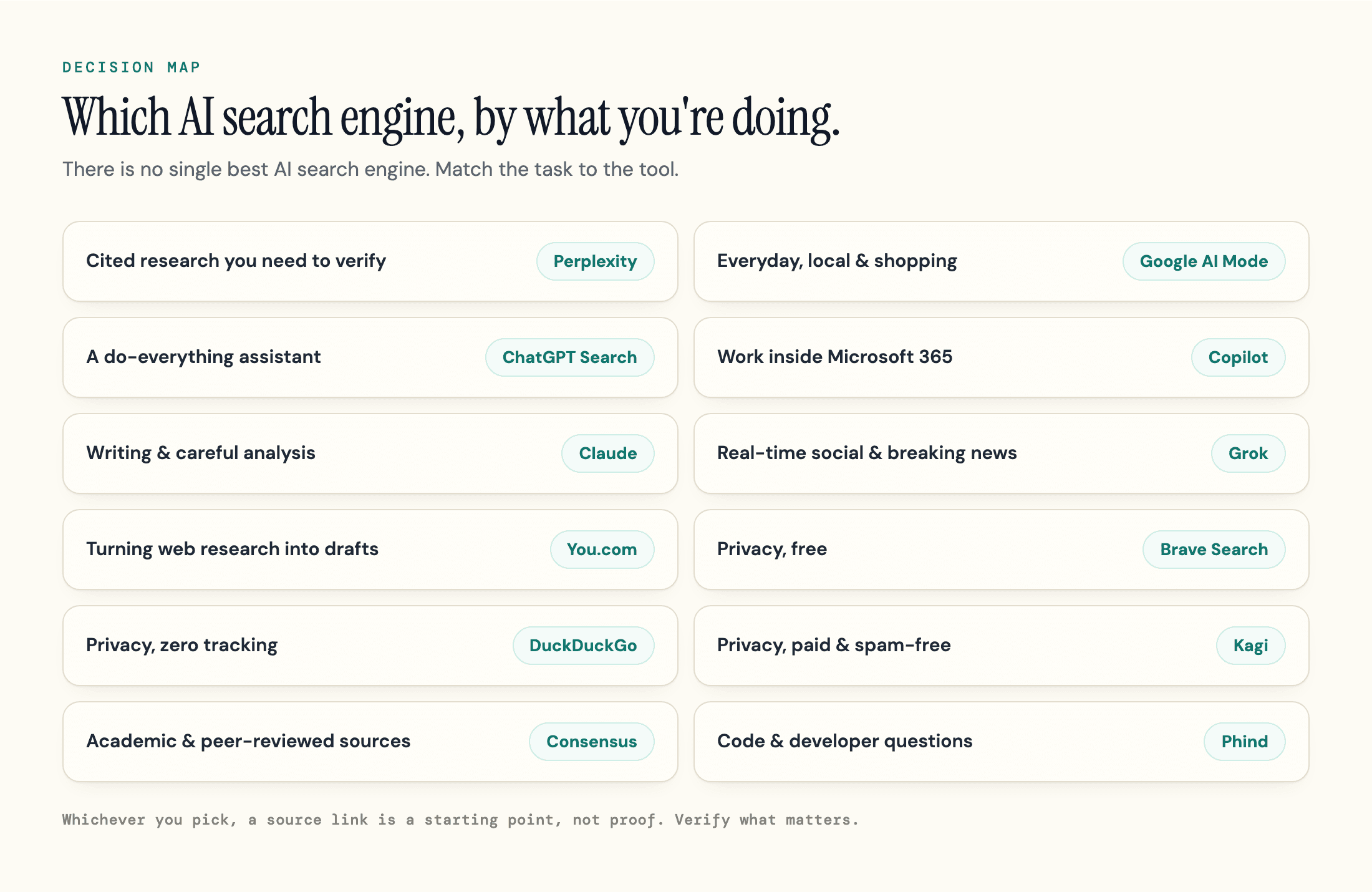
- Cited research you need to verify: Perplexity
- Everyday questions, local, and shopping: Google AI Mode
- A conversational, do-everything assistant: ChatGPT Search
- Work inside Microsoft 365: Copilot
- Writing and careful analysis: Claude
- Privacy, free: Brave. Zero tracking: DuckDuckGo. Paid and spam-free: Kagi
- Real-time social and breaking events: Grok
- Turning web research into drafts: You.com
- Academic and peer-reviewed sources: Consensus
- Code and developer questions: Phind
Most people who use these seriously end up with two or three, not one: a research tool, a general assistant, and Google for everything navigational. Start free, find where the limits bite, and pay only for the tier you actually run into.
Once you have picked the engines you rely on, there is a second question worth asking, especially if you run a business or a website: when someone asks one of these tools about your industry, does your brand show up in the answer, and is what they say about you even right? Given that these tools get citations wrong more than 60% of the time, that is not a small question. It is a different problem from choosing a search engine, and the one geotoolbox exists to solve. We are not another search engine. We measure whether the engines above actually cite you, so you can check how visible your site is to AI search and see where you are being left out. Like the tools it measures, it samples engines that give slightly different answers each time, so read it as a signal to act on rather than a fixed score. If you want to go further, our guide to tracking brand mentions in AI search walks through the ongoing version of that check.
Frequently Asked Questions
What is the best AI search engine?
Perplexity is the best starting point for most people who need verifiable sources, and Google AI Mode is hard to beat for everyday, local, and shopping queries. For a conversational assistant that also searches, use ChatGPT Search. There is no single winner because the tools are built for different jobs, so the right pick depends on what you are doing.
Are AI search engines free?
Most have a usable free tier, including Perplexity, ChatGPT Search, Google, Copilot, Claude, Grok, Brave, and You.com. Kagi is the main exception: it is paid-only, with a limited trial before plans start at $5/mo. For casual use, the free tiers are usually enough. Paid tiers mainly buy higher limits and faster or more advanced models.
Which AI search engine is most accurate?
Accuracy and citations are not the same thing, and no engine is reliably accurate on its own. In the Tow Center's testing, source attributions came back wrong more than 60% of the time on average, ranging from 37% for the best performer to 94% for the worst. Perplexity scored best on citations, but you should still verify anything that matters rather than trusting any single answer.
Does AI search replace Google?
Not for most searches. AI search is good at synthesizing information into one answer, but classic search still wins for navigation, local results, shopping, and reaching primary sources quickly. The data shows people are adding AI search alongside Google, not dropping Google. Using both, and knowing which to reach for, beats picking one.
More Questions
Is Perplexity Pro or ChatGPT Plus worth paying for?
Worth it once you hit the free tier's limits regularly. The roughly $20/mo tier on either tool raises usage caps and adds more capable models. If you only search a few times a day, the free version is usually fine. Try free first, and upgrade only when the limits actively get in your way.
How do I know if an AI answer's sources are real?
Click through to the source and search it for the exact claim the answer made. If the page does not contain that claim, or the link is dead, treat the answer as unverified. Round-number statistics and anything high-stakes deserve the most scrutiny, and a quick check of the source's date keeps you from repeating something that is no longer true.
Sources
- AI Search Has a Citation Problem - Tow Center for Digital Journalism, Columbia Journalism Review, March 2025 -
cjr.org/tow_center/we-compared-eight-ai-search-engines-theyre-all-bad-at-citing-news.php - How ChatGPT Search (Mis)represents Publisher Content - Tow Center for Digital Journalism, Columbia Journalism Review, 2024 -
cjr.org/tow_center/how-chatgpt-misrepresents-publisher-content.php - New Research: 20% of Americans Use AI Tools 10X+/Month, but Growth Is Slowing and Traditional Search Hasn't Dipped - Rand Fishkin, SparkToro, August 2025 -
sparktoro.com/blog/new-research-20-of-americans-use-ai-tools-10x-month-but-growth-is-slowing-and-traditional-search-hasnt-dipped/ - Microsoft Launches 365 Premium for Consumers, Retires Copilot Pro - PCWorld, 2026 -
pcworld.com/article/2925962/microsoft-adds-microsoft-365-premium-cuts-copilot-pro.html - The 4 Best AI Search Engines in 2026 - Zapier, July 2026 -
zapier.com/blog/best-ai-search-engine/ - The Best AI Search Engines We've Tested for 2026 - PCMag, June 2026 -
pcmag.com/picks/the-best-ai-search-engines - Perplexity pricing - Perplexity -
perplexity.ai/pro - ChatGPT pricing - OpenAI -
openai.com/chatgpt/pricing - Google AI plans (Gemini AI Plus, Pro, Ultra) - Google -
one.google.com/about/google-ai-plans - Claude pricing - Anthropic -
claude.com/pricing - The X Subscription pricing - xAI, October 2026 -
docs.x.ai - Brave Search Premium - Brave -
brave.com/search/premium - You.com pricing - You.com -
you.com - Kagi pricing - Kagi -
kagi.com/pricing